Lesson 1
Using, configuring Oracle Intelligent Agent[1] for OEM
Question: Has the utility "Net8 Assistant" been replaced with Oracle Net Manager?
Oracle Corporation has replaced the utility "Net8 Assistant" with "Oracle Net Manager". This transition occurred with the advent of Oracle 10g, as the company sought to enhance and streamline the functionality of its networking tools. "Oracle Net Manager", the replacement for "Net8 Assistant", provides a more comprehensive and robust graphical interface to configure and manage Oracle Net Services. With Oracle Net Manager, administrators can perform tasks such as creation and configuration of service names, listeners, and naming methods, which was earlier done using Net8 Assistant.
In a nutshell, Oracle Net Manager now encompasses the capabilities that were once handled by Net8 Assistant, but with improved ease of use, greater functionality, and enhanced integration with other Oracle products.
Oracle Corporation has replaced the utility "Net8 Assistant" with "Oracle Net Manager". This transition occurred with the advent of Oracle 10g, as the company sought to enhance and streamline the functionality of its networking tools. "Oracle Net Manager", the replacement for "Net8 Assistant", provides a more comprehensive and robust graphical interface to configure and manage Oracle Net Services. With Oracle Net Manager, administrators can perform tasks such as creation and configuration of service names, listeners, and naming methods, which was earlier done using Net8 Assistant.
In a nutshell, Oracle Net Manager now encompasses the capabilities that were once handled by Net8 Assistant, but with improved ease of use, greater functionality, and enhanced integration with other Oracle products.
Oracle Intelligent Agent existed for Oracle versions 8.1.5, 8i, 9i.
The utility "Net8 Assistant" has been replaced with Oracle Net Manager. For Oracle 10g the Intelligent Agent does not exist and uses a different agent, the Enterprise Manager 10g Agent. You deploy only one 10g agent per host.
The utility "Net8 Assistant" has been replaced with Oracle Net Manager. For Oracle 10g the Intelligent Agent does not exist and uses a different agent, the Enterprise Manager 10g Agent. You deploy only one 10g agent per host.
This module takes a close look at Oracle Enterprise Manager (OEM).
OEM is designed to be a centralized console from which you can display and monitor all the databases in your environment. Because all the components connect to OEM via Oracle Network Services, understanding the OEM console is an important part of Oracle networking.
The module begins with a brief tour of the OEM console, visiting the four quadrants of the OEM display:
The module begins with a brief tour of the OEM console, visiting the four quadrants of the OEM display:
- The Navigator window displays all schema information for each database.
- The Job Scheduling window allows the Oracle DBA to schedule remote database tasks.
- The Map window provides a graphical map of your entire distributed Oracle database topology.
- The Event Management window allows for the definition of customized alerts.
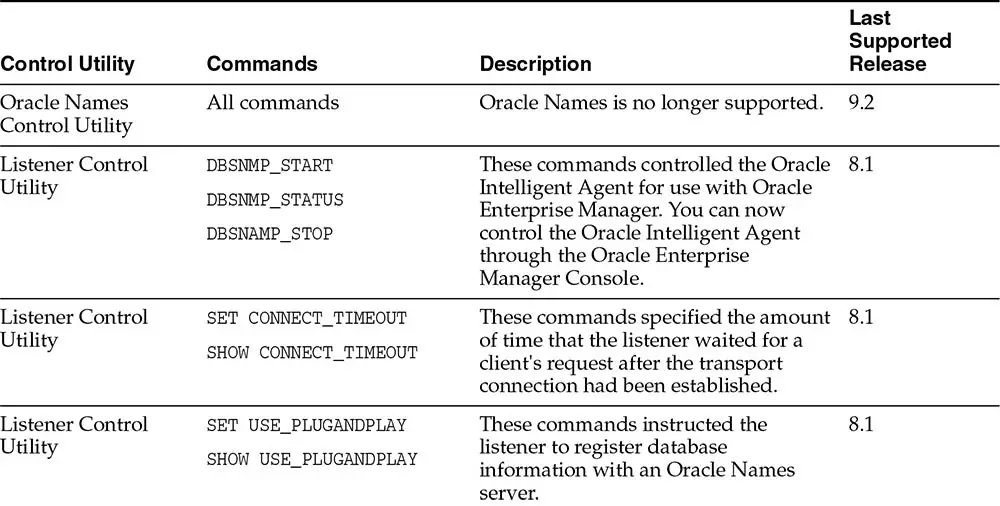
| Control Utility: | Listener Control Utility |
| Commands: | DBSNMP_START, DBSNMP_STATUS, DBSNAMP_STOP |
| Description: | These commands controlled the Oracle Intelligent Agent for use with Oracle Enterprise Manager. You can now control the Oracle Intelligent Agent through the Oracle Enterprise Manager Console. |
This module takes a close look at Oracle Enterprise Manager (OEM).
OEM is designed to be a centralized console from which you can display and monitor all the databases in your environment. Because all the components connect to OEM via Oracle Net Services, understanding the OEM console is an important part of Oracle networking.
The module begins with a brief tour of the OEM console, visiting the four quadrants of the OEM display:
The module begins with a brief tour of the OEM console, visiting the four quadrants of the OEM display:
- The Navigator window displays all schema information for each database.
- The Job Scheduling window allows the Oracle DBA to schedule remote database tasks.
- The Map window provides a graphical map of your entire distributed Oracle database topology.
- The Event Management window allows for the definition of customized alerts.
Historical Note
Multi-Threaded Server was replaced by Oracle Shared Server beginning with Oracle 9i.
Additional background processes may exist when you use certain other features of the database:
For example, shared servers (formerly the Multi-Threaded Server or MTS prior to Oracle9i), or job queues and replication.
Learning Objectives
After completing this module, you will be able to:
- Define an Intelligent Agent on each remote server.
- Use the event manager console to attach to the intelligent agents that run on the remote servers.
- Define alert thresholds in the event manager console.
[1]Oracle Intelligent Agent:The Oracle Intelligent Agent is an autonomous process running on a remote node in the network. The Agent resides on the same target as the services it supports and performs the following functions: Checks for events, and queueing the resulting event reports for Oracle Enterprise Manager.
