| Lesson 3 | Hierarchical retrieval using CONNECT BY |
| Objective | Write a query using the CONNECT BY feature in Oracle |
Hierarchical retrieval using CONNECT BY
Question: How do I execute hierarchical retrieval using CONNECT BY in Oracle?
Many business structures are naturally hierarchical: product bundles, bill-of-materials,
organization charts, chart-of-accounts trees, and so on. Oracle provides a
hierarchical query clause (START WITH ... CONNECT BY) to walk
these parent–child relationships directly in SQL.
At a minimum, a hierarchical query must specify:
- The table or view that contains both parent and child rows.
- The root row(s) of the hierarchy using
START WITH. - The parent–child relationship using
CONNECT BYand thePRIORkeyword.
The CONNECT BY syntax is Oracle-specific and is still supported in current
releases, including Oracle Database 23ai. For new development, Oracle also supports
ANSI-style recursive subquery factoring (WITH recursive queries), but
CONNECT BY remains widely used in existing systems and is important to
understand for working with legacy code and certification objectives.
Recursive and hierarchical relationships
When one row in a table refers to another row in the same table, you have a recursive relationship. When those relationships form a tree, the structure is called a hierarchy. The rows at the top of the tree are often described as “parents” and the rows beneath them as “children.”
In the sample pet store schema, the PRODUCT table implements such a hierarchy.
Some products are individual items; others are packages that bundle multiple items
together. For example, a Kitty Package might include:
- 1 cat
- 1 box of cat food
- 1 bag of catnip
- 1 cat collar
The PRODUCT table contains columns such as:
PRODUCT_ID– unique identifier for each productPRODUCT_NAME– descriptive namePACKAGE_ID– optional reference to the parent package’sPRODUCT_ID
Oracle Database 23c Administration
The following four images show how this hierarchical relationship is built step by step.
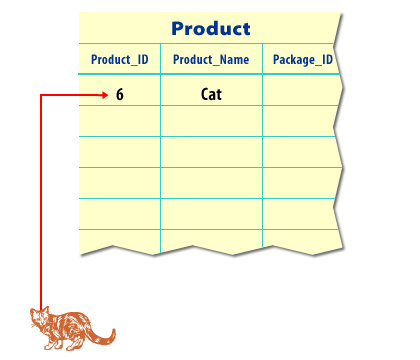
PRODUCT_ID of 6. At this
point, the PACKAGE_ID column is NULL.
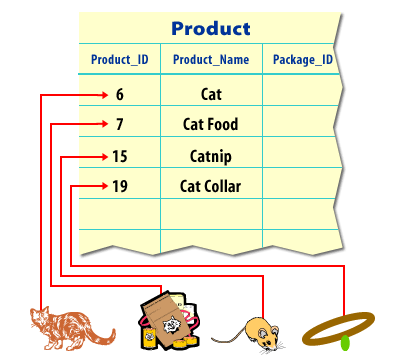
PRODUCT_ID.
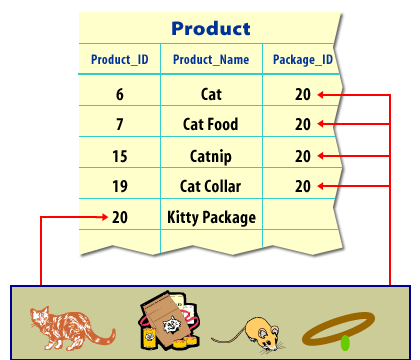
PRODUCT_ID of 20.
To connect the parent (Kitty Package) with the children (Cat, Cat Food, Catnip, Collar), the
Kitty Package’s PRODUCT_ID is placed in the PACKAGE_ID column of all
four child products.
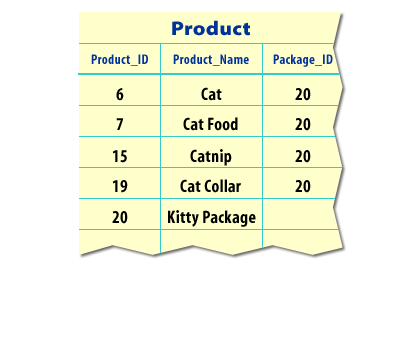
PRODUCT table, all five products can be purchased individually.
Four of them can also be purchased together as part of the Kitty Package, which is identified
as the fifth product.
Hierarchical queries in Oracle
A hierarchical query uses the parent–child relationship within a table to return rows in tree order. Oracle’s hierarchical query clause has three main parts:
SELECT column_list
FROM   table_name
START  WITH root_condition
CONNECT BY PRIOR parent_column = child_column;
START WITHidentifies the root row(s) in the hierarchy.CONNECT BYdescribes how each child row relates to its parent.PRIORmarks the expression that should be evaluated from the parent row.
Oracle also provides hierarchy-related pseudocolumns and functions. For example,
LEVEL shows the depth of a row in the tree, and
SYS_CONNECT_BY_PATH(column, separator) returns the path from the root to the
current node, with each step separated by the chosen character.
Example: CONNECT BY in an employee hierarchy
The following example uses an EMPLOYEES table where each row stores a manager
reference in MANAGER_ID. This is a classic self-referencing hierarchy.
CREATE TABLE employees (
  id         NUMBER       PRIMARY KEY,
  name       VARCHAR2(50),
  manager_id NUMBER
);
Sample data:
INSERT INTO employees (id, name, manager_id) VALUES (1, 'CEO',        NULL);
INSERT INTO employees (id, name, manager_id) VALUES (2, 'CTO',         1);
INSERT INTO employees (id, name, manager_id) VALUES (3, 'Engineer1',   2);
INSERT INTO employees (id, name, manager_id) VALUES (4, 'Engineer2',   2);
INSERT INTO employees (id, name, manager_id) VALUES (5, 'CFO',         1);
INSERT INTO employees (id, name, manager_id) VALUES (6, 'Accountant',  5);
To retrieve this data as a hierarchy starting from the CEO, you can write:
SELECT LPAD(' ', (LEVEL - 1) * 3) || name AS employee_name
FROM   employees
START  WITH manager_id IS NULL
CONNECT BY PRIOR id = manager_id
ORDER  SIBLINGS BY name;
Sample output:
CEO
   CFO
      Accountant
   CTO
      Engineer1
      Engineer2
In this query:
START WITH manager_id IS NULLchooses the CEO as the root row.CONNECT BY PRIOR id = manager_idsays “a child’sMANAGER_IDmust match its parent’sID.”LEVELincreases by 1 each time the query moves down a level in the tree.ORDER SIBLINGS BY namesorts brothers and sisters under the same parent by name.
Hierarchical query on the PRODUCT table
Now let’s apply the same idea to the pet store hierarchy. Suppose we want to list all products
that belong to the Puppy Package and show each child product under its parent.
Using the PRODUCT and PACKAGE_ID relationship, you could write:
SELECT PRODUCT_NAME,
       PRODUCT_ID
FROM   PRODUCT
START  WITH PRODUCT_NAME = 'Puppy Package'
CONNECT BY PRIOR PRODUCT_ID = PACKAGE_ID;
The special keywords START WITH, CONNECT BY, and
PRIOR are used together to tell Oracle how to walk the hierarchy. Oracle
automatically follows the tree from the root package down to all its descendants, as long as
the PACKAGE_ID values are correctly populated.
Hierarchy level with the LEVEL pseudocolumn
To see the structure of the hierarchy more clearly, you can include the LEVEL
pseudocolumn in the select list. LEVEL is 1 for root rows, 2 for their children,
and so on.
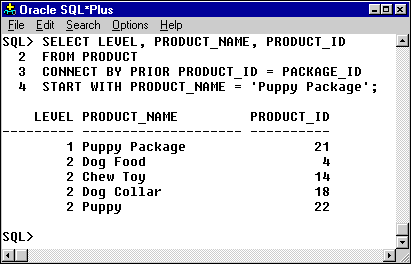
SELECT LEVEL,
       PRODUCT_NAME,
       PRODUCT_ID
FROM   PRODUCT
START  WITH PRODUCT_NAME = 'Puppy Package'
CONNECT BY PRIOR PRODUCT_ID = PACKAGE_ID;
LEVEL  PRODUCT_NAME   PRODUCT_ID
-----  -------------  ----------
1      Puppy Package  21
2      Dog Food       4
2      Chew Toy       14
2      Dog Collar     18
2      Puppy          22
By adding LEVEL, you can easily see which rows are the root and which are
children. This is especially useful when the hierarchy is deeper than two levels.
CONNECT BY in modern Oracle (including 23ai)
The CONNECT BY clause is Oracle-specific and remains supported in modern releases,
including Oracle Database 23ai. It is not deprecated as of this release and continues to be
a practical choice when:
- You are maintaining or extending existing Oracle applications.
- Your data is stored as a classic tree in a single table with parent–child keys.
- You want concise, Oracle-style syntax for hierarchical reports.
Oracle also supports recursive subquery factoring using the
WITH clause, which follows the SQL standard and can be more portable across
database platforms. For new designs where portability is important, consider writing both a
CONNECT BY version and a recursive WITH version of key queries so
you understand their behavior and performance characteristics.
Hierarchical Retrieval – Exercise
Click the Exercise link below to practice writing hierarchical queries with CONNECT BY.
CONNECT BY or with a recursive WITH clause.
START WITH, CONNECT BY, and hierarchy-related pseudocolumns such as LEVEL.