Basic elements of Transact-SQL Statement (control-of-flow logic)
Lesson 6
| Lesson 6 | Basic elements of a Transact-SQL statement, part 2 |
| Objective | Use control-of-flow logic in Transact-SQL statements. |
Control-of-flow logic in Transact-SQL statements allows you to control the execution flow of your code. This can be useful for a variety of tasks, such as conditional execution, loops, and error handling.
There are a number of different control-of-flow statements available in Transact-SQL. The most common ones are:
Many times in your SQL procedures, you need to test the value of a variable, then take some action based on that value. You can do this with SQL Server's Transact-SQL control-of-flow logic. Control-of-flow logic is a specific set of Transact-SQL commands that you can enter into your Transact-SQL procedures to dynamically control which statements are executed. Following is a list of the keywords available in Transact-SQL:
Many times in your SQL procedures, you need to test the value of a variable, then take some action based on that value. You can do this with SQL Server's Transact-SQL control-of-flow logic. Control-of-flow logic is a specific set of Transact-SQL commands that you can enter into your Transact-SQL procedures to dynamically control which statements are executed. Following is a list of the keywords available in Transact-SQL:
Keyword Function
BEGIN...END
defines a block of Transact-SQL code.
GOTO
instructs the processor to go to a specific label defined in the procedure.
IF...ELSE
tests for specific conditions that you specify. The results of these conditions always return
values of TRUE or FALSE. As such, they are known as Boolean expressions.
S
RETURN
exits the procedure.
WAITFOR
delays the execution of a statement until specific conditions exist.
WHILE
loops until a specific condition exists.
BREAK
unconditionally exits a WHILE loop.
CONTINUE
restarts the WHILE loop.
The construct of how to use most of these statements is to place
BEGIN and END keywords around any block that contains more than one line of code. For example, if you wanted to test the value of the @LoopCounter variable and the condition results in
executing multiple statements, you could do that like this:
Value of the @LoopCounter
If you wanted to test the value of the@LoopCounter variable and the condition results in executing multiple statements, you could do
that like this: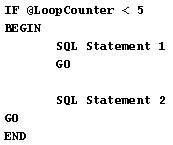
GOin lines 4 and 6
Any executable statement within your procedures must be followed by the
GO keyword to indicate to SQL Server that it is to execute
the statement.
The above structure contains pseudo-code. Pseudo-code does not contain real code, but only a placeholder to show the intent of the
code. This placeholder is generally written in plain English.
The next lesson concludes this module.
Control Flow Statements - Exercise
Before moving on to the next lesson, click the Exercise link below to practice writing a Transact-SQL statement block.Control Flow Statements - Exercise