| Lesson 3 | Character Functions: CONCAT, LENGTH, INSTR |
| Objective |
Apply CONCAT, the concatenation operator, LENGTH, and INSTR with appropriate datatype, Unicode, null, and search
semantics.
|
Oracle CONCAT, LENGTH, and INSTR Functions
Oracle SQL character functions can construct display values, measure stored text, and locate text within another value. This lesson develops three
related function families: CONCAT joins character expressions, LENGTH reports the size of a character value, and
INSTR returns the position of a substring. Together, they support address formatting, validation, delimiter detection, log analysis, and
other common query tasks in Oracle AI Database 26ai.
These functions transform or inspect the value returned by a query; they do not modify the stored column. Their results also depend on more than the characters visible on screen. Datatypes, nulls, trailing blanks, database character sets, Unicode length semantics, and collation rules can all affect the result. Understanding those rules makes an expression reliable beyond one sample row or session.
Combining Text with CONCAT and the Concatenation Operator
Oracle provides the CONCAT function and the concatenation operator (||). In Oracle AI Database 26ai, CONCAT accepts
two or more arguments:
CONCAT(char1, char2 [, char3 ...])
The arguments can be CHAR, VARCHAR2, NCHAR, NVARCHAR2, CLOB, or NCLOB.
Other datatypes can be converted implicitly to VARCHAR2, but explicit conversion is safer when the textual representation matters.
The following queries produce the same mailing-location expression:
SELECT city || ', ' || state_code || '  ' || postal_code AS mailing_location
FROM   customer;
SELECT CONCAT(city, ', ', state_code, ' ', postal_code) AS mailing_location
FROM customer;
The operator is familiar and easy to scan when an expression contains several values. CONCAT provides equivalent functionality and can also
be useful when SQL scripts move through environments where vertical-bar characters might not be translated reliably. Older Oracle examples commonly
nest calls such as CONCAT(CONCAT(city, ', '), state_code) because earlier releases documented only two arguments. That nesting is no longer
required for a multi-argument CONCAT call in 26ai.
Return Datatype and Trailing Blanks
Concatenation preserves trailing blanks. The return datatype depends on the argument datatypes and Oracle's lossless-conversion rules. For example, a
CLOB argument can cause a LOB result, while national-character arguments can cause a national-character result. This matters when a long
expression is assigned to a variable, returned through an API, compared with another value, or passed to a subsequent function.
Do not concatenate numbers or datetimes and assume that their implicit text representation will remain stable. The following expression supplies an
explicit datetime format instead of depending on NLS_DATE_FORMAT:
SELECT 'Order date: ' || TO_CHAR(order_date, 'YYYY-MM-DD') AS order_label
FROM   orders;
Handling Missing Address Components
Oracle currently treats a zero-length character string as null. When one character operand is null and the other is not, concatenation returns the non-null operand. Punctuation literals do not disappear, however. Blindly concatenating an absent state or postal code can leave an unnecessary comma or extra spaces in the result.
Conditional concatenation makes the presentation rule explicit:
SELECT city ||
       CASE WHEN state_code IS NOT NULL THEN ', ' || state_code END ||
       CASE WHEN postal_code IS NOT NULL THEN '  ' || postal_code END
       AS mailing_location
FROM   customer;
This expression adds a separator only when its associated value exists. Later in this module, CASE, NVL, and other null-handling
expressions are examined in greater detail.
Measuring Character Values with LENGTH
The LENGTH family returns a NUMBER. Unsuffixed LENGTH calculates a length in characters as defined by the input
character set. It measures the stored value of a VARCHAR2 expression rather than the column's declared maximum length. If the input is
CHAR, trailing blanks are included. If the input is null, the function returns null.
SELECT firstname,
       LENGTH(firstname) AS name_length
FROM   customer;
If firstname contains Sarah, Tom, and null, the corresponding results are 5, 3, and null. Use
LENGTH(firstname) BETWEEN 2 AND 30 when enforcing or investigating a real length rule. If the requirement is merely to find populated
values, firstname IS NOT NULL communicates that requirement more directly than LENGTH(firstname) > 0.
Selecting the Required Length Unit
Characters, bytes, Unicode code points, and user-perceived complete characters are not interchangeable. Oracle supplies several related functions so the unit can match the application requirement.
| Function | Unit returned | Important consideration |
|---|---|---|
LENGTH |
Characters defined by the input character set | Ordinary choice when the requirement is stated in characters. |
LENGTHB |
Bytes | Results depend on the encoding; LOB restrictions apply in multibyte character sets. |
LENGTHC |
Unicode complete characters | Does not accept CLOB or NCLOB. |
LENGTH2 |
UCS-2 code points | A supplementary character counts as two units; LOB input is not accepted. |
LENGTH4 |
UCS-4 code points | A supplementary character counts as one unit; LOB input is not accepted. |
For example, ß occupies more than one byte in AL32UTF8. The following query therefore returns 7 characters and 8 bytes on an AL32UTF8
database:
SELECT LENGTH('Fußball')  AS character_count,
       LENGTHB('Fußball') AS byte_count
FROM   dual;
The character-set assumption is part of the example. A byte count should never be treated as universal across database character sets. In addition,
LENGTHB supports only single-byte LOBs; it cannot operate on CLOB or NCLOB data in a multibyte character set.
Complete Characters in Oracle AI Database 26ai
Starting with Oracle AI Database 26ai, LENGTHC and INSTRC count an Ideographic Variation Sequence as one complete character.
Oracle also groups a character having the Unicode Mn general property with its preceding base character for complete-character processing.
This behavior is relevant when a search or length rule must not separate a variation selector or combining mark from its base.
The related SUBSTRC function and LIKEC condition use the same enhanced complete-character treatment. Detailed substring
extraction is reserved for Lesson 4.
Locating Substrings with INSTR
The INSTR family searches a source string for a substring and returns the position at which the requested match begins. The basic syntax is:
INSTR(string, substring [, position [, occurrence]])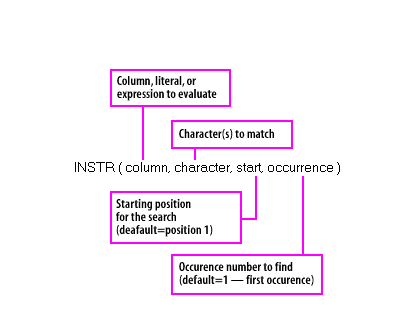
INSTR searches from the requested position for a selected occurrence and returns its one-based position, or zero when the match is absent.
stringis the source value being searched.substringis the value to locate.positionis a nonzero integer identifying where searching begins; its default is 1.- A positive
positionsearches forward. A negative value counts from the end and then searches backward. occurrenceis the positive occurrence number to locate; its default is 1.- The returned position is relative to the beginning of
string, even when searching backward.
A simple search for WOR begins at the first character and returns 7:
SELECT INSTR('HELLO WORLD', 'WOR') AS match_position
FROM   dual;
Starting Position and Occurrence
Supplying position and occurrence distinguishes a precise location request from a general contains test. The following expression
searches from character 3 for the second occurrence of OR and returns 14:
SELECT INSTR('CORPORATE FLOOR', 'OR', 3, 2) AS forward_match
FROM   dual;
A negative starting position changes the search direction. Oracle counts to the third character from the end and searches backward for the second occurrence. The result is still reported from the beginning of the source and is therefore 2:
SELECT INSTR('CORPORATE FLOOR', 'OR', -3, 2) AS backward_match
FROM   dual;
The same occurrence rule can be applied to table data:
SELECT author,
       INSTR(author, 'O', 1, 2) AS second_o
FROM   magazine;
The expression returns 5 for BONHOEFFER, DIETRICH, 4 for CROOKES, WILLIAM, and zero for a value without a second uppercase
O under the applicable collation.
Nesting INSTR Safely
One INSTR call can supply the starting position for another. If a log entry contains a period followed by additional text, the following
expression begins searching after the first period:
SELECT INSTR(log_text, 'FISH', INSTR(log_text, '.') + 1) AS fish_position
FROM   pet_care_log;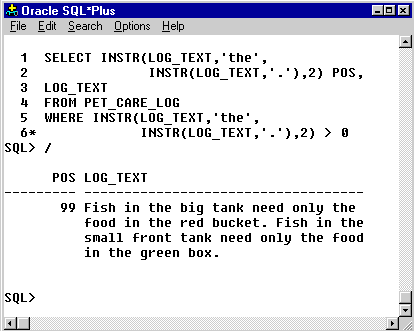
INSTR locates the delimiter first. The corrected 26ai example adds 1 so the outer search starts after the period.
Adding 1 is significant. The inner call returns the position of the period, whereas the stated requirement is to begin after it. If the period is
absent, the inner call returns zero and the outer search begins at position 1. If rows without a period must be excluded, add
WHERE INSTR(log_text, '.') > 0.
Position-based parsing is appropriate for imported text, logs, legacy strings, and presentation formats. If a value repeatedly contains distinct business attributes separated by delimiters, those attributes usually belong in separate relational columns rather than being reparsed by every query.
Collation and Case Handling
The INSTR functions compare their arguments using Oracle's collation determination rules. It is therefore incomplete to describe
INSTR as universally case-sensitive. With binary behavior, uppercase and lowercase values differ. Data-bound or explicitly selected
collations can produce different matching semantics.
A query can deliberately normalize case for a binary-style case-insensitive search:
SELECT log_text
FROM   pet_care_log
WHERE  INSTR(UPPER(log_text), UPPER('fish')) > 0;
Applying UPPER, LENGTH, or INSTR to a table column can affect whether an ordinary index supports the access path. A
frequently executed expression may require a function-based index or a collation-aware design. That physical-design choice should be based on workload
and execution plans rather than assumed from function syntax alone.
INSTR Compared with LIKE
LIKE and INSTR answer different questions. LIKE is a condition that reports whether text matches a pattern containing
wildcards. INSTR returns the numeric location of a literal substring and can select an occurrence or search backward.
| Requirement | Preferred feature |
|---|---|
| Determine whether text matches a wildcard pattern | LIKE |
| Return the exact starting position of a substring | INSTR |
| Locate a requested occurrence or search backward | INSTR |
| Use a found delimiter as a later extraction boundary | INSTR, often combined with SUBSTR |
The distinction is Boolean pattern matching versus a numeric location result—not a simplistic claim that each feature is allowed only in certain clauses. Choose the operation that directly represents the requirement.
Summary
CONCATaccepts two or more arguments in Oracle AI Database 26ai, while||remains a readable alternative.- Use explicit conversion when concatenating numbers or datetimes whose presentation must be reproducible.
LENGTHreturns characters; related suffixes select byte, UCS-2, UCS-4, or Unicode complete-character semantics.INSTRreturns a one-based position, supports occurrence selection and backward searching, and returns zero when no match exists.- Nulls, trailing blanks, LOB restrictions, collations, Unicode requirements, and index design can change the practical behavior of an expression.
The next lesson develops SUBSTR and its related variants, including how a position returned by INSTR can define the boundary of
the text to extract.