| Lesson 7 | Pseudocolumns |
| Objective | Identify the uses of various pseudo-columns in Oracle |
Oracle Pseudocolumns in 19c and 23c
Oracle provides a set of pseudocolumns—values that behave like columns in a query but are not physically stored in the table. The database generates them at runtime and uses them to expose information about:
- How a row is stored or selected (for example,
ROWID,ROWNUM,LEVEL) - The current session or environment (for example,
USER,SYSDATE) - Sequence values (for example,
sequence_name.NEXTVAL,sequence_name.CURRVAL)
In modern Oracle versions, including Oracle Database 23c, these pseudocolumns still play an important role in query optimization, auditing, and hierarchical processing. This lesson shows how to use the most common pseudocolumns correctly and highlights a few 23c–specific considerations.
What is a pseudocolumn?
A pseudocolumn:
- Can appear in a
SELECTlist,WHEREclause, orORDER BY, just like a real column. - Is computed by Oracle when the query runs; it is not stored in the table.
- Cannot be updated directly, and there is no physical column in the table that matches its name.
Some pseudocolumns have a different value for every row (for example,
ROWNUM, ROWID, LEVEL), while others
typically return the same value for all rows in a given query execution (for
example, SYSDATE, USER).
ROWID in Oracle 23c
ROWID is one of the most important pseudocolumns. It represents the
physical address of a row and is derived from:
- Data file number
- Block number within the file
- Row position within the block
Typical usage:
SELECT ROWID, emp_id, last_name
FROM   emp;
Because ROWID points directly to the row’s physical location, it is
the fastest way to retrieve a specific row when you already know its
ROWID. It is often used to:
- Locate problem rows during data cleanup
- Delete or update specific duplicates
- Investigate physical storage issues
Oracle Database 23c Administration
In Oracle 23c, the documentation emphasizes an important distinction:
-
ROWIDpseudocolumn – automatically available on every row, can change when rows move (for example, duringALTER TABLE ... MOVEor partition operations). -
ROWIDdata type – an explicit column you define to store row addresses or related information; this is separate from the pseudocolumn.
Because ROWID can change, it should not be used as a permanent
primary key. It is a powerful diagnostic and performance tool, not a business
identifier.
ROWNUM – row selection order
ROWNUM assigns a sequential number to each row in the result set in
the order Oracle selects the rows:
SELECT *
FROM   employees
WHERE  ROWNUM <= 10;
This query returns the first 10 rows that satisfy the query’s conditions. Common uses include:
- Limiting the number of rows returned (simple pagination or sampling)
- Quickly checking the “top N” rows without a full scan of the result
In Oracle 23c, ROWNUM continues to behave as in earlier versions, with
one important restriction: it cannot be referenced in a CHECK
constraint. It is evaluated at query time, not enforced as part of a row’s stored
definition.
LEVEL – hierarchical queries
LEVEL is a pseudocolumn used in hierarchical queries to indicate
how far down the tree a row is from the root:
SELECT LEVEL,
       employee_id,
       manager_id
FROM   employees
CONNECT BY PRIOR employee_id = manager_id
START  WITH manager_id IS NULL;
In this query:
LEVEL = 1for root rows (for example, the CEO).LEVEL = 2for direct reports of the root, and so on.
As with ROWNUM, LEVEL is a runtime value and cannot be
used inside a CHECK constraint. In Oracle 23c, this restriction
remains: constraints cannot reference LEVEL or ROWNUM.
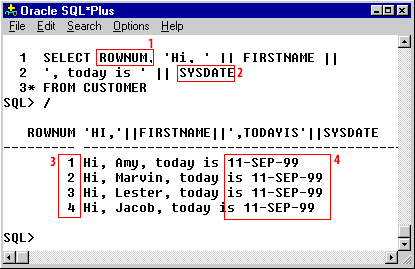
Query using ROWNUM and SYSDATE
Some pseudocolumns change per row, while others remain constant during a query. The following example uses:
ROWNUM– a sequence number for each returned row.SYSDATE– the current date and time, typically the same for all rows in a single query execution.
SELECT ROWNUM,
       'Hi, ' || FIRSTNAME ||
       ', today is ' || SYSDATE
FROM   CUSTOMER
/
ROWNUM   'HI,'||FIRSTNAME||',TODAYIS'||SYSDATE
------   ---------------------------------------------
1        Hi, Amy, today is 11-SEP-99
2        Hi, Marvin, today is 11-SEP-99
3        Hi, Lester, today is 11-SEP-99
4        Hi, Jacob, today is 11-SEP-99
Query using the ROWNUM and SYSDATE pseudocolumns
- The
ROWNUMpseudocolumn appears in theSELECTlist just like a normal column. -
The
SYSDATEpseudocolumn is concatenated with literals and theFIRSTNAMEcolumn. During a single query execution,SYSDATEnormally returns the same value for each row. ROWNUMincrements for each row returned.- The date display format (for example,
11-SEP-99) is controlled by the session’sNLS_DATE_FORMATsetting and may differ in modern 19c/23c environments.
Using multiple pseudocolumns in one query
You can safely combine several pseudocolumns in a single query. The following
example uses ROWNUM and ROWID together:
SELECT ROWNUM        AS row_number,
       ROWID         AS row_address,
       first_name,
       last_name,
       salary
FROM   employees
WHERE  ROWNUM <= 10
ORDER  BY salary DESC;
In this example:
ROWNUMassigns a running number to the rows returned.ROWIDshows the physical address of each row.- The
WHEREclause limits the result set to the first 10 rows selected. - The
ORDER BYclause sorts those rows by salary in descending order.
Be careful when combining ROWNUM with ORDER BY. The exact
behavior depends on when the optimizer applies the row limitation. For top-N
queries in modern Oracle, the FETCH FIRST syntax is often preferred,
but ROWNUM remains a useful and widely recognized tool.
CHECK constraints and pseudocolumn restrictions
A CHECK constraint enforces a rule that must be true for every row in
a table. For example:
CREATE TABLE rating_with_check
(
  rating            VARCHAR2(2) CHECK (rating <= '9'),
  rating_description VARCHAR2(50)
);
Some expressions cannot be used inside CHECK
constraints. In Oracle (including 23c), you cannot reference:
- Subqueries
- Sequence pseudocolumns (
NEXTVAL,CURRVAL) - Runtime pseudocolumns such as
SYSDATE,USER,ROWNUM, orLEVEL
These values are computed at execution time and are not fixed properties of the
stored row. A CHECK constraint must depend only on the row’s stored
columns and constant expressions.
Common Oracle pseudocolumns
The following table summarizes several commonly used pseudocolumns in Oracle:
| Pseudocolumn name | Description |
ROWID |
Physical address of a table row; useful for fast row access and diagnostics, but not stable enough to serve as a business key. |
ROWNUM |
Sequential number assigned to each selected row in a result set (1, 2, 3, ...). |
LEVEL |
Hierarchy level of a row in a hierarchical query (1 for root, 2 for children, and so on). |
SYSDATE |
Current date and time on the database server; often used in default values and audit columns. |
USER |
Username of the current Oracle session; frequently used in audit trails. |
UID |
Numeric identifier of the current user (internal user ID). |
sequence_name.CURRVAL |
Current value of a sequence in this session (after NEXTVAL has been referenced at least once). |
sequence_name.NEXTVAL |
Next value generated by a sequence; commonly used to assign surrogate keys. |
Pseudocolumns are especially helpful when inserting or updating rows. For example,
a table such as PET_CARE_LOG might record the date and user who
inserted a comment:
INSERT INTO pet_care_log
       (log_id,
        pet_id,
        comment_text,
        created_dt,
        created_by_user)
VALUES (pet_care_log_seq.NEXTVAL,
        :pet_id,
        :comment_text,
        SYSDATE,
        USER);
Here, SYSDATE and USER are pseudocolumns used to
populate audit columns consistently and automatically.
Oracle Pseudocolumns – Quiz
The next lesson concludes this module. Click the Quiz link below to review your understanding of Oracle pseudocolumns.