| Lesson 5 | Linking relational database tables |
| Objective | Link a primary key to a foreign key in a relational database system |
Linking Tables with Primary Keys and Foreign Keys
How relational tables connect in a real schema
The primary advantage of a relational database is that you can store data in multiple tables (each table focused on one subject), and then link those tables when you need combined information.
The link is created by copying the primary key of a parent table into a related table where it becomes a foreign key. That one design move enables accurate joins, prevents “orphan” rows, and supports reliable reporting at scale.
The link is created by copying the primary key of a parent table into a related table where it becomes a foreign key. That one design move enables accurate joins, prevents “orphan” rows, and supports reliable reporting at scale.
What it means to “link” two tables
Two tables are linked when they share a matching key value:
In the example used throughout this lesson, a supplier can provide many products. That is a common one-to-many relationship:
SUPPLIERS (1) → PRODUCTS (many)
- Parent table: owns the primary key (unique identifier).
- Child table: stores the parent key value as a foreign key (reference).
In the example used throughout this lesson, a supplier can provide many products. That is a common one-to-many relationship:
SUPPLIERS (1) → PRODUCTS (many)
Primary key and foreign key at a glance
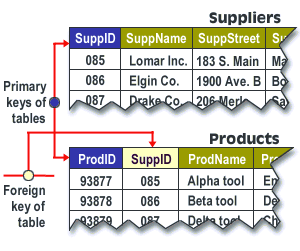
The diagram below shows the two tables and how the linking column appears in both places.
Read it from top to bottom: SuppID uniquely identifies a supplier in Suppliers, and the same value is stored in Products
to indicate which supplier provides each product.
| SuppID | SuppName   | SuppStreet    |
| -----: | ---------- | ------------- |
|    085 | Lomar Inc. | 183 S. Main   |
|    086 | Elgin Co.  | 1900 Ave. B   |
|    087 | Drake Co.  | 206 Merl Ave. |
| ProdID | SuppID | ProdName |
| -----: | -----: | ---------- |
| 93877 | 085 | Alpha tool |
| 93878 | 086 | Beta tool |
| 93879 | 087 | Delta tool |- SuppID is the primary key in Suppliers.
- SuppID is a foreign key in Products that references Suppliers.SuppID.
How the link is created in the schema
Linking tables is a schema-level decision, not just a query trick. The workflow is:
- Choose the parent table and define its primary key.
- Add the foreign key column to the child table using the same datatype as the referenced key.
- Enforce the relationship with a foreign key constraint (referential integrity).
- Index for performance (typically index the foreign key column in the child table).
- Mandatory relationship: the foreign key is NOT NULL (every child row must have a parent).
- Optional relationship: the foreign key may be NULL (a child row can exist without a parent, when that is valid for the business rule).
Example DDL
The following SQL shows the general pattern. (Syntax varies slightly by platform, but the concepts are consistent.)
CREATE TABLE Suppliers (
  SuppID     NUMBER        NOT NULL,
  SuppName   VARCHAR2(60)  NOT NULL,
  SuppStreet VARCHAR2(60),
  CONSTRAINT pk_suppliers PRIMARY KEY (SuppID)
);

CREATE TABLE Products (
  ProdID   NUMBER        NOT NULL,
  SuppID   NUMBER        NOT NULL,
  ProdName VARCHAR2(60)  NOT NULL,
  CONSTRAINT pk_products PRIMARY KEY (ProdID),
  CONSTRAINT fk_products_suppliers
    FOREIGN KEY (SuppID)
    REFERENCES Suppliers (SuppID)
);- Make the foreign key datatype and length match the referenced primary key.
- Define clear constraint names (they matter in troubleshooting and operations).
- Avoid legacy datatypes for new schema objects (for example, migrate
LONG/LONG RAWto LOB types when encountered).
Relational Database Design Implementation
Accessing data across linked tables
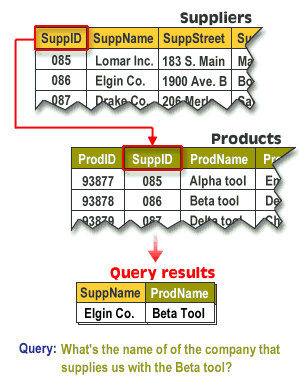
Once the tables are linked, you can ask questions that span both subjects. For example:
“What is the name of the company that supplies us with the Beta tool?”
This question is answered by joining Products to Suppliers on the matching key value (SuppID).
“What is the name of the company that supplies us with the Beta tool?”
This question is answered by joining Products to Suppliers on the matching key value (SuppID).
| SuppID | SuppName   | SuppStreet    |
| -----: | ---------- | ------------- |
|    085 | Lomar Inc. | 183 S. Main   |
|    086 | Elgin Co.  | 1900 Ave. B   |
|    087 | Drake Co.  | 206 Merl Ave. |
| ProdID | SuppID | ProdName |
| -----: | -----: | ---------- |
| 93877 | 085 | Alpha tool |
| 93878 | 086 | Beta tool |
| 93879 | 087 | Delta tool || SuppName | ProdName |
| --------- | --------- |
| Elgin Co. | Beta tool |Answer: Elgin Co.
How to link a primary key to a foreign key
At implementation time, you typically perform three actions:
- Confirm the parent key is unique and stable (primary key or UNIQUE constraint).
- Add the child key column (foreign key column) to store the parent identifier.
- Create the foreign key constraint so the database enforces the relationship.
ALTER TABLE Products
ADD CONSTRAINT fk_products_suppliers
FOREIGN KEY (SuppID)
REFERENCES Suppliers (SuppID);- You cannot insert a Products.SuppID value that does not exist in Suppliers.SuppID.
- You cannot delete a supplier row that is still referenced, unless you deliberately choose a delete rule (RESTRICT, CASCADE, SET NULL) that matches the business requirement.
Naming foreign keys when column names collide
In real schemas, column name collisions happen (especially with short names like
ID).
If the same column name appears in multiple tables, use a consistent naming convention so the meaning is obvious:
- Include the parent subject in the child foreign key name (example:
supplier_id). - Use a standard suffix like
_idfor identifiers. - Avoid special characters (do not use dotted names like
SUPPLIERS.SuppIDas a column name).
When you link tables correctly, query results become information: data organized to answer a question.
In the next lesson, you will begin using SQL to create tables and write queries that join them.
[1]foreign key: A field (or combination of fields) in a child table that references a primary key (or UNIQUE key) in a parent table.
[2]data integrity: The correctness and consistency of data, including enforcement of valid relationships (referential integrity) between tables.