| Lesson 4 | Inserting using a subquery |
| Objective | Write SQL to insert Rows using a Subquery in Oracle 23ai |
Write SQL to Insert Rows Using a Subquery
When an object table contains a REF column — a typed pointer to a row in
another object table — the INSERT statement cannot supply that column value
as a scalar literal. The reference must be retrieved at insert time using a subquery that
calls the REF() function against the referenced object table. This lesson
covers the syntax and examples for this pattern, then extends into compound DML triggers
and bulk insertion for high-volume object table operations.
Inserting with an Inline REF Subquery
The SALE_HEADER table contains a CUST_REF column associated
with CUSTOMER_TYPE, which is maintained in CUSTOMER_OBJ_TABLE.
To insert a row into SALE_HEADER, the CUST_REF value must be
retrieved from CUSTOMER_OBJ_TABLE using REF():
INSERT INTO sale_header
VALUES (
  500,
  (SELECT REF(c) FROM customer_obj_table c WHERE c.cust_id = 1),
  89.45,
  3.58,
  15,
  108.03,
  DATE '2026-03-16',
  DETAIL_TABLE()
);
The inline subquery in position 2 retrieves the object reference for customer ID 1 from
CUSTOMER_OBJ_TABLE. The REF(c) call requires the table alias
c — passing the table name directly is not valid. The subquery must return
exactly one row; if the WHERE clause matches multiple rows, Oracle raises
ORA-01427: single-row subquery returns more than one row.
The DATE '2026-03-16' literal uses ISO 8601 format and is independent of
the session NLS_DATE_FORMAT setting. The DETAIL_TABLE()
constructor initializes the nested table column as an empty collection.
The same pattern applies to the PET_CARE_LOG_OBJ_TABLE table, which
contains a PRODUCT_ID column referencing PRODUCT_OBJ_TABLE:
INSERT INTO pet_care_log_obj_table
VALUES (
  (SELECT REF(p) FROM product_obj_table p WHERE p.product_id = 34),
  TIMESTAMP '2026-03-16 12:30:00',
  'JANET',
  'New puppy needs vaccination.',
  TIMESTAMP '2026-03-16 13:30:00'
);
Here the REF subquery occupies the first position in the VALUES
clause because the reference column is the first attribute of the object type. Both
TIMESTAMP literals supply time-of-day precision and are
NLS_DATE_FORMAT independent. This differs from the Lesson 3 pattern where
the SELECT REF() appeared in the outer SELECT list — both
approaches are valid; the choice depends on whether additional columns require values
derived from the same subquery.
Syntax Template
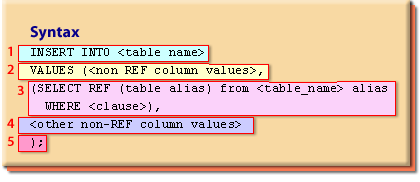
INSERT INTO <table_name>
VALUES (<non_REF_column_values>,
  (SELECT REF(a) FROM <referenced_table> a
   WHERE <clause>),
  <other_non_REF_column_values>
);| Location 1 | The INSERT INTO clause specifying the target object table |
| Location 2 | The VALUES clause supplying column values in the order defined during object table creation |
| Location 3 | The inline subquery using REF(alias) to retrieve the object reference from the referenced table |
| Location 4 | The remaining non-REF column values, including NULL where required |
| Location 5 | The closing semicolon terminating the INSERT statement |
Worked Example
INSERT INTO sale_header
VALUES (500,
  (SELECT REF(c) FROM customer_obj_table c
   WHERE c.cust_id = 1),
  89.45, 3.58, 15, 108.03,
  DATE '2026-03-16',
  detail_table()
);- The
INSERT INTO sale_headerclause names the target object table - The
VALUESclause opens and supplies500as the first column value - The inline subquery retrieves
REF(c)forcust_id = 1fromcustomer_obj_table - The remaining scalar column values —
89.45, 3.58, 15, 108.03— and the ISO 8601 date literal follow - The
detail_table()constructor and the closing);complete the statement
Compound DML Triggers with Bulk Insertion
For high-volume inserts into object tables, a compound DML trigger combined with
BULK COLLECT and FORALL provides significant performance
advantages over row-by-row processing. A compound trigger fires at multiple timing
points within a single DML statement — before the statement, before each row, after each
row, and after the statement. The after-each-row section accumulates rows into a
collection, and the after-statement section bulk-inserts the accumulated rows into the
target table in a single operation.
The performance benefit comes from replacing N individual insert round-trips with a
single bulk operation. To realize this benefit, FORALL must be combined
with BULK COLLECT INTO — using FORALL without bulk collection
still executes single-row DML operations in a loop.
Bulk Insert Example
The following example compares conventional row-by-row insertion against bulk insertion
using FORALL and measures the elapsed time of each approach using
DBMS_UTILITY.GET_TIME.
Step 1 — create and populate the test table:
-- Create a test table for the bulk insert
DROP TABLE IF EXISTS test_objects;

CREATE TABLE test_objects
  TABLESPACE users
AS
SELECT object_name, object_type
FROM   dba_objects;
Step 2 — load the table contents into a PL/SQL collection using BULK COLLECT:
-- Populate the table into an array using BULK COLLECT
DECLARE
  TYPE t_tab IS TABLE OF test_objects%ROWTYPE;
  objects_tab t_tab := t_tab();
  start_time  NUMBER;
  end_time    NUMBER;
BEGIN
  SELECT *
  BULK COLLECT INTO objects_tab
  FROM test_objects;

  -- Step 3: Bulk insert using FORALL
  EXECUTE IMMEDIATE 'TRUNCATE TABLE test_objects';
  start_time := DBMS_UTILITY.get_time;

  FORALL i IN objects_tab.FIRST .. objects_tab.LAST
    INSERT INTO test_objects VALUES objects_tab(i);

  end_time := DBMS_UTILITY.get_time;
  DBMS_OUTPUT.PUT_LINE('Bulk Insert: '
    || TO_CHAR(end_time - start_time) || ' hsecs');

  -- Step 4: Conventional row-by-row insert for comparison
  EXECUTE IMMEDIATE 'TRUNCATE TABLE test_objects';
  start_time := DBMS_UTILITY.get_time;

  FOR i IN objects_tab.FIRST .. objects_tab.LAST LOOP
    INSERT INTO test_objects (object_name, object_type)
    VALUES (objects_tab(i).object_name, objects_tab(i).object_type);
  END LOOP;

  end_time := DBMS_UTILITY.get_time;
  DBMS_OUTPUT.PUT_LINE('Conventional Insert: '
    || TO_CHAR(end_time - start_time) || ' hsecs');

  COMMIT;
END;
/
DBMS_UTILITY.GET_TIME returns elapsed time in hundredths of a second
(hsecs). The difference between the bulk and conventional elapsed times demonstrates
the performance advantage of FORALL — on large collections the bulk
approach is typically an order of magnitude faster because it sends all rows to the
database engine in a single context switch rather than one per row.
In Oracle 23ai, FORALL with BULK COLLECT remains the
recommended pattern for high-volume DML. The SAVE EXCEPTIONS clause can
be added to FORALL to capture individual row errors without aborting the
entire bulk operation — useful when inserting into object tables where some rows may
violate constraints while others are valid.
-- FORALL with exception handling in Oracle 23ai
FORALL i IN objects_tab.FIRST .. objects_tab.LAST
  SAVE EXCEPTIONS
  INSERT INTO test_objects VALUES objects_tab(i);
After a FORALL ... SAVE EXCEPTIONS block, the
SQL%BULK_EXCEPTIONS collection records the index and error code for each
failed row, allowing selective logging or retry without losing the successfully inserted
rows.
Summary
Inserting rows into object tables with REF columns requires an inline
subquery using REF(alias) to retrieve the object reference at insert time.
The subquery must return exactly one row and requires a table alias — the alias is the
argument to REF(), not the table name. Use ISO 8601 DATE and
TIMESTAMP literals instead of to_date() format strings for
portable, session-independent date handling. For high-volume inserts, combine
BULK COLLECT with FORALL to replace row-by-row DML with a
single bulk operation. The next lesson covers writing DML statements to update records
within object tables.