| Lesson 4 | What are PL/SQL Loops? |
| Objective | Determine how to begin and end a PL/SQL Loop within a block in Oracle 23ai |
Programming PL/SQL Loops in Oracle 23ai
A loop is the mechanism in PL/SQL that allows a sequence of statements to
execute repeatedly. Without a loop, a PL/SQL block executes each statement
exactly once. With a loop, you control how many times a block of statements
repeats and under what conditions it stops. This lesson covers the basic
LOOP statement, the two forms of the EXIT statement
that control loop termination, the six control structures available in
Oracle PL/SQL, and the searched CASE expression.
The Basic LOOP Statement
The LOOP statement repeats a sequence of statements indefinitely
until an explicit exit condition is reached. The statements to repeat are
placed between the LOOP and END LOOP keywords.
After the last statement in the body executes, control returns to the top
of the loop and the sequence begins again.
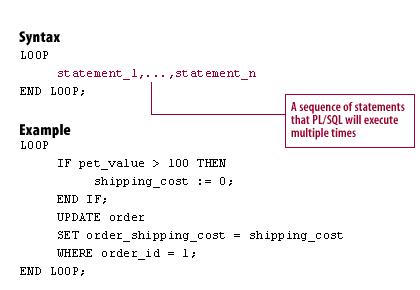
Syntax:
LOOP
  statement_1, ..., statement_n;
END LOOP;
Example — shipping cost assignment with explicit exit:
LOOP
  IF pet_value > 100 THEN
    shipping_cost := 0;
  END IF;
  UPDATE sale_header
  SET    order_shipping_cost = shipping_cost
  WHERE  order_id = 1;
  EXIT;  -- prevent infinite loop
END LOOP;
The EXIT statement at the end of the loop body ensures
the loop executes exactly once. Without it, the loop would repeat
indefinitely because nothing inside the body changes the condition
that would otherwise stop it.
A basic LOOP with no exit mechanism is an infinite loop —
it runs until the session is terminated or the database kills it due to
a resource limit. Every basic LOOP must contain at least one
EXIT or EXIT WHEN statement reachable during
normal execution. Oracle PL/SQL provides two forms of exit statement to
handle different termination patterns.
EXIT — Unconditional Loop Termination
The EXIT statement forces the loop to complete immediately and
unconditionally. When Oracle encounters EXIT, the loop ends
and control passes to the first statement after END LOOP.
The EXIT statement must always appear inside a loop — it cannot
be used to exit a PL/SQL block that is not a loop.
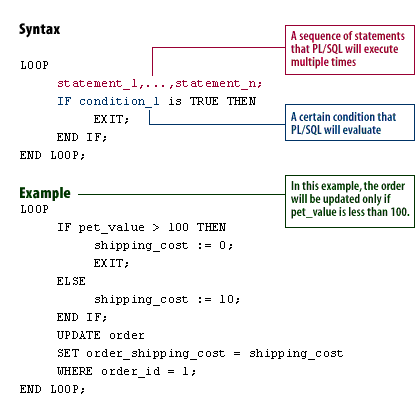
Syntax — EXIT inside an IF condition:
LOOP
  statement_1, ..., statement_n;
  IF condition_1 THEN
    EXIT;
  END IF;
END LOOP;
Example — conditional exit based on pet value:
LOOP
  IF pet_value > 100 THEN
    shipping_cost := 0;
    EXIT;
  ELSE
    shipping_cost := 10;
  END IF;
  UPDATE sale_header
  SET    order_shipping_cost = shipping_cost
  WHERE  order_id = 1;
END LOOP;
When pet_value exceeds 100, shipping_cost
is set to zero and EXIT fires immediately — the
UPDATE statement is bypassed. When pet_value
is 100 or below, shipping_cost is set to 10, the
UPDATE executes, and the loop body returns to the top.
The placement of EXIT within the loop body matters. In the
example above, EXIT is inside the IF branch,
which means it only fires when the condition is TRUE. Placing
EXIT unconditionally at the bottom of the loop body — as in
the first example — guarantees exactly one iteration regardless of any
condition.
EXIT WHEN — Conditional Loop Termination
The EXIT WHEN statement combines the condition check and the
exit into a single readable statement, replacing the verbose
IF condition THEN EXIT; END IF; pattern. When Oracle
encounters EXIT WHEN, it evaluates the condition. If the
condition is TRUE, the loop terminates and control passes
to the statement after END LOOP. If the condition is
FALSE or NULL, execution continues with the
next statement in the loop body.
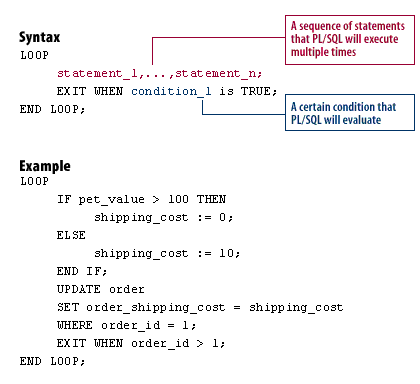
Syntax:
LOOP
  statement_1, ..., statement_n;
  EXIT WHEN condition_1;
END LOOP;
Example — loop updating shipping costs until order threshold is exceeded:
LOOP
  IF pet_value > 100 THEN
    shipping_cost := 0;
  ELSE
    shipping_cost := 10;
  END IF;
  UPDATE sale_header
  SET    order_shipping_cost = shipping_cost
  WHERE  order_id = 1;
  EXIT WHEN order_id > 1;
END LOOP;
The EXIT WHEN clause is evaluated after the
UPDATE executes on every iteration. The loop continues
as long as order_id does not exceed 1.
EXIT WHEN is the preferred form in Oracle 23ai for
conditional loop termination. It is more concise than the equivalent
IF...EXIT...END IF pattern and its intent is immediately
readable — the condition and the exit action appear on a single line
without syntactic overhead. Use unconditional EXIT only
when the loop must terminate regardless of any runtime condition.
Comparing EXIT and EXIT WHEN
The two forms are functionally equivalent when the condition is
always TRUE, but serve different purposes in practice:
-- EXIT inside IF -- verbose, two forms of END required
LOOP
  statement_1;
  IF order_count > 10 THEN
    EXIT;
  END IF;
END LOOP;

-- EXIT WHEN -- concise, preferred form
LOOP
  statement_1;
  EXIT WHEN order_count > 10;
END LOOP;
Both loops terminate when order_count exceeds 10. The
EXIT WHEN form removes four lines and one level of nesting.
The IF...EXIT form is retained in teaching materials because
it makes the two-step logic — evaluate condition, then exit — explicit
for learners new to loop control.
Loop Design Considerations
Three design principles apply to all basic LOOP statements
in Oracle PL/SQL:
- Every loop must have a reachable exit. A loop with
no reachable
EXITorEXIT WHENis an infinite loop. Oracle does not detect this at compile time — the error only manifests at runtime when the session hangs or exceeds a resource limit. - Exit placement determines what executes on the final
iteration. Statements after
EXITorEXIT WHENin the loop body are bypassed when the exit condition fires. In theEXIT WHENshipping cost example, theUPDATEalways executes before the exit is evaluated — the final row is always updated. PlacingEXIT WHENbefore theUPDATEwould skip the update on the last iteration. - Prefer
EXIT WHENoverIF...EXITfor single-condition exits. UseIF...EXITonly when the exit decision requires multiple statements or complex logic that cannot be expressed in a single Boolean condition.
The Six PL/SQL Control Structures
Oracle PL/SQL provides six control structures that together cover all conditional and iterative programming patterns:
IF-ELSIF-ELSE— executes a sequence of statements conditionally based on one or more Boolean expressions evaluated top to bottomLOOP-END LOOP— repeats a sequence of statements indefinitely until an explicitEXITorEXIT WHENterminates the loopEXIT— exits the current loop immediately and unconditionally; control passes to the statement afterEND LOOPEXIT WHEN— exits the current loop when the specified condition evaluates toTRUE; preferred overIF...EXIT...END IFfor single-condition exitsWHILE LOOP— evaluates its condition before each iteration; the loop body never executes if the condition isFALSEorNULLon the first evaluationFOR LOOP— iterates over a fixed integer range or cursor result set; the loop counter is implicitly declared and scoped to the loop
Lessons 5 and 6 of this module cover WHILE LOOP,
FOR LOOP, and labeled loop exits in detail. This lesson
focuses on the basic LOOP and its two exit mechanisms,
which underpin the behavior of all loop types.
Searched CASE Expression
A searched CASE expression evaluates each WHEN
clause as an independent Boolean condition rather than comparing a single
selector against fixed values. This makes it suitable for testing
different variables, range comparisons, and function return values in a
single expression. Each WHEN clause is evaluated in sequence
and the first one that evaluates to TRUE determines the
result. If no WHEN clause matches, the ELSE
clause applies.
The following example assigns a student appraisal using a searched
CASE expression. The first WHEN clause calls
a locally defined function. The second tests two independent conditions
with OR. The remaining clauses test a single variable
against fixed values:
DECLARE
  grade      CHAR(1)         := 'B';
  appraisal  VARCHAR2(120);
  id         NUMBER          := 8429862;
  attendance NUMBER          := 150;
  min_days   CONSTANT NUMBER := 200;

  FUNCTION attends_this_school(id NUMBER)
  RETURN BOOLEAN IS
  BEGIN
    RETURN TRUE;
  END;

BEGIN
  appraisal :=
    CASE
      WHEN NOT attends_this_school(id)
        THEN 'Student not enrolled'
      WHEN grade = 'F' OR attendance < min_days
        THEN 'Poor (poor performance or bad attendance)'
      WHEN grade = 'A' THEN 'Excellent'
      WHEN grade = 'B' THEN 'Very Good'
      WHEN grade = 'C' THEN 'Good'
      WHEN grade = 'D' THEN 'Fair'
      ELSE 'No such grade'
    END;

  DBMS_OUTPUT.PUT_LINE(
    'Result for student ' || id || ' is ' || appraisal);
END;
/
Output:
Result for student 8429862 is Poor (poor performance or bad attendance)
Tracing the evaluation: attends_this_school(id) returns
TRUE, so NOT attends_this_school(id) is
FALSE — the first WHEN does not match.
grade = 'F' is FALSE, but
attendance (150) < min_days (200) is TRUE —
the second WHEN matches because the OR
condition is satisfied. The result is assigned and the remaining
WHEN clauses are skipped.
Two points about the Boolean function call in the first
WHEN clause: the idiom NOT attends_this_school(id)
is the correct Oracle PL/SQL form for negating a Boolean function return.
The alternative attends_this_school(id) = FALSE is not valid
Oracle syntax prior to Oracle 23ai. In Oracle 23ai, native SQL
BOOLEAN support makes both forms syntactically valid, but
NOT function_name() remains the idiomatic and portable form.
Summary
The basic LOOP statement repeats a sequence of statements
until an explicit EXIT or EXIT WHEN terminates
it. EXIT terminates the loop unconditionally.
EXIT WHEN condition terminates the loop when the condition
is TRUE and is the preferred form for single-condition
exits. Exit placement within the loop body determines which statements
execute on the final iteration. The six PL/SQL control structures —
IF-ELSIF-ELSE, LOOP, EXIT,
EXIT WHEN, WHILE LOOP, and FOR LOOP
— together cover all conditional and iterative programming patterns in
Oracle 23ai. The next lesson covers the structure of FOR
and WHILE loops.