| Lesson 6 | Labels and the GOTO statement |
| Objective | Define uses for labels and the GOTO statement in Oracle 23ai |
Labels and the GOTO Statement in Oracle PL/SQL
PL/SQL labels serve two distinct purposes. The first is to name a block so that
variables declared in an outer block remain accessible by name even when an inner
block redeclares an identifier with the same name. The second is to mark a target
location for the GOTO statement, which transfers control unconditionally
to that location. This lesson covers both uses, the syntax rules that govern them,
and the strict constraints Oracle enforces on GOTO transfers to prevent
unstructured code paths.
Block Labels and Variable Scoping
When a variable declared in an enclosing block is redeclared in a subblock with the same name, the subblock's declaration takes precedence within its own scope. The enclosing block's variable becomes inaccessible by its simple name alone. A block label resolves this ambiguity — by referencing the enclosing block's label as a qualifier, the subblock can access both variables simultaneously.
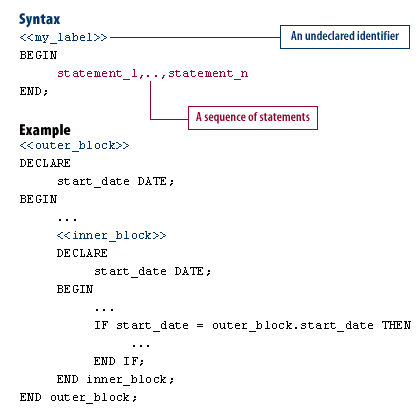
Label syntax — the label name is enclosed in double angle brackets and placed
immediately before the BEGIN keyword. The same label name can
optionally appear after the matching END keyword to improve
readability:
<<my_label>>
BEGIN
  statement_1, ..., statement_n
END my_label;
Variable scoping example — outer_block.start_date qualifies the
enclosing block's variable when the same name is redeclared in the inner block:
<<outer_block>>
DECLARE
  start_date DATE;
BEGIN
  ...
  <<inner_block>>
  DECLARE
    start_date DATE;
  BEGIN
    ...
    IF start_date = outer_block.start_date THEN
      ...
    END IF;
  END inner_block;
END outer_block;
A PL/SQL label consists of an undeclared identifier enclosed in double angle brackets, followed by a sequence of executable statements.
When a label name is used at the beginning of a block definition, using it again
after the matching END keyword is recommended. The closing label is
not required by Oracle, but it makes deeply nested blocks significantly easier to
read and audit, especially when blocks span many lines.
Worked Example — Labeled Blocks with a Logging Package
The following example defines a simple logging package and then uses labeled blocks
to demonstrate how outer_block.start_date is accessed from within the
inner block. Both blocks declare a start_date variable. The inner block
uses the outer block label to compare both values explicitly.
CREATE OR REPLACE PACKAGE demo_log_pkg AS
  PROCEDURE info(p_message IN VARCHAR2);
  PROCEDURE error(p_message IN VARCHAR2);
END demo_log_pkg;
/

CREATE OR REPLACE PACKAGE BODY demo_log_pkg AS
  PROCEDURE info(p_message IN VARCHAR2) IS
  BEGIN
    DBMS_OUTPUT.PUT_LINE('[INFO] ' || p_message);
  END info;

  PROCEDURE error(p_message IN VARCHAR2) IS
  BEGIN
    DBMS_OUTPUT.PUT_LINE('[ERROR] ' || p_message);
  END error;
END demo_log_pkg;
/

SET SERVEROUTPUT ON;

<<outer_block>>
DECLARE
  start_date DATE := DATE '2026-03-18';
BEGIN
  demo_log_pkg.info('Entered outer_block');
  demo_log_pkg.info('outer_block.start_date = '
    || TO_CHAR(start_date, 'YYYY-MM-DD'));

  <<inner_block>>
  DECLARE
    start_date DATE := DATE '2026-03-18';
  BEGIN
    demo_log_pkg.info('Entered inner_block');
    demo_log_pkg.info('inner_block.start_date = '
      || TO_CHAR(start_date, 'YYYY-MM-DD'));

    IF start_date = outer_block.start_date THEN
      demo_log_pkg.info('Inner and outer block dates match');
    ELSE
      demo_log_pkg.info('Dates do not match');
    END IF;

  EXCEPTION
    WHEN OTHERS THEN
      demo_log_pkg.error('inner_block failed: ' || SQLERRM);
      RAISE;
  END inner_block;

  demo_log_pkg.info('Exiting outer_block normally');

EXCEPTION
  WHEN OTHERS THEN
    demo_log_pkg.error('outer_block failed: ' || SQLERRM);
    RAISE;
END outer_block;
/
The logging package replaces inline DBMS_OUTPUT.PUT_LINE calls with
named info() and error() procedures, making the output
easier to distinguish at a glance. Both exception handlers re-raise with
RAISE after logging — Oracle best practice since 11g to ensure the
calling environment receives notification of the failure rather than silently
swallowing it.
The GOTO Statement
The GOTO statement transfers control unconditionally to a labeled
statement within the same PL/SQL block or subprogram. It requires two elements:
a label_name declaration marking the target location, and a
GOTO label_name statement at the point where the transfer originates.
BEGIN
  GOTO skip_processing;

  -- This code is never reached
  DBMS_OUTPUT.PUT_LINE('This line is skipped');

  <<skip_processing>>
  DBMS_OUTPUT.PUT_LINE('Resumed after GOTO');
END;
/
Oracle enforces strict rules on where GOTO transfers are permitted
and where they are prohibited.
Permitted GOTO Transfers
- From a block to an executable statement within the same block
- From an exception handler into an enclosing block
Prohibited GOTO Transfers
- From one
IFstatement clause to another — for example, jumping from theTHENbranch into theELSEbranch of the sameIF - From an enclosing block into a subblock — control cannot jump forward into a nested block that has not yet been entered
- From an exception handler into the current block — an exception handler cannot resume normal execution in the block where the exception was raised
- Out of a subprogram —
GOTOcannot transfer control outside the boundaries of the current procedure or function
Violations of these rules produce a compile-time error, not a runtime error —
Oracle validates GOTO targets during PL/SQL compilation.
GOTO in Oracle 23ai — Supported but Discouraged
Oracle 23ai continues to support the GOTO statement for backward
compatibility. It has been part of the PL/SQL language since its earliest versions
and there are no plans to remove it. However, its use is strongly discouraged in
modern PL/SQL development for several reasons.
Code that uses GOTO is harder to read because the execution path is
non-linear — a reader must scan forward and backward through the block to understand
what runs and in what order. It is harder to debug because standard tools such as
Oracle SQL Developer's PL/SQL debugger and coverage analysis assume structured
control flow. And it is harder to maintain because inserting new logic between a
GOTO and its target can silently change which statements execute.
Every practical use of GOTO in PL/SQL can be replaced with structured
alternatives:
- Use
EXITorEXIT WHENto break out of loops early - Use
CONTINUEorCONTINUE WHENto skip to the next loop iteration - Use
RETURNto exit a subprogram at any point - Use nested
IF,CASE, or procedure calls to encapsulate conditional logic - Use exception handlers to transfer control when an error condition is detected
The one scenario where GOTO retains a legitimate use is jumping
forward past a block of code from within a deeply nested structure where
EXIT is not available — for example, skipping to the end of a large
BEGIN...END block that is not a loop. Even in this case, refactoring
the block into a procedure or function with a RETURN statement is
the preferred approach.
Labels as Loop Identifiers
Labels are also used to name loops, which allows EXIT and
CONTINUE statements to target a specific outer loop when multiple
loops are nested. This is a common and well-accepted use of labels that does not
involve GOTO:
<<outer_loop>>
FOR i IN 1..5 LOOP
  <<inner_loop>>
  FOR j IN 1..5 LOOP
    IF j = 3 THEN
      EXIT outer_loop;  -- exits both loops when j reaches 3
    END IF;
    DBMS_OUTPUT.PUT_LINE('i=' || i || ' j=' || j);
  END LOOP inner_loop;
END LOOP outer_loop;
The EXIT outer_loop statement terminates both the inner and outer
loops immediately when the condition is met. Without the label, EXIT
would only exit the innermost loop, and the outer loop would continue iterating.
This labeled EXIT pattern is readable, structured, and eliminates any
temptation to use GOTO for the same purpose.
Summary
PL/SQL labels serve two legitimate purposes: disambiguating variable references
when the same name is declared in both an enclosing and a nested block, and naming
loops so that EXIT and CONTINUE can target a specific
level of nesting. The GOTO statement is syntactically supported in
Oracle 23ai but should be avoided in new code — every use case it serves is better
handled by structured control flow constructs. When labels are used to name blocks
for readability, always include the label name after the matching END
keyword. Exception handlers that catch errors should always re-raise with
RAISE to ensure failures are visible to the calling environment.
Block GOTO Statement — Exercise
GOTO statement.
Block GOTO Statement — Exercise
<<label_name>>),
optionally used to name a PL/SQL block or loop for scoping and control flow
purposes.