| Lesson 5 | FOR and WHILE loops |
| Objective | Describe the Structure of FOR and WHILE Loops in Oracle PL/SQL |
FOR and WHILE Loops in Oracle PL/SQL
The basic LOOP covered in the previous lesson repeats until an
explicit EXIT or EXIT WHEN fires. Oracle PL/SQL
provides two additional loop constructs that embed the termination condition
directly into the loop structure: the FOR loop, which iterates
over a fixed integer range or cursor result set, and the WHILE
loop, which repeats as long as a Boolean condition remains true. This lesson
covers both constructs, their syntax rules, their behavioral differences from
the basic loop, and the Oracle 23ai considerations that apply to each.
The FOR Loop
A FOR loop iterates over a specified range of integers, executing
its body once for each integer in the range. The range is defined by a lower
bound and an upper bound separated by the range operator ... Both
bounds are evaluated exactly once when the loop is first entered and never
re-evaluated during execution. The loop counter increments by one after each
iteration.
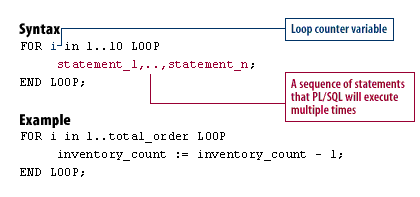
-- Syntax
FOR i IN 1..10 LOOP
  statement_1, ..., statement_n;
END LOOP;
-- Example: decrement inventory for each order processed
FOR i IN 1..total_order LOOP
inventory_count := inventory_count - 1;
END LOOP;FOR Loop Characteristics
Five behavioral rules govern the FOR loop that distinguish it
from the basic LOOP:
- The loop counter is implicitly declared. Oracle declares
the counter variable automatically — you do not declare it in the
DECLAREsection. Its scope is limited to the loop body. Attempting to reference it outside the loop produces a compile-time error. - The loop counter cannot be assigned a value. Statements
such as
i := 5inside the loop body produce a compile-time error. The counter is read-only within the loop. - The range is evaluated once at loop entry. If
total_orderchanges during loop execution, the loop still iterates the original number of times. The upper bound is fixed at the moment the loop begins. - The bounds must evaluate to integers. Literals, variables,
or expressions are all valid as bounds, but they must resolve to
PLS_INTEGERorINTEGERvalues. Non-integer bounds produce a compile-time error. - The loop executes zero times if the lower bound exceeds the upper
bound.
FOR i IN 10..1 LOOPdoes not execute at all — it silently completes without running the body. To iterate in reverse, use theREVERSEkeyword.
FOR Loop with REVERSE
The REVERSE keyword causes the loop counter to iterate from the
upper bound down to the lower bound. The range is still written low to high —
Oracle handles the reversal internally:
-- Iterates: 10, 9, 8, 7, 6, 5, 4, 3, 2, 1
FOR i IN REVERSE 1..10 LOOP
  DBMS_OUTPUT.PUT_LINE('Counter: ' || i);
END LOOP;
Dynamic Range at Runtime
The bounds of a FOR loop range can be variables or expressions
evaluated at runtime, not just compile-time constants. This allows the loop
count to be determined by data fetched from a query or passed as a parameter:
DECLARE
  v_start NUMBER := 1;
  v_end   NUMBER;
BEGIN
  SELECT COUNT(*) INTO v_end FROM sale_header;

  FOR i IN v_start..v_end LOOP
    DBMS_OUTPUT.PUT_LINE('Processing order ' || i);
  END LOOP;
END;
/
The upper bound v_end is populated from a query before the loop
begins. Once the loop starts, the range is fixed regardless of whether
additional rows are inserted into sale_header during execution.
Cursor FOR Loop
The FOR loop has a second form that iterates over a cursor result
set rather than an integer range. Oracle opens the cursor, fetches each row
into an implicitly declared record variable, and closes the cursor
automatically when all rows are processed:
-- Implicit cursor FOR loop using an inline query
FOR rec IN (SELECT order_id, order_value FROM sale_header) LOOP
  DBMS_OUTPUT.PUT_LINE('Order: ' || rec.order_id
    || ' Value: ' || rec.order_value);
END LOOP;
The record variable rec is implicitly declared by Oracle with
fields corresponding to each column in the query. No explicit cursor
declaration, OPEN, FETCH, or CLOSE
statements are required. The cursor FOR loop is the most concise
and safest way to process a query result set in PL/SQL — it eliminates the
risk of forgetting to close the cursor.
The WHILE Loop
The WHILE loop evaluates a Boolean condition before each
iteration. If the condition is TRUE, the loop body executes and
control returns to the top of the loop for the next evaluation. If the
condition is FALSE or NULL on any evaluation —
including the very first — the loop body is skipped and execution continues
at the statement after END LOOP.
-- Syntax
WHILE condition1 LOOP
  statement_1, ..., statement_n;
END LOOP;
-- Example: process orders while inventory remains available
WHILE inventory_count > 0 LOOP
v_order_id := v_order_id + 1;
INSERT INTO sale_header (order_id, order_value)
VALUES (v_order_id, 1000);
inventory_count := inventory_count - 1;
END LOOP;WHILE loop condition appears at the top of the
construct and is evaluated before each iteration. The loop body never
executes if the condition is FALSE or NULL on
the first evaluation.WHILE Loop Characteristics
Three behavioral rules govern the WHILE loop:
- The condition is evaluated before each iteration. Unlike
the basic
LOOPwhere the exit condition is checked inside the body, theWHILEcondition is checked at the top before any statement in the body executes. This means the body may execute zero times if the condition is alreadyFALSEorNULLwhen the loop is first encountered. - The number of iterations is not known in advance. The
loop continues as long as the condition remains
TRUE. If the condition never becomesFALSE, the loop runs indefinitely. It is the programmer's responsibility to ensure that statements inside the loop body eventually cause the condition to evaluate toFALSEorNULL. NULLterminates the loop. A condition that evaluates toNULLis treated the same asFALSE— the loop exits. This is consistent with Oracle's three-valued logic but can produce unexpected early termination if variables used in the condition can becomeNULLduring execution.
WHILE vs Basic LOOP
The WHILE loop and the basic LOOP with
EXIT WHEN are functionally equivalent when the exit condition
is placed at the top of the basic loop body. The choice between them is
primarily a matter of readability:
-- Basic LOOP with EXIT WHEN at top — equivalent to WHILE
LOOP
  EXIT WHEN inventory_count = 0;
  v_order_id := v_order_id + 1;
  INSERT INTO sale_header (order_id, order_value)
  VALUES (v_order_id, 1000);
  inventory_count := inventory_count - 1;
END LOOP;

-- WHILE LOOP — same logic, condition stated upfront
WHILE inventory_count > 0 LOOP
  v_order_id := v_order_id + 1;
  INSERT INTO sale_header (order_id, order_value)
  VALUES (v_order_id, 1000);
  inventory_count := inventory_count - 1;
END LOOP;
The WHILE form is preferred when the termination condition is
known before the loop begins and can be expressed as a single Boolean
expression. The basic LOOP with EXIT WHEN is
preferred when the exit decision requires statements that must execute before
the condition can be evaluated, or when the condition must be checked at a
point other than the very top of the body.
Choosing the Right Loop Construct
Oracle PL/SQL provides three loop constructs for different iteration scenarios:
- Use a FOR loop when the number of iterations is known before the loop begins — either a fixed integer range or the row count of a cursor result set. The loop counter is managed automatically and the termination is guaranteed.
- Use a WHILE loop when the termination condition can be
evaluated before each iteration and the number of iterations is not known
in advance. The condition must be guaranteed to eventually become
FALSEorNULL. - Use a basic LOOP when the exit condition arises from logic that must execute inside the body before the condition can be checked, or when multiple exit points at different positions in the body are required.
Oracle 23ai Loop Enhancements
Oracle 23ai introduces no breaking changes to the FOR or
WHILE loop constructs — all syntax and behavior described in
this lesson applies from Oracle 11g through 23ai without modification.
However, two Oracle 23ai features interact with loop-based code worth noting:
Native SQL BOOLEAN: WHILE loop conditions that
call PL/SQL functions returning BOOLEAN previously required
wrapper functions when those functions needed to be called from SQL. In Oracle
23ai, BOOLEAN is a native SQL type, eliminating the need for
wrappers. A WHILE condition can now directly call functions that
return SQL BOOLEAN values derived from SQL queries.
Qualified expressions for loop variables: Oracle 12c
introduced qualified expressions for record and collection initialization,
which simplifies variable setup before FOR and WHILE
loops that process collections. In Oracle 23ai, these expressions are further
refined, reducing the boilerplate code required to initialize loop-scoped
variables.
Summary
The FOR loop iterates over a fixed integer range evaluated once
at loop entry. The loop counter is implicitly declared, read-only, and scoped
to the loop. Use REVERSE to iterate from upper to lower bound.
The cursor FOR loop extends this pattern to query result sets,
with Oracle managing open, fetch, and close automatically. The
WHILE loop evaluates its condition before each iteration —
the body may execute zero times if the condition is initially
FALSE or NULL. Ensure the condition eventually
becomes FALSE to prevent infinite loops. Choose FOR
when iteration count is known, WHILE when the termination
condition precedes the body, and basic LOOP when exit logic
must execute inside the body first. The next lesson covers labels and the
GOTO statement.