| Lesson 10 | Alternative concurrency mechanisms for Web applications |
| Objective | Implement alternative locking for a Web application. |
Date/Time Stamp — Optimistic Locking with Timestamps in Oracle 23ai
Update Each Row with a Date/Time Stamp
The second tuning technique for replacing the Oracle exclusive locking scheme in web applications requires adding a date_last_updated column to each table that may be updated. The column records when the row was last modified. Every update request includes the original timestamp value in its WHERE clause — Oracle
compares it against the current row value at update time, providing optimistic
conflict detection without any row lock being held between the read and the write.
This technique is the timestamp variant of the UPDATE WHERE pattern covered in Lesson 9. Where Lesson 9 embedded all display column values in the WHERE clause, this technique uses a single dedicated timestamp column as the version indicator — simpler to maintain and less sensitive to which columns were displayed on the page.
Use single quotes for string literals and a bind variable for the timestamp to preserve data type precision. The corrected Oracle SQL for the date/time stamp pattern:
UPDATE employee
SET    salary            = salary * 1.1,
       date_last_updated = SYSTIMESTAMP
WHERE  emp_name          = 'Richards'
AND    date_last_updated = :host_date_value;
Always update date_last_updated to SYSTIMESTAMP in the
SET clause so the next update request from any user or session sees the new timestamp
value and the optimistic check remains accurate.
Oracle 23ai Date/Time Stamp Update Check
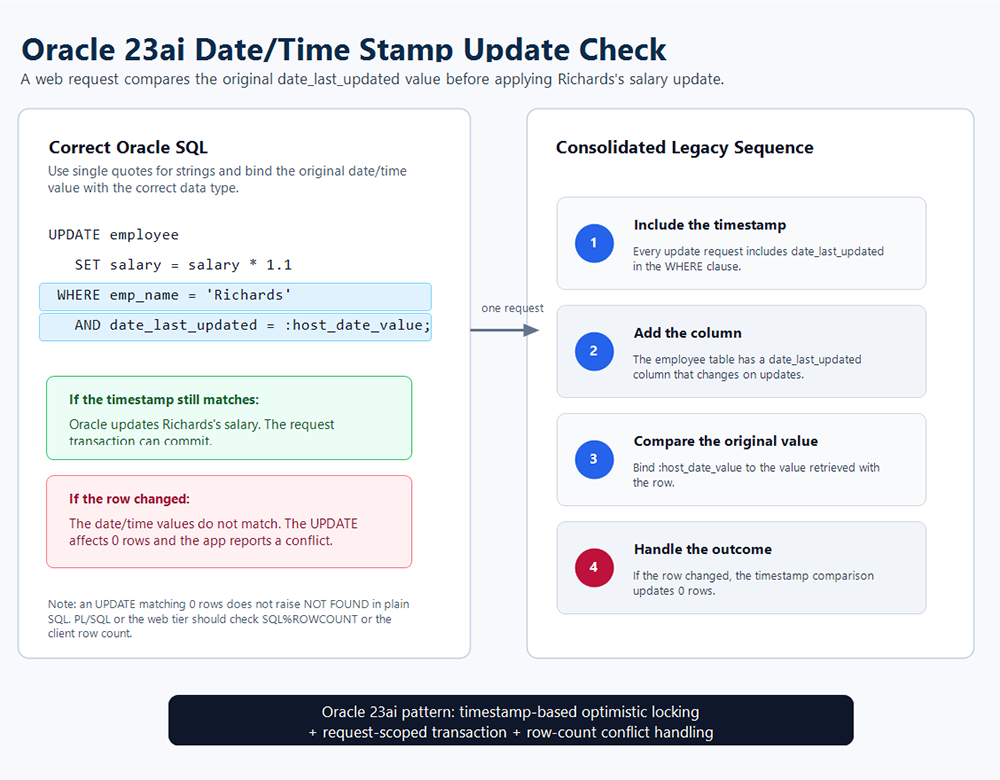
date_last_updated value before applying the salary update. If
the timestamp still matches, Oracle updates the row and the transaction commits. If
the row was modified by another user, the timestamps differ and the UPDATE affects
0 rows — the application checks SQL%ROWCOUNT and reports a concurrency
conflict.The Four-Step Timestamp Pattern
The diagram consolidates four sequential steps into one reference view:
- Include the timestamp: when issuing any UPDATE, all applications
select the
date_last_updatedcolumn at read time and include its value in the WHERE clause of the subsequent UPDATE statement. - Add the column: a
date_last_updatedcolumn is added to every table that web users may update. Every successful UPDATE sets this column toSYSTIMESTAMP. - Compare the original value: the bind variable
:host_date_valuecarries thedate_last_updatedvalue retrieved when the row was displayed. Oracle compares it against the current column value at update time. - Handle the outcome: if the timestamps match, the UPDATE succeeds
and commits. If another user modified the row in the interim, the timestamps differ
and the UPDATE affects 0 rows. The application checks
SQL%ROWCOUNTand reports the conflict — prompting the user to refresh and retry with current data.
Table Setup
Add the timestamp column with a default value and index it for efficient WHERE clause evaluation:
CREATE TABLE employee (
    emp_id            NUMBER PRIMARY KEY,
    emp_name          VARCHAR2(100),
    salary            NUMBER(10,2),
    date_last_updated TIMESTAMP WITH TIME ZONE
                      DEFAULT SYSTIMESTAMP
);

CREATE INDEX idx_employee_date_updated
    ON employee(date_last_updated);
Full PL/SQL Procedure with Error Handling
The following production-ready PL/SQL procedure implements timestamp-based optimistic locking with four status codes — SUCCESS, CONFLICT, NOT_FOUND, and ERROR — suitable for use with ORDS, APEX, or any application calling PL/SQL:
CREATE OR REPLACE PROCEDURE update_employee_salary (
    p_emp_name      IN  VARCHAR2,
    p_raise_factor  IN  NUMBER,
    p_old_timestamp IN  TIMESTAMP WITH TIME ZONE,
    p_status        OUT VARCHAR2,
    p_new_timestamp OUT TIMESTAMP WITH TIME ZONE,
    p_new_salary    OUT NUMBER
)
IS
    v_rows_updated   NUMBER;
    v_current_salary NUMBER;
    e_concurrent_update EXCEPTION;
    PRAGMA EXCEPTION_INIT(e_concurrent_update, -20001);

BEGIN
    -- Re-validate the row exists
    SELECT salary
    INTO   v_current_salary
    FROM   employee
    WHERE  emp_name = p_emp_name;

    -- Optimistic update with timestamp check
    UPDATE employee
    SET    salary            = salary * p_raise_factor,
           date_last_updated = SYSTIMESTAMP
    WHERE  emp_name          = p_emp_name
    AND    date_last_updated = p_old_timestamp;

    v_rows_updated := SQL%ROWCOUNT;

    IF v_rows_updated = 0 THEN
        RAISE e_concurrent_update;
    END IF;

    -- Return new values to caller
    SELECT salary, date_last_updated
    INTO   p_new_salary, p_new_timestamp
    FROM   employee
    WHERE  emp_name = p_emp_name;

    p_status := 'SUCCESS';
    COMMIT;

EXCEPTION
    WHEN NO_DATA_FOUND THEN
        p_status := 'NOT_FOUND';
        ROLLBACK;

    WHEN e_concurrent_update THEN
        p_status := 'CONFLICT';
        DBMS_OUTPUT.PUT_LINE(
            'Optimistic lock conflict for: ' || p_emp_name);
        ROLLBACK;

    WHEN OTHERS THEN
        p_status := 'ERROR: ' || SQLERRM;
        ROLLBACK;

END update_employee_salary;
/
Usage Example
DECLARE
    v_status     VARCHAR2(20);
    v_new_ts     TIMESTAMP WITH TIME ZONE;
    v_new_salary NUMBER;
    v_old_ts     TIMESTAMP WITH TIME ZONE;
BEGIN
    -- Step 1: Read the row and capture the timestamp
    SELECT date_last_updated
    INTO   v_old_ts
    FROM   employee
    WHERE  emp_name = 'Richards';

    -- Step 2: Attempt the update
    update_employee_salary(
        p_emp_name      => 'Richards',
        p_raise_factor  => 1.10,
        p_old_timestamp => v_old_ts,
        p_status        => v_status,
        p_new_timestamp => v_new_ts,
        p_new_salary    => v_new_salary
    );

    -- Step 3: Handle the result
    CASE v_status
        WHEN 'SUCCESS' THEN
            DBMS_OUTPUT.PUT_LINE(
                'Update successful. New salary: ' || v_new_salary);
        WHEN 'CONFLICT' THEN
            DBMS_OUTPUT.PUT_LINE(
                'Row modified by another user. Refresh and retry.');
        WHEN 'NOT_FOUND' THEN
            DBMS_OUTPUT.PUT_LINE('Employee not found.');
        ELSE
            DBMS_OUTPUT.PUT_LINE('Error: ' || v_status);
    END CASE;
END;
/
Oracle 23ai Alternatives to the Timestamp Column
The timestamp column approach is simple and portable. Oracle 23ai provides three additional options that reduce column management overhead or improve concurrency further:
ORA_ROWSCN — No Extra Column Required
Oracle maintains an internal SCN for every row. Use it for optimistic locking
without adding or maintaining a timestamp column. Requires ROWDEPENDENCIES
at the table level:
-- Read
SELECT salary, ORA_ROWSCN AS row_scn
FROM   employee
WHERE  emp_name = 'Richards';

-- Update
UPDATE employee
SET    salary     = salary * 1.1
WHERE  emp_name   = 'Richards'
AND    ORA_ROWSCN = :host_row_scn;
JSON Relational Duality Views — ETAG-Based Conflict Detection
For REST and JSON web applications, Oracle 23ai JSON Relational Duality Views provide ETAG-based value concurrency automatically. The application reads the document — which includes an ETAG — and the database rejects any update where the ETAG no longer matches. This is equivalent to the timestamp check but handled natively by the database without explicit WHERE clause version management.
Lock-Free Reservations — For Numeric Columns Under High Contention
For salary, inventory, or balance columns that many users update simultaneously,
RESERVABLE columns eliminate the serialization bottleneck without any
timestamp comparison:
ALTER TABLE employee MODIFY salary RESERVABLE;Recommendation Summary
| Approach | When to Use | Effort |
|---|---|---|
Timestamp column (date_last_updated) |
Simple apps, full developer control | Low |
ORA_ROWSCN |
No extra columns wanted | Very Low |
| JSON Duality Views + ETAG | Modern REST/JSON web applications | Medium |
| Lock-Free Reservations | High-contention numeric updates | Low |
It is important that display data is not changed when executing alternative
locking for a web application. These techniques minimize the use of
SELECT FOR UPDATE — ensuring that displayed values remain unaltered
between the read and the write, and that database locks are never held across HTTP
request boundaries.
Alternative Locking Methods - Exercise
Apply the two alternative locking techniques covered in Lessons 9 and 10 with the following exercise:
Alternative Locking Methods - ExerciseThe next lesson concludes this module.