| Lesson 8 | Cloud Control Schema Object Interface |
| Objective | Use Enterprise Manager 24ai Cloud Control to view database objects, program units, materialized views, user-defined types, and related schema services. |
Use Cloud Control to View Schema Objects
Oracle Enterprise Manager Cloud Control provides a modern web-based interface for viewing and managing schema objects in an Oracle database. In older Oracle Enterprise Manager environments, DBAs used a standalone tool called Schema Manager to inspect tables, indexes, views, procedures, functions, packages, triggers, and other objects. That older tool belongs to the legacy DBA Management Pack era. In a modern Oracle environment, the equivalent workflow is performed through the Schema section of Enterprise Manager Cloud Control.
The purpose of this lesson is to explain how Enterprise Manager 24ai Cloud Control organizes schema object information for an Oracle Database 23ai target. The lesson is not about repeating an old Schema Manager simulation. Instead, it explains the modern Schema menu categories, the types of objects a DBA can inspect, and how Cloud Control fits into day-to-day schema object review.
Enterprise Manager 24ai is the management platform. Oracle Database 23ai is the managed database target. A DBA uses Cloud Control to select the database target, confirm the correct CDB or PDB context, open the Schema section, and inspect database objects owned by schemas.
From Schema Manager to Cloud Control
The old Schema Manager interface was useful because it gave DBAs a graphical way to browse and modify schema-owned database objects. A DBA could view tables, indexes, views, synonyms, stored procedures, functions, packages, and triggers from a desktop-style management tool.
Modern Oracle administration uses a different model. Cloud Control is browser-based, target-centered, and integrated with broader Enterprise Manager services. Instead of launching a separate Schema Manager application, the DBA opens a database target in Cloud Control and uses the Schema section to view objects by category.
This change matters because modern database environments are usually larger and more complex than the older single-instance training examples. A DBA may need to inspect objects in a CDB root, a PDB, a RAC database, or a cloud-connected database target. The selected target and container context affect which objects are visible and what administrative actions are available.
Understanding Schemas and Schema Objects
In Oracle Database, a schema is closely associated with a database user. When a user is created, Oracle creates a schema namespace for that user. The schema becomes populated when objects are created under that user. Those objects can include tables, indexes, views, sequences, procedures, packages, triggers, materialized views, object types, and other database structures.
A schema object is a named database object that belongs to a schema. For example, a table named EMPLOYEES may belong to the HR schema. A package named ORDER_API may belong to an application schema. A synonym may point to an object in another schema. A materialized view may store precomputed query results for reporting or replication-style use cases.
When a DBA views schema objects, the goal is not only to see object names. The DBA may need to inspect object type, owner, status, dependencies, DDL, statistics, storage information, privileges, and whether the object is valid or invalid.
The Schema Section in Enterprise Manager 24ai
The Schema section in Enterprise Manager 24ai Cloud Control organizes schema-related objects and services into practical categories. The image below shows the modernized instructional view of that interface.
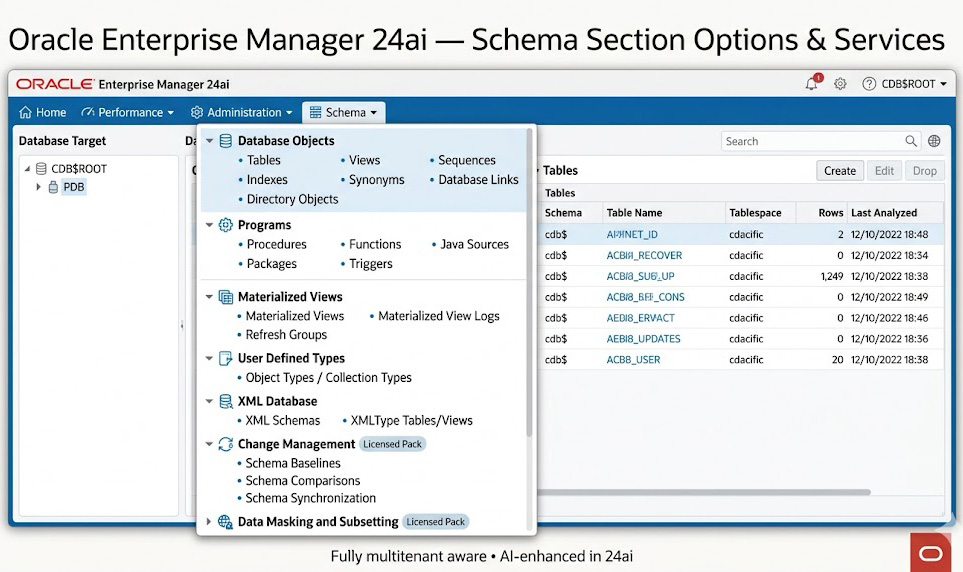
The figure shows a modern Cloud Control-style Schema menu. It groups common database objects into categories such as Database Objects, Programs, Materialized Views, User Defined Types, XML Database, Change Management, and Data Masking and Subsetting. Some items are basic object-browsing functions. Others may require additional configuration, privileges, or licensing.
Database Objects
The Database Objects category contains many of the objects that DBAs and developers inspect most often. This category commonly includes tables, indexes, views, synonyms, sequences, database links, and directory objects.
Tables store data. Indexes support efficient access paths. Views define stored queries that present data through a logical interface. Synonyms provide alternate names for objects. Sequences generate numeric values. Database links support remote database access. Directory objects represent operating system locations that database features can reference when properly authorized.
When viewing database objects in Cloud Control, the DBA should usually filter by schema owner and search for the object name. This prevents confusion in databases that contain many schemas and thousands of objects. The DBA may then drill into the object details page to review metadata, status, DDL, statistics, dependencies, or storage information where available.
Program Objects
The Programs category contains stored executable database logic. This includes procedures, functions, packages, package bodies, triggers, and Java sources where used.
Program objects are important because they often implement business logic, validation logic, batch processing, API layers, and application-side database behavior. A package may expose a stable interface for application code. A trigger may enforce a rule or perform automatic processing when data changes. A stored procedure may perform a controlled administrative or application task.
When reviewing program objects, the DBA should pay attention to object status. An invalid procedure, function, package, or trigger may indicate a dependency problem, compilation error, missing object, privilege issue, or schema change that broke dependent code.
Materialized Views
The Materialized Views category includes materialized views, materialized view logs, and refresh groups. A materialized view stores query results physically, unlike a normal view, which stores only a query definition. Materialized views are often used for reporting, summaries, replication-style patterns, and query performance optimization.
A DBA reviewing materialized views should understand whether a materialized view is fresh, stale, or in need of refresh. The DBA may also need to inspect refresh schedules, refresh methods, materialized view logs, and dependencies on source tables.
Cloud Control can provide a visual starting point for this review, while SQL data dictionary views remain important for detailed validation and reporting.
User Defined Types
The User Defined Types category includes object types and collection types. These are Oracle object-relational features that allow users to define structured data types beyond simple scalar columns.
Object types can model structured values with attributes and methods. Collection types can define nested tables or variable-size arrays. These features are less common in some application schemas than tables, indexes, and packages, but they are important in databases that use Oracle object-relational capabilities.
When reviewing user-defined types, the DBA should consider dependencies. Tables, packages, procedures, and views may depend on a type definition. Changing a type can affect dependent objects.
XML Database Objects
The XML Database category may include XML schemas, XMLType tables, XMLType views, and related XML DB structures. These objects support XML storage, validation, and querying use cases.
A DBA may need to inspect XML database objects when an application stores XML documents, validates XML against registered schemas, or exposes XML-based structures through database objects. As with other schema objects, ownership, dependencies, privileges, and validity are important.
Change Management and Licensed Options
The Schema menu may also expose change management options such as schema baselines, schema comparisons, and schema synchronization. These features can help compare schema definitions across environments, detect drift, and support controlled migration between development, test, and production systems.
These capabilities should be discussed carefully because they may depend on Enterprise Manager configuration and Management Pack licensing. A visible menu option does not automatically mean every organization is licensed to use it.
The Data Masking and Subsetting area should also be treated as a licensed capability. Data masking and subsetting are used to create safer non-production data sets by masking sensitive values and extracting smaller, controlled subsets of production data. This is related to schema and data management, but it is not merely a basic schema object browser feature.
Requirements Before Viewing Schema Objects
Before using Cloud Control to inspect schema objects, several requirements should be satisfied.
- Enterprise Manager must be available.
Enterprise Manager 24ai should be used where available. Some organizations may still operate patched Enterprise Manager 13c Release 5 systems, but the modern training direction should focus on Cloud Control as the current web-based management model. - The database target must be discovered.
The Oracle database must be discovered and promoted as a managed Enterprise Manager target before schema object information can be viewed in Cloud Control. - The agent or supported remote monitoring path must be functioning.
Enterprise Manager depends on target communication for status and configuration information. If the target cannot be monitored, schema pages may be unavailable or incomplete. - The correct CDB or PDB context must be selected.
In multitenant environments, a schema object may exist in one PDB but not another. The DBA must know which target or container context is being viewed. - The user must have appropriate privileges.
Viewing object information requires appropriate Enterprise Manager and database access. Creating, editing, dropping, compiling, comparing, synchronizing, or masking objects requires stronger privileges. - Licensing boundaries must be respected.
Basic schema visibility is different from advanced change management, data masking, subsetting, or lifecycle management features.
How to View Schema Objects in Cloud Control
The exact menu path can vary by Enterprise Manager release, target type, plug-ins, privileges, and configuration. The general workflow is consistent.
- Log in to Oracle Enterprise Manager Cloud Control.
- Navigate to Targets > Databases.
- Select the Oracle Database 23ai target.
- Confirm whether you are viewing the CDB root, a PDB, or another database target context.
- Open the database home page.
- Select the Schema menu or equivalent schema administration page.
- Choose an object category, such as Tables, Indexes, Views, Packages, Procedures, Triggers, Sequences, Synonyms, Materialized Views, or Types.
- Filter by schema owner.
- Search for the object name.
- Open the object details page and review the available metadata.
A common conceptual path is:
Targets > Databases > [database target] > Schema > Database Objects > TablesFor stored program units, the conceptual path may look like this:
Targets > Databases > [database target] > Schema > Programs > PackagesThese paths should be treated as conceptual navigation paths. Enterprise Manager menus can vary by release, target type, role, and installed options.
Interpreting Schema Object Information
After opening an object details page, the DBA should interpret more than the object name. Important object information may include owner, object type, status, DDL, dependencies, statistics, storage details, privileges, and last analyzed time where available.
Common object conditions include:
- A table exists but belongs to a different schema than expected.
- A procedure, function, package, or trigger is invalid.
- A view is invalid because a dependent object changed.
- An index is unusable.
- A materialized view is stale or needs refresh.
- A synonym points to a missing, renamed, or changed object.
- A database link introduces a remote dependency or security consideration.
- A schema object exists in one PDB but not another.
- A common object or local object is being interpreted in the wrong container context.
These conditions show why schema object review is more than simple navigation. Schema objects participate in dependencies, privileges, storage, application logic, and performance. Cloud Control gives the DBA a visual starting point for that review.
SQL Validation and Data Dictionary Views
Cloud Control is useful for visual inspection, but SQL remains essential for validation, reporting, automation, and detailed investigation. A DBA may confirm Cloud Control information with data dictionary views.
Useful views include:
DBA_OBJECTS- object names, owners, types, and status.DBA_TABLES- table metadata.DBA_INDEXES- index metadata and status.DBA_VIEWS- view definitions.DBA_SEQUENCES- sequence metadata.DBA_SYNONYMS- synonym definitions.DBA_PROCEDURES- stored program unit metadata.DBA_TRIGGERS- trigger definitions.DBA_DEPENDENCIES- object dependency information.DBA_ERRORS- compilation errors for invalid PL/SQL and other objects.DBA_TAB_PRIVS- object privilege grants.CDB_OBJECTS- object information across containers.CDB_TABLES- table information across containers.CDB_INDEXES- index information across containers.
Cloud Control and SQL should be viewed as complementary tools. Cloud Control provides the management interface. SQL provides precision, repeatability, and scriptable validation.
Schema Name and CREATE SCHEMA Clarification
The legacy version of this lesson contained a long example using the CREATE SCHEMA statement. That statement is useful, but it should not dominate this lesson because the lesson objective is to view schema objects through Cloud Control.
In Oracle Database, a schema namespace is normally created when a user is created. Creating objects under that user populates the schema. The CREATE SCHEMA statement does not create a user in the usual Oracle administration sense. Instead, it can group certain statements under one authorization.
At a high level, CREATE SCHEMA can include statements such as:
CREATE TABLECREATE VIEWGRANT
This is useful as SQL background, but the modern Cloud Control lesson should remain focused on browsing and interpreting schema objects in the Schema section.
Administrative Actions and Caution
Cloud Control may allow authorized users to perform schema-related actions such as creating objects, editing objects, dropping objects, compiling invalid objects, viewing DDL, reviewing dependencies, reviewing statistics, comparing schemas, synchronizing schemas, or participating in masking and subsetting workflows.
These actions must be handled carefully. Viewing schema object information is a review activity. Changing schema objects is a structural database operation. Dropping an object, changing a package, modifying a table, or synchronizing a schema can affect applications, privileges, dependencies, jobs, performance, and availability.
Before making schema changes, a DBA or developer should understand the purpose of the change, the affected application, the dependency chain, the approval process, the rollback plan, and any deployment requirements.
Summary
The Cloud Control Schema section is the modern replacement for the old Schema Manager workflow. It allows a DBA to view database objects, program units, materialized views, user-defined types, XML database objects, and related schema services from a centralized Enterprise Manager interface.
The key lesson is that schema object browsing requires context. The DBA must know the database target, schema owner, object type, object status, dependency relationships, privilege context, and CDB or PDB scope. Enterprise Manager 24ai provides the visual management layer, while SQL data dictionary views provide deeper validation and repeatable investigation.
Used correctly, the Schema section helps the DBA move from legacy object browsing to modern schema object review for Oracle Database 23ai targets.