| Lesson 2 | Enterprise Manager Architecture 24ai |
| Objective | Oracle Enterprise Manager 24ai console, Oracle Management Service, Management Repository, agents |
Oracle Enterprise Manager 24ai Architecture
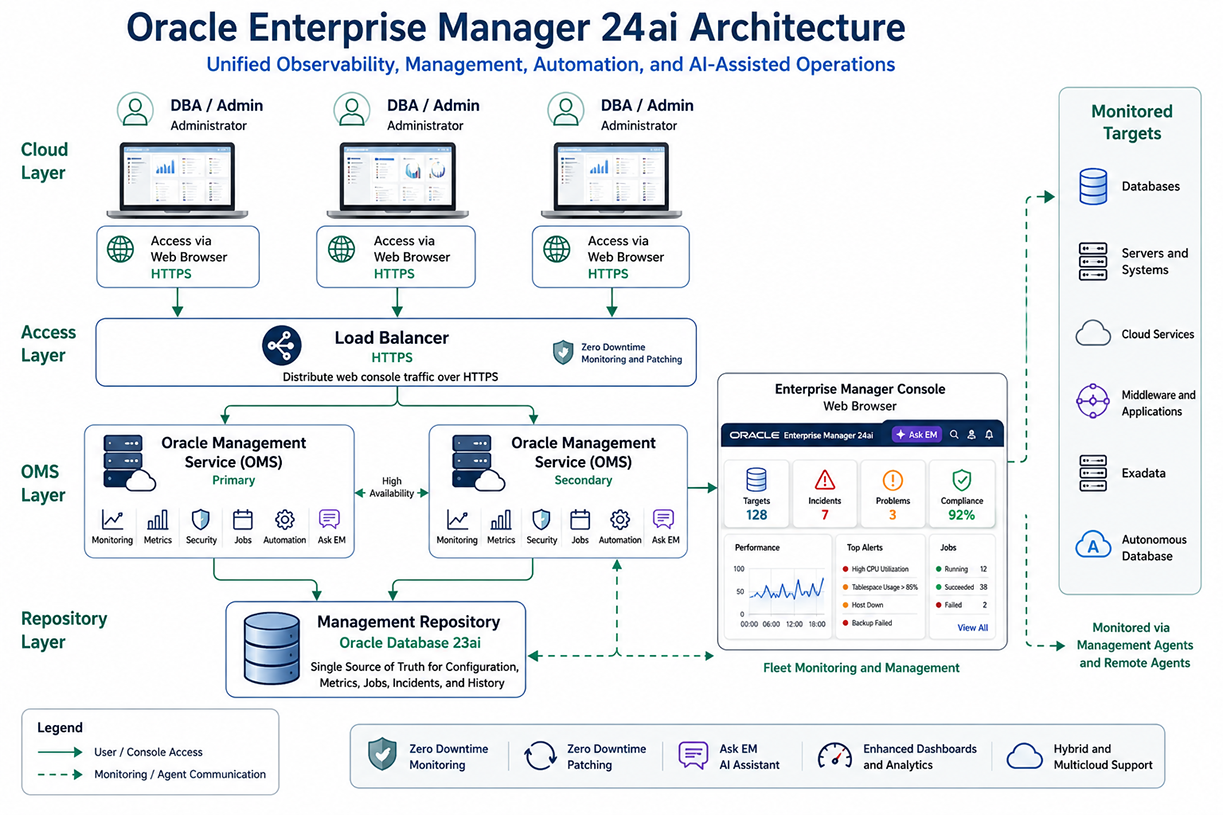
Oracle Enterprise Manager 24ai is a centralized management platform used to monitor, manage, automate, and observe Oracle databases and related infrastructure. In earlier Oracle environments, Enterprise Manager was often described as a collection of desktop-based graphical administration tools. That older model is no longer the best way to understand the product. Modern Enterprise Manager is a browser-based enterprise management architecture built around a console, one or more Oracle Management Service instances, a Management Repository, Management Agents, Remote Agents, plug-ins, and monitored targets.
The purpose of this lesson is to describe that architecture. The learner should understand that Enterprise Manager 24ai is not a single utility installed on a DBA workstation. It is a multi-component management system that collects operational data from targets, stores that information in a repository, and presents monitoring, administration, automation, and diagnostic workflows through a web-based console.
Enterprise Manager does not replace SQL*Plus, SQLcl, RMAN, SQL, PL/SQL, operating system tools, or DBA judgment. A database administrator still needs to understand users, roles, privileges, profiles, storage, performance, backup, recovery, connectivity, and security. Enterprise Manager adds a centralized operational layer over those responsibilities. It helps the DBA see what is happening across many systems and respond to conditions before they become larger incidents.
From Legacy OEM to Enterprise Manager 24ai
Older Oracle Enterprise Manager material commonly referred to the DBA Management Pack, Oracle Tuning Pack, Oracle Diagnostic Pack, two-tier configurations, three-tier configurations, desktop Java applications, and the Oracle Management Server. Those terms reflected earlier product generations. They are useful historically because they show how Oracle moved from local graphical tools toward centralized enterprise administration.
In the older two-tier model, a DBA ran management applications on a local PC and connected directly to a database. In the older three-tier model, a console communicated with a middle-tier management server, which then stored information in a repository. That three-tier idea was an important step because it separated the administrator interface, management logic, and repository storage.
Enterprise Manager 24ai continues that separation of responsibilities, but in a modernized architecture. The current model is based on the Enterprise Manager Console, Oracle Management Service, Oracle Management Repository, Management Agents, Remote Agents, plug-ins, and targets. The older desktop-tool model should therefore be treated as legacy context, not as the organizing structure for current Oracle Database administration.
Core Components of Enterprise Manager 24ai
Enterprise Manager 24ai can be understood as a set of cooperating components. Each component has a specific architectural role.
- Enterprise Manager Console: The browser-based interface used by DBAs, administrators, and operations teams.
- Oracle Management Service: The middle-tier service layer that coordinates the Enterprise Manager environment.
- Oracle Management Repository: The database repository that stores Enterprise Manager management data.
- Oracle Management Agent: The agent software that collects monitoring and configuration data from managed hosts and targets.
- Remote Agent: A newer Enterprise Manager 24ai agent model that can monitor supported remote targets without requiring a local agent installation on every target host.
- Plug-ins: Extensible components that enable Enterprise Manager to monitor and manage specific target types.
- Targets: Managed objects such as databases, hosts, listeners, middleware, applications, cloud services, Exadata systems, and Autonomous Databases.
These components work together to provide monitoring, alerting, incident management, job execution, configuration visibility, dashboard reporting, and fleet-level management.
Enterprise Manager Console
The Enterprise Manager Console is the browser-based administrative interface. DBAs access the console over HTTPS, often through a load balancer in larger deployments. The console is the visible interface used to view targets, examine dashboards, review alerts, investigate incidents, inspect jobs, and move through administration workflows.
It is important to distinguish the console from the full Enterprise Manager system. The console is not the whole product. It is the user interface presented by the Enterprise Manager architecture. Behind the console are the Oracle Management Service, the Management Repository, agents, plug-ins, and target communication paths.
A production DBA may begin the day by opening the console to check database availability, review critical alerts, examine target status, and determine whether any jobs failed overnight. From there, the DBA may drill down into a database target, host target, incident page, job page, or performance view. The console gives the DBA a centralized starting point before deeper investigation begins.
Oracle Management Service
The Oracle Management Service, commonly abbreviated as OMS, is the middle-tier service layer of Enterprise Manager. It coordinates communication between the console, Management Agents, Remote Agents, plug-ins, and the Management Repository.
The OMS receives uploaded information from agents, processes monitoring data, evaluates events and incidents, supports job execution, communicates with the repository, and presents the application logic behind the web console. If the console is the administrator-facing interface, the OMS is the service layer that makes Enterprise Manager function as an integrated management platform.
In larger environments, multiple OMS instances may be deployed behind a load balancer. This improves availability and scalability. The load balancer routes administrator access and communication traffic to the OMS layer. A multi-OMS deployment also supports high availability patterns because the Enterprise Manager environment is not dependent on a single OMS instance.
Oracle Management Repository
The Oracle Management Repository is the database repository used by Enterprise Manager to store management information. It stores target metadata, configuration data, metric data, incident data, job history, administrator information, and historical monitoring information.
The repository should not be confused with the production databases being monitored. A production Oracle Database 23ai target may be managed by Enterprise Manager, but the Management Repository is the database used by Enterprise Manager itself to store management data. It is the system of record for the Enterprise Manager environment.
The repository is important because Enterprise Manager is not limited to showing current status. It can also show historical trends, past job execution, previous incident behavior, configuration records, and target metadata. This historical view is valuable when the DBA is troubleshooting recurring issues, reviewing changes, or comparing current behavior to previous behavior.
Management Agents
The Oracle Management Agent is a core component of Enterprise Manager architecture. An agent is installed to monitor a managed host and the targets associated with that host. It collects metrics, configuration information, availability status, and event-related data. It then communicates with the OMS so that Enterprise Manager can display and process the information.
Agents make Enterprise Manager scalable. Without agents, the central management layer would need to directly inspect every system continuously. With agents, monitoring work is distributed closer to the managed targets. The agent can collect data locally, detect conditions, queue information when communication is temporarily unavailable, and forward management data to the OMS.
The agent also supports administrative operations. Depending on configuration and target type, agents can participate in job execution, configuration collection, provisioning workflows, patching workflows, and other management tasks. This is why the Management Agent is not merely a passive monitoring process. It is an active part of the Enterprise Manager control architecture.
Remote Agents in Enterprise Manager 24ai
Enterprise Manager 24ai introduces Remote Agent capabilities to reduce the operational burden of installing and maintaining a traditional local agent on every monitored host. A Remote Agent can monitor and manage supported targets on remote systems by using remote protocols and, where needed, secure remote command execution mechanisms.
This is significant in large environments. If an organization manages many databases and hosts, agent lifecycle management can become a major administrative task. Each local agent has to be installed, patched, secured, and maintained. Remote Agents can reduce that footprint by allowing selected monitoring tasks to be centralized through dedicated agent hosts.
Remote Agents do not mean that traditional Management Agents disappear in every deployment. Instead, they add another architecture option. A DBA or Enterprise Manager administrator should understand both models. Local agents remain important for many target types and management workflows. Remote Agents provide a more flexible deployment pattern for supported use cases.
Plug-ins and Target Types
Plug-ins extend Enterprise Manager so that it can discover, monitor, and manage different target types. A plug-in contains target-specific management knowledge. For example, a database target, host target, middleware target, Exadata target, or cloud-related target may require different discovery logic, metrics, dashboards, and management operations.
A target is any managed object in Enterprise Manager. Common target examples include Oracle databases, pluggable databases, listeners, hosts, application servers, middleware components, cloud services, storage systems, Exadata systems, Autonomous Databases, and application components.
This target model is one of the reasons Enterprise Manager is useful in enterprise environments. The DBA does not only need to know whether a single database is running. The DBA often needs to know how that database relates to its host, listener, storage, application tier, cloud service, and operational workload. Enterprise Manager organizes these objects as targets and provides a common management framework around them.
Monitoring, Events, Incidents, and Notifications
Enterprise Manager monitoring is based on metrics collected from targets. A metric may describe database availability, tablespace usage, host CPU utilization, memory usage, listener status, job status, session activity, or another measurable condition. These metrics can be evaluated against thresholds.
A threshold defines a warning or critical condition. When a metric crosses a threshold, Enterprise Manager can raise an event. Related events can become incidents that administrators can track, assign, review, and resolve. Notifications can alert DBAs or operations teams when important conditions occur.
This model allows Enterprise Manager to support unattended monitoring. The DBA does not need to manually check every target at all times. Instead, Enterprise Manager can collect metrics, evaluate conditions, raise alerts, create incidents, and send notifications when configured rules are met.
High Availability and Load Balancing
A large Enterprise Manager environment may use a load balancer in front of multiple OMS instances. The load balancer distributes browser and service traffic across the OMS layer. This helps support high availability and scalability.
The load balancer should be understood as an access and routing component. It is not a database and it is not the repository. Its purpose is to route HTTPS access to the OMS layer and support a resilient Enterprise Manager deployment.
High availability matters because Enterprise Manager often monitors production systems. If the management platform is unavailable, administrators may lose centralized visibility during the exact time when visibility is needed most. Multi-OMS architecture, load balancing, repository protection, and operational continuity features help reduce that risk.
Zero Downtime Monitoring and Patching
Enterprise Manager 24ai adds important operational continuity capabilities. Zero Downtime Monitoring is designed to preserve monitoring, event handling, incident handling, and notification capabilities during certain planned Enterprise Manager maintenance operations.
This is important because maintenance of the management platform should not completely blind the operations team. If a production database raises a critical condition while Enterprise Manager is being maintained, the monitoring and notification path still matters. Zero Downtime Monitoring helps preserve that operational path.
Enterprise Manager 24ai also includes Zero Downtime Patching capabilities for applying Enterprise Manager Release Updates with reduced disruption. In a modern enterprise environment, the management platform itself must be patched and maintained. Zero Downtime Patching helps keep the platform current while preserving monitoring of critical targets during planned maintenance windows.
Ask EM and AI-Assisted Administration
Enterprise Manager 24ai also introduces AI-assisted administration through Ask EM. Ask EM is a generative AI assistant intended to help administrators locate information, interpret Enterprise Manager context, and investigate management topics more efficiently.
Ask EM should be understood as an assistant, not as a replacement for DBA expertise. A DBA still needs to know how Oracle Database works, how privileges are granted, how roles are designed, how profiles affect accounts, how performance problems are investigated, and how operational risks are evaluated.
The value of Ask EM is that it can help reduce friction when navigating documentation, interpreting product features, or beginning an investigation. In a large platform with many dashboards, incidents, targets, and configuration areas, natural language assistance can help the administrator move more quickly from question to relevant context.
How the Architecture Supports Oracle Database 23ai Administration
Enterprise Manager 24ai supports Oracle Database 23ai administration by giving the DBA a centralized view of database health, availability, performance, jobs, incidents, configuration, and related infrastructure. A database target may be monitored for availability, storage usage, workload behavior, session activity, backup-related conditions, and other operational metrics.
In a user management course, this architecture matters because user administration is not isolated from the rest of the system. Users, roles, privileges, profiles, auditing, and security configuration all exist inside an operational environment. If a user account is locked, if failed login behavior increases, if a database becomes unavailable, or if a security-related configuration changes, the DBA needs both command-level knowledge and operational visibility.
Enterprise Manager provides that visibility. SQL*Plus and SQLcl remain essential for direct SQL administration. Enterprise Manager adds dashboards, target status, alerting, incident handling, and historical context. Together, these tools support a more complete DBA workflow.
Architecture Summary
Oracle Enterprise Manager 24ai is a modern enterprise management architecture, not a legacy collection of desktop administration programs. Its main components are the Enterprise Manager Console, Oracle Management Service, Oracle Management Repository, Management Agents, Remote Agents, plug-ins, and monitored targets.
The console gives administrators browser-based access. The OMS coordinates the management platform. The repository stores Enterprise Manager management data. Agents and Remote Agents collect information from managed targets. Plug-ins extend Enterprise Manager for different target types. Targets represent the databases, hosts, applications, middleware components, cloud services, and systems being monitored.
Enterprise Manager 24ai also adds modern capabilities such as Remote Agents, Zero Downtime Monitoring, Zero Downtime Patching, improved dashboards, job system improvements, fleet management, and Ask EM. These features help Oracle administrators manage complex Oracle Database 23ai environments with greater visibility, continuity, and operational control.