| Lesson 6 | Use Cloud Control to View Tablespace Information |
| Objective | Use Cloud Control to View Tablespace Information in Oracle 23ai |
Use Cloud Control to View Tablespace Information in Oracle 23ai
Oracle Enterprise Manager Cloud Control is the modern web-based management console used to monitor and administer Oracle Database environments. In earlier Oracle Enterprise Manager versions, DBAs often used Storage Manager to view database storage information. In modern Oracle administration, that legacy model has been replaced by Cloud Control pages that expose database targets, tablespaces, datafiles, usage metrics, alerts, and storage-related drill-down information from a centralized console.
The purpose of this lesson is to explain how a DBA uses Cloud Control to view tablespace information for an Oracle Database 23ai target. Enterprise Manager 24ai is the management platform. Oracle Database 23ai is the managed database target. This distinction matters because Cloud Control is not the database itself. It is the monitoring and administration layer that collects information from discovered targets and displays that information through a browser-based interface.
The lesson is intentionally generic. The COIN database can still be used as a course example, but the main topic is broader: how to use Oracle Enterprise Manager Cloud Control to inspect tablespace status, interpret storage usage, and identify conditions that may require DBA action.
From Storage Manager to Cloud Control
The original version of this topic referred to Storage Manager. Storage Manager was useful in older Oracle Enterprise Manager environments because it gave DBAs a graphical way to inspect and manage storage objects. A DBA could use it to view tablespaces, add datafiles, and perform other storage-related administration tasks.
Modern Oracle environments require a broader management model. A DBA may be responsible for many databases, pluggable databases, hosts, listeners, clusters, standby databases, cloud-connected targets, and engineered systems. A standalone storage tool is no longer the best conceptual model. Cloud Control provides a centralized interface where the DBA can locate a database target, open its storage pages, review tablespace health, and drill into details when a warning or capacity issue appears.
The administrative question remains familiar: "How much space is available, and is any tablespace approaching a problem condition?" The modern answer is found through Enterprise Manager Cloud Control.
What a Tablespace Represents
A tablespace is a logical storage container inside an Oracle database. Tablespaces organize the storage used by database objects such as tables, indexes, LOB segments, materialized views, and other schema objects. A tablespace is logical because users and DBAs refer to it by name, but it is backed by physical storage files at the operating system, ASM, or storage layer.
In Oracle Database, a permanent tablespace stores persistent database segments. A temporary tablespace supports temporary operations such as sorting, hash joins, temporary segment creation, and intermediate query processing. An undo tablespace stores undo records used for transaction rollback, read consistency, and some flashback-related operations.
Understanding tablespace information requires the DBA to connect several ideas:
- Tablespace name - the logical storage container being monitored.
- Datafile or tempfile - the physical or ASM-backed file associated with the tablespace.
- Allocated space - the amount of space currently allocated to the tablespace.
- Used space - the amount of allocated space currently consumed by segments or temporary usage.
- Free space - the amount of allocated space still available.
- Percent used - the percentage of allocated or maximum space currently consumed.
- Autoextend - whether a datafile or tempfile can grow automatically up to a configured limit.
- Thresholds - warning and critical levels that can trigger alerts.
Why Tablespace Monitoring Matters
Tablespace monitoring is one of the most practical DBA responsibilities. A database may be available and open, but still be at risk because one or more tablespaces are nearly full. If application tablespaces run out of space, inserts, updates, index maintenance, batch jobs, and application transactions can fail. If the temporary tablespace is under pressure, large sorts and reporting queries may fail or slow down. If undo space is insufficient, long transactions and read consistency can be affected.
Cloud Control helps the DBA identify these conditions before they become outages. Instead of waiting for an application error, the DBA can inspect tablespace usage, configure thresholds, monitor historical growth, and evaluate whether more storage will be required.
Tablespace information is also useful during change planning. Before a data load, index rebuild, upgrade, migration, or application release, a DBA may inspect tablespace capacity to make sure enough space exists for the planned work. Capacity review is especially important for large databases and multitenant environments where one PDB may have a local storage problem even though the CDB appears generally healthy.
Enterprise Manager 24ai and Oracle Database 23ai Targets
Enterprise Manager 24ai is the management platform used to monitor and administer supported targets. Oracle Database 23ai is one of the database releases that can be managed as a target. When the database is discovered and promoted in Enterprise Manager, Cloud Control can display status, alerts, performance metrics, configuration details, and storage information for that target.
In a modern deployment, the database target may be:
- a single-instance Oracle database
- a RAC database
- a container database, or CDB
- a pluggable database, or PDB
- a standby database in a Data Guard configuration
- a database running on engineered systems such as Exadata
The DBA should be aware of the target type being viewed. In multitenant architecture, storage conditions may need to be interpreted at both the CDB and PDB levels. A CDB can appear healthy while a specific PDB, application tablespace, or local temporary tablespace requires attention.
Requirements Before Viewing Tablespace Information
Before a DBA can view useful tablespace information in Cloud Control, several requirements must be satisfied.
- Enterprise Manager must be available.
A current Enterprise Manager release, such as Enterprise Manager 24ai, should be used where available. Some organizations may still use patched Enterprise Manager 13c Release 5 environments, but modern course material should describe the current Cloud Control direction. - The database target must be discovered.
The Oracle database must be discovered and promoted as a managed target. If the database is not listed under Targets > Databases, the DBA cannot inspect its tablespace information from Cloud Control. - The Management Agent or supported Remote Agent must be functioning.
Enterprise Manager depends on agent communication to collect metrics, status, and configuration information. If the agent is down, unreachable, or misconfigured, storage information may be missing, stale, or unavailable. - The user must have appropriate privileges.
Viewing tablespace information requires appropriate Enterprise Manager target access. Changing storage, adding datafiles, resizing datafiles, or modifying thresholds requires stronger privileges. A user who can view a target should not be assumed to have authority to change database storage. - Licensing must be considered.
Basic storage visibility is different from advanced diagnostics, historical analytics, predictive capacity planning, and other pack-dependent features. A DBA should understand which features are available under the organization's licenses.
How to View Tablespace Information in Cloud Control
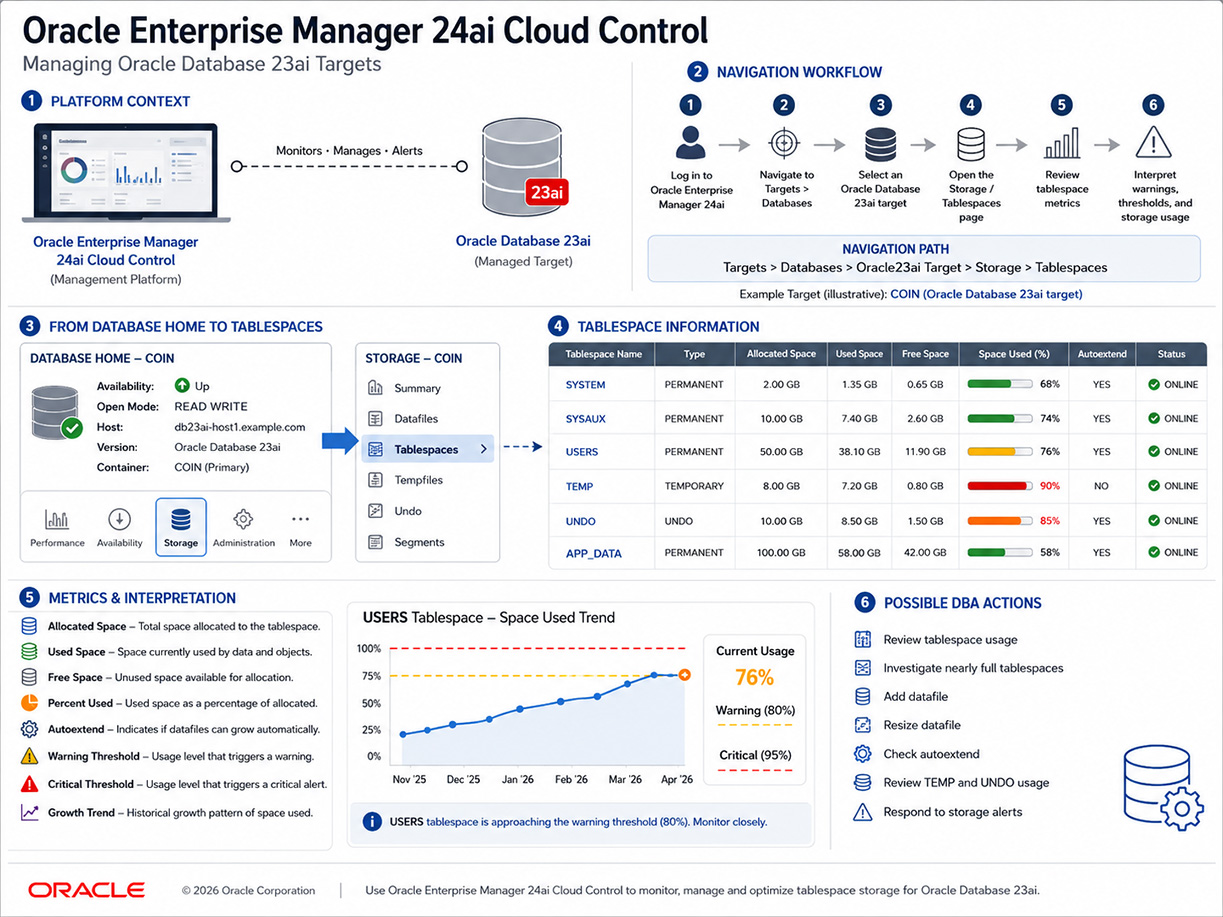
The exact menu path may vary slightly by Enterprise Manager version, target type, and installed plug-ins. However, the general workflow is consistent.
- Log in to Oracle Enterprise Manager Cloud Control.
- Navigate to Targets > Databases.
- Select the Oracle Database 23ai target you want to inspect.
- Open the database home page for that target.
- Navigate to the storage or administration area that contains tablespace information.
- Open the Tablespaces page.
- Review the tablespace list and the usage metrics displayed for each tablespace.
- Drill into a specific tablespace if you need datafile, tempfile, extent, segment, or growth information.
A common conceptual path is:
Targets > Databases > [database target] > Storage > TablespacesFrom the tablespace page, the DBA can review storage usage across the database and decide whether any tablespace requires investigation or action.
Understanding the Tablespace List
The tablespace list is the starting point for storage review. It normally provides one row per tablespace, with columns that summarize usage and status. The DBA should not look at the tablespace name alone. The important question is whether the usage pattern is normal, approaching a threshold, or already in a problem state.
Important columns and values include:
- Tablespace Name - the logical name, such as SYSTEM, SYSAUX, USERS, TEMP, UNDO, or an application-specific tablespace.
- Type - permanent, temporary, or undo.
- Status - whether the tablespace is online, offline, read only, or otherwise restricted.
- Allocated Space - how much space is currently allocated.
- Used Space - how much allocated space is consumed.
- Free Space - how much allocated space remains available.
- Space Used (%) - a percentage view of usage.
- Maximum Size - the maximum possible size if autoextend is enabled.
- Autoextend - whether associated files can grow automatically.
- Warning and Critical Thresholds - alert levels that help identify emerging space pressure.
A tablespace with high percent used is not always an immediate emergency. The DBA must also check whether autoextend is enabled, whether the maximum size has been reached, whether the file system or ASM disk group has available capacity, and whether the growth pattern is normal. A tablespace at 85 percent used may be acceptable if it grows slowly and has room to autoextend. A tablespace at 60 percent used may still be concerning if it is growing rapidly during a data load.
Permanent Tablespaces
Permanent tablespaces store persistent database objects. Application tables, indexes, LOB segments, materialized views, and other schema objects typically consume permanent tablespace space. Examples may include SYSTEM, SYSAUX, USERS, and application-specific tablespaces such as APP_DATA or APP_INDEX.
The SYSTEM and SYSAUX tablespaces are especially important because they support core database metadata and auxiliary database components. Application tablespaces are important because they support business data and application workload. When a permanent tablespace fills up, application DML, index operations, or maintenance tasks can fail.
When reviewing permanent tablespaces in Cloud Control, the DBA should check space used, growth rate, segment distribution, datafile configuration, and alerts. If a tablespace is growing quickly, the DBA may need to investigate which schema objects are consuming space.
Temporary Tablespaces
Temporary tablespaces are used for transient operations. Large sorts, hash operations, temporary table activity, and some reporting workloads can consume temporary space. TEMP usage can rise sharply during end-of-month reports, batch processing, poorly tuned queries, or large parallel operations.
A temporary tablespace problem may not look like a permanent storage problem. TEMP usage can spike and then drop after a query completes. A DBA should distinguish between a short-lived spike and a repeated capacity issue. Cloud Control can help identify whether TEMP pressure is occasional, workload-driven, or consistently approaching limits.
If TEMP pressure is recurring, the DBA may need to review SQL workload, add tempfile capacity, adjust application processing, or investigate queries that perform large sorts or hash joins.
Undo Tablespaces
Undo tablespaces store undo information. Oracle uses undo for transaction rollback, read consistency, and related database features. Undo pressure can appear during long transactions, heavy DML activity, batch processing, or workloads that require long read-consistent queries.
In Cloud Control, undo-related information helps the DBA determine whether the database has enough undo capacity for the workload. A shortage of undo can affect long-running queries and transaction processing. The DBA should interpret undo usage in relation to workload behavior, undo retention settings, and application transaction patterns.
Interpreting Alerts and Thresholds
Cloud Control can display warning and critical alerts for space-related conditions. These alerts help DBAs respond before the database encounters failure conditions. A warning alert usually means the DBA should investigate and plan corrective action. A critical alert means the condition may require immediate attention.
Common storage-related alert conditions include:
- A tablespace has crossed a warning threshold.
- A tablespace has crossed a critical threshold.
- A datafile has reached its maximum size.
- Autoextend is disabled and free space is low.
- Autoextend is enabled but the underlying file system or ASM disk group has limited capacity.
- TEMP usage is unusually high.
- UNDO usage is under pressure.
- A tablespace is offline or unavailable.
The DBA should not respond mechanically to a percentage alone. The correct response depends on the tablespace type, workload, trend, file configuration, and available storage. A nearly full read-only tablespace may be less urgent than a rapidly growing application tablespace. A TEMP spike may be acceptable during a known batch window but abnormal during normal online activity.
Administrative Actions from Cloud Control
Cloud Control can expose storage-management actions for authorized users. Depending on privileges, configuration, and version, a DBA may be able to perform or initiate tasks such as adding a datafile, resizing a datafile, enabling or adjusting autoextend, creating a tablespace, taking a tablespace online or offline, or reviewing segments that consume the most space.
These actions should be handled carefully. Viewing tablespace information is a monitoring task. Changing tablespace storage is an administrative task. Storage changes can affect backup planning, ASM capacity, file system usage, recovery planning, Data Guard behavior, and application availability.
Before making changes, the DBA should verify the cause of the problem. For example, adding space may be appropriate if normal growth has consumed capacity. But if a runaway batch job, accidental data duplication, or failed purge process caused unusual growth, simply adding space may hide the real issue.
Example: Viewing Tablespaces for the COIN Database
After the general workflow is understood, the COIN database can be used as a course example. The DBA would log in to Cloud Control, navigate to Targets > Databases, select the COIN database target, and open its storage or tablespace page.
From there, the DBA would review tablespaces such as SYSTEM, SYSAUX, USERS, TEMP, UNDO, and any application-specific tablespaces configured for the sample database. The DBA would compare allocated space, used space, free space, autoextend status, and threshold alerts.
The important point is that COIN is only an example target. The same Cloud Control workflow applies to other Oracle Database 23ai targets that have been discovered and monitored by Enterprise Manager.
Practical DBA Checklist
When reviewing tablespace information in Cloud Control, use a repeatable checklist:
- Confirm that the database target is available.
- Open the tablespace or storage page.
- Identify tablespaces near warning or critical thresholds.
- Check whether autoextend is enabled.
- Check whether maximum size has been reached.
- Review available file system or ASM disk group capacity.
- Inspect TEMP and UNDO usage separately from permanent tablespace usage.
- Review growth trends if historical data is available.
- Investigate unusually large or rapidly growing segments.
- Decide whether the correct response is monitoring, cleanup, resizing, adding storage, or deeper workload analysis.
Transition to Later Storage Lessons
This lesson focuses on viewing tablespace information. Later lessons and related courses can expand into storage administration tasks such as creating tablespaces, adding datafiles, managing redo logs, reviewing undo behavior, investigating segment growth, and using SQL-based data dictionary views to validate what Cloud Control displays.
Cloud Control is an effective starting point because it gives the DBA a visual overview of storage health. SQL tools remain important for validation, scripting, automation, and detailed investigation. A strong DBA should be able to use both approaches.
Summary
Oracle Enterprise Manager Cloud Control provides a modern way to view tablespace information for Oracle Database 23ai targets. Instead of relying on the older Storage Manager model, the DBA uses Cloud Control to select a database target, open the storage or tablespace page, and interpret metrics such as allocated space, used space, free space, percent used, autoextend, thresholds, and alerts.
The most important lesson is that tablespace monitoring is both technical and interpretive. A DBA must understand what the numbers mean, how the database workload uses storage, and whether a condition requires immediate action or capacity planning. Enterprise Manager 24ai helps centralize that information so the DBA can monitor storage health across modern Oracle database environments.