| Lesson 6 | Tuning tips for Web-based Oracle connectivity |
| Objective | See how Oracle manages incoming Web requests. |
Tuning Tips for Web-Based Oracle Connectivity
Oracle manages incoming web requests to Oracle databases in several ways depending on the deployment configuration. The three primary entry mechanisms in Oracle 23ai are:
- Oracle REST Data Services (ORDS): the primary web listener and routing layer for Oracle 23ai. ORDS receives HTTP/HTTPS requests directly or behind a load balancer, routes them to APEX, REST API modules, or the PL/SQL Gateway, and manages pooled JDBC connections to Oracle Database 23ai. In most Oracle 23ai deployments, ORDS is the sole web listener.
- Oracle HTTP Server (OHS) / Load Balancer (optional): OHS or a hardware/software load balancer can sit in front of ORDS as a reverse proxy, providing SSL termination, request routing across multiple ORDS instances, and static content serving. This layer is optional — standalone ORDS handles these functions natively for most deployments.
- Oracle Cloud Infrastructure (OCI) API Gateway: for cloud-native deployments, OCI API Gateway provides managed API routing, rate limiting, policy enforcement, and analytics in front of ORDS or OCI Functions. Appropriate for public APIs requiring enterprise API management.
Once a web request reaches Oracle Database 23ai via ORDS, the database processes the request and returns the response — as APEX HTML, SQL result set, JSON, or REST API response — which ORDS formats and delivers back to the client. Oracle also provides authentication and authorization mechanisms (OAuth2, OpenID Connect), unified auditing, and security policies to control and monitor web-based database access.
Replicated Environment in Web Interfaces to Oracle
Like all very large database systems, most web interfaces to Oracle databases use a replicated environment. Critical tables are replicated using Oracle GoldenGate into separate database schemas, often on different database servers. When a request is received, a load balancer or customized web listener directs traffic to the least loaded replicated database — reserving the primary for write operations.
An important tuning discipline: separate the performance issues associated with the web tier from Oracle database performance issues. ORDS and the web server are entirely separate software layers with their own components, tuned independently from the Oracle database. Common web tier issues — ORDS connection pool exhaustion, slow DNS resolution, SSL handshake overhead, TCP connection queuing — are not Oracle database problems and should not be diagnosed using Oracle tuning tools such as AWR or SQL Tuning Advisor.
| Layer | Primary Tuning Tools | Key Parameters |
|---|---|---|
| Browser / Client | Browser DevTools, network trace | Page load time, TTFB |
| Load Balancer / OHS | OHS access logs, load balancer metrics | Connection queue depth, SSL latency |
| ORDS | ORDS connection pool stats, ORDS log | jdbc.MaxLimit, jdbc.MinLimit, request queue |
| Oracle Net | sqlnet.ora, tnsnames.ora | SDU size, connection timeout |
| Oracle Database 23ai | AWR, ADDM, SQL Tuning Advisor | SQL elapsed time, wait events, buffer cache |
Web-Based Applications and Client-Server Applications
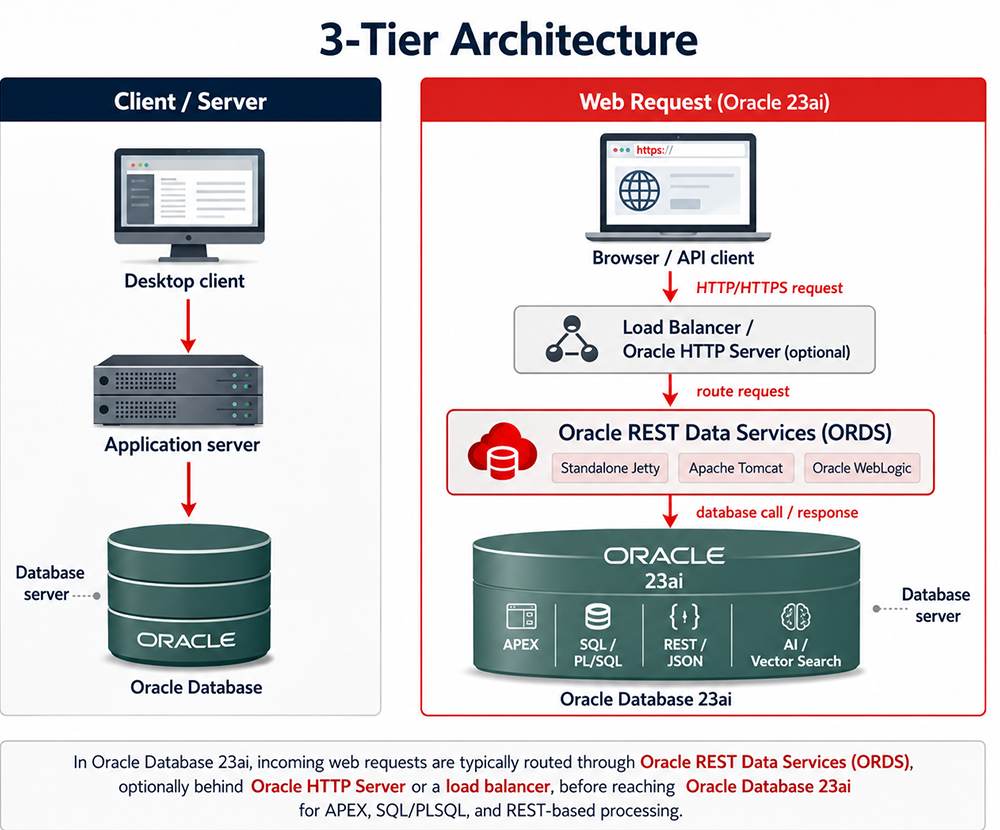
A web-based Oracle application can be viewed as a three-tiered client-server application. The models are structurally equivalent — the web tier simply replaces the proprietary client and application server with a browser and ORDS:
| Tier | Client/Server Model | Oracle 23ai Web Model |
|---|---|---|
| Tier 1 (Client) | Desktop client (PC, workstation) | Browser or API client |
| Tier 2 (Middle) | Application server | ORDS (optionally behind OHS or load balancer) |
| Tier 3 (Database) | Oracle Database server | Oracle Database 23ai |
Three key architectural parallels connect the two models:
- A client-server architecture has a PC-based client — the web architecture has a browser or API client. Both initiate requests that travel through a middle layer before reaching the database.
- Just as a PC-client request is intercepted by an application server, a web-based request is intercepted by ORDS. This middle layer formats the request and manages the connection to the database — the same intermediary role, implemented with modern REST-native technology.
- Both the application server and ORDS format the request into an Oracle SQL, PL/SQL, or REST database call and pass it to the database server via Oracle Net Services using Easy Connect Plus or directory-based naming.
The critical tuning implication: because the web model adds an additional network hop — browser → ORDS → Oracle Net → database — compared to a direct client-server connection, latency compounds across three tiers. Optimizing each tier boundary independently is more effective than treating web application performance as a single monolithic problem.
Tuning Tips for Oracle 23ai Web Connectivity
ORDS Connection Pool Tuning
The ORDS JDBC connection pool is the most impactful tuning lever for web-facing Oracle applications. Key parameters in the ORDS configuration:
jdbc.MaxLimit— maximum number of JDBC connections in the pool. Setting too low causes request queuing under load; setting too high exhausts Oracle session resources. Use the Oracle databaseSESSIONSparameter as the practical upper bound.jdbc.MinLimit— minimum connections kept open at idle. Prevents cold-start latency on the first requests after an idle period.jdbc.InitialLimit— connections created at ORDS startup. Set equal tojdbc.MinLimitfor consistent startup behavior and immediate availability.
Oracle Net Configuration for Web Workloads
Web workloads generate many short-lived database calls rather than a few long-running sessions. Oracle Net configuration should be tuned for this pattern:
- SDU (Session Data Unit): increase from the default 8KB to 32KB or 64KB for workloads returning large JSON or CLOB result sets via ORDS — reduces the number of network round-trips per response.
SQLNET.EXPIRE_TIME: set to detect and clean up dead client connections from dropped browser sessions — prevents ghost sessions accumulating inV$SESSIONand consuming database resources.TCP.CONNECT_TIMEOUT: set in sqlnet.ora to prevent ORDS from waiting indefinitely on failed Oracle Net connections under network partition conditions.
Database-Side Tuning for Web Workloads
Web workloads typically generate high concurrency with short-duration SQL statements. Database tuning priorities differ from batch or reporting workloads:
- Monitor
db file sequential readandlatch: cache buffers chainswait events — high concurrency on frequently accessed OLTP tables amplifies both. - Use the
RESULT_CACHEhint orCREATE RESULT CACHEfor PL/SQL functions that return reference data served by multiple concurrent ORDS requests — eliminates repeated identical SQL executions. - Oracle 23ai True Cache reduces round-trips to the primary database for read-heavy web workloads — cached objects are served from the True Cache tier without Oracle Net overhead to the primary.
- For APEX applications, monitor APEX session state table
(
WWV_FLOW_SESSION_STATE) growth — high concurrent APEX usage generates significant DML on session state tables and can become a contention point.
Replication and Load Distribution
Critical tables accessed by high-traffic web applications can be replicated using Oracle GoldenGate into separate read-replica schemas on different database servers. Web listener or load balancer routing then directs read-only traffic to the least loaded replica, reserving the primary database for writes. This pattern delivers horizontal read scalability without application changes — ORDS connection strings point to the replica TNS alias and the application SQL is unchanged.
Tuning Tips — Exercise
Before continuing to the next lesson, test your knowledge of Oracle WebServer components and architecture with a matching exercise.
Tuning Tips - ExerciseTuning Tips - Exercise
Tuning Tips - Exercise