| Lesson 2 | Special extensions for the IN clause |
| Objective | Use IN with a single expression or a row-value expression list, and match the subquery columns by position and compatible datatype. |
Oracle IN Subqueries with One or Multiple Columns
The Oracle IN condition tests membership. It asks whether a value is equal to any member of a list and is therefore equivalent to
= ANY. The list can contain literal values written in the statement, or it can be the result of a subquery. A literal list is useful
when the accepted values are a stable part of a business rule. A subquery is useful when the comparison set must come from database rows.
This lesson develops the idea in stages. It begins with a fixed list, replaces that list with a one-column subquery, and then extends the condition to compare two expressions as a pair. Both subquery forms are membership tests. They are not special join syntax, even though a subquery can contain a join of its own.
Literal lists and dynamic subquery results
Suppose a report should include customers in Hawaii, Wisconsin, or Nebraska. The rule can be expressed with three state abbreviations in a literal list:
SELECT c.cust_id,
       c.lastname,
       c.firstname,
       c.state
FROM   customer c
WHERE  c.state IN ('HI', 'WI', 'NE')
ORDER  BY c.lastname, c.firstname;
Oracle compares c.state with the members of the list. The row qualifies when at least one equality comparison is true. This form is
clear when the three states are the actual rule. A literal list is not inferior to a subquery merely because it is fixed.
If the allowed states instead come from rows in a table, maintaining the same values in SQL would duplicate data and require code changes. A subquery can derive the comparison set when the statement executes. The set reflects the statement's read-consistent view of the database; it is not a permanently stored or independently refreshed list.
Single-column IN subquery syntax
In the single-column form, the left side contains one expression and the subquery returns one expression. Each value produced by the subquery is a possible match for the outer expression.
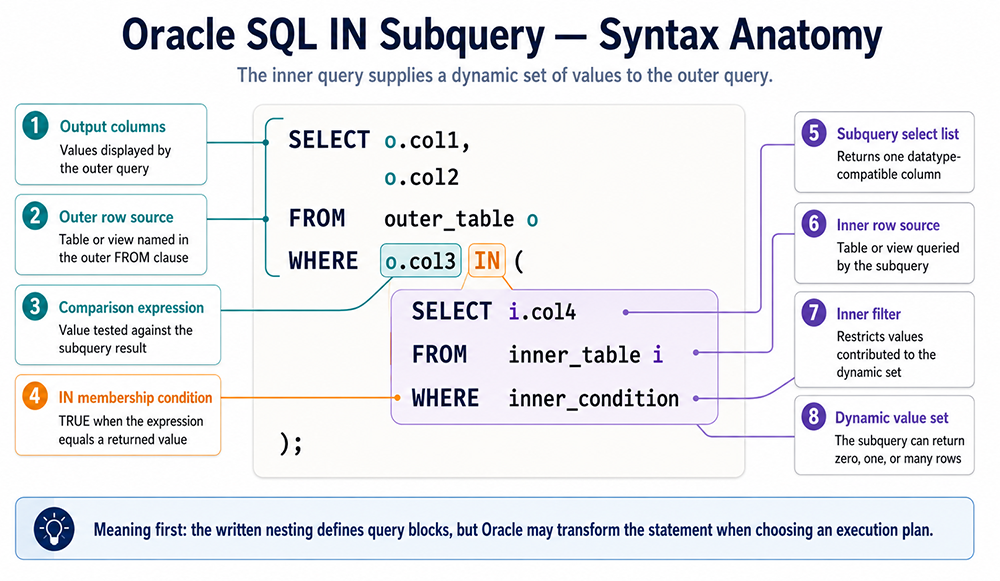
The same pattern is available as selectable text:
SELECT o.col1,
       o.col2
FROM   outer_table o
WHERE  o.col3 IN (
         SELECT i.col4
         FROM   inner_table i
         WHERE  inner_condition
       );
The subquery can return no rows, one row, or many rows. If it returns no rows, there is no member for o.col3 to match and the condition is
false. If it returns the same non-null value more than once, the duplicate does not change the truth of the membership test. For that reason,
DISTINCT is not required merely because a subquery supplies values to IN.
The subquery must select one expression because the left side has one expression. It can still contain filters, joins, grouping, or other valid SQL needed to calculate that expression. The number of rows is flexible; the number of selected expressions is not.
Customers with a sale greater than $40
The Pet Store schema stores customer details in CUSTOMER and sales in CUSTOMER_SALE. The inner query finds customer IDs for
sales greater than $40. The outer query then returns the names belonging to those IDs:
SELECT c.lastname,
       c.firstname
FROM   customer c
WHERE  c.cust_id IN (
         SELECT cs.cust_id
         FROM   customer_sale cs
         WHERE  cs.total_sale_amount > 40
       )
ORDER  BY c.lastname, c.firstname;
This statement answers: Which customers have at least one sale greater than $40? The membership relationship is one expression to one expression:
c.cust_id is compared with values of cs.cust_id. A customer with several qualifying sales still appears once because the
outer query reads that customer's row once. Duplicate customer IDs in the subquery do not multiply the outer row.
| LASTNAME | FIRSTNAME |
|---|---|
| Black | Amy |
| Lee | Lester |
| Redding | Marvin |
The displayed order is deliberate. Without the outer ORDER BY, Oracle does not promise that rows will appear alphabetically or in the
order produced by either query block.
Read the outer and inner query blocks separately
A useful way to understand an IN subquery is to state the job of each query block. In the sales example, the inner block produces the
customer IDs associated with qualifying sales. The outer block produces customer names, but retains only customers whose IDs belong to that set.
This explanation describes the logical result without claiming that Oracle must execute the inner block first.
You can inspect the inner SELECT by running it independently during development. Check that it returns the intended expression and
datatype, then place it inside the outer condition. This technique is a debugging aid, not a promise about the optimizer's runtime order. If the
inner block returns surprising IDs, correct its joins and filters before investigating the outer query.
Keep the selected expression focused on the membership rule. Ordering inside this kind of subquery does not control the final presentation, so the
outermost query owns the report's ORDER BY. Similarly, extra columns cannot be selected “for information” in a single-expression
IN condition; adding a second selected expression changes the required left side to a two-expression row value.
Multiple-column IN subquery syntax
The row-value form compares two or more expressions together. Parentheses group the expressions on the left into a tuple. The subquery must return the same number of expressions in the corresponding logical order:
SELECT o.col1,
       o.col2
FROM   outer_table o
WHERE  (o.col3, o.col4) IN (
         SELECT i.col5,
                i.col6
         FROM   inner_table i
         WHERE  inner_condition
       );
Oracle compares o.col3 with i.col5 and o.col4 with i.col6. The outer row qualifies when its pair equals
at least one complete pair returned by the subquery. The two comparisons belong to the same returned row; Oracle does not independently choose one
first value and one second value from different subquery rows.
Position is part of the meaning. Reversing i.col5 and i.col6 changes the comparison and can also cause a datatype-conversion
error. Corresponding expressions must have compatible datatypes. The selected expressions use the normal comma-separated SELECT list;
do not add a second pair of parentheses around that select list.
Multiple-column membership is especially useful with composite keys, but it is not limited to keys. Any expression tuple can be tested when its
components have a meaningful positional relationship. A fixed tuple list is also possible, such as
(region_code, status_code) IN (('N', 'A'), ('S', 'P')), when those pairs truly are constants.
Products purchased by Amy Black
In the Pet Store sample data, customer ID 1 identifies Amy Black. The next statement compares each product and that customer ID with
purchased product-customer pairs. The subquery uses an ANSI join to connect each sale with its line items:
SELECT p.product_name
FROM   product p
WHERE  (p.product_id, 1) IN (
         SELECT si.product_id,
                cs.cust_id
         FROM   customer_sale cs
         JOIN   sale_item si
                ON si.sales_id = cs.sales_id
       )
ORDER  BY p.product_name;
The outer tuple is (product ID, customer ID). The inner query returns tuples with the same meaning and order. A product qualifies when
the pair (p.product_id, 1) is present in the purchased-pair set. The outer query does not need to join CUSTOMER because the
example already supplies Amy's customer ID.
Qualifying shared column names avoids ambiguity, while JOIN ... ON states the relationship between CUSTOMER_SALE and
SALE_ITEM directly. This prevents the accidental Cartesian product that can result when a legacy comma join is missing a predicate.
| PRODUCT_NAME |
|---|
| Chew Toy |
| Dog Food |
| Kitty Package |
| Puppy Package |
Choose the form that matches the rule
Start with the number of values that together identify a match, and then ask where the comparison set comes from. The following table summarizes the decision. It separates membership from existence testing so that the SQL expresses the business question directly.
| Requirement | Appropriate form |
|---|---|
| Test one value against fixed constants | expression IN (value1, value2, ...) |
| Test one value against rows returned now | expression IN (SELECT one_expression ...) |
| Test a pair against fixed pairs | (expr1, expr2) IN ((value1, value2), ...) |
| Test a pair against rows returned now | (expr1, expr2) IN (SELECT expression1, expression2 ...) |
| Test whether at least one related row exists | Use EXISTS, introduced in Lesson 5 |
| Test whether an expression is null | Use IS NULL or IS NOT NULL |
Do not force a multiple-column test merely because several columns appear elsewhere in the statement. Group expressions only when their combined
values define one membership key. Conversely, two separate one-column IN conditions do not guarantee that both values came from the
same inner row; use a row-value condition when that pairing matters.
Nulls and NOT IN require care
Oracle 26ai behavior to remember
The written subquery explains the logical relationship, not a mandatory physical execution sequence. Oracle's optimizer can unnest eligible
IN subqueries or choose another equivalent plan. Performance conclusions should come from the actual statement, data, statistics, and
execution plan rather than from a rule that subqueries are always faster or slower than joins.
Character membership comparisons follow the applicable collation rules. Oracle AI Database 26ai also allows as many as 65,535 expressions in an expression list, but that upper bound is not a design recommendation. Large business-controlled sets usually belong in rows that can be validated, maintained, and queried instead of in enormous hardcoded lists.
Lesson summary
expression IN (value1, value2, ...)tests one value against a fixed list.expression IN (SELECT one_expression ...)tests one value against a set calculated from database rows.(expr1, expr2) IN (SELECT expression1, expression2 ...)tests a tuple against dynamic tuples.- The two sides of a row-value test must correspond by expression count, position, meaning, and compatible datatype.
- Duplicate subquery results do not alter membership truth, so
DISTINCTis not automatically necessary. - Use qualified aliases and ANSI joins inside a subquery when it reads multiple row sources.
- Account for nulls before using
NOT IN, and test null values withIS NULLorIS NOT NULL.
In the next lesson, Oracle Outer Join Syntax, you will compare modern ANSI outer joins with Oracle's legacy outer-join notation.