Lesson 1
Introduction to Oracle Materialized Views for Performance Tuning
Modern Oracle databases provide several features that help you speed up queries on large data sets, especially in data warehouse and reporting environments. One of the most important of these features is the materialized view, which stores precomputed results—aggregations, joins, and filtered subsets of data—and allows the optimizer to reuse these results instead of re-running expensive queries.
Materialized views are particularly effective in schemas that resemble a data warehouse[1], where fact tables can contain millions (or billions) of rows and queries frequently group data by time, geography, or product dimensions. By storing summary data in materialized views and enabling query rewrite, Oracle’s cost-based optimizer can transparently redirect user queries to these prebuilt summaries, often improving performance by orders of magnitude.
In this module, you will learn how materialized views fit into the broader performance-tuning toolbox and how to design and manage them effectively.
Module Objectives
In this module, you will learn how to:
Materialized views are particularly effective in schemas that resemble a data warehouse[1], where fact tables can contain millions (or billions) of rows and queries frequently group data by time, geography, or product dimensions. By storing summary data in materialized views and enabling query rewrite, Oracle’s cost-based optimizer can transparently redirect user queries to these prebuilt summaries, often improving performance by orders of magnitude.
In this module, you will learn how materialized views fit into the broader performance-tuning toolbox and how to design and manage them effectively.
Module Objectives
In this module, you will learn how to:
- Describe what a materialized view is and when to use it.
- Explain the key clauses and parameters in the
CREATE MATERIALIZED VIEWstatement. - Write SQL to create materialized views that store summary and replicated data.
- Describe indexing strategies for materialized views and how they affect performance.
- Check materialized view status, troubleshoot invalid or stale views, and repair them.
- Describe the conditions that allow the optimizer to perform query rewrite using materialized views.
- Describe the role of packages such as
DBMS_OLAPandDBMS_MVIEWin managing summaries and refresh operations.
Expert Oracle Indexing and Access Paths
What Is a Materialized View?
A materialized view is a database object that stores the result of a query physically on disk. Unlike a normal (logical) view, which is just a stored SELECT statement, a materialized view keeps a copy of the data. This data can be:
With each major release (10g, 11g, 12c, 19c, and into 23c/23ai), Oracle has improved how the optimizer discovers, selects, and rewrites queries to use eligible materialized views.
- A summarized version of a fact table (for example, sales by month and region).
- A join of multiple tables (for example, sales joined to products and customers).
- A replicated subset of data from a remote or primary database.
- Precompute
GROUP BYaggregations at different levels in a hierarchy (day, month, quarter, year). - Store rollup or cube-style summaries that many users query repeatedly.
- Provide local copies of remote tables to avoid constant distributed queries.
With each major release (10g, 11g, 12c, 19c, and into 23c/23ai), Oracle has improved how the optimizer discovers, selects, and rewrites queries to use eligible materialized views.
SQL Tuning Advisor and Automatic SQL Tuning
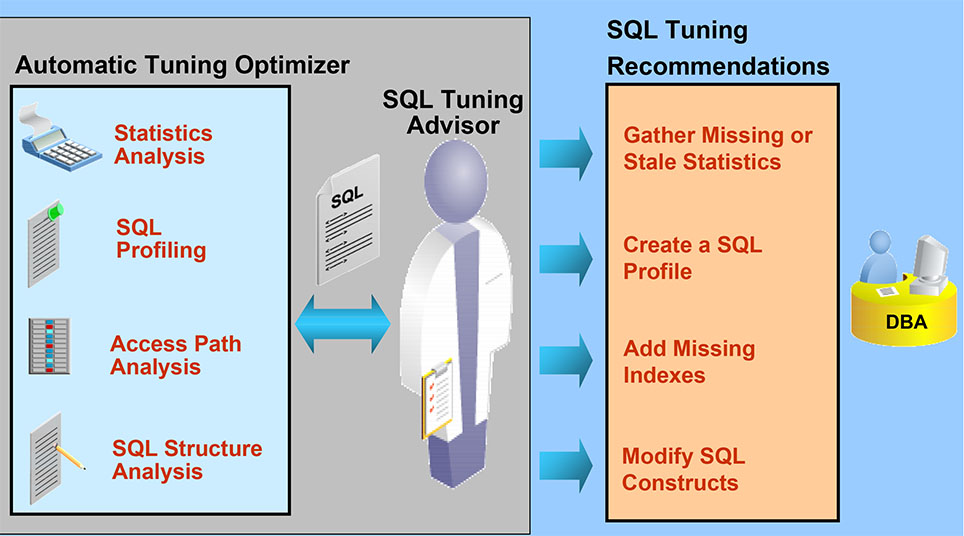
- Automatic Tuning Optimizer
- Statistics Analysis
- Checks for missing or stale statistics on tables and indexes.
- Recommends gathering or refreshing statistics to improve plan quality.
- SQL Profiling
- Creates SQL profiles that guide the optimizer toward better execution plans without changing the original SQL text.
- Captures additional information (such as corrected cardinality estimates) that the optimizer can use at parse time.
- Access Path Analysis
- Evaluates existing indexes and potential new indexes for the SQL workload.
- Identifies where new indexes or different access paths can reduce I/O and CPU usage.
- SQL Structure Analysis
- Analyzes SQL syntax and structure for anti-patterns or inefficiencies.
- Identifies opportunities to rewrite queries so they are easier for the optimizer to transform and tune.
- Statistics Analysis
- SQL Tuning Advisor
- Uses the output from the Automatic Tuning Optimizer to generate specific tuning recommendations for individual SQL statements or captured workloads.
- Acts as the main interface between the tuning engine and the DBA, whether invoked from Enterprise Manager, Cloud Console, or PL/SQL APIs.
- SQL Tuning Recommendations
- Gather Missing or Stale Statistics – Ensures the optimizer has accurate metadata.
- Create SQL Profiles – Improves plan stability and quality.
- Add or Adjust Indexes – Addresses access path inefficiencies.
- Modify SQL Constructs – Suggests alternative query formulations that perform better.
- Interaction with the DBA
- The DBA reviews recommendations, tests them as needed, and then applies them manually or configures them for automatic implementation in some environments.
- The DBA ensures that any changes align with application requirements, maintenance windows, and service-level objectives.
Summary:
Oracle’s Automatic SQL Tuning framework combines continuous workload analysis with actionable recommendations. Materialized views and indexes are often key outputs of this process, giving DBAs practical options for improving performance without rewriting entire applications.
Automatic Tuning Advisor from 11gR2 to Cloud-Enabled Databases (12c–19c and Beyond)
The SQL Tuning Advisor and Automatic SQL Tuning were introduced in Oracle Database 10g and continue to play a central role in Oracle 11g Release 2 and the cloud-enabled databases from 12c through 19c (including Autonomous Database offerings).
Oracle 11g R2
Oracle 11g R2
- Automatic SQL Tuning tasks typically run during nightly maintenance windows.
- Problematic SQL statements are identified from the workload (e.g., AWR snapshots) and fed to the tuning engine.
- Recommendations may include creating SQL profiles, adding or modifying indexes, restructuring queries, or—where appropriate—introducing materialized views.
- SQL Tuning Advisor is tightly integrated with:
- Automatic Workload Repository (AWR) for historical performance data.
- SQL Plan Baselines to preserve stable, known-good execution plans.
- Adaptive Query Optimization to refine estimates and join methods at runtime.
- In cloud deployments and Autonomous Database, many tuning operations can be fully or partially automated. The system may:
- Auto-accept certain SQL profiles.
- Recommend or automatically use new access structures.
- Leverage machine learning to detect regressing SQL statements.
Materialized Views Beyond Data Warehousing
While materialized views are often associated with classical data warehouses and star schemas, they are equally useful in other scenarios:
- Snapshot replication for distributed sites: Local materialized views can hold copies of remote data, reducing network round trips for read-heavy workloads.
- Mobile and disconnected environments: Extracts of key tables can be stored as materialized views on edge or mobile systems and refreshed periodically.
- Reporting and BI environments: Complex reports can be redirected to summary materialized views rather than base transactional tables.
- Create local copies of remote tables or subsets of those tables.
- Build summary materialized views using
GROUP BYagainst large transaction tables. - Schedule automatic refreshes (for example, hourly or nightly) to keep summaries reasonably current while avoiding excessive refresh overhead.
- The general usage patterns for materialized views.
- Refresh options (FAST vs. COMPLETE, ON COMMIT vs. ON DEMAND, scheduled refresh).
- How materialized views interact with query rewrite and the cost-based optimizer.
[1]
Data Warehouse: A type of database used primarily for analysis and reporting. Data warehouses frequently employ star schemas rather than highly normalized transactional schemas and are often kept separate from OLTP systems.
[2]
SQL Advisor: An Oracle Database feature (SQL Tuning Advisor and related tools) that performs in-depth optimization analysis on selected SQL statements or workloads and suggests actions such as statistics collection, SQL profiles, indexes, and materialized views.