Oracle SQL Extensions and Built-In Functions Conclusion
This module examined how Oracle SQL extends the core SQL language with built-in functions, optimizer transformations, SQL*Plus scripting, and related features that simplify data retrieval, calculation, formatting, and reporting. The central theme was not merely that Oracle supplies many functions, but that their placement and purpose determine whether they improve a statement or make it harder to optimize.
Built-in functions allow the database to perform work close to the data. They can replace procedural loops, application-side formatting, null checks, character translations, date calculations, and summary logic. This often reduces network traffic and keeps business rules in one SQL statement. At the same time, a function applied to an indexed column can alter available access paths, and a user-defined function called once per row can add measurable overhead. Effective Oracle SQL therefore combines expressive functions with careful attention to semantics, datatypes, indexes, and execution plans.
After completing this module, you should be able to:
- Describe the purpose of Oracle SQL built-in functions and identify common scalar, aggregate, date, conversion, and analytic functions.
- Explain how built-in functions move transformations into the SQL layer and reduce unnecessary application-side processing.
- Use aggregate functions such as
MIN,MAX,AVG,SUM, andCOUNT. - Use
NVLto replace null expressions while preserving the intended meaning of the data. - Use
DECODEfor compact equality-based translation and recognize whenCASEis the clearer alternative. - Explain how
GROUPINGandROLLUPcreate readable subtotal and grand-total reports. - Use selected advanced functions such as
GREATEST,LEAST,TRANSLATE,LAST_DAY, andTO_CHAR. - Distinguish SQL built-in functions, SQL*Plus
SPOOL, native dynamic SQL, and user-defined functions. - Explain how function placement can affect index access and when a function-based index or predicate rewrite may be appropriate.
- Describe how the Oracle optimizer can transform a query into a semantically equivalent form before choosing an execution plan.
Built-In Functions as SQL-Layer Transformations
Oracle built-in functions execute as part of a SQL statement. They accept values, expressions, or groups of rows and return transformed results. Scalar functions normally return one result for each input row, aggregate functions return one result for a group, and analytic functions calculate values across a window while retaining individual rows.
Examples from this module include:
UPPER(last_name)
SUBSTR(phone_number, 1, 3)
NVL(commission_amount, 0)
DECODE(status_code, 'A', 'Active', 'I', 'Inactive', 'Unknown')
AVG(salary)
ROW_NUMBER() OVER (PARTITION BY department_id ORDER BY salary DESC)
These functions can eliminate equivalent application code, but that does not mean every transformation belongs in every query. Formatting intended only for a user interface may be better handled by the presentation layer when multiple clients require different formats. Conversely, calculations and data-quality rules that must be consistent across applications are often better expressed close to the data.
Aggregate and Analytic Processing
Aggregate functions replace procedural collection and iteration. Instead of retrieving every salary and calculating statistics in application memory, Oracle can compute the values directly:
SELECT
    MIN(salary) AS minimum_salary,
    AVG(salary) AS average_salary,
    MAX(salary) AS maximum_salary
FROM employee;
Analytic functions extend this idea by calculating rankings, running totals, offsets, and window-based statistics without collapsing the result set:
SELECT
    employee_id,
    department_id,
    salary,
    RANK() OVER (
        PARTITION BY department_id
        ORDER BY salary DESC
    ) AS salary_rank
FROM employee;
Aggregate and analytic functions are set-oriented. They usually express the business requirement more directly than procedural loops or repeated correlated queries.
NULL, Three-Valued Logic, and NVL
SQL uses three truth values: TRUE, FALSE, and UNKNOWN. A comparison involving a null value normally evaluates to
UNKNOWN, which means the row does not satisfy a WHERE condition. Null values must therefore be tested with IS NULL or
IS NOT NULL, not with = NULL.
NVL replaces a null expression with a second value:
NVL(expression, replacement_value)The replacement must reflect the meaning of the data. A missing salary is not automatically zero. For display purposes, a report might use:
NVL(
    TO_CHAR(salary, 'FM999G999G990'),
    'NOT YET ASSIGNED'
)
For arithmetic, zero may be correct when a missing discount truly means that no discount applies:
quantity * unit_price - NVL(discount_amount, 0)The module also demonstrated why null handling matters in outer joins. A data file with no free extents can have no matching row in
DBA_FREE_SPACE. A left outer join preserves the row from DBA_DATA_FILES, and NVL(SUM(a.bytes), 0) converts the
missing free-space total to zero for reporting.
DECODE, CASE, GROUPING, and ROLLUP
DECODE compares one expression with search values in sequence and returns the result associated with the first match:
DECODE(
    region_code,
    10, 'EAST',
    20, 'WEST',
    30, 'SOUTH',
    40, 'NORTH',
    'NONE'
)
It remains supported in Oracle Database 23ai, but it is Oracle-specific. A simple or searched CASE expression is generally preferred for new
portable SQL and for conditions involving ranges, inequalities, or multiple predicates.
DECODE is especially useful in older summary reports that label rows generated by ROLLUP. The GROUPING function
identifies whether Oracle generated a null placeholder for a subtotal or grand total:
DECODE(
    GROUPING(region_name),
    1, 'All Regions',
    region_name
)
ROLLUP(region_name, job_title) creates detail groups, regional subtotals, and a grand total. GROUPING distinguishes generated
summary nulls from null values stored in the source table, while DECODE converts the grouping indicator into readable labels.
Character, Date, and Conversion Functions
The module also reviewed several functions that solve common transformation problems:
GREATESTandLEASTreturn the greatest or least compatible value in a list.TRANSLATEperforms positional character-by-character substitution.UPPERandLOWERnormalize character case.SUBSTRextracts part of a character value.LAST_DAYreturns the final calendar day of a month.ADD_MONTHSandMONTHS_BETWEENperform month-based date arithmetic.TO_CHARformats datetime and numeric values as character data.TO_DATEandTO_NUMBERconvert character input with explicit format models.
Oracle DATE stores year, month, day, hour, minute, and second. It does not store fractional seconds; use TIMESTAMP when
fractional-second precision is required. Session settings such as NLS_DATE_FORMAT affect default display and implicit conversion, not the internal
date value.
Typed literals and explicit conversions are safer than relying on session-dependent conversion:
DATE '2026-06-15'

TO_DATE('2026-06-15', 'YYYY-MM-DD')
SQL*Plus SPOOL, Dynamic SQL, and User-Defined Functions
The module distinguished several features that are often incorrectly grouped together.
SQL*Plus SPOOL
SPOOL is a SQL*Plus client command that writes displayed output to a file. A data dictionary query can generate a second SQL script, which is
then executed with @filename.sql. This is script generation, not native dynamic SQL.
Native dynamic SQL
PL/SQL uses EXECUTE IMMEDIATE when the SQL structure must be created at runtime. Bind variables should be used for data values, while dynamic
object names must be validated before they are concatenated into SQL text.
EXECUTE IMMEDIATE
    'UPDATE employee
     SET status = :1
     WHERE department_id = :2'
USING 'ACTIVE', 20;
User-defined functions
User-defined functions can encapsulate reusable domain logic and appear in SQL expressions. They can also introduce context-switching or per-row execution cost, so ordinary set-oriented SQL should be preferred when it expresses the requirement clearly.
Functions, Predicates, and Index Access
A function in a predicate does not automatically force a full table scan. The cost-based optimizer selects an access path using statistics, selectivity, available indexes, partitioning, transformations, and estimated cost. However, applying a function to an indexed column can prevent direct use of a conventional index on the original column.
WHERE UPPER(last_name) = 'JONES'Possible solutions include:
- Create a matching function-based index.
- Rewrite the predicate so that the indexed column is not transformed.
- Use a supported collation strategy for case-insensitive searches.
- Normalize stored data when that design accurately reflects the domain.
For date filtering, a half-open range is often clearer and more index-friendly than converting the date column to text:
WHERE order_date >= DATE '2026-06-01'
  AND order_date <  DATE '2026-07-01'
This form includes every time on the last day of June and avoids applying TO_CHAR to the indexed column.
Query Transformation and OR Expansion
Before choosing an execution plan, the Oracle optimizer can transform a SQL statement into a semantically equivalent form. A transformation does not change the result required by the statement; it exposes alternative access paths or join strategies that may have a lower estimated cost.
The image below illustrates OR expansion. The submitted query is:
SELECT *
FROM sales
WHERE promo_id = 33
   OR prod_id = 136;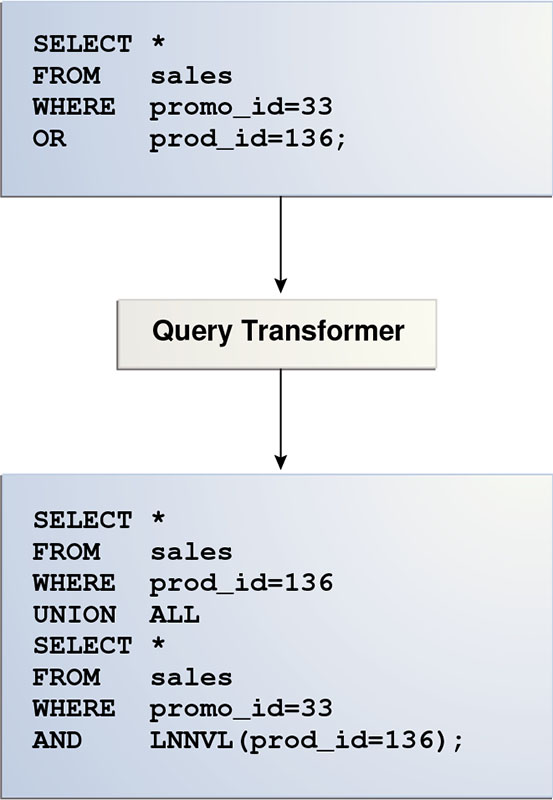
Oracle query transformation using OR expansion
SELECT *
FROM sales
WHERE prod_id = 136

UNION ALL

SELECT *
FROM sales
WHERE promo_id = 33
AND LNNVL(prod_id = 136);
The first branch retrieves rows matching prod_id = 136. The second branch retrieves rows matching promo_id = 33 while
LNNVL(prod_id = 136) prevents rows that satisfy both original predicates from being returned twice.
The transformed branches can be costed independently and may use different indexes. The optimizer compares the available alternatives and selects the plan with the lowest estimated cost. The application continues to submit the original statement; Oracle performs the transformation internally.
Important Terms from the Module
- Built-in function
- A function supplied by Oracle that operates within a SQL statement.
- Scalar function
- A function that normally returns one value for each input row.
- Aggregate function
- A function that calculates one result from a group of rows.
- Analytic function
- A function that calculates a value across a row window while preserving individual result rows.
- Three-valued logic
- SQL's logical system in which a condition can evaluate to
TRUE,FALSE, orUNKNOWN. - Outer join
- A join that preserves rows even when no matching row exists on the optional side.
- Function-based index
- An index that stores the result of an expression so Oracle can consider indexed access for matching predicates.
- Query transformation
- An optimizer rewrite that produces a semantically equivalent SQL form for costing and plan selection.
- Dynamic SQL
- SQL text constructed and executed at runtime, commonly with
EXECUTE IMMEDIATEin PL/SQL.
Final Review
Oracle SQL extensions are most valuable when they make a requirement more declarative, more set-oriented, and easier for the optimizer to evaluate. The functions covered in this module can replace substantial procedural code, but they should be chosen according to the meaning of the data and verified against real execution plans when performance matters.
The most important practices are:
- Use null substitutions only when the replacement preserves the meaning of the original data.
- Prefer explicit datatypes and format models over implicit conversion.
- Use
CASEwhen complex or portable conditional logic is required. - Use ANSI join syntax for new SQL while recognizing legacy Oracle syntax in older code.
- Avoid transforming an indexed column in a predicate when an equivalent range or direct comparison is available.
- Create function-based indexes only for stable, frequently used expressions that justify their maintenance cost.
- Use bind variables for dynamic data values and validate dynamic object names.
- Confirm optimizer behavior with an execution plan instead of assuming that a function must cause a full scan.
The next module introduces foundational Oracle SQL tuning tools and techniques, including execution plans, statistics, optimizer access paths, and methods for identifying statements that use database resources inefficiently.
Built-In Functions - Quiz
Test your understanding of Oracle SQL built-in functions, null handling, conditional translation, query transformation, and function-aware indexing:
Oracle Built-In Functions - Quiz