| Lesson 6 | Oracle-supplied SQL extensions and built-in functions |
| Objective | Describe the purpose of selected advanced Oracle SQL built-in functions and related extensions. |
Oracle-Supplied SQL Extensions and Built-In Functions
Oracle SQL provides a large collection of built-in functions for comparing values, translating characters, formatting dates and numbers, calculating intervals, and transforming query results. Oracle also supplies related tools and language features—including SQL*Plus scripting, native dynamic SQL, and user-defined functions—that extend what developers and database administrators can accomplish with SQL.
These capabilities are related, but they operate at different layers:
- SQL built-in functions execute inside SQL statements in the database.
- SQL*Plus commands are interpreted by the SQL*Plus client.
- Native dynamic SQL creates and executes SQL text at runtime from PL/SQL.
- User-defined functions add reusable application-specific logic that can be called from SQL.
Understanding the distinction helps you select the correct feature, write safer code, and avoid performance assumptions that no longer apply to modern Oracle Database releases.
Comparing values with GREATEST and LEAST
GREATEST returns the greatest value in a list, while LEAST returns the smallest. Both functions can compare compatible character,
numeric, or datetime expressions.
SELECT GREATEST('Bach', 'Brahms', 'Grieg') AS greatest_name
FROM dual;
Example result:
GREATEST_NAME
-------------
Grieg
For character values, the result depends on Oracle's comparison semantics and applicable collation settings. The functions are not limited to text:
SELECT
    GREATEST(42, 17, 93, 8) AS highest_value,
    LEAST(42, 17, 93, 8) AS lowest_value
FROM dual;
A null argument can cause the result to become null. Apply a null-handling rule only when it accurately reflects the business meaning:
GREATEST(
    NVL(score_a, 0),
    NVL(score_b, 0),
    NVL(score_c, 0)
)
This expression is appropriate only when a missing score should legitimately be treated as zero.
Character-by-character translation with TRANSLATE
TRANSLATE performs positional, one-character-to-one-character substitution. Every character in the second argument maps to the character in the
same position in the third argument.
SELECT TRANSLATE(
           'BURLEEZE',
           '0123456789ABCDEFGHIJKLMNOPQRSTUVWXYZ',
           '9876543210zyxwvutsrqponmlkjihgfedcba'
       ) AS translated_value
FROM dual;
Example result:
TRANSLATED_VALUE
----------------
yfiovhlm
TRANSLATE is different from REPLACE:
TRANSLATEmaps individual characters by position.REPLACEsubstitutes complete substrings.- If the source set contains a character with no corresponding replacement character,
TRANSLATEremoves that character.
For example, punctuation can be replaced with spaces before further normalization:
TRANSLATE(phone_number, '()-', ' ')For more complex patterns, use regular-expression functions such as REGEXP_REPLACE.
Working with dates using LAST_DAY
LAST_DAY returns the final calendar day of the month containing a supplied date.
SELECT
    SYSDATE AS current_date,
    LAST_DAY(SYSDATE) AS month_end,
    LAST_DAY(SYSDATE) - TRUNC(SYSDATE) AS days_after_today
FROM dual;
Oracle DATE arithmetic returns a number of days. Because SYSDATE includes the current time through the second, subtracting it
directly can return a fractional number. TRUNC(SYSDATE) removes the time portion when the requirement is a whole calendar-day count.
Whether the result should include today or the final day of the month depends on the reporting requirement. State that rule explicitly rather than relying on an ambiguous heading such as Days Left.
Related datetime functions
ADD_MONTHS(order_date, 1)
MONTHS_BETWEEN(end_date, start_date)
NEXT_DAY(SYSDATE, 'MONDAY')
TRUNC(SYSDATE, 'MM')
EXTRACT(YEAR FROM order_date)
Perform calculations with date or timestamp datatypes. Convert values to character data only when formatting output.
SQL*Plus script generation with SPOOL
SQL*Plus can write displayed output to a file with the SPOOL command. A data dictionary query can therefore generate a second SQL script that
is executed later.
Suppose you want to generate a SELECT * statement for every table in the current schema whose name begins with EMP:
SET HEADING OFF
SET FEEDBACK OFF
SET PAGESIZE 0
SET VERIFY OFF
SET ECHO OFF

SPOOL run_emp.sql

SELECT 'SELECT * FROM "' ||
       REPLACE(table_name, '"', '""') ||
       '";'
FROM user_tables
WHERE table_name LIKE 'EMP%'
ORDER BY table_name;

SPOOL OFF
Execute the generated script from SQL*Plus with:
@run_emp.sqlThis is script generation, not native dynamic SQL. SQL*Plus writes SQL text to a file, and the client subsequently reads and executes that file.
Why USER_TABLES is the better default
The legacy example queries DBA_TABLES. That view lists tables across the database and normally requires elevated privileges. When the requirement
is limited to the current schema, USER_TABLES is safer and more precise.
Use ALL_TABLES or DBA_TABLES only when the process must inspect other schemas and the account has the necessary privileges. In that case,
include the owner in generated object names.
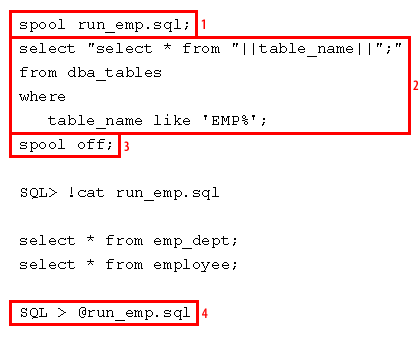
SQL displayed in the legacy image:
SPOOL run_emp.sql

SELECT 'SELECT * FROM ' || table_name || ';'
FROM dba_tables
WHERE table_name LIKE 'EMP%';

SPOOL OFF
The image demonstrates this sequence:
- Begin writing SQL*Plus output to
run_emp.sql. - Query the data dictionary and concatenate table names into executable SQL statements.
- Stop spooling.
- Execute the generated script with
@run_emp.sql.
For current scripts, suppress headings and feedback so the file contains executable SQL rather than SQL*Plus report text. Prefer
USER_TABLES when only the current schema is required.
Specify an explicit filename and extension in production scripts:
SPOOL query.txtThis avoids relying on client-version-specific defaults.
Example generated script and output
The generated file might contain:
SELECT * FROM EMP_DEPT;
SELECT * FROM EMPLOYEE;
Running the script could produce output similar to:
SQL> SELECT * FROM emp_dept;

DEPARTMENT_NAME
---------------
Marketing
Finance
IS

3 rows selected.

SQL> SELECT * FROM employee;

LAST_NAME  FIRST_NAME
---------- ----------
Norris     Chuck
Ellison    Larry
Carleton   Fiorina

3 rows selected.
The actual columns and rows depend on the schema.
Native dynamic SQL in PL/SQL
Native dynamic SQL constructs and executes SQL at runtime without generating an intermediate file. Use EXECUTE IMMEDIATE when one SQL or
PL/SQL statement can be represented as a string:
DECLARE
    l_sql VARCHAR2(32767);
BEGIN
    l_sql := 'UPDATE employee ' ||
             'SET status = :new_status ' ||
             'WHERE department_id = :department_id';

    EXECUTE IMMEDIATE l_sql
        USING 'ACTIVE', 20;
END;
/
Bind variables should be used for data values. They reduce parsing, avoid many quoting errors, and improve resistance to SQL injection.
Object names cannot be supplied as ordinary bind variables. Validate an object name before concatenating it into SQL text:
DECLARE
    l_table_name VARCHAR2(128) := 'EMPLOYEE';
    l_row_count  PLS_INTEGER;
    l_sql        VARCHAR2(32767);
BEGIN
    l_table_name := DBMS_ASSERT.SQL_OBJECT_NAME(l_table_name);
    l_sql := 'SELECT COUNT(*) FROM ' || l_table_name;

    EXECUTE IMMEDIATE l_sql INTO l_row_count;

    DBMS_OUTPUT.PUT_LINE('Rows: ' || l_row_count);
END;
/
Use dynamic SQL only when the structure of the statement must vary at runtime. Static SQL is easier to validate, secure, tune, and maintain.
User-defined SQL functions
Oracle allows developers to create functions that can be called from SQL statements.
CREATE OR REPLACE FUNCTION annual_salary (
    p_monthly_salary IN NUMBER
) RETURN NUMBER
DETERMINISTIC
IS
BEGIN
    RETURN p_monthly_salary * 12;
END;
/
The function can then be referenced in a query:
SELECT
    employee_id,
    annual_salary(salary) AS annual_salary
FROM employee;
User-defined functions can encapsulate reusable domain logic, but they require careful design:
- A PL/SQL function called from SQL can add context-switching overhead.
- A function executed once per row can become expensive on large result sets.
- Functions used in indexes or virtual columns must satisfy additional rules.
DETERMINISTICis a promise made by the developer; Oracle does not prove that the function always returns the same result.- Side effects or session-dependent behavior make SQL functions difficult to optimize and test.
Prefer a direct SQL expression when it is clear and efficient. Create a function when reuse, encapsulation, or domain meaning provides a measurable benefit.
Character functions in predicates
Character functions are commonly used to normalize text for searches:
SELECT customer_stuff
FROM customer
WHERE UPPER(last_name) = 'JONES';
This predicate provides a case-insensitive comparison at the SQL-expression level. However, applying UPPER to the column can prevent direct use
of a conventional index on last_name. A matching function-based index may help:
CREATE INDEX customer_last_name_upper_fbi
    ON customer (UPPER(last_name));
The indexed expression and query predicate should match closely enough for Oracle to recognize the access path.
Other commonly used character and conversion functions include:
TO_NUMBER(character_expression, format_model)
TO_DATE(character_expression, format_model)
UPPER(character_expression)
LOWER(character_expression)
SUBSTR(character_expression, start_position, length)
Use explicit format models when converting text to numeric or date values:
TO_DATE('2026-06-15', 'YYYY-MM-DD')For a fixed date embedded in SQL, an ANSI date literal is clearer:
DATE '2026-06-15'Oracle DATE, TIMESTAMP, and formatting
Oracle DATE stores year, month, day, hour, minute, and second. It does not store fractional seconds. Use TIMESTAMP when
fractional-second precision is required:
TIMESTAMP '2026-06-15 19:30:45.123456'NLS_DATE_FORMAT controls the default character representation used by many displays and implicit conversions. It does not change the internal
date value.
A comparison that relies on implicit conversion is fragile:
WHERE order_date = '15-JUN-26'Use a typed literal or an explicit conversion:
WHERE order_date = DATE '2026-06-15'or:
WHERE order_date = TO_DATE('2026-06-15', 'YYYY-MM-DD')Session settings can change SQL behavior when SQL text depends on implicit conversion. Changing a display format does not independently change an execution plan.
Formatting dates with TO_CHAR
TO_CHAR converts a date or timestamp to character data according to a format model:
SELECT
    TO_CHAR(SYSDATE, 'DD') AS day_of_month,
    TO_CHAR(SYSDATE, 'MM') AS month_number,
    TO_CHAR(SYSDATE, 'YYYY') AS four_digit_year
FROM dual;| Element | Meaning | Example |
|---|---|---|
DD | Day of month | 15 |
DY | Abbreviated day name | MON |
DAY | Full day name | MONDAY |
MM | Month number | 06 |
MON | Abbreviated month name | JUN |
MONTH | Full month name, normally blank-padded | JUNE |
YY | Two-digit year | 26 |
YYYY | Four-digit year | 2026 |
Use the FM modifier to suppress blank padding:
TO_CHAR(SYSDATE, 'FMMonth')Textual day and month names depend on NLS_DATE_LANGUAGE. Numeric date extraction or typed range predicates are usually safer for filtering.
Built-in functions and optimizer access paths
A function in a predicate does not automatically force a full table scan. Oracle's optimizer chooses an access path according to statistics, selectivity, available indexes, partitioning, transformations, and estimated cost.
Applying a function to a column can, however, prevent direct use of a conventional index on the unmodified column:
WHERE UPPER(last_name) = 'JONES'Possible remedies include:
- Create a matching function-based index.
- Normalize stored data when that matches the data model.
- Use an appropriate case-insensitive collation strategy.
- Rewrite the predicate so the indexed column is not transformed.
For date filtering, a half-open range is generally safer than converting the indexed date column to text:
SELECT COUNT(*)
FROM orders
WHERE order_date >= DATE '2026-06-01'
  AND order_date <  DATE '2026-07-01';
This includes every time on June 30 and avoids a function on order_date.
Choosing the correct Oracle feature
| Feature | Use it when |
|---|---|
| Built-in SQL function | A value must be transformed within a set-oriented SQL statement. |
SQL*Plus SPOOL | A client-side report or executable script file must be generated. |
| Native dynamic SQL | The SQL structure must vary at runtime inside PL/SQL. |
| User-defined function | Reusable domain logic cannot be expressed clearly with existing SQL functions. |
| Function-based index | A frequently used transformed expression needs an indexable access path. |
Key points
GREATESTandLEASTcompare compatible values and are not limited to character strings.TRANSLATEperforms positional character-by-character substitution.LAST_DAYreturns the final date of a month.- SQL*Plus
SPOOLgenerates files; it is not native dynamic SQL. EXECUTE IMMEDIATEprovides native dynamic SQL in PL/SQL.- Bind data values and validate dynamic object names.
- User-defined functions can extend SQL but may add per-row execution cost.
- Oracle
DATEstores time through whole seconds;TIMESTAMPstores fractional seconds. NLS_DATE_FORMATcontrols default formatting and implicit conversion behavior, not the internal value.- A function in a predicate does not guarantee a full table scan.
- Function-based indexes can support frequently used transformed expressions.
- Date-range predicates are often safer and more index-friendly than converting date columns to text.
The next lesson concludes the module and reviews how Oracle built-in functions simplify data retrieval, transformation, and reporting.