| Lesson 2 | Physical and logical backups |
| Objective | Determine your basic backup strategy in Oracle AI Database 26ai |
Physical and Logical Backups in Oracle AI Database 26ai
Choosing a backup strategy is still like buying insurance. The questions have changed with the product, but the idea has not: how much downtime can you accept, how much data can you afford to lose, and what are you willing to operate every day? If the database dies, the strategy either pays off or it does not.
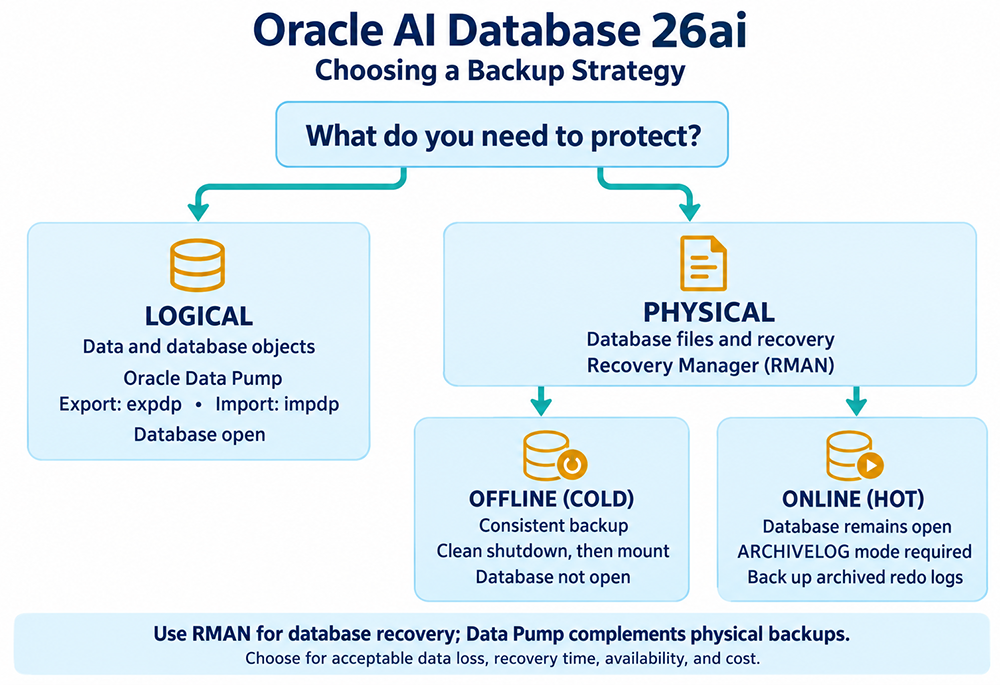
Oracle still divides protection into two classes. A physical backup copies the files the instance needs to reconstruct the database: data files, control files, the SPFILE, and archived redo logs. A logical backup extracts objects, tables, procedures, whole schemas, or a PDB's logical contents, into a dump file that is independent of those physical file names.
Physical backups are the foundation of any recovery plan. Logical backups are a supplement for migrations, refreshes, and object-level repair. They are not a substitute for RMAN when a disk fails. In the 26ai documentation, "backup" means a physical backup unless the text says otherwise.
The original Export utility (
Oracle still divides protection into two classes. A physical backup copies the files the instance needs to reconstruct the database: data files, control files, the SPFILE, and archived redo logs. A logical backup extracts objects, tables, procedures, whole schemas, or a PDB's logical contents, into a dump file that is independent of those physical file names.
Physical backups are the foundation of any recovery plan. Logical backups are a supplement for migrations, refreshes, and object-level repair. They are not a substitute for RMAN when a disk fails. In the 26ai documentation, "backup" means a physical backup unless the text says otherwise.
The original Export utility (
exp) has long since been desupported; this remains true in Oracle AI Database 26ai. Use Data Pump (expdp/impdp) instead. The original imp utility still exists, but only as a way to read very old exp dump files, not as a current backup tool.
Physical Backups
A physical backup copies database files from one place to another: disk to disk, disk to tape, or disk to cloud object storage. Recovery Manager (RMAN) is the engine Oracle expects you to use. User-managed operating-system copies still exist, but they do not validate blocks, track backup metadata, or integrate with incremental recovery the way RMAN does.
Physical backups give you two operating modes:
Physical backups give you two operating modes:
- Offline (consistent, cold). The CDB is shut down cleanly, then mounted but not opened. RMAN copies files that all share one checkpoint SCN. This is the only whole-database physical backup you can take in
NOARCHIVELOGmode. Nobody can use the database while it runs. - Online (inconsistent, hot). The database stays open. The backup of each data file is consistent only up to a different SCN, so you must apply archived redo after restore. That requires
ARCHIVELOGmode. This is the normal method for anything that cannot be taken down for a full copy.
BACKUP DATABASE PLUS ARCHIVELOG;RECOVER COPY, encrypt backups (AES256 in XTS mode is the current default once COMPATIBLE is 23.0.0 or higher), and send them to the Fast Recovery Area, a media manager, Recovery Appliance, or cloud storage. Connect to the CDB root to protect the whole container, or use BACKUP PLUGGABLE DATABASE for selected PDBs when connected to the root (connecting directly to a PDB instead, you'd use the ordinary BACKUP DATABASE command for that PDB alone). A PDB-only backup is not a complete disaster-recovery plan for the CDB.
Where the Backups Actually Go
"Send them to the Fast Recovery Area, a media manager, Recovery Appliance, or cloud storage" covers a real range of choices, and picking one is as much a policy decision as a technical one. The Fast Recovery Area, covered in this course's Module 4, is the default and simplest choice: it's disk-based, local, and centralizes backup pieces, archived logs, and flashback logs together with automatic space management. It's fast to restore from, but it's still disk on the same infrastructure as the database it's protecting, so it doesn't protect you against losing the whole site. A media manager writing to tape, or an object storage destination like OCI Object Storage or Amazon S3, moves the copy somewhere genuinely separate, at the cost of slower restores. Recovery Appliance sits in between: purpose-built, incremental-forever backup storage that's still fast to recover from but lives on separate infrastructure. Most real strategies use more than one of these together rather than picking exactly one, an FRA copy for fast, routine recovery, and a second copy somewhere physically separate for the disaster scenario the FRA alone can't cover.
Incremental Backups: Level 0 and Level 1
That "incremental level 0/1" mention is worth unpacking, since it's the mechanism that keeps a good RMAN schedule from turning into a full backup every single night. A level 0 backup copies every used block in a data file, functionally identical to a full backup, and serves as the baseline every subsequent incremental builds on. A level 1 backup, taken afterward, copies only the blocks that changed since the last level 0 (or the last level 1, if you're doing cumulative incrementals). With block change tracking enabled, RMAN doesn't even have to scan every block to find out what changed; it consults a small tracking file that already knows, which is what keeps incremental backups fast even on a large database.
The practical shape of this is a level 0 backup taken periodically (weekly is common), with level 1 backups filling the gaps in between (nightly, for instance), plus
The practical shape of this is a level 0 backup taken periodically (weekly is common), with level 1 backups filling the gaps in between (nightly, for instance), plus
RECOVER COPY rolling an image copy forward so restoring doesn't mean replaying a long chain of incrementals from scratch. RMAN can also validate what it just wrote, block by block, with an optional CHECK LOGICAL pass that looks for logical corruption once the physical block checks have already passed, catching problems a purely physical check wouldn't notice.
Recovery Catalog: Optional, but Worth Understanding
The decision tree below mentions adding a recovery catalog "if you manage many databases," and it's worth being specific about what that actually buys you, since by default RMAN's metadata lives only in each target database's own control file. A recovery catalog is a separate schema, typically kept in its own dedicated database, that stores RMAN metadata for one or more target databases. It gives you three things the control file alone doesn't: redundancy, since your backup metadata survives even if a target's control file and all its backups are lost together; centralization, since reporting and administration across many databases is easier from one place instead of connecting to each one separately; and longer history, since the control file only retains metadata for a limited window by default (seven days, unless you've changed
None of this is required to run RMAN at all; plenty of single-database environments never set one up, relying on the control file alone. It becomes worth the extra piece of infrastructure specifically once you're managing enough databases, or need long enough backup history, that losing the control file's short memory would actually hurt.
CONTROL_FILE_RECORD_KEEP_TIME, covered earlier in this course), while a recovery catalog can hold that history for as long as you want it to.
None of this is required to run RMAN at all; plenty of single-database environments never set one up, relying on the control file alone. It becomes worth the extra piece of infrastructure specifically once you're managing enough databases, or need long enough backup history, that losing the control file's short memory would actually hurt.
Logical Backups
A logical backup does not copy data files. Data Pump reads object definitions and rows and writes a dump file, or streams them over a database link. The database must be open. Typical uses:
- Move a schema or PDB to another CDB or to Autonomous AI Database
- Refresh a test environment
- Recover a dropped table when Flashback or an RMAN table recovery is not available
- Filter objects with
INCLUDE,EXCLUDE, andQUERY
exp did; the dump file gets written by the database server itself, to a path the database can see, not wherever your client happens to be running. Creating that directory object is a one-time setup step:
CREATE OR REPLACE DIRECTORY dpump_dir AS '/u01/app/oracle/dpdump';
GRANT READ, WRITE ON DIRECTORY dpump_dir TO app;expdp system/********@orc1pdb1 \
schemas=app \
dumpfile=app_%U.dmp \
parallel=4 \
compression=all%U substitution in the file name is what lets a parallel job write multiple dump file pieces at once rather than serializing everything through a single file.
A Basic Decision Tree
Start with the recovery question, not the tool:
- Can you shut the database down for a consistent copy?
- No, you need
ARCHIVELOGmode and online RMAN backups. - Yes, and data loss since the last backup is acceptable: offline RMAN (or a clean user-managed copy) in
NOARCHIVELOGcan be enough for a lab.
- No, you need
- Do you need to reconstruct the whole CDB after media failure?
- Yes: physical RMAN backups of the CDB, plus archived redo, plus a usable SPFILE and control file. Add a recovery catalog if you manage many databases.
- Do you also need object movement or logical refresh?
- Yes: add Data Pump. Do not retire the RMAN schedule.
- Do you need faster logical rewind than restore?
- Consider Flashback Database, Flashback Table, and a sized Fast Recovery Area. Those complement backups; they do not replace them.
One point worth remembering as you build any of this out: a backup strategy is only as good as its last successful restore, not its last successful backup job. A backup that completes without error but has never actually been restored and opened is still an unverified assumption, not a tested recovery plan. That's true whichever path this decision tree leads you down.
The next lesson is about noarchivelog mode.
The next lesson is about noarchivelog mode.