Review the maintenance decisions and operation sequence by completing the Control File Maintenance - Exercise.
| Lesson 4 | Control File Maintenance |
| Objective | Describe how to add and move control-file copies, protect recovery metadata, and choose between restoring a backup and recreating a control file. |
Control File Maintenance in Oracle AI Database 26ai
A control file records the database identity, datafile and redo log locations, checkpoint information, and recovery metadata. Oracle needs this information to mount the database and determine how its physical files fit together. In a multitenant database, control files belong to the container database (CDB). Pluggable databases (PDBs) share them.
Maintenance begins by identifying what remains usable. Adding another current copy, restoring an older backup, and reconstructing a control file from SQL are different operations. Choosing the appropriate method preserves available metadata and determines whether media recovery and RESETLOGS are necessary.
Choose the appropriate maintenance operation
| Condition | Action | Recovery consequence |
|---|---|---|
| Current files are healthy; another location is needed. | Add or move a copy while the instance is stopped. | Restart normally after updating the configuration. |
| One current copy survives a control-file failure. | Repair the failed member using the surviving current copy. | No media recovery is needed solely for this loss if other database files are intact. |
| All current copies are unusable; a usable backup exists. | Restore the backup control file. | The RMAN recovery path requires recovery followed by OPEN RESETLOGS. |
| All current copies and usable backups are unavailable. | Consider database-specific CREATE CONTROLFILE reconstruction. | Recoverability depends on the surviving files, redo, and reconstruction choices. |
Maintain at least two active copies on separate physical disks or independent storage failure domains. Different drive letters alone do not establish separation. Oracle updates the configured copies during operation, but losing a member can still interrupt the instance. Multiplexing provides surviving recovery material; backups preserve earlier recoverable states. Oracle describes these distinctions in Managing Control Files.
The relationship between the files explains the maintenance sequence. During startup, Oracle reads initialization parameters before mounting the database through its control files. The control file identifies datafiles and redo needed for subsequent operations. A correct SPFILE entry cannot compensate for a missing physical control file, and a correctly copied file remains unused until the active configuration includes its path.
Inspect the database and its parameter source
The following example uses a single-instance CDB, an SPFILE, and manually named Windows filesystem files. Connect to the intended database through SQL*Plus as an authorized SYSDBA. Confirm that the current container is CDB$ROOT and record the configuration:
CONNECT / AS SYSDBA
SHOW CON_NAME
SHOW PARAMETER spfile
SHOW PARAMETER control_files

SELECT name, dbid, log_mode, force_logging
FROM v$database;

SELECT name FROM v$controlfile ORDER BY name;
SHOW PDBS
A populated spfile value identifies the server parameter file used at startup. An empty value indicates text-PFILE startup, which requires the alternative procedure below. Record existing control-file locations and the PDB open states the application requires.
CONTROL_FILES is a static parameter. With SPFILE startup, change it using ALTER SYSTEM and SCOPE=SPFILE; the saved setting takes effect at the next startup. The change does not create a physical file. A binary SPFILE must be managed through supported commands rather than edited as text. See the parameter reference and ALTER SYSTEM documentation.
Adding a second control file
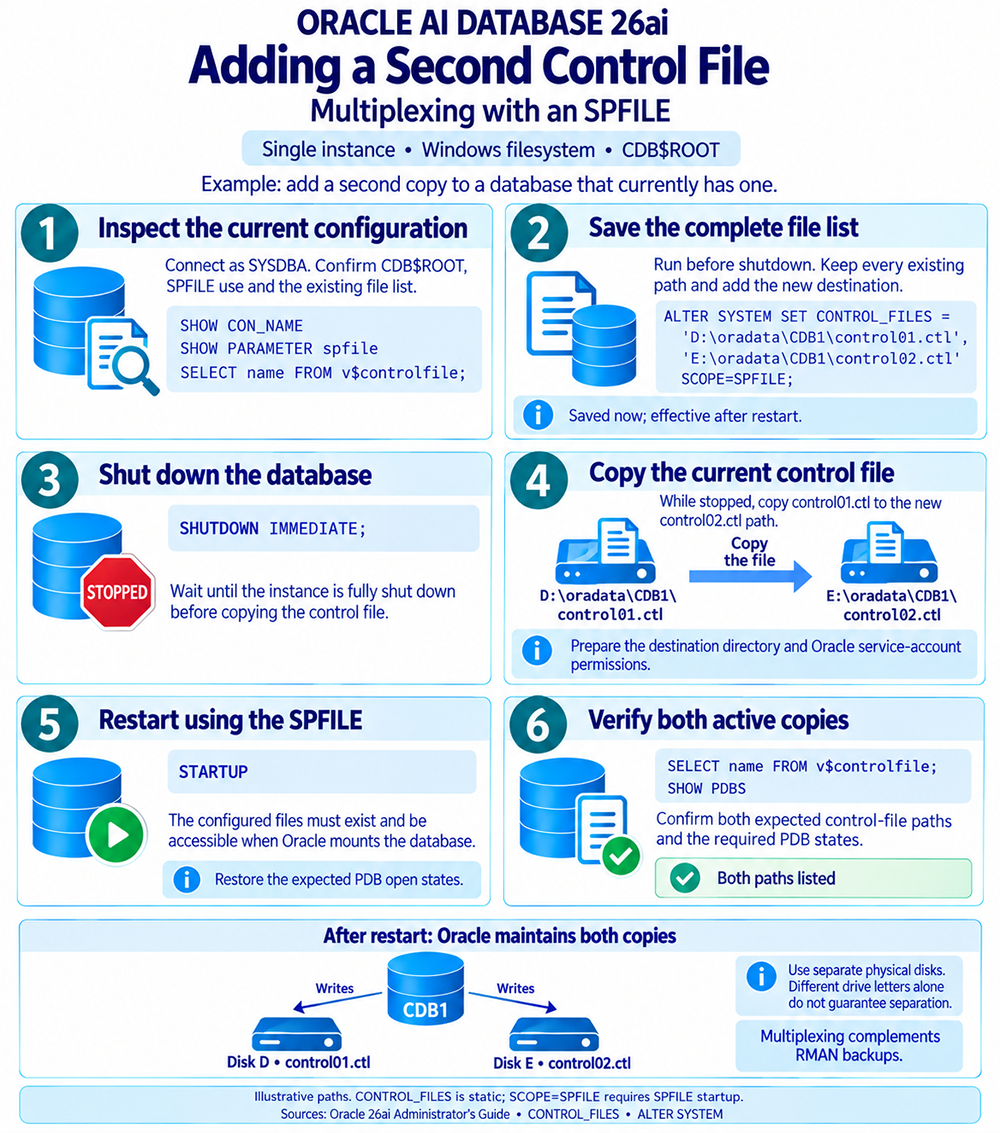
Assume that the current file is D:\oradata\CDB1\control01.ctl and the new copy will be E:\oradata\CDB1\control02.ctl. Substitute actual server paths. Prepare the destination directory and Oracle service-account permissions, confirm independent storage, and schedule the CDB outage. Preserve the existing configuration and check that backups are available.
-
Inspect the current configuration. Use the preceding queries to confirm SPFILE startup and identify the current control file. If more than one copy already exists, retain every intended entry when extending the list.
-
Save the complete list before shutdown. While the instance is running, include the existing file and new destination:
ALTER SYSTEM SET CONTROL_FILES =
  'D:\oradata\CDB1\control01.ctl',
  'E:\oradata\CDB1\control02.ctl'
  SCOPE=SPFILE;
The running instance continues using its current configuration. This is why the new path can be saved before the file is copied. Use
SCOPE=SPFILEfor this static setting. -
Shut down cleanly. In SQL*Plus, issue:
SHUTDOWN IMMEDIATE;Wait for shutdown to finish. Keep the instance stopped throughout the filesystem copy so the source does not change.
-
Copy and verify the current file. Run these commands in Windows PowerShell on the database server. The destination directory must exist, and the destination filename must be unused:
if (Test-Path -LiteralPath 'E:\oradata\CDB1\control02.ctl') {
    throw 'Destination already exists; choose an unused path.'
}

Copy-Item -LiteralPath 'D:\oradata\CDB1\control01.ctl' -Destination 'E:\oradata\CDB1\control02.ctl'

Get-FileHash -LiteralPath 'D:\oradata\CDB1\control01.ctl', 'E:\oradata\CDB1\control02.ctl' -Algorithm SHA256
Confirm matching hashes before restarting. This comparison belongs to the stopped-instance phase; active control files change during database operation. Use the current control file, not an older backup or a text trace.
-
Restart using the updated SPFILE. Return to SQL*Plus:
STARTUPEvery configured file must exist and be accessible when Oracle mounts the database. Restore the required PDB open states before returning application access.
-
Verify both active copies. Check the resulting configuration:
SHOW PARAMETER control_files
SELECT name FROM v$controlfile ORDER BY name;
SHOW PDBS
The example should list the D: and E: files. If startup reports a file-access or consistency problem, investigate the paths, permissions, and copy before continuing.
When the instance uses a text PFILE
Shut down, copy the current control file while stopped, and edit the text initialization file actually used at startup. Retain the complete list:
control_files = ('D:\oradata\CDB1\control01.ctl',
                 'E:\oradata\CDB1\control02.ctl')
Restart explicitly with that PFILE, substituting its actual location for this example:
STARTUP PFILE='D:\oracle\admin\CDB1\pfile\initCDB1.ora'Verify the paths and PDB states as above. A small PFILE containing only an SPFILE=... pointer still directs startup to a binary SPFILE; inspect the actual startup arrangement before choosing how to change parameters.
Moving or retiring an existing location
Moving a copy replaces one configured path while retaining the other active members. Building on the previous example, move the E: copy to F: while keeping the D: file. Before shutdown, save:
ALTER SYSTEM SET CONTROL_FILES =
  'D:\oradata\CDB1\control01.ctl',
  'F:\oradata\CDB1\control02.ctl'
  SCOPE=SPFILE;
Shut down the instance, then copy the current E: file to the prepared, unused F: destination. Apply the same existence, permissions, and offline hash checks used when adding a copy. The PowerShell copy command is:
Copy-Item -LiteralPath 'E:\oradata\CDB1\control02.ctl' -Destination 'F:\oradata\CDB1\control02.ctl'Restart and verify that V$CONTROLFILE lists D: and F:. Keep the old file through verification, then retire it according to the maintenance plan. Removing a path from CONTROL_FILES does not delete the operating-system file. Once Oracle resumes updating the active members, the retired copy becomes stale.
ALTER DATABASE RENAME FILE does not relocate control files. Their locations come from the initialization parameter. Routine relocation also does not require CREATE CONTROLFILE or RESETLOGS.
If a failed path prevents mounting, an instance can start in NOMOUNT to change the SPFILE setting. Another shutdown and startup is then needed to load that static change. This is useful during an incident, rather than an extra cycle required for every planned move.
When one current copy survives and other database files are intact, repair or relocate the failed member while stopped, then restart without media recovery solely for that control-file loss. Any temporary reduction in the number of copies should be followed by restoring multiplexed protection.
Protecting the control file and its recovery metadata
An RMAN control-file backup preserves binary recovery information. A trace script records SQL for reconstruction. Keep both for their respective purposes. At the RMAN prompt, connected to the target CDB root with appropriate backup privileges, inspect autobackups and create explicit backups:
Active copies and backups protect different points in time. An additional active member receives subsequent database changes along with the original. A retained backup preserves the information recorded when that backup was taken. Keeping both helps address physical file loss while retaining historical recovery material. Record the DBID and backup locations outside the database so that losing its control files does not also remove the information needed to find their backups.
SHOW CONTROLFILE AUTOBACKUP;
BACKUP CURRENT CONTROLFILE;
BACKUP SPFILE;
The SPFILE command assumes SPFILE startup. Control-file autobackups are enabled by default for CDBs, but verify the actual configuration and availability of usable backups. Review protection after structural changes such as adding datafiles or redo log groups. Oracle explains the settings in Configuring the RMAN Environment.
Generate and locate a reconstruction trace
While the CDB is mounted or open, run the following in one SQL*Plus session:
ALTER DATABASE BACKUP CONTROLFILE TO TRACE;

SELECT name, value
FROM v$diag_info
WHERE name IN ('Diag Trace', 'Default Trace File');
The default output is stored in the Automatic Diagnostic Repository (ADR). Diag Trace identifies the directory, and Default Trace File identifies the current process's trace file. The alert log can also identify the generated file. Use these reported locations instead of assuming an installation-specific trace directory. See Oracle's diagnostic-file guidance.
The trace contains CREATE CONTROLFILE and related recovery statements. Without an explicit RESETLOGS or NORESETLOGS choice during trace generation, Oracle provides both alternatives for later review. Creating this text does not recreate the control file, reset logs, or delete recovery records.
A reconstructed control file may lack historical RMAN records and archived-log information retained by a binary backup. Missing repository metadata is different from deleted backup files. Recovery may require reconciling available backups with the repository. Oracle's control-file backup documentation explains what the two backup forms preserve.
Restoring a backup control file
If every current copy is unusable and a usable backup exists, restore the backup rather than manually rebuilding its contents. The RMAN procedure prepares the instance in NOMOUNT, restores the control file, mounts the database, recovers it, and opens with RESETLOGS after successful recovery. In this backup-control-file recovery path, RECOVER is required even when no datafiles were restored.
Backup selection depends on the recorded DBID, recovery-catalog availability, backup format, and necessary channels. An autobackup search must have the correct context. If the backup-piece handle is known, it can identify the source directly. Follow the applicable RMAN backup-control-file recovery procedure, including available redo and any missing repository information.
This differs from copying a surviving current member: an older backup can lag behind the database's current structure and recovery history. Restoring it alone does not establish that the database is ready to open.
Recreating a control file from SQL
CREATE CONTROLFILE is principally a recovery option when all current copies are lost and no usable control-file backup remains. Oracle also documents specific structural uses. Ordinary growth does not always require reconstruction: the datafile section can expand within DB_FILES, and log-history storage can grow. For a database-name change, Oracle recommends the separate DBNEWID workflow.
Use a verified script derived from the actual database's trace and inventory. A short example listing only several root datafiles cannot represent an entire CDB. While the database is healthy, capture its file inventories, or recover this information from retained records:
SELECT con_id, file#, name
FROM v$datafile
ORDER BY con_id, file#;

SELECT group#, type, member
FROM v$logfile
ORDER BY group#, member;

SELECT con_id, file#, name
FROM v$tempfile
ORDER BY con_id, file#;
Account for the root, PDB$SEED, and application PDBs. Handle read-only or offline files according to the generated script and documented recovery procedure. Tempfiles must not be placed in the CREATE CONTROLFILE datafile clause. Inventory collection and statement construction therefore require separate review.
Check redo membership as carefully as datafile names. The reconstruction statement must describe the applicable online redo groups and their members. The inventory's TYPE column helps distinguish online and standby redo entries; do not paste every returned path into a clause without checking its purpose. Preserve actual group numbers and relevant file attributes rather than substituting values from another database.
Prepare, reconstruct, and recover
Preserve the available files. Back up surviving datafiles, redo, and configuration before reconstruction. Confirm the intended control-file destinations and retain evidence needed to recover from an unsuccessful attempt.
Prepare the instance. Use SYSDBA or SYSBACKUP privileges. No instance may have the database mounted during
CREATE CONTROLFILE. If the SPFILE destinations are changed, restart to load them before relying on the new list.Start without mounting. From the stopped state, use SQL*Plus:
STARTUP NOMOUNTRun the reviewed reconstruction statement. Preserve the actual identity, required file entries, archive mode, force-logging state, and applicable options. The
REUSEclause can overwrite existing control files and requires a deliberate choice.Complete the applicable recovery. Recovery requirements depend on the reconstruction options and the condition of datafiles and redo. Open only after those requirements are satisfied, then back up the new control file and verify the database.
NORESETLOGS reconstruction requires the intact current online redo logs and an unchanged database name. After any required complete recovery and consistency checks, the applicable normal-open command is:
ALTER DATABASE OPEN;A RESETLOGS reconstruction follows different redo handling and requires the corresponding open after appropriate recovery:
ALTER DATABASE OPEN RESETLOGS;These are alternative paths. SET DATABASE requires RESETLOGS, and missing required redo can limit recovery. RESETLOGS does not recreate missing transactions, reset the DBID or database SCNs to 1, or automatically invalidate every earlier backup. Follow the CREATE CONTROLFILE reference and the applicable user-managed recovery procedure, including backup-control-file recovery semantics where required.
Verify the result and account for the environment
For an addition or move, confirm the live paths, successful startup, and required PDB states. After restoration or reconstruction, also inspect recovery output and the alert log, reconcile file inventories, verify application access, and restore backup and repository protection. Investigate MISSINGnnnn entries according to the original file state and recovery history; neither unconditional renaming nor dropping a tablespace is a general repair.
Retain the before-and-after configuration with the maintenance record. It should identify the source and destination files, successful copy verification, the paths reported after restart, and any PDB state changes. This record makes the next maintenance operation easier to assess and helps distinguish retired files from the copies Oracle currently maintains.
For ASM, use documented storage-specific operations rather than filesystem copy commands. Changing Oracle Managed Files destination parameters does not relocate existing files. RAC requires shared accessible control-file storage, consistent parameter lists, and coordinated instance management. Data Guard requires role-specific recovery planning. These environments retain the same maintenance principles but need procedures matched to their storage and startup configuration.
The next lesson examines redo log files, which record the changes needed to recover the datafiles whose locations and recovery state are tracked in the control file.