| Lesson 4 | The easiest way to query a varray |
| Objective | Write a simple array query. |
Simple Varray Query in Oracle (SELECT the Collection as a Whole)
What Is a Varray?
Ordered, Fixed-Maximum, Inline-Stored
A varray — variable-size array — is an ordered collection of elements, all of the same declared type, with a maximum element count specified at type creation time. The maximum size is declared in the VARRAY(n) clause and cannot be exceeded without an ALTER TYPE statement. Elements are accessed by integer index starting at 1 and maintain their insertion order — element 1 is always the first element inserted, element n is the nth.Varrays can store instances of any SQL datatype or user-defined object type. They are defined at the schema level with CREATE OR REPLACE TYPE and can be used as column types in relational tables, as PL/SQL variable types, and as parameters to stored subprograms. When used as a table column, a varray stores its data inline with the parent row for small-to-medium collections — in the same data block as the other columns. For large varrays that exceed the block size, Oracle stores the data in a LOB segment, but the collection remains logically associated with the parent row.
Varray vs Nested Table — The Storage Difference That Simplifies Querying
The fundamental reason that querying a varray is simpler than querying a nested table comes down to storage architecture. Nested table data is stored out-of-line in a separate segment, linked to the parent row through a hidden NESTED_TABLE_ID column. To query nested table elements with SQL, the TABLE() function must navigate that out-of-line storage boundary — hence the correlated join syntax covered in lessons 2 and 3.
Varray data is stored inline. When Oracle reads the parent row from CUSTOMER_OBJ_TABLE, the PHONE_LIST varray data travels with that row — it is part of the same physical storage unit. A simple SELECT of the varray column name retrieves the entire collection in one operation. No TABLE() is needed because there is no out-of-line boundary to cross. The varray arrives as a single structured value containing all its elements, ready to be processed by the application or by a PL/SQL block.
The Simplest Varray Query
Why This Is the Simplest Form
The simplest way to query a varray is to name the varray column in a SELECT statement, exactly as you would name any other column. The database returns the entire varray — all of its elements — as a single value in the result set. This form is appropriate when the application or PL/SQL block needs the complete collection and will process individual elements programmatically after retrieval, rather than filtering or joining against individual elements in SQL.Syntax — SELECT the Varray Column
The syntax for a simple varray retrieval query follows the standard three-clause SELECT structure:
SELECT <varray name>
FROM table_name
WHERE <condition for selection>;
SELECT names the varray column to retrieve as a whole collection value. FROM specifies the parent object table. WHERE identifies the specific row — returning that row's entire varray as a single result cell.
What the Result Looks Like — The Whole Collection as One Value
When this query executes, Oracle returns one row for each parent table row that matches the WHERE condition. The varray column appears as a single cell in the result set — not as multiple rows. In Oracle SQL Developer and SQL*Plus, the varray value is displayed using its constructor expression syntax. For a PHONE_LIST_TY varray containing two phone numbers, the result cell displays as:
PHONE_LIST_TY('555-0192', '555-0317')Querying a Varray — Example
The phone_list Schema
The example used throughout this lesson is built on a CUSTOMER_OBJ_TABLE that stores customer contact information including a varray of phone numbers. The schema definition establishes the varray type and the object table that uses it:-- Define the varray type — maximum 5 phone numbers per customer
CREATE OR REPLACE TYPE phone_list_ty AS VARRAY(5) OF VARCHAR2(20);
/
-- Define the customer object type using the varray
CREATE OR REPLACE TYPE customer_ty AS OBJECT (
cust_id NUMBER,
cust_name VARCHAR2(100),
phone_list phone_list_ty
);
/
-- Create the object table
CREATE TABLE customer_obj_table OF customer_ty;The Example Query
To retrieve the complete phone list for the customer whose CUST_ID is 26, the query selects the PHONE_LIST varray column by name:SELECT phone_list
FROM customer_obj_table
WHERE cust_id = 26;phone_list varray column from customer_obj_table for the row where cust_id = 26. The entire varray is returned as a single collection value — no TABLE() flattening is needed to retrieve the varray whole.Accessing Individual Elements in PL/SQL
After the varray is retrieved into a PL/SQL variable, individual elements are accessed by integer index. The following block fetches the phone_list varray for customer 26 and iterates through its elements using a FOR loop:DECLARE
v_phones phone_list_ty;
BEGIN
-- Fetch the entire varray into a PL/SQL variable
SELECT phone_list
INTO v_phones
FROM customer_obj_table
WHERE cust_id = 26;
-- Access individual elements by index (1-based)
DBMS_OUTPUT.PUT_LINE('Primary phone: ' || v_phones(1));
IF v_phones.COUNT >= 2 THEN
DBMS_OUTPUT.PUT_LINE('Secondary phone: ' || v_phones(2));
END IF;
-- Iterate all elements using COUNT
FOR i IN 1..v_phones.COUNT LOOP
DBMS_OUTPUT.PUT_LINE('Phone ' || i || ': ' || v_phones(i));
END LOOP;
END;
/Single-Dimensional SQL Collections — Figure m4-4.1
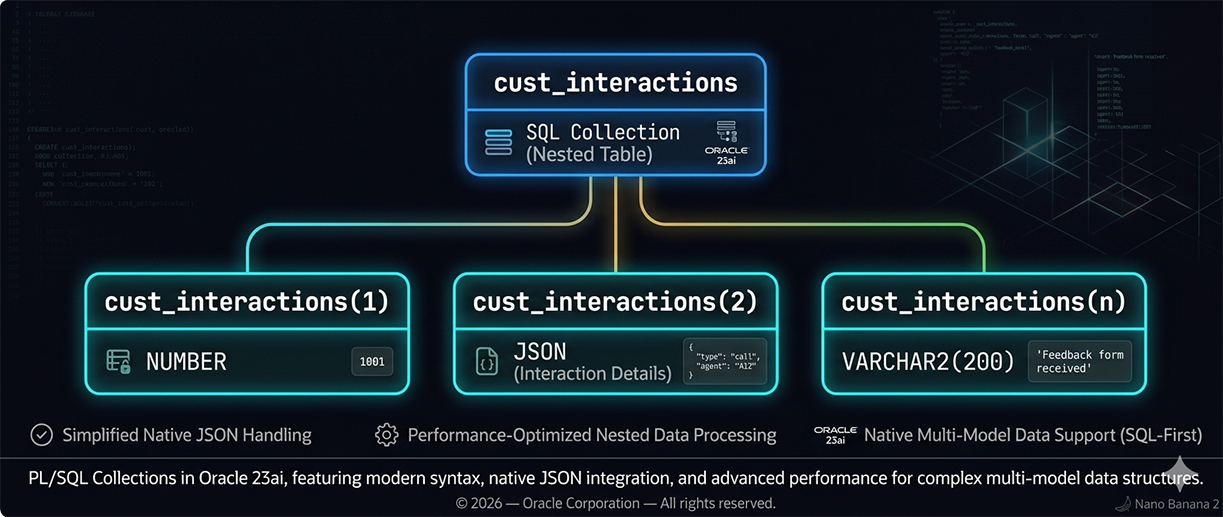
The Inverted Tree Structure
The inverted tree representation captures two key properties of single-dimensional collections. First, the collection has a single root — the collection variable itself — from which all elements branch. This single root means the collection is a flat, one-level structure: there are no nested levels, no sub-collections at each node. Second, each leaf node represents one element with its own index and its own datatype value. In Oracle 23ai, those element datatypes can include NUMBER, VARCHAR2, DATE, JSON, and user-defined object types — the diagram's three nodes show NUMBER (1001), JSON (interaction details), and VARCHAR2(200) ('Feedback form received') as concrete examples of the multi-type flexibility available in modern Oracle collections.Sequential vs Non-Sequential Indexing
Varrays and nested tables use sequential integer indexes starting at 1. The index increments by one for each element — element 1, element 2, element 3 — enabling traversal by a simple FOR loop from 1 to COUNT. This sequential structure is what the inverted tree represents: each branch is one step in a numbered sequence.Associative arrays — the third Oracle collection type introduced in lesson 1 — support non-sequential indexing. An associative array can be indexed by any integer (including negative numbers and non-contiguous values) or by unique VARCHAR2 strings. This makes associative arrays suitable for in-memory lookup tables keyed by a business identifier rather than a position number. The trade-off is that associative arrays are PL/SQL-only — they cannot be stored as column types in relational tables. Varrays and nested tables can be stored in table columns and are therefore the collection types relevant to SQL querying.
Three Types of Oracle Collections
Varrays
Varrays are ordered, fixed-maximum collections stored inline with the parent row. They are best suited for small, bounded sets of same-type values where element order is significant and the maximum count is known at schema design time — phone numbers, email addresses, status history, measurement readings. The maximum size constraint is enforced by the database engine; INSERT and UPDATE operations that would exceed it fail with an error. Varrays support element access by integer index and can be queried whole (this lesson) or flattened with TABLE() (lesson 5).Nested Tables
Nested tables are ordered by insertion but support arbitrary deletion — individual elements can be removed, leaving a sparse index sequence. They have no declared maximum size and are stored out-of-line in a separate segment. Nested tables are better suited for variable-size, potentially large collections where individual element deletion is required. They require TABLE() flattening to query individual elements in SQL, as covered in lessons 2 and 3.Associative Arrays
Associative arrays are in-memory PL/SQL-only structures — they cannot be stored as column types in relational tables. They are indexed by integer or VARCHAR2 and have no maximum size constraint. They are the most flexible collection type for in-memory computation — lookup tables, caches, intermediate result sets — and the least suitable for persistent SQL storage. Because they cannot be stored in table columns, they are not part of the SQL querying patterns covered in this module.Collections in SQL vs PL/SQL Only
The SQL/PL/SQL boundary is the critical characteristic for this module. Collections of SQL datatypes — types defined with CREATE OR REPLACE TYPE at the schema level — work in both SQL and PL/SQL environments. They can be stored in table columns, queried with SELECT, and manipulated with DML. Collections of PL/SQL datatypes — types defined with TYPE ... IS TABLE OF or TYPE ... IS VARRAY inside a PL/SQL block — are available only within that PL/SQL context; they cannot be used in SQL statements or stored in table columns.Collection Categories: Arrays and Lists
Arrays — Fixed Physical Size (Varrays)
Arrays in Oracle's collection model are varrays. They have a physical size allocated when the type is defined — the VARRAY(n) maximum. This pre-declared limit makes varrays predictable in storage consumption and enables inline storage for small collections. The limit is a constraint, not a pre-allocation — a VARRAY(5) that currently contains 2 elements does not consume the space of 5 elements; it allocates only what is needed for the current elements, up to the declared maximum.Lists — No Physical Limit (Nested Tables)
Lists in Oracle's collection model are nested tables. They have no declared maximum size and grow dynamically as elements are added. The practical upper bound on a nested table's size is available storage in the out-of-line segment, not a schema-level constraint. This makes nested tables appropriate for collections whose size cannot be predicted at design time — order line items, audit log entries, sensor readings accumulated over time.
The SGA Memory Constraint
When collections are used as in-memory PL/SQL structures — associative arrays, or nested table and varray variables populated in PL/SQL blocks — their practical size is constrained by the memory available in the System Global Area (SGA). Very large in-memory collections that approach SGA memory limits will cause performance degradation or ORA-04031 errors. For collections that may grow very large, storing them as persistent table columns with out-of-line nested table storage is more memory-efficient than holding them in PL/SQL variables.
TABLE() function to flatten the collection into individual queryable rows.