| Lesson 2 | The elements of databases |
| Objective | Understand the Relationship between Database Elements |
Database Elements Explained (Schema, Metadata, and Logical Containers)
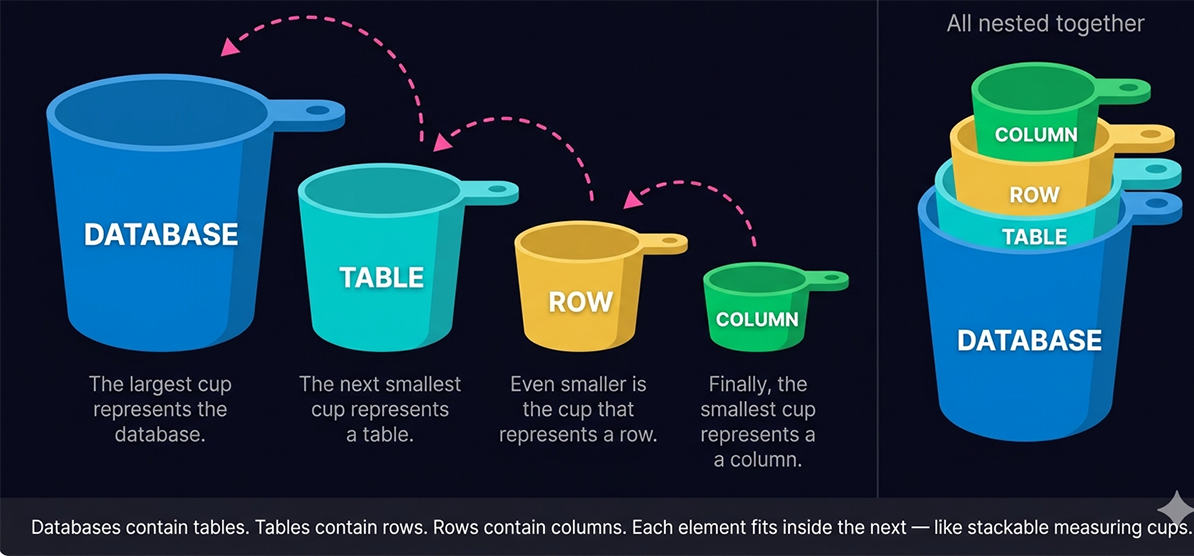
Lesson 1 introduced the four-level hierarchy — database, table, row, column — and the measuring cups analogy that makes the nesting relationship intuitive. This lesson goes deeper into each element, introduces the concepts of metadata and schema that give the hierarchy its structure, and covers the SQL commands used to create databases across the major database engines. By the end of this lesson you will be able to describe not just what each element is, but how the elements relate to each other and how the database engine uses metadata to manage and query them.
Databases and Spreadsheets — An Analogy
Databases are straightforward to understand once you map their structure to something familiar. Think of a database the way you think about a folder of spreadsheet files on your computer. The folder itself — the directory that holds all your spreadsheet files — is the database. It is the outermost container, the named location where all the related data lives together.
Each individual spreadsheet file inside that folder represents a table in the database. Just as you might have one spreadsheet for customers and another for orders and a third for products, a database has one table for customers, one for orders, and one for products. Each file — each table — has its own structure, its own column headers, and its own rows of data.
From there, the mapping continues naturally. The rows inside a spreadsheet correspond directly to rows in a database table — each row is one complete record, one horizontal stripe of information. The columns in the spreadsheet correspond to columns in the database table — each column is one specific attribute, one vertical slice of a particular type of information across all records.
The key difference between a spreadsheet folder and a relational database is that the database enforces relationships between its tables. A spreadsheet folder is a passive container — files sit inside it with no awareness of each other. A relational database is an active system — its tables can reference each other through foreign keys, the engine enforces constraints across tables, and SQL queries can combine data from multiple tables in a single operation.
Each individual spreadsheet file inside that folder represents a table in the database. Just as you might have one spreadsheet for customers and another for orders and a third for products, a database has one table for customers, one for orders, and one for products. Each file — each table — has its own structure, its own column headers, and its own rows of data.
From there, the mapping continues naturally. The rows inside a spreadsheet correspond directly to rows in a database table — each row is one complete record, one horizontal stripe of information. The columns in the spreadsheet correspond to columns in the database table — each column is one specific attribute, one vertical slice of a particular type of information across all records.
The key difference between a spreadsheet folder and a relational database is that the database enforces relationships between its tables. A spreadsheet folder is a passive container — files sit inside it with no awareness of each other. A relational database is an active system — its tables can reference each other through foreign keys, the engine enforces constraints across tables, and SQL queries can combine data from multiple tables in a single operation.
The Two Types of Data a Database Stores
Efficient data management requires a database that stores not just the data itself, but also a complete description of that data. A relational database is a shared, integrated computer structure that stores two distinct categories of information.
End-user data lives in the rows of database tables. Each row is one instance of end-user data — one customer, one product, one order. The columns define what attributes each instance has. The values in each cell are the actual facts: the customer's name is "Gauss", the product price is 49.99, the order date is 2026-04-15.
The metadata provides a description of the data characteristics and the set of relationships that link the data found within the database. It complements and expands the value of the end-user data by giving the database engine — and any developer working with the database — a complete, precise picture of what the data means and how it is structured.
In SQL, the standard way to query metadata is through the
End-User Data — The Raw Facts
End-user data is the raw factual content that the database exists to store and retrieve — the customer names, product prices, order dates, transaction amounts, and all the other specific values that represent real-world entities and events. This is the data that application users create, read, update, and delete through the software systems built on top of the database.End-user data lives in the rows of database tables. Each row is one instance of end-user data — one customer, one product, one order. The columns define what attributes each instance has. The values in each cell are the actual facts: the customer's name is "Gauss", the product price is 49.99, the order date is 2026-04-15.
Metadata — Data About Data
Metadata[1] is data about the data — the structural description that tells the database engine how the end-user data is organized and what rules it must follow. The metadata component of a database stores the name of each table, the name of each column in each table, the data type of each column (integer, text, date, decimal), whether each column can contain NULL values, which columns are primary keys, which columns are foreign keys referencing other tables, and what constraints apply to what values.The metadata provides a description of the data characteristics and the set of relationships that link the data found within the database. It complements and expands the value of the end-user data by giving the database engine — and any developer working with the database — a complete, precise picture of what the data means and how it is structured.
The Self-Describing Database
The combination of end-user data and metadata is why relational databases are often described as "collections of self-describing data." The database carries its own documentation inside itself. You do not need a separate manual to understand what data a table contains — you can query the metadata directly and the database tells you: here are the tables, here are their columns, here are their data types, here are their constraints.In SQL, the standard way to query metadata is through the
information_schema — a set of read-only views defined by the SQL standard that expose the database's structural information as queryable tables. This is covered in detail at the end of this lesson.
Database Schema
A schema is a named group of related database objects — tables, views, indexes, constraints, and other structures — that belong together and are managed as a unit. Within a schema, objects have defined relationships to one another. A schema has one owner: a database user account that has the authority to create, modify, and drop any object within that schema.
It is important to distinguish between two uses of the word "schema" that you will encounter. In the narrow sense, a schema is a named namespace within a database — the container that groups related objects. In the broader sense, "the schema" of a table or database refers to its structural definition — the column names, data types, and constraints that define what the table looks like. Both uses are common, and context usually makes the intended meaning clear.
When a database designer produces an Entity-Relationship diagram or writes a set of CREATE TABLE statements, they are working at the conceptual model level. The result — the collection of table definitions — is what most developers mean when they say "the schema."
The internal model separates the physical requirements of hardware and operating systems from the logical data model. A well-designed relational database hides the physical model from the SQL developer — you write a SELECT statement against the logical structure (tables and columns), and the engine handles the physical execution. Understanding the internal model becomes important when tuning query performance, configuring storage, or diagnosing I/O bottlenecks.
For programmatic schema exploration, every major SQL database supports the
It is important to distinguish between two uses of the word "schema" that you will encounter. In the narrow sense, a schema is a named namespace within a database — the container that groups related objects. In the broader sense, "the schema" of a table or database refers to its structural definition — the column names, data types, and constraints that define what the table looks like. Both uses are common, and context usually makes the intended meaning clear.
The Conceptual (Logical) Model
The conceptual model, also called the logical model, is the database design at its most abstract level — the definition of what entities exist, what attributes they have, and what relationships connect them, expressed independently of any physical implementation. The conceptual model deals with organizational structures: what tables are needed, what columns each table requires, what the primary and foreign key relationships are, and what constraints ensure data integrity.When a database designer produces an Entity-Relationship diagram or writes a set of CREATE TABLE statements, they are working at the conceptual model level. The result — the collection of table definitions — is what most developers mean when they say "the schema."
The Internal (Physical) Model
The internal model, also called the physical model, deals with how the database engine actually stores and accesses the data on disk. It covers the physical organization of data pages, the structure of indexes, the location of data files, the configuration of storage engines, and the physical access paths the query optimizer uses to retrieve data efficiently.The internal model separates the physical requirements of hardware and operating systems from the logical data model. A well-designed relational database hides the physical model from the SQL developer — you write a SELECT statement against the logical structure (tables and columns), and the engine handles the physical execution. Understanding the internal model becomes important when tuning query performance, configuring storage, or diagnosing I/O bottlenecks.
The External (Application Interface) Model
The external model, or application interface, deals with how users and applications access the schema. It includes the views, stored procedures, APIs, and data input forms through which application users interact with the database without directly touching its underlying table structure. The external model allows different applications to have different views of the same underlying data — a customer-facing application sees customer and order data, a reporting application sees aggregated sales figures, an administrative application sees the full schema.Exploring a Schema with Modern Tools
In 2026, the most practical way to explore a database schema is through a visual database client. DBeaver, Beekeeper Studio, and HeidiSQL all provide a schema browser — a tree-view panel showing the database's tables, columns, indexes, and constraints in a navigable hierarchy. Expanding a table node in DBeaver shows its columns with their data types and nullability, its indexes, and its foreign key relationships — all the information from the conceptual and internal models made visible without writing a single query.For programmatic schema exploration, every major SQL database supports the
information_schema views. The command SHOW TABLES in MySQL or \dt in PostgreSQL lists the tables in the current database. These commands and the information_schema are covered in the final section of this lesson.
Databases, Tables, Rows, and Columns — In Depth
Databases as Logical Containers
A database is a logical container — a named boundary that groups all the tables, views, indexes, and other objects that belong to a single application or domain. Tables inside the same database can reference each other with foreign keys. Tables in different databases on the same server cannot reference each other with foreign keys in most database systems without explicit cross-database configuration.You will recall from the normalization lessons that several different tables make up a given information set. A retail application has a Customers table, an Orders table, an Items table, and an OrderLines table. All of these tables reside in a single database — the logical container that treats them as one coherent system. The database name is specified when connecting to the server and implicitly scopes every table reference in your SQL statements.
A single database server can host many databases simultaneously — one per application, one per environment (development, staging, production), or one per client in a multi-tenant system. Creating a new database is a one-time setup operation; most of your daily SQL work will involve creating and querying tables inside an existing database.
Tables as Collections of Related Information
Tables contain the sets of normalized information that represent your data. A table is not an individual data element but a collection of very specific, related items — all sharing the same column structure. A Customers table contains customer records. A Products table contains product records. A Sales table contains sales transaction records. Each table has a single, well-defined subject — the principle that normalization enforces and that makes tables reliable to query.A table that mixes data about multiple entities — customers and their orders in the same rows, for example — violates normalization and produces the anomalies covered in module 3. A properly designed table has exactly one subject, one primary key, and a set of columns that all depend directly on that primary key.
Rows as Complete Information Records
Rows refer to the set of information values that make up a single, complete record. Think of rows literally as what they sound like — horizontal stripes of information running across the full width of the table. Each row represents one instance of the entity the table describes: one customer, one product, one order.A row in the Customers table contains all the known information about one specific customer — their ID, their name, their city, their email address, their account status. The row is the atomic unit of data retrieval: when you query for a customer, you retrieve an entire row. When you insert a new customer, you insert an entire row. When you delete a customer, you delete an entire row.
Columns as Specific Information Items
The column is the most specific element in the database hierarchy. If the database is the folder, the table is the spreadsheet file, and the row is one line of data, then the column is one specific cell value within that line — the vertical piece of information that represents one attribute across all rows.Each column has a name, a data type, and a set of constraints. The column name identifies the attribute (CustomerName, OrderDate, UnitPrice). The data type constrains what values the column can hold (VARCHAR for text, INT for integers, DECIMAL for money, DATE for dates). The constraints define additional rules (NOT NULL prevents empty values, UNIQUE prevents duplicates, CHECK validates against a condition).
Typically, when you write SQL statements, you will be selecting specific columns — particular information items — from rows — complete records — in a given table — a set of related information. The SELECT clause names the columns; the FROM clause names the table; the WHERE clause identifies the rows.
Creating a Database
Syntax Varies by Database Engine
The commands used to create a database vary by database engine. Each major relational database system implements the CREATE DATABASE statement with its own syntax, options, and defaults. Before creating a database, confirm with your database administrator that you have the necessary permissions — in most production environments, only DBAs and system administrators have CREATE DATABASE privileges. For developers, it is more common to create tables inside an existing database than to create new databases.The practical implication of this variation is that the CREATE DATABASE syntax you learn for one database engine may not transfer directly to another. The good news is that the command is simple in its basic form across all engines — the complexity comes from optional parameters for character sets, collations, file locations, and storage configurations, most of which you will never need to specify explicitly because the engine's defaults are appropriate for standard use.
PostgreSQL
In PostgreSQL, the basic CREATE DATABASE command is:CREATE DATABASE my_database;CREATE DATABASE my_database
ENCODING 'UTF8'
LC_COLLATE 'en_US.UTF-8'
LC_CTYPE 'en_US.UTF-8'
TEMPLATE template0;\l. To switch to a specific database, use \c database_name.
MySQL / MariaDB
In MySQL and MariaDB, the CREATE DATABASE and CREATE SCHEMA commands are synonymous:CREATE DATABASE my_database;
-- or equivalently:
CREATE SCHEMA my_database;CREATE DATABASE my_database
CHARACTER SET utf8mb4
COLLATE utf8mb4_unicode_ci;utf8mb4 character set is the recommended choice for new MySQL databases — it supports the full Unicode range including emoji and supplementary characters, unlike MySQL's older utf8 encoding which was limited to three bytes per character. To list all databases, use SHOW DATABASES;.
Microsoft SQL Server
In SQL Server, CREATE DATABASE creates both the database and its initial data and log files:CREATE DATABASE my_database;CREATE DATABASE my_database
ON PRIMARY (
NAME = my_database_data,
FILENAME = 'C:\SQLData\my_database.mdf',
SIZE = 100MB,
FILEGROWTH = 10MB
)
LOG ON (
NAME = my_database_log,
FILENAME = 'C:\SQLData\my_database_log.ldf',
SIZE = 50MB,
FILEGROWTH = 5MB
);SELECT name FROM sys.databases;
When You Need to Create a New Database
In practice, you do not need to create a new database each time you need to store data. A database holds many tables — you only need a new database when you are starting a genuinely new application or domain that is logically separate from existing databases on the server. Adding a new feature to an existing application means adding new tables to the existing database, not creating a new database. Remember: tables inside the same database can reference each other through foreign keys; tables in different databases generally cannot, without additional configuration.Querying Metadata — The information_schema
The
To list all tables in the current database:
The connection between
information_schema is a set of read-only views defined by the SQL standard that expose a database's metadata as queryable tables. Every major relational database — PostgreSQL, MySQL, SQL Server, and others — implements information_schema, making it the portable, standard way to programmatically explore a database's structure.
To list all tables in the current database:
SELECT table_name, table_type
FROM information_schema.tables
WHERE table_schema = 'public'   -- PostgreSQL: use schema name
ORDER BY table_name;SELECT column_name,
data_type,
character_maximum_length,
is_nullable,
column_default
FROM information_schema.columns
WHERE table_name = 'Customers'
ORDER BY ordinal_position;The connection between
information_schema and what you learned in module 3 lesson 1 is direct: the information_schema is the SQL-queryable surface of the Distributed Metastore Catalog shown in the 2026 DBMS architecture diagram. The metastore catalog stores schema definitions, statistics, and security policies; the information_schema views expose the schema definition portion of that catalog to any user with SELECT access. Every decision the query planner makes when executing your SQL is informed by the same metadata that information_schema exposes.
Database Parts - Quiz
Take this brief quiz on the different parts of databases.
Database Parts - Quiz
Database Parts - Quiz
[1]metadata: a set of data that describes and gives information about other data.