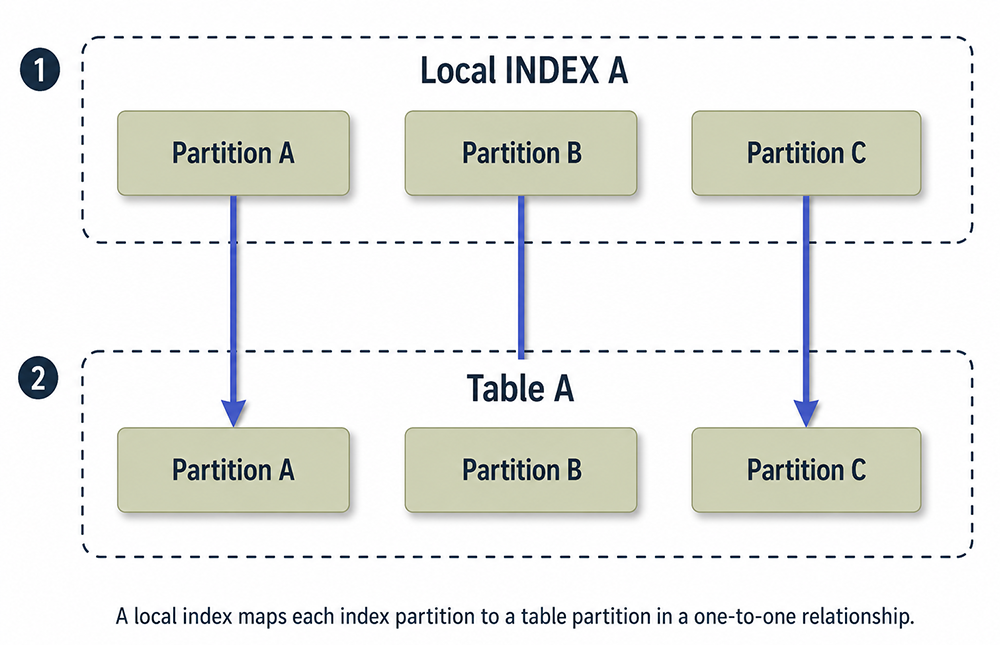
When you create a local index, it is automatically equipartitioned[1] with the same partitioning scheme as its underlying table. This provides the benefits of an equipartitioned index without needing to manually define index partitions during creation or maintenance. The following diagram illustrates the one-to-one relationship between a local index and its corresponding table.
Figure 1: A local index maps each index partition to a table partition in a one-to-one relationship.
Local Index A
Each index partition corresponds directly to a table partition.
Table A
Table partitions are defined when creating or maintaining the table.
Creating a Locally Partitioned Index
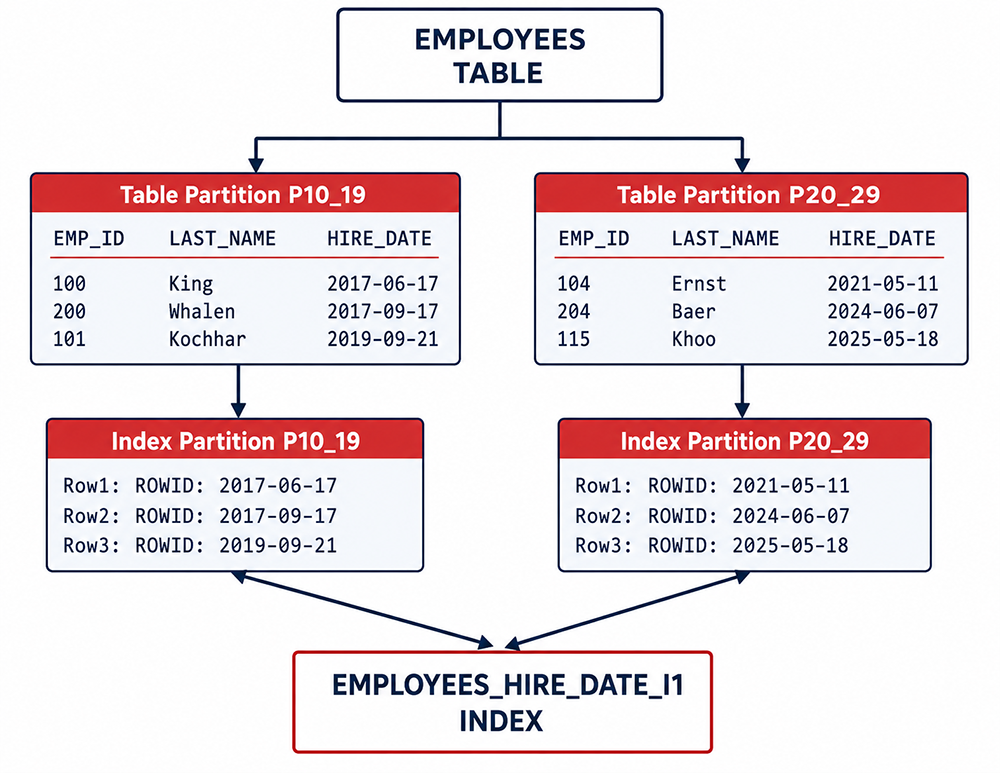
The most common type of partitioned index is the locally partitioned index, which can only be created on partitioned tables. A local index maintains a one-to-one relationship between data partitions and index partitions. For example, if a table is partitioned by range based on hire dates, a local index on that table will have one corresponding index partition for each table partition. See Figure 2 for a worked example of this architecture.
Figure 2: An EMPLOYEES table partitioned into P10_19 and P20_29 by hire date, each with its own matching index partition in EMPLOYEES_HIRE_DATE_I1.
In this example, the EMPLOYEES table is partitioned by range on HIRE_DATE. Partition P10_19 holds employees hired between 2010 and 2019, including King, Whalen, and Kochhar, with hire dates in 2017 and 2019. Partition P20_29 holds employees hired from 2020 onward, including Ernst, Baer, and Khoo, with hire dates from 2021 through 2025. The local index EMPLOYEES_HIRE_DATE_I1 mirrors this structure exactly: its P10_19 index partition stores ROWIDs only for rows in the table's P10_19 partition, and likewise for P20_29. Neither partition needs to be defined separately for the index. Because the index is LOCAL, Oracle creates and maintains this one-to-one mapping automatically as the table's partitions themselves are created and maintained.
This structure pays off directly at query time. A query such as SELECT * FROM EMPLOYEES WHERE HIRE_DATE BETWEEN '2017-01-01' AND '2019-12-31' touches only the P10_19 table partition and its matching index partition, never scanning P20_29 at all. It also pays off during maintenance: archiving or dropping the oldest partition drops its index partition along with it, with no separate cleanup step, and the whole arrangement scales the same way as the underlying data grows, since each new table partition simply gets its own matching index partition.
Oracle Global Index versus Local Index
Question: What is the difference between an Oracle global index and a local index?
Answer: In Oracle partitioning, indexes can be defined as global or local:
Global Index: A global index has a one-to-many relationship, where one index partition can map to multiple table partitions. It can be partitioned by range or hash and used on both partitioned and non-partitioned tables.
Local Index: A local index has a one-to-one mapping between an index partition and a table partition. Local indexes simplify partition pruning, leading to faster query execution plans (see Figure 1).
Maintaining Local Index Partitions
Local indexes are automatically maintained when table partitions are modified (e.g., split, merged, or dropped), but you can perform specific maintenance tasks on local index partitions:
Modify Index Partition: Use the ALTER INDEX ... MODIFY PARTITION clause to change physical attributes (e.g., tablespace) or mark a partition as UNUSABLE. For example:
ALTER INDEX idxA MODIFY PARTITION P80_89 TABLESPACE new_tablespace;
Rebuild Index Partition: Rebuild an unusable index partition to restore it:
ALTER INDEX idxA REBUILD PARTITION P80_89;
Specify Tablespace during Creation: Assign a tablespace to local index partitions during creation:
CREATE INDEX idxA ON tabA(colA) LOCAL
(PARTITION P80_89 TABLESPACE ts1, PARTITION P90_99 TABLESPACE ts2);
These operations ensure local indexes remain aligned with table partitions while optimizing storage and performance.
Local Indexes After Bulk Table Maintenance
Certain table-level partition operations leave one or more local index partitions in an UNUSABLE state rather than updating them automatically. An EXCHANGE PARTITION that swaps in a staging table, for example, brings in new data without a matching local index partition already built, so Oracle marks that index partition unusable until it is rebuilt. The same can happen after a TRUNCATE PARTITION or certain direct-path load operations, depending on the indexing options in effect.
The dictionary view USER_IND_PARTITIONS is the fastest way to check for this after any bulk table maintenance:
SELECT index_name, partition_name, status
FROM   user_ind_partitions
WHERE  index_name = 'EMPLOYEES_HIRE_DATE_I1'
AND    status = 'UNUSABLE';
Any partition returned by that query needs an ALTER INDEX ... REBUILD PARTITION before queries against it can rely on the index again. Making this check part of a routine bulk-load or archiving process avoids silently falling back to full partition scans on data that was recently loaded or exchanged in.
Define a Local Partitioned Index
To define a local partitioned index, add the LOCAL keyword to the CREATE INDEX statement:
CREATE INDEX idxA ON tabA(colA) LOCAL;
The local index automatically adopts the table's partitioning scheme. You can optionally specify tablespaces for individual index partitions.
Prefixed and Non-Prefixed Indexes
A prefixed local index includes the table's partitioning key (e.g., colA) at the start of its column list. A non-prefixed local index excludes the partitioning key or lists it after other columns. Both types are partitioned on the table's partitioning key. For example, if a table is partitioned on colA (e.g., by month) and has columns colA, colB, and colC:
A prefixed index on colA, colB is partitioned by colA.
A non-prefixed index on colB is still partitioned by colA.
Benefits of Prefixed vs. Non-Prefixed Indexes
Prefixed and non-prefixed local indexes offer distinct advantages:
Prefixed Indexes: When the partitioning key (e.g., HIRE_DATE) is in the WHERE clause, the Oracle optimizer uses partition pruning to access only relevant table and index partitions, optimizing query performance.
Non-Prefixed Indexes: These index different columns (e.g., account_number) but are still partitioned by the table's key (e.g., month). For a query filtering by both month and account number, Oracle prunes partitions by month and uses the index to locate the account number within those partitions, improving performance without scanning irrelevant data.
Example: For a table partitioned by month on HIRE_DATE with a non-prefixed index on account_number, a query like:
SELECT * FROM EMPLOYEES WHERE HIRE_DATE BETWEEN '1990-01-01' AND '1990-12-31' AND account_number = '12345';
prunes to the 1990 partition and uses the index to find the account number efficiently.
In the next lesson, you will explore global partitioned indexes.
[1] equipartitioning: Equipartitioning means an index has the same partitioning scheme, number of partitions, and partition bounds as its underlying table.