| Lesson 5 | Resolving an Inaccessible Inactive Redo Log Group |
| Objective | Diagnose an inaccessible online redo log group, verify that it is inactive and archived, and restore database availability using the appropriate repair or clearing procedure in Oracle AI Database 26ai. |
Resolve an Inaccessible Inactive Redo Log Group in Oracle 26ai
After repairing a database, you discover that an online redo log member cannot be opened. You want to preserve the work already completed and restore application access. The immediate question is whether Oracle still needs the affected group's redo for instance recovery, and whether another usable member or archived copy exists.
This lesson follows a single-instance primary container database (CDB) running in ARCHIVELOG mode. Its current control files and startup configuration remain usable. The datafiles and required active and current redo are intact. The affected group is group 4 in thread 1, and investigation confirms that it is INACTIVE and archived. These conditions define the example; they must be established for your database before using its commands.
The goal is to restore availability by repairing access or reinitializing an eligible online redo group. This is not a procedure for applying only inactive logs, and clearing does not reconstruct lost transactions. A database restore or point-in-time rollback is not part of this particular repair.
Understand the Error Before Choosing a Repair
An attempted startup can report the following messages. This is illustrative output, with an example Windows filename:
ORA-00313: open failed for members of log group 4 of thread 1
ORA-00312: online log 4 thread 1: 'D:\ORADATA\ORCL\REDO04.LOG'
ORA-00313 reports that members of the group could not be opened. It does not, by itself, establish permanent corruption, loss of every member, or a need to restore the database. ORA-00312 supplies the filename associated with another error. Inspect the complete error stack, particularly operating-system errors, and correlate it with the alert log and relevant trace files. See Oracle Error Help for ORA-00313 and ORA-00312.
A disconnected volume, inaccessible directory, failed device, or changed access permissions can make an otherwise usable member unavailable. Check access for the operating-system account running the Oracle processes, not just the account used by the administrator. For ASM storage, use the corresponding ASM diagnostics and storage procedures rather than treating the file as an ordinary Windows file.
Distinguish an online redo access failure from an archive destination or Fast Recovery Area capacity problem. Archive space exhaustion can prevent log reuse. Online redo members are preallocated, so a full filesystem does not automatically mean that every write to an existing member fails. Recreation may require available capacity, but the corrective action must follow the actual I/O error.
Preserve the diagnostic output before changing the configuration. Record the group, thread, member paths, observed status, and incident time. This evidence helps distinguish the original failure from any subsequent clearing or startup error.
Choose the Appropriate Response
An inactive group is no longer required for instance recovery. Its redo can still matter when recovering an older backup or an offline datafile. Group status and archiving therefore answer different questions. Oracle's documented procedure for an inactive archived group is appropriate only after the underlying storage problem and recovery dependencies have been assessed.
| Evidence | Response |
|---|---|
| Temporary access failure; original members remain usable | Restore access, verify the members, and reassess opening. Clearing may be unnecessary. |
| A usable member survives in the affected group | Preserve it and use the appropriate member repair or replacement procedure. |
| The group needs recreation, is inactive and archived, and its recovery dependencies are accounted for | Repair the destinations, then use the inactive archived clearing procedure. |
| The group is active, current, or unarchived | Leave this worked example and assess the applicable recovery procedure. |
| Control files, datafiles, or required redo also failed | Develop a recovery plan that covers the additional damage. |
A surviving multiplexed member is valuable because it can preserve the group's redo. Clearing the entire group to repair one failed member would discard that advantage. Do not copy actively written online redo with ordinary operating-system commands as a substitute for a supported member maintenance procedure.
The lack of a recent backup does not make clearing permissible. Even if several hours of work are at stake, eligibility depends on the redo and database state. Enabling ARCHIVELOG mode does not reconstruct older redo that has already been overwritten or replace a tested backup strategy.
Worked Example: Inactive Archived Group 4
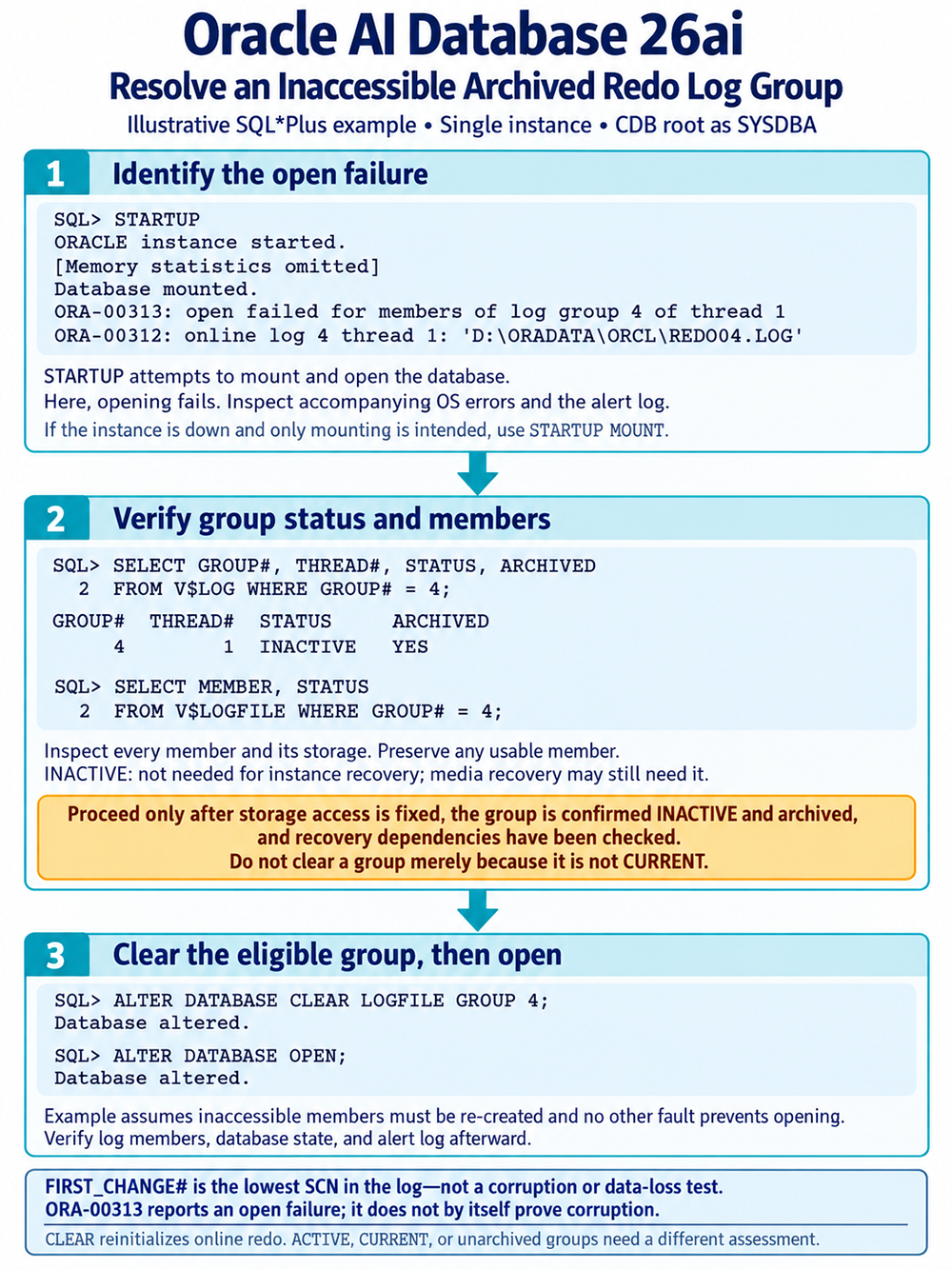
1. Establish the Instance State and Container
Use an authorized SQL*Plus connection as SYSDBA to the affected CDB's root. Online redo management belongs to the CDB, not to an individual PDB. Select the correct local Oracle environment before connecting:
sqlplus / as sysdbaIn this example, an earlier STARTUP attempted to start, mount, and open the database. The abbreviated illustrative transcript shows opening fail after mounting:
SQL> STARTUP
ORACLE instance started.
Database mounted.
ORA-00313: open failed for members of log group 4 of thread 1
ORA-00312: online log 4 thread 1: 'D:\ORADATA\ORCL\REDO04.LOG'
Do not repeat startup unconditionally. If the instance remains mounted, continue from that state. If it is shut down and you intend only to mount it for investigation, use STARTUP MOUNT. Once mounted, inspect the context:
SHOW CON_NAME

SELECT instance_name, status
FROM v$instance;

SELECT name, database_role, open_mode, log_mode
FROM v$database;
The worked example expects CDB$ROOT, a mounted primary database, and ARCHIVELOG mode. If these assumptions do not hold, adapt the recovery plan before proceeding. RAC threads and Data Guard configurations require their applicable coordination; this single-instance example is not a substitute for those procedures.
2. Inspect the Group and Every Member
Query both the group metadata and member metadata. V$LOG describes groups; V$LOGFILE lists their members.
SELECT group#, thread#, sequence#, status, archived,
       members, first_change#
FROM v$log
WHERE group# = 4;

SELECT group#, type, member, status
FROM v$logfile
WHERE group# = 4
ORDER BY member;
Read every member path, including members not named in the first error message. A null member status is not a replacement for checking physical accessibility and diagnostics. A member-level fault also does not establish that the entire group is unusable.
For clarity, the decision-making columns can be displayed separately:
SELECT group#, thread#, status, archived
FROM v$log
WHERE group# = 4;
Illustrative result for this lesson:
GROUP#  THREAD#  STATUS    ARCHIVED
------  -------  --------  --------
     4        1  INACTIVE  YES
INACTIVE means this group is not needed for instance recovery. Merely being noncurrent is insufficient: a noncurrent group can still be ACTIVE. Archiving and checkpoint progress are separate, so do not substitute one observation for the other.
FIRST_CHANGE# identifies the lowest SCN in the log. It is not a corruption flag, a proof that no data was lost, or a threshold that independently authorizes clearing. Do not diagnose a damaged file from this column alone.
ARCHIVED=YES records that the group's contents were archived. It does not prove that the archived copy is still present, readable, and protected. An archived online group and an archived redo log file are different objects. Verify the needed archive copies or backups and review any offline datafile dependencies before destroying the online copy.
3. Restore Usable Storage Destinations
If the failure is temporary, restore storage access and determine whether the original members are usable. That repair may be enough. If one healthy member survives, preserve it and repair the failed members through the appropriate maintenance procedure.
When recreation is necessary, make sure the configured destinations can support it. Check availability, the Oracle process account's permissions, and capacity. If a destination has permanently failed, use the documented relocation procedure rather than assuming CLEAR will select a new disk automatically.
Do not remove all members or delete files simply to make an error disappear. Keep the current control file metadata and the intended member configuration aligned throughout the repair. A storage fault left unresolved can cause clearing to fail too.
4. Clear the Eligible Group
Recheck the state close to execution. Continue only when group 4 is confirmed inactive and archived, no usable member should be preserved instead, the destinations permit recreation, recovery dependencies are accounted for, and the remaining database files support normal opening.
With this example's database mounted and the SQL*Plus session connected to the CDB root, issue:
ALTER DATABASE CLEAR LOGFILE GROUP 4;Read the statement's outcome and inspect any diagnostic messages before taking another step. Clearing reinitializes the online group so it can be reused. It does not apply archived redo, repair unrelated datafiles, or recover transactions whose only redo copy was lost.
If clearing fails with an I/O error or the group remains in a clearing state, investigate the storage and Oracle's documented interrupted-clear handling. A failed statement can leave work to complete; do not treat it as success or respond by dropping every member.
5. Open Normally After Successful Repair
Only after clearing succeeds and any other opening problems are resolved, open the mounted database:
ALTER DATABASE OPEN;Do not make this an unconditional follow-on to a failed clear in an unattended script. The example does not require RECOVER DATABASE, a backup control file, or OPEN RESETLOGS. Following an abnormal shutdown, Oracle may still perform automatic instance recovery during normal opening using the required redo that remains intact.
If opening reports another error, diagnose that error in context. Additional damage changes the recovery problem. Repeated clearing is not a general response to every failure encountered during startup.
Verify Availability and Restore Protection
Successful command completion is one checkpoint in the repair. Confirm the database state, all group members, and the PDBs needed by the application:
SELECT group#, thread#, status, archived, members
FROM v$log
WHERE group# = 4;

SELECT group#, member, status
FROM v$logfile
WHERE group# = 4
ORDER BY member;

SELECT name, open_mode, database_role
FROM v$database;

SELECT name, open_mode, restricted
FROM v$pdbs;
A cleared group can show UNUSED until it is used again. Do not insist that its immediate status must be INACTIVE. Interpret the output with the alert log and the operation just performed. Confirm the intended PDB open states separately; opening the CDB does not by itself demonstrate that every application PDB is available.
Review application connectivity and representative application data, then monitor normal redo use and archiving. ALTER SYSTEM SWITCH LOGFILE remains a valid command, but repeated forced switches are not a repair strategy. A switch alone does not certify successful archiving, checkpoint completion, or standby apply.
Restore appropriate redo multiplexing across independent failure domains. Different filenames on the same failed volume do not provide useful protection against that volume's loss. Monitor both online redo storage and archive destinations because they serve different recovery needs.
In the opening scenario, no new verified backup was taken after the earlier repair. Complete that planned database and control-file backup and confirm the necessary archived redo is protected. This recommendation follows the incident's backup gap; clearing an already archived group does not universally impose the same backup requirement as clearing unarchived redo.
RMAN backs up datafiles, control files, the SPFILE, and archived redo as requested. It does not back up online redo members. A successful backup job must therefore be considered alongside the available redo chain, retention policy, storage health, and tested recovery procedure.
Is Incomplete Recovery Necessary?
Not in this worked example. The current datafiles and redo required for instance recovery are intact, the failed group is inactive, and its archived contents and recovery dependencies have been assessed. Clearing the eligible group and opening normally does not deliberately roll the database back to an earlier point.
However, none of the statements “the log is not current,” “the log was archived,” or “the logs are multiplexed” independently guarantees recoverability. The group may still be active, the archive may be unavailable, or every multiplexed member may share the failed storage.
If necessary redo is permanently lost, assess surviving copies and applicable recovery alternatives. Incomplete recovery may be required, but it needs suitable backups and a reachable consistent target. Without a usable recovery source, preservation of all committed changes may not be possible. Clearing cannot create the missing information.
For unarchived redo and offline datafile consequences, review Clearing Corrupt Online Redo Log Files. Do not add the UNARCHIVED option merely to bypass an error in this lesson's archived-group procedure.
The next lesson explains how to recreate online redo log files.
Recovering a Database with Inactive Redo Logs: Quiz
Check your understanding of group status, archived redo, and the conditions for clearing in the Recovering Database with Inactive Redo Logs Quiz.
Technical reference: Oracle AI Database Backup and Recovery User's Guide, 26ai, G43741-04, May 2026, sections 37.7.1 and 37.7.2, particularly 37.7.2.1.1, “Clearing Inactive, Archived Redo,” and 37.7.2.1.3, “Failure of CLEAR LOGFILE Operation.”