| Lesson 6 | Recovery of a read-only tablespace |
| Objective | Determine whether a restored tablespace requires redo recovery by examining its state at backup time and every subsequent read/write transition. |
Recover a Read-Only Tablespace in Oracle AI Database 26ai
A read-only tablespace still needs protection against missing files, storage failure, and corruption. Its recovery requirements depend on the selected backup and the tablespace's history. A backup made while the tablespace was read-only can be sufficient without redo application if the tablespace remained read-only afterward. A later writable period changes that conclusion.
This lesson uses EMP_HISTORY, an ordinary application tablespace in a pluggable database (PDB). The examples assume ARCHIVELOG mode, a surviving current control file, usable backups, required redo, repaired storage, and any necessary encryption keys. Backup or re-created control files and point-in-time recovery require separate procedures.
The central question is not simply, “Is the tablespace read-only now?” Ask when the selected backup was taken, whether the READ ONLY transition had completed, and whether the tablespace became writable at any later time.
Read the Recovery Timeline
In the diagram, T1 represents an earlier backup, T2 represents a state change and an optional later backup, and T3 represents media failure. Any T2 backup is taken after the state change completes. The labels describe a sequence of events, not timestamps to enter in an UNTIL clause.
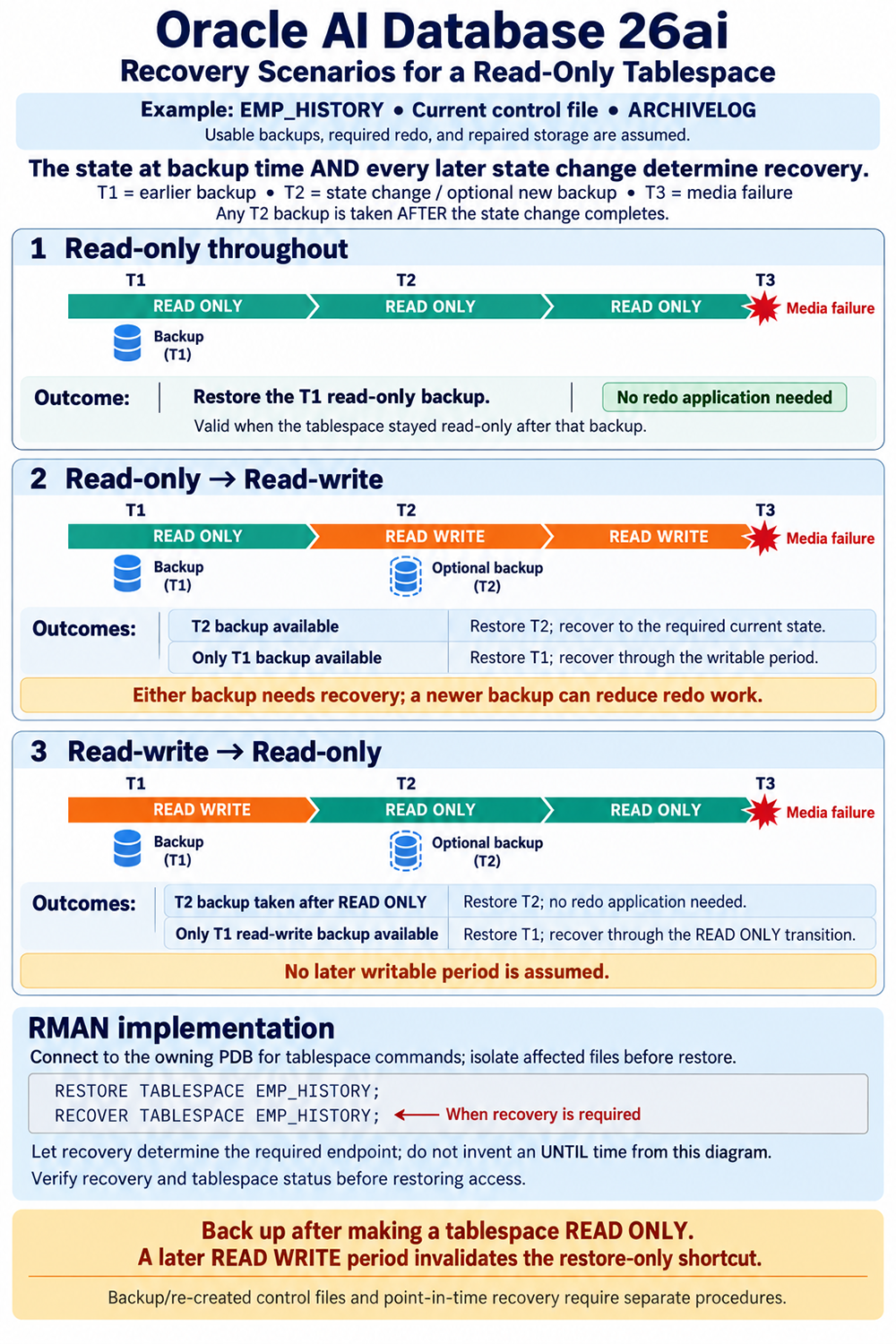
RESTORE replaces a file using backup contents. RECOVER applies the changes needed to reach the required recovered state. These are different operations: successfully copying backup blocks to disk does not establish that those blocks include subsequent business updates.
READ ONLY also differs from ONLINE or OFFLINE. Read-only describes whether the tablespace permits ordinary data modifications. Online availability describes whether it is accessible. A read-only tablespace can remain available for queries, and making an offline tablespace online does not itself request a change to read/write mode.
Scenario 1: Read-Only Throughout
EMP_HISTORY is read-only when its T1 backup is taken and stays read-only until the failure at T3. Under the diagram's current-control-file assumptions, restore the valid read-only backup. No redo application is needed for the unchanged read-only interval.
For example, a historical reporting tablespace was made read-only after a completed annual data load. A backup was taken afterward, and no later maintenance window returned it to read/write. Losing its storage does not mean that months of unrelated activity elsewhere in the database must be applied to that unchanged tablespace.
This conclusion does not remove the operational work. Verify the backup's identity and usability, repair or replace the destination, isolate files appropriately before restoration, and confirm the restored state before returning access. “No redo application” does not mean that an inaccessible file can be ignored or that a backup can be copied over a file in active use.
Scenario 2: Read-Only Followed by Read/Write
EMP_HISTORY is read-only at T1, then becomes read/write at T2. Updates occur before failure at T3. If only the T1 backup is available, it remains a possible starting point, but recovery must account for the transition and subsequent writable period.
If a suitable T2 backup exists, it can reduce the amount of later recovery work. It does not automatically remove that work: an online read/write backup and subsequent updates still require the appropriate recovery procedure. The diagram's statement that either backup needs recovery describes this illustrated workload.
The practical lesson is that a missing post-transition backup is not automatically fatal when an earlier usable backup and the required recovery changes survive. However, the older backup can increase recovery time and dependence on retained redo. Do not restore it and declare success merely because its contents were consistent when originally backed up.
Scenario 3: Read/Write Followed by Read-Only
EMP_HISTORY is read/write at T1 and becomes read-only at T2. It stays read-only until failure. A valid T2 backup taken after the transition completes can be restored without applying redo for the later unchanged interval.
If only the T1 read/write backup is available, restore it and recover through the required changes and the READ ONLY transition. The fact that the tablespace was read-only immediately before failure does not make the earlier read/write backup equivalent to a post-transition backup.
Do not estimate the transition's wall-clock time and stop recovery there manually. This example is complete media recovery of the affected files. Let the supported recovery operation use the available metadata to determine the required endpoint.
Compare the Backup Choices
| History | Selected backup | Required approach |
|---|---|---|
| Continuously read-only | T1 read-only backup | Restore; no redo application for the unchanged interval. |
| Read-only, then read/write | T1 read-only backup | Restore and recover through the writable period. |
| Read-only, then read/write | T2 read/write backup | Restore and perform the required recovery to the current state. |
| Read/write, then continuously read-only | T2 backup after READ ONLY completes | Restore; no redo application for the later unchanged interval. |
| Read/write, then read-only | T1 read/write backup | Restore and recover through the READ ONLY transition. |
Consider a fourth history: read-only at backup time, read/write during a correction window, and read-only again before failure. The starting and ending labels match, but the backup lacks the corrections. That intermediate writable period removes the restore-only shortcut. Preserve state-change records so that recovery decisions do not depend on memory alone.
Recover from an Older Read-Only Backup with RMAN
The following worked example implements scenario 2. The CDB root and owning PDB are open, EMP_HISTORY is currently read/write, and it is an ordinary application tablespace. Its damaged files require restoration, and the only eligible backup is the earlier read-only backup. All required redo is available. No SYSTEM or required undo files are involved.
1. Diagnose and Confirm the Container
Investigate the storage failure before restoring. ORA-01157 reports a file identification or access problem; it does not by itself prove block corruption. ORA-01110 identifies the related file. Check the path, permissions, storage accessibility, and alert-log details.
In an authorized SQL*Plus session connected to the owning PDB, confirm the container and tablespace:
SHOW CON_NAME

SELECT tablespace_name, status
FROM dba_tablespaces
WHERE tablespace_name = 'EMP_HISTORY';

SELECT file_id, file_name, tablespace_name, online_status
FROM dba_data_files
WHERE tablespace_name = 'EMP_HISTORY';
These dictionary checks assume an open PDB and sufficient privileges. If the PDB cannot open, use appropriate mounted-state or root diagnostics and a separately scoped recovery procedure. Do not assume every damaged PDB can be opened by offlining one file.
2. Isolate the Application Tablespace
For this currently read/write tablespace in ARCHIVELOG mode, take it offline before restoring:
ALTER TABLESPACE EMP_HISTORY OFFLINE IMMEDIATE;OFFLINE IMMEDIATE requires media recovery before the tablespace returns online. It is appropriate to this recovery-required example, not a universal preparation step for every restore-only row in the table. A continuously read-only case needs an appropriate offline-file or mounted-container procedure and assessment of its resulting recovery requirements.
Objects dependent on EMP_HISTORY remain unavailable during the operation. Other tablespaces can remain accessible, although application dependencies may still affect useful service. Tell application owners which functions are unavailable rather than describing an open PDB as proof that all work can continue.
3. Restore and Recover in RMAN
Connect RMAN directly to the owning PDB through its service with an authorized SYSBACKUP or SYSDBA account. Confirm the target connection; a local operating-system connection does not automatically select the intended PDB.
RESTORE TABLESPACE EMP_HISTORY;
RECOVER TABLESPACE EMP_HISTORY;
These are RMAN commands. The first restores eligible backup contents; the second performs the required recovery. Review the selected backups and recovery output. RMAN selection depends on repository information and the request, so do not assume T1 is selected when newer eligible backups also exist. See Oracle's RESTORE reference and RECOVER reference.
If a required log is unavailable, investigate its identity and other copies or backups. Do not invent an UNTIL value merely to bypass an error. A change from complete recovery to an earlier target is a different recovery decision, with different consequences.
4. Verify Before Returning Access
Confirm that recovery completed successfully and resolve every error. Review the affected file requirements and alert log. Then, in SQL*Plus in the same owning PDB:
ALTER TABLESPACE EMP_HISTORY ONLINE;Verify the tablespace and application reads. In this example, the intended recovered state is read/write. Do not append READ ONLY automatically, and do not issue OPEN RESETLOGS for this complete tablespace recovery with a current control file.
This operation is not tablespace point-in-time recovery. It does not require the auxiliary database and Data Pump workflow used for TSPITR. Its purpose is to recover the affected files to their required current state while preserving unaffected resources.
5. Protect the Recovered Tablespace
Take an appropriate new backup and ensure EMP_HISTORY participates in the ongoing strategy now that it is writable. In the correctly connected RMAN session:
BACKUP TABLESPACE EMP_HISTORY;Check that the backup completed and is stored where it can survive the failure you are protecting against. Recording a successful recovery without correcting the backup-policy omission leaves the same operational weakness in place.
Restore to Replacement Storage When Necessary
If the original destination is unusable, plan both the physical restore and the metadata update. ALTER DATABASE RENAME FILE changes Oracle's recorded filename; it does not restore backup bytes or copy the file to the new location.
RMAN supports SET NEWNAME followed by RESTORE and SWITCH for relocation. In this alternative example, file 12 has already been verified as an affected EMP_HISTORY datafile and isolated. Replace the number and destination with verified values:
RUN {
  SET NEWNAME FOR DATAFILE 12
    TO '/u02/oradata/APPPDB/emp_history01.dbf';
  RESTORE DATAFILE 12;
  SWITCH DATAFILE 12;
  RECOVER DATAFILE 12;
}
This replaces the original-location restore for that file; do not run it as an extra step after completing the earlier workflow. Handle every affected file in a multifile tablespace. Use supported destinations for ASM or Oracle Managed Files rather than applying filesystem-copy assumptions. Oracle documents the relocation sequence in the RESTORE reference.
Interpret a Skipped Restore Carefully
RMAN can skip restoration of a read-only file when it exists, is readable, and has the expected checkpoint. Those checks are not a whole-file scan for corrupt blocks. If corruption is known or suspected in a readable file, use a diagnosis-appropriate validation and restoration plan rather than treating a skipped restore as proof of health.
Similarly, a RECOVER operation can determine that no recovery work is needed for a valid continuously read-only file. Distinguish issuing a command to establish requirements from actually applying redo. The restore-only scenarios should not be described as requiring nonzero redo merely because other examples contain a RECOVER statement.
Maintain Backups Across State Changes
Take a backup after a READ ONLY transition completes. Record its identity, completion time, and storage location. A backup taken before the transition finishes is not interchangeable with a post-transition read-only backup.
When EMP_HISTORY becomes writable again, include it in routine protection and take an appropriate new backup. The earlier read-only backup can still be useful with the required recovery chain, but relying on it indefinitely can increase recovery work. Review any exclusions that were introduced while the tablespace was static.
Retain state-change records alongside backup records. For example, a maintenance ticket should identify when the tablespace became writable, what work occurred, and when it returned to read-only. This information helps distinguish an unchanged archive from one that merely has the same current status as an old backup.
Do not delete archived redo solely because this tablespace is now read-only. Other files, earlier backups, and recovery objectives can require it. Backup retention must protect the database's recovery requirements as a whole. Protect the associated control-file information and encryption resources as well as the datafile backup.
Confirm the Outcome and Recognize the Limits
Use several checks together: successful RMAN output, resolved file recovery requirements, appropriate file headers, alert-log evidence, expected tablespace status, and representative application reads. Current DBA_TABLESPACES results describe the present state, not every transition since the backup.
V$RECOVER_FILE is not reliable after a control file has been restored or re-created. Empty results therefore cannot replace the procedure appropriate to that control-file state. An open CDB root also does not establish that every PDB or application file is ready.
The previous lesson distinguished current, backup, and re-created control files. That distinction remains important here. A backup control file can record an earlier read/write state, while a re-created control file has special handling for read-only files and missing entries. The supplied Oracle 26ai Backup and Recovery User's Guide addresses these cases in sections 37.2.4 and 37.3.2.
NOARCHIVELOG and point-in-time recovery likewise need separate plans. The diagram's restore-only shortcut applies to its stated current-control-file history, not to every operation involving a tablespace that happens to be read-only.
The next lesson investigates recovery issues related to the read-only tablespace.