| Lesson 8 | From Legacy Rules to Modern SQL Tuning |
| Objective | Replace legacy RBO tuning rules with a process for evaluating optimizer estimates, executed plans, and measured query performance in Oracle 26ai. |
From Legacy RBO Rules to Modern SQL Tuning
Older Oracle tuning checklists often instructed developers to rearrange tables, reorder filters, and force indexes. Those instructions reflected the limitations of the historical rule-based optimizer (RBO). They are not a procedure for tuning Oracle AI Database 26ai. This optional reference lesson explains what to retain from that history: understand the requested result, investigate the work required to obtain it, and verify that a change actually helps.
The modern cost-based optimizer (CBO) uses estimates to compare possible execution plans. Missing statistics do not make current Oracle revert to RBO. Your task is to help the optimizer with useful information and suitable SQL, then assess the resulting execution using representative conditions.
Replace the Six Legacy Checklist Rules
Historical RBO behavior included ranked access paths and order-sensitive decisions in particular circumstances. It did not amount to a universal rule that the last table always drives every query, or that every predicate receives a priority from its written position. Use the following comparison when reviewing old tuning notes.
| Legacy advice | Modern evaluation |
|---|---|
Put the driving table last in FROM. | Inspect the chosen join order and method. Written table order is not a general control over execution order. |
| Always start with the table returning the fewest rows. | Consider filtered row counts together with available access paths, join constraints, and the total work of the candidate plan. |
| Put the most selective Boolean condition first. | Preserve correct Boolean grouping and null behavior. Predicate position does not guarantee evaluation order or index selection. |
Index every column in WHERE. | Choose indexes for the workload, allowing for storage and modification costs. A full scan can be appropriate. |
Use EXPLAIN PLAN to prove the optimal path. | Use it to examine an estimated plan, then investigate the executed cursor and measured work. |
Add an INDEX hint to guarantee consistent performance. | Verify hint usage and performance. Evaluate SQL plan management when accepted plans need to be managed. |
Understand How a Cost-Based Plan Is Chosen
Start with the intended result: correct joins, correctly grouped conditions, and compatible datatypes. SQL describes that result while allowing Oracle to choose how to obtain it. Reordering conditions must not accidentally change an AND/OR grouping or the treatment of null values.
The optimizer considers transformations, access paths, join orders, and join methods. It chooses the lowest estimated-cost plan among the candidates it considers. Cost is an internal comparison measure, not elapsed seconds or proof of the fastest possible execution. Oracle describes this process in Query Optimizer Concepts.
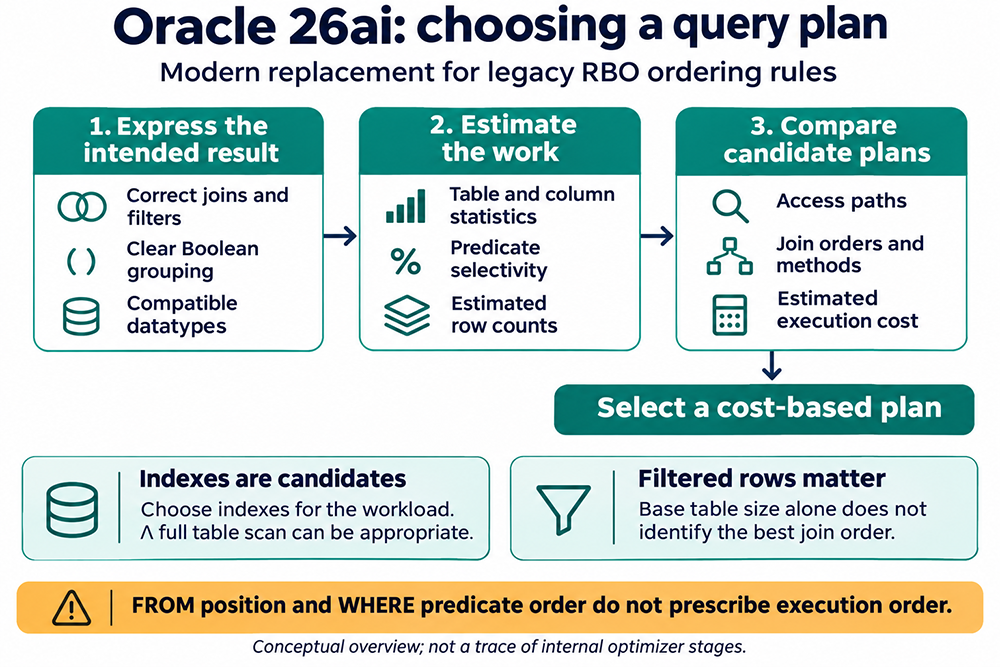
Selectivity describes the fraction of rows expected to satisfy a condition. Cardinality describes the estimated number of rows produced by an operation. A large table with a selective filter can produce fewer rows than a small table, but that observation alone does not determine the best join order. The cost of retrieving and combining those rows also matters.
Statistics help describe the data. Oracle provides automatic statistics gathering and the DBMS_STATS package for managing optimizer statistics. Investigate whether missing or stale information, skewed values, or correlated columns could explain poor estimates. Do not refresh every object's statistics simply because one query is slow, or assume a refresh must improve its plan.
Likewise, an index is a candidate access structure rather than a certificate of efficiency. Retrieving many scattered table rows through an index can require substantial work. A non-indexed filter also does not necessarily force a full scan: another predicate may provide a useful access path, followed by filtering of the retrieved rows.
Validate a Representative Execution
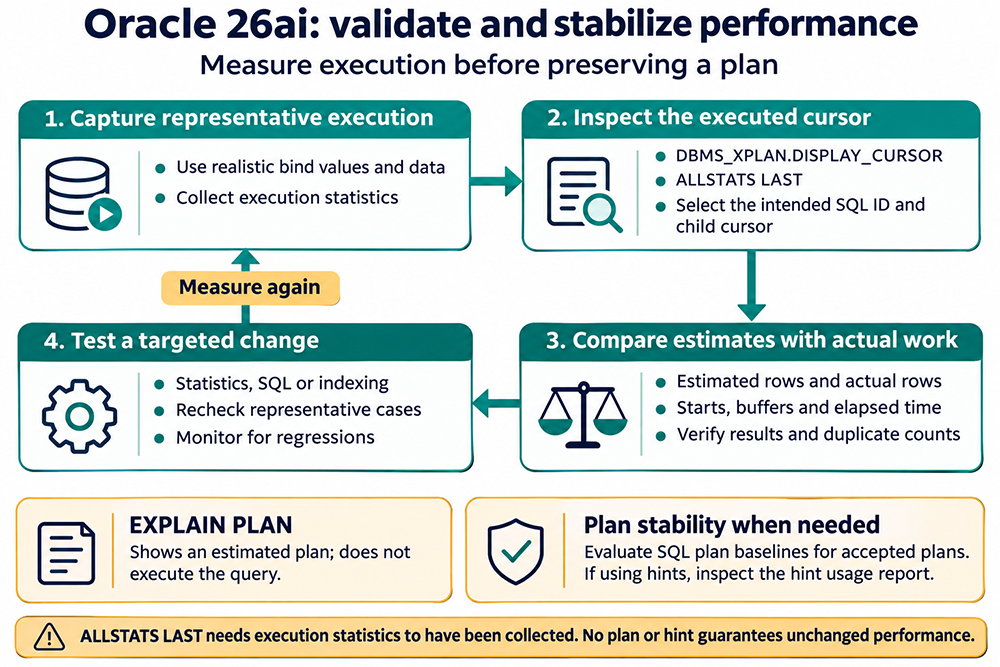
A plan diagram explains how Oracle accesses data; measurements establish whether that execution meets the application's needs. Follow this cycle when investigating a query, keeping a record of the SQL, inputs, environment, and results so comparisons remain meaningful.
1. Establish Correct Results and Realistic Inputs
Use representative data and bind values, including both common and unusual cases. Verify returned values, duplicate counts, and null handling before comparing speed. Record whether the application fetches every result row or stops early; an incomplete fetch and a complete report are different workloads.
2. Inspect the Intended Executed Cursor
EXPLAIN PLAN does not execute the query, and its estimated plan can differ from the plan used by an actual cursor. For execution evidence, identify the intended SQL ID and child cursor. Oracle's execution-plan guide explains these distinctions.
Collect execution statistics before inspecting them, for example by using the statement-level GATHER_PLAN_STATISTICS hint during a controlled test. Then use DBMS_XPLAN.DISPLAY_CURSOR with ALLSTATS LAST for the relevant cursor. That format option does not collect statistics retroactively. The calling account also needs access to the required diagnostic views; see the DBMS_XPLAN reference. Do not assume the most recent statement in a tool is necessarily your target query.
3. Compare Estimates with Observed Work
Review estimated rows, actual rows, and the number of starts for important operations. A repeatedly executed row source can accumulate actual rows over many starts, so a raw estimated-versus-actual comparison needs that context. Examine buffer work and measured elapsed time as well. Neither a low estimated cost nor an index scan alone demonstrates success.
4. Test One Justified Change
Use the evidence to choose a targeted statistics, SQL, or indexing change. Repeat the representative cases, verify that results remain correct, and compare the measurements. Keep a rollback option and watch for regressions in other inputs or affected statements. This is an evaluation process, not a promise that any particular rewrite will be faster.
Manage Stability After Measuring Performance
A hint can express a specific tuning decision, but verify whether Oracle used it and whether it helped. Syntax errors, conflicts, or transformations can make hints ineffective. The hint usage report helps investigate their treatment. Do not add an INDEX hint to every statement as a final tuning ritual.
Where plan stability is required, SQL plan baselines provide a way to manage accepted plans and evaluate alternatives. They do not freeze response time: data growth, resource contention, and other environmental changes can affect execution even when the plan remains the same.
The useful transition from RBO history is a change in the questions you ask. What result is required? What work did Oracle estimate? What actually happened? Which measured change improves the workload? Those questions provide the foundation for practical cost-based SQL tuning.