| Lesson 3 | Calculate the data buffer hit ratio |
| Objective | Calculate the buffer hit ratio. |
Calculate Data Buffer Hit Ratio
Oracle caches data blocks in memory (the database buffer cache) to reduce physical I/O. When a session needs a block, Oracle checks memory first; if the block is not present, Oracle performs a physical read to bring it into cache.
Historically, DBAs computed the buffer cache hit ratio to estimate how much work was being avoided at the disk layer. In modern Oracle (including Oracle 23ai), that ratio is no longer a primary tuning target; you still may calculate it for context, but you should diagnose performance with time-based metrics (DB Time), wait events, and SQL execution plans.
Historically, DBAs computed the buffer cache hit ratio to estimate how much work was being avoided at the disk layer. In modern Oracle (including Oracle 23ai), that ratio is no longer a primary tuning target; you still may calculate it for context, but you should diagnose performance with time-based metrics (DB Time), wait events, and SQL execution plans.
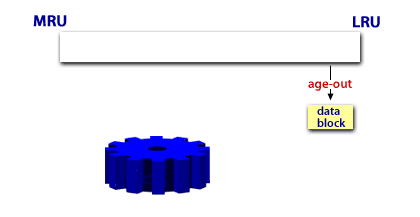
How blocks age in and out of the buffer cache
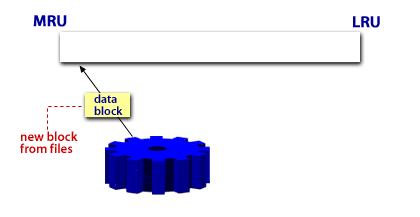
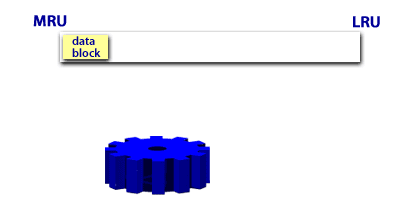
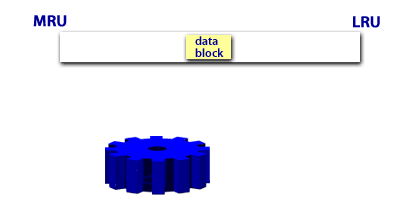
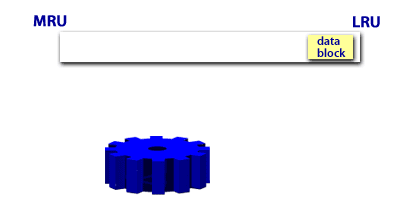
The following images provide a conceptual model of cache behavior (recently used blocks tend to remain “hot” longer than blocks that are not reused). Oracle’s internal algorithms have evolved over time, but the fundamental idea remains: blocks that are repeatedly accessed are more likely to stay in memory, reducing physical reads.
Why DBAs calculated the hit ratio in earlier Oracle versions
In older on-premises environments (especially when:
This was frequently paired with manual memory sizing (e.g., explicitly allocating a larger buffer cache) and with workload patterns dominated by repeated index lookups and small-row OLTP reads.
- disk latency was the dominant bottleneck (spinning disks),
- memory was constrained, and
- automatic diagnostics were limited),
This was frequently paired with manual memory sizing (e.g., explicitly allocating a larger buffer cache) and with workload patterns dominated by repeated index lookups and small-row OLTP reads.
Why the hit ratio is not a primary metric in Oracle 23ai
In Oracle 23ai-era practice, the buffer cache hit ratio is a derived statistic that can be misleading:
- High hit ratio can still hide slow SQL (inefficient plans, bad joins, high CPU, serialization waits).
- Low hit ratio is not automatically bad for workloads designed for large scans, direct-path reads, or analytics.
- Modern platforms change the bottleneck: SSD/NVMe, Exadata storage offload, and cloud architectures reduce the predictive power of a single cache percentage.
Oracle Database Performance Tuning
How to calculate the buffer cache hit ratio
If you still want to compute the classic buffer cache hit ratio for context, the common approach uses
V$SYSSTAT:
- db block gets: current-mode reads (typically for updates)
- consistent gets: consistent-mode reads (query reads)
- physical reads: blocks read from disk (or other storage tiers)
Example: get the statistics
SELECT name, value
FROM   v$sysstat
WHERE  name IN (
  'db block gets',
  'consistent gets',
  'physical reads'
);
Example: compute the classic ratio
-- Classic approximation (expressed as a percentage):
-- Hit Ratio ≈ 100 * (1 - (physical_reads / (db_block_gets + consistent_gets)))

WITH s AS (
  SELECT
    SUM(CASE WHEN name = 'physical reads'    THEN value END) AS physical_reads,
    SUM(CASE WHEN name = 'db block gets'     THEN value END) AS db_block_gets,
    SUM(CASE WHEN name = 'consistent gets'   THEN value END) AS consistent_gets
  FROM v$sysstat
  WHERE name IN ('physical reads','db block gets','consistent gets')
)
SELECT
  ROUND(100 * (1 - (physical_reads / NULLIF(db_block_gets + consistent_gets, 0))), 2)
    AS buffer_cache_hit_ratio_pct
FROM s;
Note: This ratio is an approximation and should not be used in isolation to justify increasing cache size.
Use it as a directional signal only, then confirm root cause with AWR/ADDM, wait events, and SQL plan analysis.
Modern troubleshooting strategy in Oracle 23ai
When you suspect I/O or caching issues, use a workflow that leads to root cause:
- Triage the bottleneck: Is the database spending time on CPU, I/O waits, concurrency waits, or commit waits?
- Use AWR/ADDM: Identify top SQL by DB Time and the top wait events driving latency.
- Validate execution plans: Confirm access paths, join methods, cardinality estimates, and plan stability.
- Use targeted memory advice: Consider cache advice views and Oracle’s automatic memory features rather than manual guesswork.
What to look for (examples)
- I/O-related waits:
db file sequential read,db file scattered read,direct path read - Buffer/cache pressure symptoms:
free buffer waits,buffer busy waits(often object-level hotspots, not “cache too small”) - SQL-driven issues: large scans from missing indexes, poor join order, implicit conversions, stale stats
Key takeaway
Understanding how the buffer cache works remains important for advanced troubleshooting. However, in Oracle 23ai-era administration, you typically do not “tune to a hit ratio.”
Instead, you use automated diagnostics and time-based analysis to find what is slow, why it is slow, and which SQL or subsystem is responsible.