| Lesson 8 | Size the archived redo log file system |
| Objective | Set appropriate sizes for the archived redo log file system. |
Size the Archived Redo Log File System
Archived redo logs (archivelogs) are the historical record of database changes. They are essential for point-in-time recovery, disaster recovery, and (in many environments) Data Guard. The operational risk is straightforward: if Oracle cannot archive a full online redo log because the archive destination is full (or unavailable), database activity can stall.
The goal of sizing is therefore practical and measurable: allocate enough space to absorb peaks in redo generation for the time window in which logs may remain on disk (for example, until they are backed up and deleted), with a safety margin for unexpected spikes.
Modern deployment context for Oracle 23ai
- Autonomous Database: archive log management is automated by the service. You typically do not size or manage an archive log filesystem directly; the DBA focus shifts to retention, backups, and operational guardrails exposed by the platform.
- OCI Base Database Service / Exadata Database Service (co-managed): sizing still matters. Oracle may provision sensible defaults, but you remain responsible for ensuring the archive destination (often the Fast Recovery Area (FRA)) has adequate capacity and that backups are running frequently enough.
- Multitenant (CDB/PDB): redo generation and archivelogs are managed at the CDB level; PDBs do not have separate redo log streams.
Best practice: use the Fast Recovery Area (FRA) for archive logs
In modern Oracle implementations, the recommended pattern is to archive redo logs to the Fast Recovery Area rather than to an unmanaged filesystem directory. The FRA allows Oracle to manage recovery-related files as a single pool of storage governed by a size limit and retention policies.
Key configuration parameters:
-- FRA location (filesystem path or ASM diskgroup such as +RECO)
ALTER SYSTEM SET db_recovery_file_dest = '+RECO' SCOPE=BOTH;

-- FRA size (can be adjusted online as needs change)
ALTER SYSTEM SET db_recovery_file_dest_size = 200G SCOPE=BOTH;
Sizing still matters with FRA: if the FRA fills and Oracle cannot reclaim space (because logs are still needed for recovery, Data Guard, or backups have not completed), the database can still be forced to wait. FRA simplifies management; it does not remove the need for capacity planning.
Capacity planning: size for peak redo over your retention window
A useful sizing model is:
- Peak redo per hour (or per day), not just the average
- Retention window on disk (how long archivelogs may remain before backup + deletion)
- Safety margin (typically 20–50% depending on workload volatility and operational maturity)
Example: if you want archivelogs on disk for up to 48 hours and your peak redo rate is 15 GB/hour during batch windows, then a baseline requirement is ~720 GB (15 × 48), plus margin and space for other FRA contents.
Operational note: in co-managed environments, archivelog retention should be driven by your recovery point objective (RPO) and the frequency of RMAN backups. The more frequently you back up and delete logs, the smaller the on-disk buffer you need.
Measure redo generation using log switch history
One simple way to estimate redo volume is to analyze online redo log switches. The following script summarizes daily switch counts and converts them into megabytes using the current redo log member size.
SET pages 9999;
SET feedback ON;
SET echo ON;

-- Daily log switch counts
CREATE TABLE temp_loghist AS
SELECT TO_CHAR(first_time,'YYYY-MM-DD') AS day,
       COUNT(*) AS switches
FROM   v$log_history
GROUP  BY TO_CHAR(first_time,'YYYY-MM-DD');

-- Convert switches into MB/day using current redo log size
SELECT MAX(switches)                         AS max_switches,
       ROUND(AVG(switches))                  AS avg_switches,
       ROUND(l.bytes/1048576)                AS redo_log_mb,
       ROUND((MAX(switches)*l.bytes)/1048576)     AS max_mb_per_day,
       ROUND(((MAX(switches)*l.bytes)/1048576)*2) AS max_mb_two_day
FROM   temp_loghist h
CROSS JOIN (SELECT bytes FROM v$log WHERE status IN ('CURRENT','ACTIVE') FETCH FIRST 1 ROW ONLY) l
GROUP  BY l.bytes;

DROP TABLE temp_loghist;
Interpretation: this approach gives you a quick “how much redo could I generate on a busy day” estimate. It is intentionally conservative when you use the maximum switch count.
Redo log sizing and switch frequency
Archive capacity planning is closely tied to redo log sizing. If redo logs are too small, switches occur too frequently, increasing archiver overhead and risking “checkpoint not complete” behavior. If redo logs are too large, recovery granularity may be coarser and operational response to surges can be slower.
A common target in many OLTP systems is to see log switches roughly every 15–30 minutes during peak load. Treat this as a starting point, not a rule: measure your workload and tune to observed behavior and recovery requirements.
(ASM) Automatic Storage Management in modern OCI
In OCI Base Database and Exadata services, ASM is commonly used for database storage. ASM organizes storage into
disk groups (for example, +DATA and +RECO) and manages striping and mirroring automatically.
This simplifies the placement of redo logs, archivelogs (via FRA), and other recovery files.
ASM redundancy is typically configured as: normal (2-way mirroring) or high (3-way mirroring), with failure groups to ensure mirrored extents land on separate failure domains.
File System Components
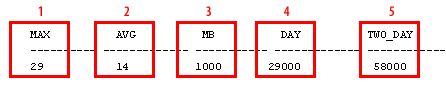
| MAX | Maximum number of redo log switches observed per day (peak switching activity). |
| AVG | Average number of redo log switches per day. |
| MB | Redo log size in megabytes (used to convert switch counts to data volume). |
| DAY | Estimated megabytes of redo generated on the busiest day (MAX switches × redo log size). |
| TWO_DAY | Estimated megabytes for two busy days (a common buffer target when logs may remain on disk up to 48 hours). |
Operational guardrails
- Back up and delete frequently: in most environments, schedule RMAN jobs that back up archivelogs and delete them according to policy (and Data Guard requirements).
- Monitor FRA usage: alert on FRA utilization and reclaimable space before hitting the limit.
- Ensure sufficient redo log groups: avoid LGWR waiting for ARCn by maintaining enough groups for your workload, especially during bursts.
- Test recovery: sizing decisions should be validated by recovery drills (restore + recover) so RPO/RTO assumptions hold in practice.
Redo Log Tuning Concepts - Quiz
The next lesson explores common redo log operations. Before moving on, click the Quiz link below to test your understanding of archived redo log sizing and management.
Redo Log Tuning Concepts - Quiz