| Lesson 15 | The Archiver (ARC0) |
| Objective | Explain the function of the Archiver. |
Archiver (ARCn): How Redo Is Archived, What the 6 Images Show, and How to Troubleshoot
ARCn (Archiver) copies each filled online redo log to one or more archive destinations when the database runs in ARCHIVELOG mode. This preserves a complete redo history for media recovery, point-in-time recovery, and standby databases. LGWR writes redo to the online logs; ARCn copies completed logs to archived redo.
Image sequence (6 panels) - the essential story
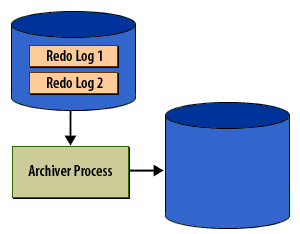
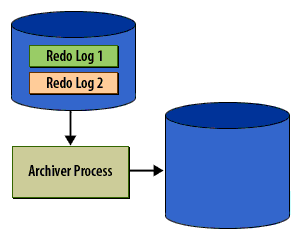
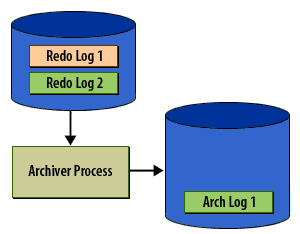
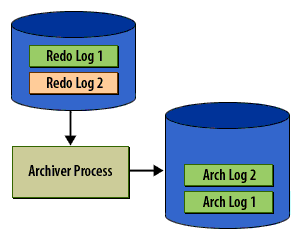
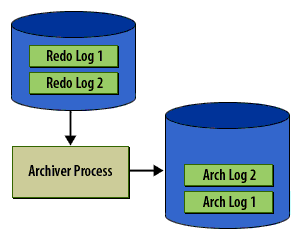
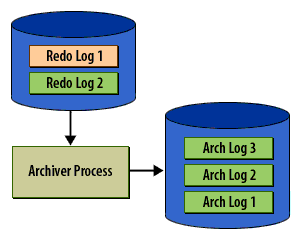
Caption analysis (why these 6 matter)
- Panels 1–2 (must keep): establish roles (LGWR vs ARCn) and the switch-then-archive ordering.
- Panel 3 (keep, concise): communicates the steady-state expectation (no backlog).
- Panel 4 (critical): illustrates the user-visible symptom of archive lag - commit stalls when groups exhaust.
- Panel 5 (critical): states the rule that prevents data loss: no reuse until archived.
- Panel 6 (keep, concise): closes the loop and ties to disaster recovery semantics.
ARCn vs LGWR - responsibilities
- LGWR: writes redo to current online log; determines commit durability.
- ARCn: copies filled logs to archive destinations; can scale as ARC0…ARCn.
- In Data Guard, you may use
LGWRorARCHtransport per destination; choose to match RPO/RTO.
Configuration snippets
-- Enable and point archive destinations (example pattern)
ALTER SYSTEM SET log_archive_dest_1 =
  'LOCATION=/u01/arch VALID_FOR=(ONLINE_LOGFILES,PRIMARY_ROLE)';

-- Add a remote destination (Data Guard style, example)
ALTER SYSTEM SET log_archive_dest_2 =
  'SERVICE=stby1 ASYNC NOAFFIRM LGWR VALID_FOR=(ONLINE_LOGFILES,PRIMARY_ROLE)
   DB_UNIQUE_NAME=STBY1';

-- Let Oracle scale ARCn automatically; optionally set a floor
ALTER SYSTEM SET log_archive_max_processes = 4 SCOPE=BOTH;

-- Force archival of the current group on demand
ALTER SYSTEM ARCHIVE LOG CURRENT;
Troubleshooting “Failed to archive log” (alert log)
The message indicates delay/backlog, not necessarily data loss. Check destinations and throughput:
- Are destinations reachable and writable? Verify path/permissions/space; clear full filesystems.
- Enough redo groups and size? Right-size for workload so ARCn has time to copy between switches.
- Throughput: ensure archive device and network (for remote) are fast enough; consider more ARCn processes.
- Health views (examples below) to see errors, lag, and process states.
Monitoring
-- Destinations and status (errors, space, lag hints)
SELECT dest_id, status, error, destination, archived_seq#
FROM   v$archive_dest
ORDER  BY dest_id;

-- Archiver background processes
SELECT process, status, log_sequence
FROM   v$archive_processes
ORDER  BY process;

-- Recent switch cadence
SELECT sequence#, first_time, next_time
FROM   v$log_history
ORDER  BY first_time DESC
FETCH FIRST 20 ROWS ONLY;

-- What has been archived
SELECT sequence#, applied, completion_time
FROM   v$archived_log
ORDER  BY sequence# DESC
FETCH FIRST 20 ROWS ONLY;
Practical guidance
- Keep redo on low-latency storage; size online redo logs for a steady switch interval.
- Provide fast, reliable archive destinations; separate from data/redo devices when possible.
- Allow ARCn to scale; increase
LOG_ARCHIVE_MAX_PROCESSESonly when evidence shows backlog. - For standbys, choose SYNC/AFFIRM for zero data loss (higher commit latency) or ASYNC/NOAFFIRM for lower latency with non-zero RPO.