Lesson 1
Understanding Oracle's Memory Architecture
You have already covered how Oracle organizes its physical files and its background and server
processes. Memory is the last piece of the architecture puzzle, and it is the piece that ties the
other two together. Every file Oracle reads is eventually staged in memory, and every process that
touches the database does its work against memory structures rather than against disk directly.
Oracle's memory divides into two top-level structures:
Oracle's memory divides into two top-level structures:
- System Global Area (SGA), a single block of shared memory used by every session and background process in the instance.
- Program Global Area (PGA), a private block of memory allocated separately to each server process and each background process.
Shared Memory: The System Global Area
The SGA is created when the Oracle instance starts and is released when the instance shuts down.
Every session connected to the database reads from and writes to the same SGA, which is what makes
it possible for one session's cached data block to be reused by a completely different session
moments later, instead of every session re-reading the same block from disk.
Because the SGA is shared, its size is set once at the instance level rather than per session. You can view its current size at any time with:
Because the SGA is shared, its size is set once at the instance level rather than per session. You can view its current size at any time with:
SELECT * FROM V$SGA;SGA Sub-Components
The SGA is not one undifferentiated pool. It is divided into several sub-components, each with a
distinct job:
- Shared Pool: holds the library cache (parsed SQL and PL/SQL) and the data dictionary cache. This is the component most sensitive to poorly written, non-reusable SQL, because every unique statement text consumes its own slot.
- Database Buffer Cache: holds copies of data blocks read from disk, split into default, KEEP, and RECYCLE pools so that frequently reused blocks can be protected from eviction by one-time large scans.
- Redo Log Buffer: a small, fast buffer that holds redo entries until the Log Writer (LGWR) background process flushes them to the online redo log files on disk.
- Large Pool: an optional area used for memory-heavy operations that would otherwise compete with the Shared Pool, including RMAN backup and restore, shared server session memory, and parallel query message buffers.
- Java Pool: memory reserved for Java code and data when the database runs Java stored procedures inside the JVM.
- Streams Pool: supports Oracle Streams and GoldenGate style capture-and-apply replication.
- In-Memory Area: an optional area that holds a column-oriented copy of selected table data alongside the row-oriented buffer cache, letting analytic queries scan only the columns they need.
- Vector Pool: an optional area introduced for AI Vector Search, holding vector embeddings and supporting structures used for similarity search queries against vector data.
- Fixed SGA and Other Structures: a small internal area holding instance-level bookkeeping and pointers to the rest of the SGA components; it is not separately configurable.
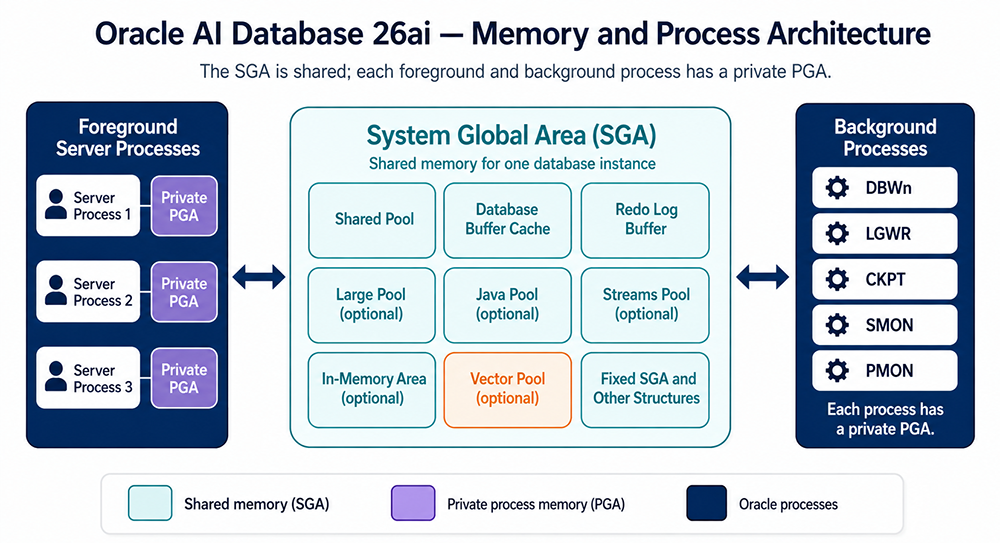
Private Memory: The Program Global Area
Where the SGA is shared, the PGA is private. Every server process gets its own PGA, and no other
process can read it. A PGA typically contains:
- A Private SQL Area, holding bind variable values and the runtime state of an executing cursor.
- SQL work areas, used for sort, hash join, bitmap merge, and bulk load operations.
- Session memory, which under the default dedicated server connection model lives inside the private PGA.
- Stack space, the operating-system-level call stack for the process itself.
How Oracle Uses Memory for Sorting
Sorting deserves its own explanation because it is one of the most common sources of PGA memory
pressure. Any time a query includes ORDER BY, GROUP BY, a DISTINCT, a hash join, or a bitmap index
merge, Oracle needs a work area in which to do that operation. Those work areas live inside the
PGA of the session running the query, not in any shared SGA structure.
Older versions of Oracle required a database administrator to size these work areas by hand, through parameters such as SORT_AREA_SIZE and HASH_AREA_SIZE. Those parameters still exist for backward compatibility, but they are not the current recommended approach. Once PGA_AGGREGATE_TARGET is set above zero, which it is by default, Oracle sizes each session's work areas automatically, expanding and shrinking them as needed and reclaiming memory from idle sessions to give to active ones. This is why modern Oracle memory tuning is far less about hand sizing individual parameters and far more about setting sensible aggregate targets and letting the instance manage the details.
Older versions of Oracle required a database administrator to size these work areas by hand, through parameters such as SORT_AREA_SIZE and HASH_AREA_SIZE. Those parameters still exist for backward compatibility, but they are not the current recommended approach. Once PGA_AGGREGATE_TARGET is set above zero, which it is by default, Oracle sizes each session's work areas automatically, expanding and shrinking them as needed and reclaiming memory from idle sessions to give to active ones. This is why modern Oracle memory tuning is far less about hand sizing individual parameters and far more about setting sensible aggregate targets and letting the instance manage the details.
Automatic Memory Management
Oracle gives you three levels of automation to choose from, and it is worth knowing all three even
if your environment only uses one:
- MEMORY_TARGET / MEMORY_MAX_TARGET: the most hands-off option. A single target governs both the SGA and the total instance PGA as one combined pool, and Oracle shifts memory between them automatically as workload demands change.
- SGA_TARGET / SGA_MAX_SIZE: governs only the SGA. Used when you want to size the PGA separately rather than let Oracle manage both pools together.
- PGA_AGGREGATE_TARGET / PGA_AGGREGATE_LIMIT: governs the total PGA memory available across all sessions combined, which is what actually drives the automatic sort and hash work area sizing described above.
SELECT * FROM V$PGASTAT;SHOW PARAMETER target;Why This Matters for Database Performance
Properly sizing the SGA and PGA has a direct, measurable impact on database performance. The SGA is
the more significant of the two structures to understand first, since it is shared across the
entire instance and its sub-components, the database buffer cache, the redo log buffer, and the
shared pool, are where most tuning work happens in practice. This module goes into much more detail
on each of those structures, with particular attention to the shared pool.
When you finish this module, you should be able to:
When you finish this module, you should be able to:
- Describe the memory structures that make up the SGA
- Describe how the database buffer cache manages data blocks
- Describe the purpose of the three types of buffer pools
- Describe the function of the redo log buffer
- Identify the function of the large pool
- Describe how each session gets its own memory
- List the contents of the PGA
- Describe how Oracle uses memory for sorting