| Lesson 7 | Matching SQL statements |
| Objective | Explain how Oracle compares SQL statements in the shared pool. |
Characters Must Match in the Shared Pool
Oracle is very picky when it comes to deciding whether a newly submitted SQL statement matches one
already sitting in the shared SQL area. Character case, white space, and comments are all significant. Oracle matches two statements through a character-by-character comparison of the SQL text itself, not by comparing what the statements actually mean. The following statements are all semantically identical, and yet none of them would be considered the same statement by Oracle:
- SELECT SYSDATE FROM DUAL
- select sysdate from dual
- select sysdate from dual;
- select sysdate /* this is a comment */ from dual
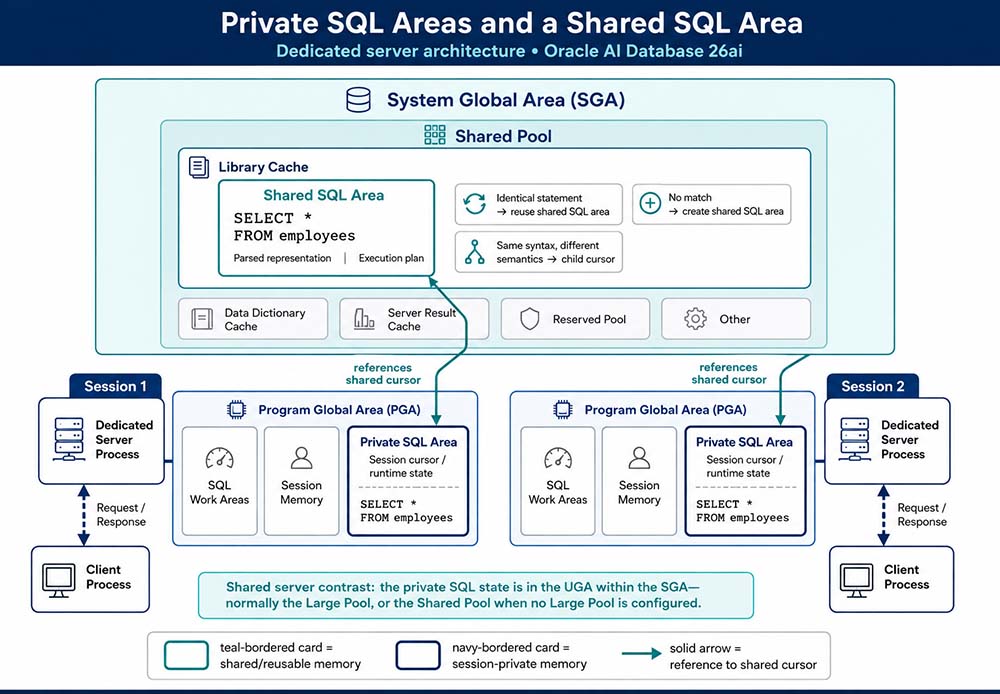
Shared SQL Areas
The database automatically determines when applications submit similar SQL statements, considering
both statements issued directly by users and applications and recursive statements issued internally
by other statements. It performs the following steps:
- Checks the shared pool for an existing shared SQL area that is syntactically and semantically
identical:
a) If an identical statement already exists, the database reuses that shared SQL area for the new instance of the statement, reducing memory consumption instead of allocating a duplicate.
b) If no identical statement exists, the database allocates a new shared SQL area. A statement with identical syntax but different semantics, different objects referenced, for example, uses a child cursor rather than a fresh, unrelated shared SQL area. Either way, the session's private SQL area ends up pointing to the shared SQL area holding the statement and its execution plan. - Allocates a private SQL area on behalf of the session: where this area actually lives depends on how the session connected. If a session is connected through a shared server, part of the private SQL area is kept in the SGA rather than living entirely in the session's own PGA.
Referenced Objects Must Match
Beyond case, white space, and comments, Oracle also checks that the objects referenced by two
statements are actually the same objects. Consider users Jenny and Jeff, each owning an identical
table named
coin. Both issue the exact same statement:
select * from coincoin resolves to the table
jenny.coin. In Jeff's session, it resolves to jeff.coin. Even though the
two statements are character-for-character identical, the objects they actually reference are
different tables entirely. Because the underlying objects differ, Oracle will not treat the two
statements as identical, and each gets its own shared SQL area.
Relaxing the Match: CURSOR_SHARING
Everything above describes Oracle's default, strict behavior, controlled by the
CURSOR_SHARING parameter, which defaults to EXACT. Under EXACT, the four
SYSDATE variations at the top of this lesson really do get four separate shared SQL areas, wasting
memory and giving up reuse for statements that differ only cosmetically.
ALTER SESSION SET CURSOR_SHARING = FORCE;CURSOR_SHARING = FORCE lets Oracle substitute literal values with
system-generated bind variables, so statements differing only in a literal, for example
WHERE customer_id = 101 versus WHERE customer_id = 202, can share a single
cursor instead of each hard-parsing separately. This does not relax the case, white space, comment,
or referenced-object rules covered above; it specifically targets literal values. Older Oracle
versions offered a third setting, SIMILAR, which attempted a middle ground between
EXACT and FORCE. It has since been removed entirely in favor of adaptive, bind-aware cursor sharing
that Oracle manages automatically, so EXACT and FORCE are the only two values you'll find today.
<%@ include file="../../semrush7.jsp" %>