| Lesson 5 | The redo log buffer |
| Objective | Explain the Function of the Redo Log Buffer |
Function of Oracle Redo Log Buffer
The redo log buffer is an area of memory set aside to hold redo log entries long enough for
the Log Writer process to write them to the redo log files. Ideally, LGWR would write each entry the
instant it was generated, and you would not need a buffer at all. In reality, that is simply not
feasible. Server processes generate redo far faster, and far more unpredictably, than any disk write
could keep pace with one entry at a time, so Oracle batches entries in memory and flushes them
together instead. The diagram below shows how that batching actually works, from the moment a server
process changes a block to the moment LGWR switches between redo log files.
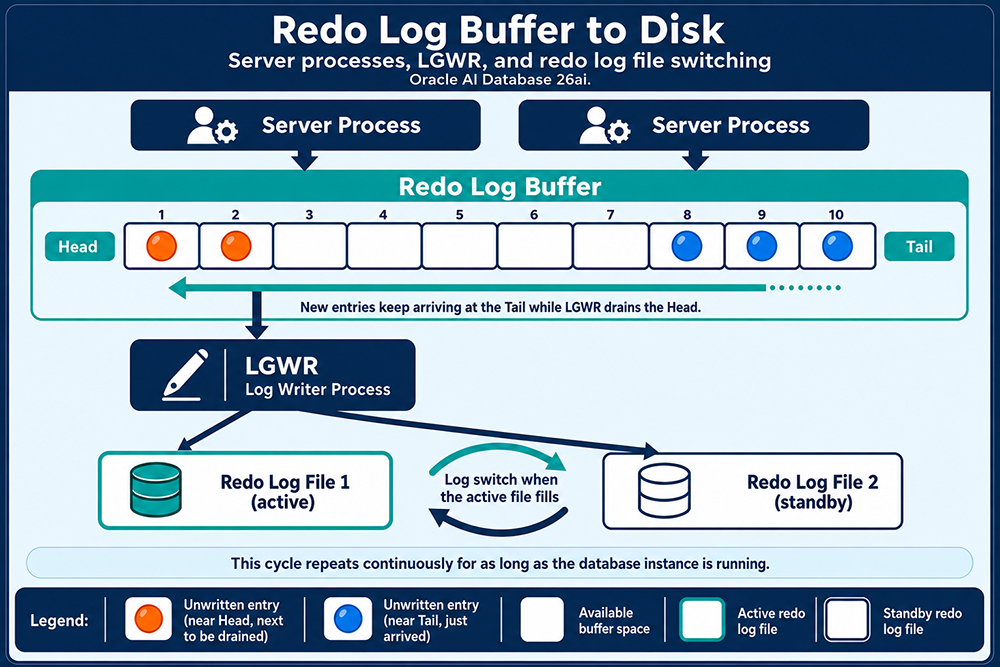
Data in the Redo Log Buffer When an Oracle Instance Crashes
When an instance crashes, the data still sitting in the redo log buffer itself is lost, because the
buffer lives entirely in the system's volatile memory (RAM). That sounds alarming, but it is not the
whole picture. Oracle safeguards transactional integrity through the redo log files the buffer feeds
into, not through the buffer itself. Here is what actually happens:
So even though the redo log buffer itself is gone the instant the instance goes down, the persistent redo log files behind it ensure no committed transaction is ever lost, and the database can always be recovered to a consistent state.
- Redo Log Files: Oracle continuously writes redo entries from the buffer to the redo log files on disk, which are non-volatile storage. These files ensure that every change made to the database can be recovered, even if the block containing that change was never itself written to a datafile before the crash.
- Checkpoint Process: periodically, Oracle performs a checkpoint, advancing the recorded position in the redo stream up to which modified data blocks have actually been written to the data files. Everything before that position is guaranteed safe on disk; everything after it is exactly what instance recovery needs to replay.
- Instance Recovery: on restart, Oracle reads the redo log files starting from the last checkpoint position and reapplies every change recorded after it, bringing the database back to a consistent state as of the moment of the crash.
So even though the redo log buffer itself is gone the instant the instance goes down, the persistent redo log files behind it ensure no committed transaction is ever lost, and the database can always be recovered to a consistent state.
How the Redo Log Buffer Works
The redo log buffer caches redo information until it can be written to the physical redo log files on
disk. This is fundamentally a performance optimization: Oracle holds redo in memory until it can be
flushed at a more efficient moment, rather than paying the overhead of a disk write for every single
change.
The buffer holds the most recent changes to data blocks in the datafiles, and LGWR does not wait indefinitely to flush it. A write is triggered whenever any of the following happens, whichever comes first: the buffer becomes one-third full, three seconds elapse since the last write, or, as of Oracle 10g, 1MB of redo has accumulated in the buffer. Once entries are written to the redo log files, they become critical to database recovery if the instance crashes before the corresponding changed blocks make it from the buffer cache to the datafiles themselves. This is also why a user's committed transaction is not actually considered complete until its redo entries have been successfully written to disk, not merely generated in memory. That write is what a COMMIT is really waiting on.
The buffer holds the most recent changes to data blocks in the datafiles, and LGWR does not wait indefinitely to flush it. A write is triggered whenever any of the following happens, whichever comes first: the buffer becomes one-third full, three seconds elapse since the last write, or, as of Oracle 10g, 1MB of redo has accumulated in the buffer. Once entries are written to the redo log files, they become critical to database recovery if the instance crashes before the corresponding changed blocks make it from the buffer cache to the datafiles themselves. This is also why a user's committed transaction is not actually considered complete until its redo entries have been successfully written to disk, not merely generated in memory. That write is what a COMMIT is really waiting on.
Tuning How Commits Wait on Redo
Because a commit's durability depends on redo actually reaching disk, Oracle exposes some control over
how aggressively that write happens. Two current parameters govern this:
COMMIT_LOGGING, set toIMMEDIATEorBATCH, controls how LGWR batches redo for commits.COMMIT_WAITcontrols whether a session waits for that write to complete before control returns to the client.
ALTER SESSION SET COMMIT_LOGGING = BATCH;
ALTER SESSION SET COMMIT_WAIT = NOWAIT;COMMIT_WRITE, used to control both behaviors together
with a single string like 'BATCH,NOWAIT'. It still exists for backward compatibility,
but it is deprecated, and COMMIT_LOGGING plus COMMIT_WAIT are the parameters to reach for now. Worth
knowing regardless of which you use: NOWAIT trades durability for speed. It can let a failure occur
after the database has already told the client a commit succeeded, but before the redo actually made
it to disk, which is not a trade to make lightly on data you cannot afford to lose.
Redo Log Buffer Space Prioritization
Oracle AI Database 26ai introduced a new parameter directly relevant to this lesson,
LOG_REDO_PRIORITIZATION. When enabled, Oracle continuously monitors how much free space
remains in the redo log buffer and, once free space drops below an internal threshold, starts
prioritizing redo generation for certain sessions over others, for example favoring latency-sensitive
OLTP sessions over large batch jobs that are generating redo in bulk. It defaults to disabled:
ALTER SYSTEM SET LOG_REDO_PRIORITIZATION = TRUE;Checking Redo Activity Yourself
A few views make redo log buffer behavior directly observable rather than theoretical. Current log
file status and size:
SELECT group#, status, bytes/1024/1024 AS mb FROM V$LOG;SELECT name, value FROM V$SYSSTAT WHERE name = 'redo entries';SELECT * FROM V$INSTANCE_RECOVERY;SGA Memory Structures - Quiz
Click the Quiz link below to review the material you have learned so far.
SGA - Memory Structures - Quiz
SGA - Memory Structures - Quiz