| Lesson 2 | Binding data-bound Design Time Controls |
| Objective | Add a recordset object and bind it to other controls in the database to display data. |
Binding data-bound Design Time Controls
The previous lesson named three ADO.NET pieces,
SqlConnection, SqlCommand, and SqlDataReader, and sketched roughly where each one fits, without writing a complete, working example. This lesson writes that example: a real connection string, an open connection, a query against VirtualBookShelf's Inventory table, and the result displayed on a Razor Page. By the end, every object this lesson's legacy objective named, the Recordset and the controls it was bound to, will have a working modern replacement.
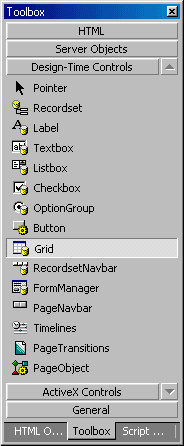
The toolbox pictured above held more than just the Recordset and Grid. Pointer wasn't really a control at all, it was simply the cursor, the toolbox's default selection tool rather than something a developer dragged onto a page. Label, Textbox, Listbox, Checkbox, OptionGroup, and Button were ordinary form elements with data-binding built in, the rough equivalents of today's plain HTML
<label>, <input>, <select>, and <button> elements, each connected to a page model property through Razor's own model binding instead of a DTC's property sheet. FormManager coordinated a group of these controls as one submission, the modern equivalent of a Razor Page's OnPost handler reading an entire posted form at once. PageObject, Timelines, and PageTransitions were multimedia and presentation features largely unrelated to data access, tools for building animated or timed page sequences; nothing in a modern data-driven web application reaches for a direct substitute, because the problems they solved are handled today by CSS and JavaScript rather than by anything resembling a database-bound control. Only Recordset, Grid, and RecordsetNavbar were really about moving data from a database onto a page, which is why they're the three this lesson and the next few in this module actually rebuild.
Accessing Data with ADO.NET
What replaces a data-bound DTC is a small number of ADO.NET classes used directly in C# code, plus a Razor Page's own model-and-markup structure to display what they retrieve. ADO.NET itself ships as part of .NET 10 and needs no separate installation. The SQL this lesson's example runs is written and tested first in Azure Data Studio, the same habit this course has followed since Module 3, and only copied into C# once it's confirmed correct. Entity Framework Core, mentioned in Module 1 as this course's later data-access topic, builds on top of ADO.NET rather than replacing it; understanding what EF Core is doing underneath, which this module covers, makes it considerably less of a black box once it's introduced.
Setting Up a Connection String
Before any of this lesson's C# code gets written, the query itself is worth confirming on its own, in Azure Data Studio, against VirtualBookShelf directly:
A connection string is a single line of text telling ADO.NET where SQL Server is and which database to use. In an ASP.NET Core project, it lives in
SELECT BookID, Title, Author, Price FROM Inventory;
SqlCommand's SQL text doesn't fail until the page actually runs, and the error it throws then is a database error, not a C# compiler error, since the SQL itself is just a string as far as C# is concerned. Catching a mistake here, in a tool built for exactly this, is faster than catching it after wiring it into a page model.
A connection string is a single line of text telling ADO.NET where SQL Server is and which database to use. In an ASP.NET Core project, it lives in
appsettings.json, not scattered across individual pages:
{
  "ConnectionStrings": {
    "VirtualBookShelf": "Server=localhost;Database=VirtualBookShelf;Trusted_Connection=True;TrustServerCertificate=True"
  }
}
IConfiguration, which ASP.NET Core makes available automatically to any class that asks for it in its constructor, no extra registration required beyond what a new project already sets up:
public class CatalogModel : PageModel
{
    private readonly string _connectionString;

    public CatalogModel(IConfiguration configuration)
    {
        _connectionString = configuration.GetConnectionString("VirtualBookShelf")!;
    }

    // OnGet and the Inventory property are defined below.
}
_connectionString without knowing or caring where it ultimately came from.
Opening a Connection and Running a Query
With a connection string in hand, retrieving data takes three ADO.NET objects working together.
SqlConnection opens and holds the connection itself. SqlCommand holds the SQL statement to run. SqlDataReader steps through whatever rows come back, one at a time:
public void OnGet()
{
    using SqlConnection connection = new(_connectionString);
    connection.Open();

    SqlCommand command = new("SELECT BookID, Title, Author, Price FROM Inventory", connection);

    using SqlDataReader reader = command.ExecuteReader();
    while (reader.Read())
    {
        Inventory.Add(new Book
        {
            BookID = reader.GetInt32(reader.GetOrdinal("BookID")),
            Title = reader.GetString(reader.GetOrdinal("Title")),
            Author = reader.GetString(reader.GetOrdinal("Author")),
            Price = reader.GetDecimal(reader.GetOrdinal("Price"))
        });
    }
}
OnGet is the method a Razor Page runs automatically whenever it's requested with an ordinary HTTP GET, which makes it the natural home for a page's initial data retrieval. The using keyword in front of connection guarantees the connection closes once this method finishes, even if something inside it throws an error, exactly the resource cleanup habit introduced in the previous lesson. reader.GetOrdinal("Title") looks up a column's position by name rather than hardcoding a number, so the code keeps working even if Inventory's columns are ever reordered.
Binding the Result to a Page Model
The code above refers to a
Book class and an Inventory property that haven't been shown yet. Both are ordinary C#, with nothing database-specific about them:
public class Book
{
    public int BookID { get; set; }
    public string Title { get; set; } = string.Empty;
    public string Author { get; set; } = string.Empty;
    public decimal Price { get; set; }
}
public List<Book> Inventory { get; set; } = new();
OnGet copies each row's values into a plain Book object and adds it to the Inventory list, and only then does the page's markup read that list to build its HTML. By the time the page renders, the database connection is already closed; Inventory is just a list of objects sitting in memory, the same as any other C# list, which is exactly why it can be sorted, filtered, or handed to a unit test without touching SQL Server again.
Rendering the Bound Data on the Page
The page's
.cshtml file turns that list into an HTML table with an ordinary @foreach loop:
<table>
    <thead>
        <tr><th>Title</th><th>Author</th><th>Price</th></tr>
    </thead>
    <tbody>
@foreach (var book in Model.Inventory)
{
        <tr>
            <td>@book.Title</td>
            <td>@book.Author</td>
            <td>@book.Price.ToString("C")</td>
        </tr>
}
    </tbody>
</table>
SqlConnection opened against it, a SqlCommand running a plain SELECT, a SqlDataReader copying each row into a Book, and a Razor loop turning the resulting list into a table a visitor actually sees. Nothing here was dragged onto a design surface, and nothing stayed silently connected to the database once the page was done retrieving its data, the two biggest differences from how a data-bound DTC used to work.
What a RecordsetNavbar Used to Do
Frequently Asked Questions
Is there an ADO.NET object that's a closer structural match to the old Recordset than SqlDataReader is? Yes, in one specific sense. A
What happens if a column's value is
Is a Tag Helper the same thing as the HTML Helpers used in older ASP.NET MVC code? They solve a similar problem, turning server-side data into HTML, but a Tag Helper looks like an ordinary HTML attribute (
Could this same page model retrieve rows from both
Does learning Entity Framework Core later make everything in this lesson unnecessary? No. EF Core still opens a connection, builds a command, and reads a result underneath its own API, it just generates the SQL and the object mapping automatically instead of a developer writing
Is the Inventory data on this page refreshed every time it loads, or cached somewhere? Refreshed every time.
Why does
Could the
What happens if the SQL text inside a
Does
SqlDataReader is forward-only and stays connected to the database the whole time it's being read, closer to how a Recordset behaved in its default, fastest mode. ADO.NET also has a DataTable, which loads an entire result set into memory at once and then disconnects, closer to a Recordset opened in a disconnected or client-side cursor mode. This lesson used SqlDataReader because it's the more common starting point and maps directly onto the Book list pattern shown above; DataTable is worth knowing exists, but isn't needed for anything in this course.
What happens if a column's value is
NULL when SqlDataReader reads it? Calling a method like GetString on a column that's actually NULL throws an exception, so a column known to allow NULL, such as VirtualBookShelf's Customer.Phone, needs a check first: reader.IsDBNull(reader.GetOrdinal("Phone")) ? null : reader.GetString(reader.GetOrdinal("Phone")). None of Inventory's columns allow NULL, which is why this lesson's own example didn't need that check, but it comes up as soon as a query touches a nullable column.
Is a Tag Helper the same thing as the HTML Helpers used in older ASP.NET MVC code? They solve a similar problem, turning server-side data into HTML, but a Tag Helper looks like an ordinary HTML attribute (
asp-for="Title", for example), while an HTML Helper looked like a C# method call mixed into the markup (@Html.DisplayFor(...)). This lesson's example used a plain @foreach loop instead of either one, which is enough for a simple table and doesn't require introducing Tag Helper syntax before it's actually needed.
Could this same page model retrieve rows from both
Customer and Inventory at once? Not from a single SqlCommand the way this lesson wrote one, no. Combining rows from two tables in one query is what a JOIN does, which this course hasn't covered yet. A page model can run two separate commands against two separate tables in the same OnGet method without any trouble; that's a different thing from joining them in SQL itself.
Does learning Entity Framework Core later make everything in this lesson unnecessary? No. EF Core still opens a connection, builds a command, and reads a result underneath its own API, it just generates the SQL and the object mapping automatically instead of a developer writing
SqlCommand and SqlDataReader by hand. Knowing what EF Core is actually doing makes its behavior, including when it's slow or generates an unexpected query, far easier to reason about once this course reaches it.
Is the Inventory data on this page refreshed every time it loads, or cached somewhere? Refreshed every time.
OnGet runs, and the query inside it runs, on every request to the page; nothing shown in this lesson introduces caching. That's the simplest possible behavior and the right default until a specific, measured performance problem gives a reason to add caching on top of it.
Why does
SqlCommand need a reference to the SqlConnection when it's created? A command has to run somewhere, and passing the connection into SqlCommand's constructor is how it's told which open connection to use. A single SqlConnection can be reused by more than one SqlCommand in sequence, one after another, though each one still has to wait for the previous command to finish before it can run.
Could the
SELECT statement in OnGet have been written with a WHERE clause instead of retrieving every row? Yes, and Module 3 already covered everything needed to do it. SqlCommand doesn't care whether its SQL text is a bare SELECT * FROM Inventory or a filtered statement with a WHERE clause and parameters; the ADO.NET code around it stays exactly the same either way. This lesson kept the query unfiltered to keep the full retrieve-and-display round trip as simple as possible on a first pass.
What happens if the SQL text inside a
SqlCommand has a typo, like a misspelled column name? SQL Server rejects the statement when ExecuteReader runs it, and ADO.NET surfaces that as a SqlException at that point in the code, not any earlier. Since C# has no way to check a string's contents against an actual database schema while compiling, a typo inside a SqlCommand's SQL text looks perfectly valid to the compiler and only fails once the page actually runs, one more reason to confirm a query in Azure Data Studio first.
Does
Book need to match every column in the Inventory table? No. Book only has properties for the columns this particular page actually needs, BookID, Title, Author, and Price, leaving out ISBN and QuantityOnHand entirely. A C# class used this way only has to describe the shape of the data a given page cares about, not the full table; a different page retrieving the same table for a different purpose could define its own, differently-shaped class.
Binding DataBound Design TimeControls - Exercise
Click the Exercise link below to practice retrieving and displaying a set of rows from VirtualBookShelf's
Binding DataBound Design TimeControls - Exercise
In the next lesson, you will learn how to add a command object to a Web page.
Inventory table.
Binding DataBound Design TimeControls - Exercise
In the next lesson, you will learn how to add a command object to a Web page.