| Lesson 3 | Oracle Listener and Shared Server |
| Objective | Describe how the listener works with Shared Server to manage connections in Oracle AI Database 26ai. |
Oracle listener and Shared Server
Oracle Shared Server, formerly called multi-threaded server (MTS), remains available in Oracle AI Database 26ai. The name changed; the architecture was not removed. Many client connections share a pool of server processes.
The Oracle Net Listener establishes connections to service handlers. In Shared Server, the handler is a dispatcher. The listener does not execute SQL or carry the ongoing request-and-response traffic.
The listener is the same process whichever handler a session ends up with: a dedicated server process, a dispatcher, or, for Database Resident Connection Pooling (DRCP), a pooled server. What changes is the handler it selects.
From Connection Request to Shared Server
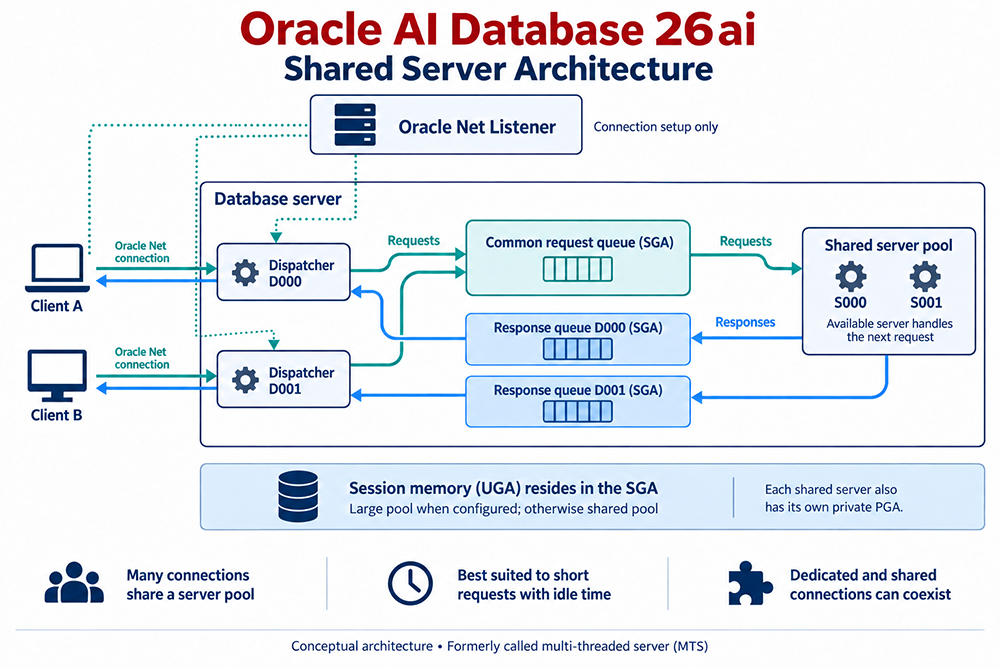
- Register services and handlers. The database's LREG process supplies the listener with service names, dispatcher addresses, and handler load information.
- Request a service. The client contacts the listener using an Oracle Net connect descriptor. A PDB application normally connects through its database service; a SQL database link is not required.
- Select a dispatcher. For a shared connection, the listener chooses the dispatcher with the lightest registered load. It uses direct hand-off whenever possible, passing the connection request to the dispatcher itself. When, for example, the dispatcher is remote to the listener, it instead sends the client a redirect message containing the dispatcher's address, and the client connects to the dispatcher directly.
- Process requests. The dispatcher queues work in the SGA. An available shared server executes a request, then places the result on that dispatcher's response queue.
- Return results. The dispatcher sends the response to the client. Different requests from a session can use different shared servers; the listener is outside this ongoing data path.
How the Listener Treats a Dedicated Server Request
The contrast with a dedicated request shows what is specific to Shared Server. For a dedicated server, the listener starts a separate server process for each incoming connection request, and that process ends when the session does. Either the new process inherits the connection from the listener, or it reports its own address and the listener redirects the client to it; the operating system and transport protocol decide which. When the client and database are on the same computer, the bequeath protocol can bypass the listener altogether, because the application starts the dedicated process itself.
Shared Server has no equivalent shortcut. A session that uses Shared Server must connect through Oracle Net Services even when it runs on the same computer as the instance, and the listener starts nothing per connection: it points the client at a dispatcher that is already running.
Request Shared or Dedicated Connections
This illustrative tnsnames.ora entry explicitly requests Shared Server. Replace the host and service with values configured for your environment, and if you maintain such entries by hand across many clients, adopt a predictable naming and distribution strategy and test each entry with TNSPING.
APP_SHARED =
  (DESCRIPTION =
    (ADDRESS = (PROTOCOL = TCP)(HOST = db.example.com)(PORT = 1521))
    (CONNECT_DATA =
      (SERVICE_NAME = apppdb.example.com)
      (SERVER = SHARED)
    )
  )
An explicit SERVER=SHARED means the client always wants a dispatcher. If none is available, the connection request is rejected and the client receives an error, typically ORA-12520, "listener could not find available handler for requested type of server." A client that does not specify SERVER at all is treated more gently: if Shared Server is configured but no dispatcher is registered, its request is simply served by a dedicated server process.
To request a dedicated handler, use SERVER=DEDICATED in the connect descriptor. Alternatively, setting USE_DEDICATED_SERVER in the client's sqlnet.ora adds (SERVER=dedicated) to the connect data of every connection that client makes, and overwrites any SERVER value already present in a connect descriptor:
USE_DEDICATED_SERVER = ONSome work should ask for a dedicated server whatever the database is configured to do. Oracle's documentation names batch jobs that leave little or no idle time, and RMAN backup, restore, and recovery. It also states that administrative connections used to start or shut down an instance, or to perform media recovery, must use a dedicated server, because those operations cannot be performed while connected to a dispatcher. The same listener can support both modes; two separate listeners are not required.
Configuration and Registration
Shared Server requires a configured dispatcher and shared-server processes. Check DISPATCHERS, SHARED_SERVERS, and MAX_SHARED_SERVERS. SHARED_SERVERS is the only required parameter: set to a nonzero value it enables Shared Server, and if no dispatcher has been configured Oracle starts one for TCP by default. Dispatchers and shared servers can be started or adjusted with ALTER SYSTEM without restarting the instance.
An XDB-only dispatcher does not establish that application connections can use Shared Server. A database created with DBCA typically has a dispatcher configured for Oracle XML DB (XDB), which gives SHARED_SERVERS a value of 1. In that configuration only sessions that connect to the XDB service use Shared Server; regular SQL sessions still get dedicated servers until you add a dispatcher that is not XDB-specific.
The database can start before the listener. LREG retries registration: when a listener starts after the instance, registration does not occur until LREG's next discovery run, which by default happens every 60 seconds. An administrator can request immediate registration after the listener starts:
ALTER SYSTEM REGISTER;Registration still requires correct listener addresses and reachable endpoints. The statement has no effect while the listener is down or when everything is already registered, and it does not configure Shared Server or open a PDB service.
Verify the Connection Path
Inspect the listener's registered services and handlers:
lsnrctl servicesThis is also the first check when a connection is refused with ORA-12520: it shows which handlers the listener knows about, whether each is a dedicated server or a dispatcher, and whether they are accepting connections.
Use V$DISPATCHER for dispatcher activity, V$SHARED_SERVER for worker activity, V$QUEUE for queue statistics, and V$CIRCUIT for virtual circuits. V$DISPATCHER_CONFIG shows how the dispatchers are configured, and V$DISPATCHER_RATE gives their rate statistics. V$QUEUE is restricted: only SYS and users with the SELECT ANY TABLE privilege, such as SYSTEM, can query it. These checks distinguish connection setup from request-processing capacity.
The next lesson examines Shared Server initialization parameters.
Troubleshooting a Refused Shared Connection
When a client that asked for SERVER=SHARED is refused, work through the connection path in the order a request travels it. Each step rules out one link in the chain covered above.
- Does the listener know the service and a matching handler? Run
lsnrctl services. If the service is missing, registration has not happened yet or the instance cannot reach the listener; if it is listed only with a dedicated handler, no dispatcher has registered for it. Oracle's own guidance for ORA-12520 also notes that a handler can be in a blocked state and not accepting new connections. - Is a suitable dispatcher configured? Check
DISPATCHERSandSHARED_SERVERS. A dispatcher that exists only for XDB serves the XDB service and nothing else. - Did registration catch up? If the listener started after the instance, wait for LREG's next discovery run, about 60 seconds by default, or run
ALTER SYSTEM REGISTERand checklsnrctl servicesagain. - What is the client really asking for? A
USE_DEDICATED_SERVER=ONentry in the client'ssqlnet.oraoverwrites anySERVERvalue in a connect descriptor, so a descriptor that says shared can still produce a dedicated connection. - Are the dispatchers healthy? Query
V$DISPATCHERfor status and load, andV$QUEUEasSYSorSYSTEMto see whether requests are waiting.
The useful habit is separating the two questions this lesson keeps returning to: whether the listener can find a handler for the session, and whether the handler and shared server pool can carry its work. The first is settled by registration and configuration; the second shows up in the queue and dispatcher views.
Oracle 26ai References
Listener Concepts - Quiz
Listener Concepts - Quiz