| Lesson 6 | The architecture of Shared Server |
| Objective | Identify elements of Shared Server which exist in Oracle 26ai |
Oracle Shared Server Architecture: The Elements
Shared Server is built from a handful of cooperating pieces: a listener, a registration process, dispatchers, virtual circuits, two kinds of queue, a pool of shared servers, and a few initialization parameters that tie them together. This lesson names each element, shows how a connection uses them, and ties them to the request and response flow in the diagram.
The Elements of Shared Server
- Listener. Accepts the client's connection request and routes it to a dispatcher, by direct hand-off or by redirect.
- LREG. The listener registration process. It registers each dispatcher's address and current load with the listener, so new connections go to a less busy dispatcher.
- Dispatchers (
Dnnn). Multiplex many client connections. Each connection is bound to a virtual circuit. - Virtual circuits. Pieces of shared memory the dispatcher uses for a client's database requests and replies. The
CIRCUITSparameter limits how many exist. - Common request queue. Where dispatchers place incoming requests. There is one per instance, in the SGA, shared by all dispatchers.
- Shared servers (
Snnn). A pool of processes that take requests from the common queue, do the work, and release the circuit. - Dispatcher response queues. Each dispatcher has its own, in the SGA. A shared server places a completed response on the queue of the dispatcher that sent the request.
- Initialization parameters.
SHARED_SERVERS,MAX_SHARED_SERVERS,DISPATCHERS,MAX_DISPATCHERS,SHARED_SERVER_SESSIONS, andCIRCUITS, covered in Lesson 4. - Optional pieces. The
LISTENERattribute ofDISPATCHERS, orLOCAL_LISTENER, for a nondefault listener;MULTIPLEXfor Oracle Connection Manager; and the client'sSERVER=sharedorSERVER=dedicated.
SHARED_SERVERS=0.
How a Connection Reaches a Dispatcher
The listener is normally already running when clients arrive, and LREG keeps it informed: it registers the instance's services and each dispatcher's address and load. When a remote connection request arrives, the listener:
- Examines the request.
- Determines whether the client can use a shared server process.
- If so, selects the dispatcher with the lightest load.
- Connects the client to that dispatcher.
Oracle Dispatcher
Dispatchers manage multiple requests with a request queue and response queues. When a user makes a call, which is a single API call that is part of the user's SQL statement, the following happens:
- The dispatcher places the request on the request queue, where the next available shared server process picks it up. The request queue is in the SGA and is common to all dispatcher processes of an instance.
- The shared server processes check the common request queue for new requests, picking them up on a first-in, first-out basis.
- One shared server process picks up one request and makes all the calls to the database needed to complete it.
- When the server completes the request, it places the response on the calling dispatcher's response queue. Each dispatcher has its own response queue in the SGA.
- The dispatcher returns the completed request to the appropriate client process.
Example of Request and Response Queues
Suppose a customer-entry clerk's client process connects to a dispatcher. Each request the clerk makes goes to that dispatcher, which places it on the request queue. The next available shared server picks up the request, services it, and puts the response on the response queue. When the request is complete, the clerk remains connected to the dispatcher, but the shared server that processed it is released and available for other requests. While one clerk talks to a customer, another clerk can use the same shared server process.
The diagram below shows how a client communicates with the dispatcher over Oracle Net and how the dispatcher hands the client's request to the shared server pool and gets the response back.
The diagram below shows how a client communicates with the dispatcher over Oracle Net and how the dispatcher hands the client's request to the shared server pool and gets the response back.
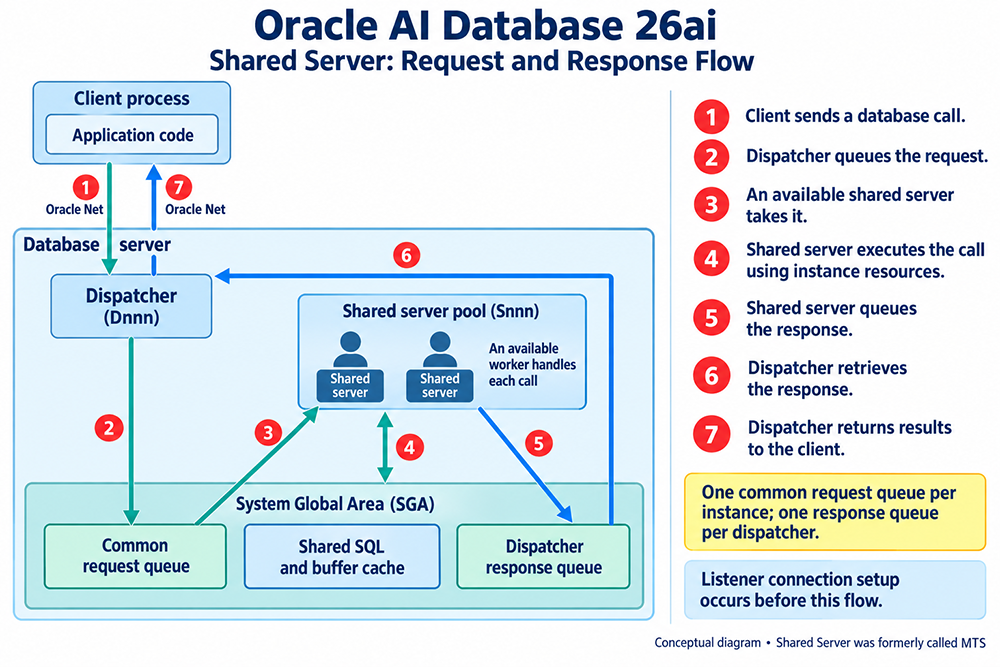
- The client sends a database call over Oracle Net.
- The dispatcher queues the request on the common request queue in the SGA.
- An available shared server takes it.
- The shared server executes the call using instance resources, including the shared SQL area and the buffer cache.
- The shared server queues the response on the dispatcher's response queue.
- The dispatcher retrieves the response.
- The dispatcher returns the results to the client over Oracle Net.
Tracing One Connection Through Every Element
Putting the elements in order shows how little any one of them does alone. A new client asks the listener for a shared connection to a service. The listener already knows the service and its dispatchers because LREG registered them, so it picks the dispatcher with the lightest load and connects the client to it. The dispatcher binds the client's connection to a virtual circuit. When the client sends its first call, the dispatcher places that circuit on the common request queue, and whichever shared server is idle takes it. The shared server works through the call, using the instance's shared SQL and buffer cache like any other server process, and places the response on the response queue that belongs to the originating dispatcher. The dispatcher reads it and sends it back over Oracle Net.
From then on the listener plays no part. The client keeps talking to its dispatcher, each new call repeats the queue and shared server steps, and the shared server that handled one call is free to handle anyone's next. When the client disconnects, the dispatcher releases the virtual circuit.
From then on the listener plays no part. The client keeps talking to its dispatcher, each new call repeats the queue and shared server steps, and the shared server that handled one call is free to handle anyone's next. When the client disconnects, the dispatcher releases the virtual circuit.
Which View Shows Which Element
When something behaves unexpectedly, it helps to know which element to look at and where:
| Element | Where to look |
|---|---|
| Listener and LREG registration | lsnrctl services shows which services and handlers the listener knows; ALTER SYSTEM REGISTER forces registration to catch up |
| Dispatchers | V$DISPATCHER for status and load, V$DISPATCHER_CONFIG for how they are configured |
| Virtual circuits | V$CIRCUIT |
| Request and response queues | V$QUEUE (restricted to SYS and users with SELECT ANY TABLE) |
| Shared servers | V$SHARED_SERVER |
| Parameters | SHOW PARAMETER for SHARED_SERVERS, DISPATCHERS, and the other Shared Server parameters |
Older Names You May Still See
Older scripts and articles use the Multi-Threaded Server parameter names, which Oracle 9i replaced along with the feature's name. None of the
MTS_ names appears in the current documentation, and they should not be used in Oracle AI Database 26ai:
| Older MTS name | Current name |
|---|---|
MTS_SERVERS | SHARED_SERVERS |
MTS_MAX_SERVERS | MAX_SHARED_SERVERS |
MTS_DISPATCHERS | DISPATCHERS |
MTS_MAX_DISPATCHERS | MAX_DISPATCHERS |
MTS_SESSIONS | SHARED_SERVER_SESSIONS |
MTS_CIRCUITS | CIRCUITS |
Seeing the Elements on a Running System
The dynamic performance views show each element directly. List the dispatchers with:
At the operating system level, when the database runs in the default process mode, each dispatcher and shared server is a separate background process, named along the lines of
The next lesson concludes this module.
SELECT NAME, NETWORK FROM V$DISPATCHER;V$SHARED_SERVER lists the shared servers, V$CIRCUIT the virtual circuits, and V$QUEUE the request and response queues.
At the operating system level, when the database runs in the default process mode, each dispatcher and shared server is a separate background process, named along the lines of
ora_d000_<instance> and ora_s000_<instance>, so a ps -ef listing filtered on those names shows them. If the database runs in threaded execution mode (THREADED_EXECUTION=TRUE), Oracle processes execute as operating system threads, so an OS process listing no longer gives a reliable count and the V$ views are the better source.
The next lesson concludes this module.