Lesson 7
Oracle Shared Server using 26ai Summary
This module set out to explain a feature that has been renamed once, misdescribed often, and rarely questioned: Oracle Shared Server. The architecture it describes, many client sessions sharing a small pool of server processes, is exactly what runs in Oracle AI Database 26ai today. What needed work was everything around it: the terminology inherited from the Multi-Threaded Server era, a lesson premise that compared two things that were never parallel, and a handful of claims about when Shared Server is the right choice that were stronger than Oracle's own documentation supports. This closing lesson pulls the six lessons back together, corrections included.
The Same Architecture Under a New Name
The history is short. SQL*Net version 1 required the listener to start a separate operating system process for every new connection. SQL*Net version 2 introduced the Multi-Threaded Server, or MTS, in which a small set of dispatcher processes handled many connections. Oracle 9i renamed MTS to Shared Server. That was a rename, not an invention, and the dispatcher, request queue, shared server pool, and response queue design survived it unchanged. The one visible casualty of the rename was the parameter names:
The clearest correction in the module was to the phrase "dedicated listener." Lesson 2 established that there is no such product. There is one Oracle Net Listener, and its whole job is to accept a connection, choose a service handler, and hand the session off. The handler is one of three things: a dedicated server process, a dispatcher for Shared Server, or a pooled server for Database Resident Connection Pooling. The real comparison is between Shared Server and a dedicated server, and both run on the same listener at the same time. Older material that describes two listener processes, one for each mode, is working around a distinction that never required two listeners.
MTS_SERVERS became SHARED_SERVERS, MTS_DISPATCHERS became DISPATCHERS, MTS_MAX_SERVERS became MAX_SHARED_SERVERS, and so on. None of the MTS_ names appears in the current documentation, so an old script or article that uses them is describing a system that no longer exists under those names.
The clearest correction in the module was to the phrase "dedicated listener." Lesson 2 established that there is no such product. There is one Oracle Net Listener, and its whole job is to accept a connection, choose a service handler, and hand the session off. The handler is one of three things: a dedicated server process, a dispatcher for Shared Server, or a pooled server for Database Resident Connection Pooling. The real comparison is between Shared Server and a dedicated server, and both run on the same listener at the same time. Older material that describes two listener processes, one for each mode, is working around a distinction that never required two listeners.
How the Client Chooses, and What Happens When It Can't Have It
The client states its preference in the
Some work should use a dedicated server whatever the database is configured to do. Oracle's documentation names batch jobs that leave little or no idle time and RMAN backup, restore, and recovery, and it states that administrative connections used to start or shut down an instance or perform media recovery must be dedicated, because those operations cannot be performed through a dispatcher.
SERVER attribute of the connect descriptor: SERVER=shared, SERVER=dedicated, or SERVER=pooled for DRCP, which is a separate feature and not another name for Shared Server. What happens when the preference can't be met is a distinction worth remembering, because the two cases look alike and behave differently. A client that says nothing is served by a dedicated server if no dispatcher is registered. A client that explicitly asks for SERVER=shared when no dispatcher is available is rejected, typically with ORA-12520, "listener could not find available handler for requested type of server." And a USE_DEDICATED_SERVER=ON entry in a client's sqlnet.ora overwrites any SERVER value already in a connect descriptor, so a descriptor that says shared can still produce a dedicated connection.
Some work should use a dedicated server whatever the database is configured to do. Oracle's documentation names batch jobs that leave little or no idle time and RMAN backup, restore, and recovery, and it states that administrative connections used to start or shut down an instance or perform media recovery must be dedicated, because those operations cannot be performed through a dispatcher.
The Listener's Part, and Where It Ends
The listener has a narrower role in Shared Server than older descriptions suggest. LREG, the listener registration process, keeps it informed: it registers the instance's services and each dispatcher's address and current load. When a shared connection arrives, the listener picks the dispatcher with the lightest load and connects the client to it. Oracle's Net Services guide says the listener uses direct hand-off whenever possible, and issues a redirect message with the dispatcher's address when, for example, the dispatcher is remote to the listener. Either way, once the client is connected to its dispatcher the listener is no longer part of the traffic, and it never carries SQL or results.
Two practical details from Lesson 3 belong in any troubleshooting habit. If the listener starts after the instance, registration doesn't happen until LREG's next discovery run, which by default is every 60 seconds;
Two practical details from Lesson 3 belong in any troubleshooting habit. If the listener starts after the instance, registration doesn't happen until LREG's next discovery run, which by default is every 60 seconds;
ALTER SYSTEM REGISTER forces it immediately. And lsnrctl services is the first place to look when a shared connection is refused, because it shows which handlers the listener actually knows about and whether each is a dedicated server or a dispatcher. From there the diagnosis follows the path a request travels: is the service registered, is a suitable dispatcher configured, did registration catch up, what is the client really asking for, and are the dispatchers healthy.
The Elements and the Request Flow
Lessons 5 and 6 named the pieces and followed a request through them. The elements are the listener, LREG, the dispatchers (
Dnnn), virtual circuits, the common request queue, the shared servers (Snnn), and a response queue for each dispatcher. A virtual circuit is a piece of shared memory the dispatcher uses for a client's requests and replies. There is one common request queue per instance, shared by every dispatcher, and one response queue per dispatcher. The flow is the same for every call:
- The client sends a database call over Oracle Net to its dispatcher.
- The dispatcher places the connection's virtual circuit on the common request queue in the SGA.
- An available shared server takes the queued request.
- The shared server executes the call, using shared SQL and the buffer cache as needed.
- The shared server places the response on the originating dispatcher's response queue.
- The dispatcher retrieves the response.
- The dispatcher returns the results to the client.
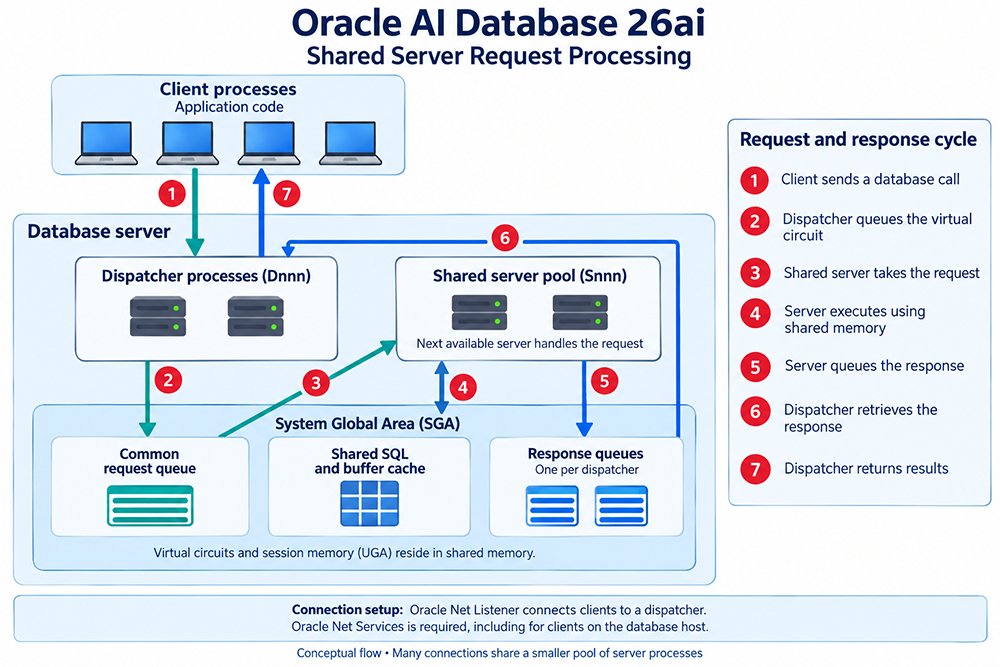
Three consequences of that design explain most of how Shared Server behaves. First, the shared server that handles one call is not necessarily the one that handles the next: in Oracle's own example, the calls that parse a query, fetch the first row, fetch the next row, and close the result set can each be served by a different shared server. That works because a session's state lives in its UGA in the SGA, where every shared server can reach it, rather than in a private process PGA. Second, if every shared server is busy, requests wait on the common request queue rather than fail. Third, a shared server working on a request can't serve anyone else until it finishes, which is why a handful of long, continuous requests can hold servers that dozens of quick ones are waiting for. That is the mechanical reason Shared Server fits many short, intermittent requests and fits poorly around sustained work.
Because shared sessions can't use the operating system shortcut that lets a local client start its own dedicated process, a session that uses Shared Server must connect through Oracle Net Services even when it runs on the same computer as the instance. The listener, in turn, starts nothing per connection: it points the client at a dispatcher that is already running.
Because shared sessions can't use the operating system shortcut that lets a local client start its own dedicated process, a session that uses Shared Server must connect through Oracle Net Services even when it runs on the same computer as the instance. The listener, in turn, starts nothing per connection: it points the client at a dispatcher that is already running.
Configuring It
Lesson 4 covered the initialization parameters, and a few points are worth keeping in view.
Two parameters behave differently from what older material says.
SHARED_SERVERS is the only required parameter. Set to a nonzero value it enables Shared Server, and if no dispatcher has been configured Oracle starts one for TCP by default. If neither SHARED_SERVERS nor DISPATCHERS is present at startup, you can't start Shared Server later by altering only DISPATCHERS; you must set SHARED_SERVERS to a nonzero value. A database created with DBCA usually already has a dispatcher for Oracle XML DB, which sets SHARED_SERVERS to 1 but lets only XDB sessions use Shared Server, so seeing a nonzero value does not mean application sessions are using it.
Two parameters behave differently from what older material says.
MAX_SHARED_SERVERS is not a ceiling that SHARED_SERVERS must stay under: SHARED_SERVERS overrides it, and the server count only adjusts itself when the maximum is higher. And MAX_DISPATCHERS is described by Oracle as something that can be ignored for now, since you can raise the dispatcher count above it with ALTER SYSTEM. For sizing, Oracle's guidance is about one shared server for every ten connections in typical systems, and a dispatcher count worked out per protocol as the maximum concurrent sessions divided by the connections one dispatcher supports, rounded up. Shared servers and dispatchers can be started or adjusted with ALTER SYSTEM without restarting the instance, and reducing the number of dispatchers takes effect gradually as users disconnect. In a container database, Shared Server is configured in the root; a pluggable database can only disable it, by setting SHARED_SERVERS to 0, or reset the parameter to return to the root's behavior. Parameters can live in an SPFILE or a text init.ora file; the text file is still fully supported, but the SPFILE keeps ALTER SYSTEM changes without manual editing.
Deciding Whether to Use It
The module's most important correction was to the question of when Shared Server is the right choice. Oracle's documentation gives a balanced answer rather than a flat recommendation in either direction. Database Concepts lists the benefits, fewer operating system processes, less PGA memory, more clients connected at once, and possibly faster connects when clients connect and disconnect at a high rate, alongside the disadvantages: slower response time in some cases, incomplete feature support, and more complex setup and tuning. Its general guideline is to use Shared Server only when you have more concurrent connections than the operating system can handle. The Performance Tuning Guide adds that shared servers are beneficial for many OLTP users performing intermittent transactions, and that some features, parallel execution among them, can bind a session to one shared server.
Oracle's own memory example makes the trade concrete. Assuming 400 KB per session, 4 MB per server process, a pool of 100, and 100 shared servers, 5,000 client connections use about 22 GB with dedicated servers, about 2.5 GB with Shared Server, and about 615 MB with Database Resident Connection Pooling. Those figures explain why Shared Server exists and why DRCP is worth comparing for applications that acquire a connection, use it briefly, and release it.
The cloud adds one specific data point. On Autonomous Database on Dedicated Exadata Infrastructure, Shared Server is an option you choose when you provision the Autonomous Container Database, and it then applies to every database in that container; it can't be disabled for one database, and a dedicated connection to a database in that container isn't available. Oracle positions it for maintaining legacy applications designed without connection pooling. On Base Database Service and Exadata Database Service you manage the database yourself and configure Shared Server exactly as you would on-premises.
Oracle's own memory example makes the trade concrete. Assuming 400 KB per session, 4 MB per server process, a pool of 100, and 100 shared servers, 5,000 client connections use about 22 GB with dedicated servers, about 2.5 GB with Shared Server, and about 615 MB with Database Resident Connection Pooling. Those figures explain why Shared Server exists and why DRCP is worth comparing for applications that acquire a connection, use it briefly, and release it.
The cloud adds one specific data point. On Autonomous Database on Dedicated Exadata Infrastructure, Shared Server is an option you choose when you provision the Autonomous Container Database, and it then applies to every database in that container; it can't be disabled for one database, and a dedicated connection to a database in that container isn't available. Oracle positions it for maintaining legacy applications designed without connection pooling. On Base Database Service and Exadata Database Service you manage the database yourself and configure Shared Server exactly as you would on-premises.
Shared Server and Its Neighbors
Shared Server is easier to place once you separate it from the tools that address connection volume from different angles. Application-side pools such as UCP, HikariCP, and DBCP reduce the number of sessions the database sees; Shared Server reduces the number of server processes needed for the sessions that exist. Database Resident Connection Pooling pools server processes inside the database and is requested with
SERVER=pooled. Oracle Connection Manager multiplexes many client sessions through a single network connection, and with dispatchers configured with MULTIPLEX=on it builds on Shared Server rather than replacing it, at the cost of requiring clients to connect through Connection Manager. Scaling up or adding RAC nodes adds capacity but doesn't reduce the number of processes each connection requires. They answer different questions.
Where to Look When Something Is Wrong
Every element in the architecture has a place to inspect it.
Taken together, the six lessons describe a feature that is small in concept and easy to misstate. The listener chooses a handler; a dispatcher holds the network session; a queue feeds a pool of servers that borrow session state from shared memory; and whether that trade of process count for latency and complexity is worth making depends on how many connections you have and how much of the time they are actually working. The Oracle 26ai documentation the lessons draw on is linked below.
lsnrctl services shows the listener's view of services and handlers. V$DISPATCHER shows dispatcher status and load and V$DISPATCHER_CONFIG how the dispatchers are configured. V$SHARED_SERVER shows the shared servers, V$CIRCUIT the virtual circuits, and V$QUEUE the request and response queues, though that view is restricted to SYS and users with the SELECT ANY TABLE privilege. Used together they separate the two questions that run through the whole module: whether the listener can find a handler for a session, and whether the handlers and the shared server pool can carry its work.
Taken together, the six lessons describe a feature that is small in concept and easy to misstate. The listener chooses a handler; a dispatcher holds the network session; a queue feeds a pool of servers that borrow session state from shared memory; and whether that trade of process count for latency and complexity is worth making depends on how many connections you have and how much of the time they are actually working. The Oracle 26ai documentation the lessons draw on is linked below.
Oracle 26ai References
- The client sends a database call to its dispatcher.
- The dispatcher places the connection's virtual circuit on the common request queue in the System Global Area (SGA).
- An available shared server takes the queued request.
- The shared server executes the request, accessing shared SQL and the database buffer cache as needed.
- The shared server places the response in the originating dispatcher's response queue.
- The dispatcher retrieves the response from its queue.
- The dispatcher returns the results to the client.
In a shared server configuration, client user processes connect to a dispatcher.
A dispatcher can support multiple client connections concurrently. Each client connection is bound to a virtual circuit. A virtual circuit is a piece of shared memory used by the dispatcher for client database connection requests and replies. The dispatcher places a virtual circuit on a common queue when a request arrives. An idle shared server picks up the virtual circuit from the common queue, services the request, and relinquishes the virtual circuit before attempting to retrieve another virtual circuit from the common queue. This approach enables a small pool of server processes to serve a large number of clients. A significant advantage of shared server architecture over the dedicated server model is the reduction of system resources, enabling the support of an increased number of users. The shared server architecture requires Oracle Net Services. User processes targeting the shared server must connect through Oracle Net Services, even if they are on the same machine as the Oracle instance.
Having completed this module, you should be able to:
Having completed this module, you should be able to:
- Define types of Oracle listeners
- Describe how MTS differs from a dedicated listener
- Describe how the dedicated listener spawns connections
- Identify the components of MTS
- Describe how MTS handles incoming connections
- Define the elements of MTS