| Lesson 5 | Load balancing with Shared Server |
| Objective | Configure multiple listeners to facilitate load balancing. |
Configure Oracle Load Balancing
The most common multiple listener setup is one listener per database instance, but it is also possible to run several listeners, one per incoming network protocol. Listener load balancing is the general term for spreading connections across a set of listeners so that no single listener becomes a bottleneck and incoming requests do not wait longer than they need to just to get a listener's attention.
Two distinct mechanisms work together to make this happen, and it is worth keeping them separate in your head, since they operate at different points in the connection process. Client side load balancing is where the client itself randomizes which listener address it tries first. Server side connection load balancing is where the listener that actually receives the request picks the least loaded instance, node, or dispatcher to hand that request to. This lesson covers both, then walks through the diagram that ties them together end to end.
Two distinct mechanisms work together to make this happen, and it is worth keeping them separate in your head, since they operate at different points in the connection process. Client side load balancing is where the client itself randomizes which listener address it tries first. Server side connection load balancing is where the listener that actually receives the request picks the least loaded instance, node, or dispatcher to hand that request to. This lesson covers both, then walks through the diagram that ties them together end to end.
Registering a Dispatcher Across Multiple Listeners
A dispatcher registers with more than one listener through its own
None of this strictly requires an explicit
Concretely, an explicit configuration naming a multi-listener alias looks like the syntax from Lesson 2, just with that alias resolving to more than one address behind the scenes:
LISTENER attribute, covered in Lesson 2, when that attribute's alias resolves, through a naming method, to a description containing more than one listener address. It is not a matter of repeating a LISTENER parameter once per listener; a single alias can point at several addresses at once. LISTENER_NETWORKS, covered in Lessons 2 and 3, is the other tool available here. It is the general purpose parameter for partitioning registration across multiple networks, and it can be used to cross register a dispatcher's information with more than one listener as well.
None of this strictly requires an explicit
DISPATCHERS entry in the first place. If SHARED_SERVERS is enabled with no DISPATCHERS specified at all, Oracle creates a single default TCP dispatcher automatically, and that default dispatcher can still be pointed at a multi-address LISTENER alias exactly like an explicitly configured one. What actually determines whether a dispatcher registers across multiple listeners is the LISTENER attribute, or LISTENER_NETWORKS, resolving to more than one address, not the mere presence of a DISPATCHERS line in the parameter file.
Concretely, an explicit configuration naming a multi-listener alias looks like the syntax from Lesson 2, just with that alias resolving to more than one address behind the scenes:
DISPATCHERS = "(PROTOCOL=tcp)(LISTENER=listener_alias)"
listener_alias defined in a server side tnsnames.ora as a description containing every listener address the dispatcher should register with, and no CONNECT_DATA clause, since this alias is used for registration rather than for a client actually connecting anywhere.
Client Side Load Balancing
When a client's connect descriptor lists more than one address under a single
It is worth being precise about what each keyword does on its own, since they solve different problems.
DESCRIPTION, with LOAD_BALANCE=on, the client randomizes which address it tries first, spreading connection attempts across the available listeners instead of always hitting the same one. Adding FAILOVER=on alongside it means the client tries the next address in the list if the first one fails, rather than giving up on the first failure:
sales=
 (DESCRIPTION=
  (LOAD_BALANCE=on)
  (FAILOVER=on)
  (ADDRESS=(PROTOCOL=tcp)(HOST=host1)(PORT=1521))
  (ADDRESS=(PROTOCOL=tcp)(HOST=host2)(PORT=1521))
  (CONNECT_DATA=(SERVICE_NAME=sales.us.example.com)))
tnsnames.ora on the client side, so it is worth having a predictable naming and distribution strategy for that file across every client that needs it, and testing each alias with TNSPING once it is in place rather than waiting for a real connection attempt to surface a typo. The network topology course covers building and maintaining tnsnames.ora files in detail.
It is worth being precise about what each keyword does on its own, since they solve different problems.
LOAD_BALANCE=on by itself only changes the order addresses are tried in; without FAILOVER=on alongside it, a client that happens to pick a down listener first simply fails rather than moving on to the next address in the list. In practice the two are almost always set together, since load balancing without failover mostly just relocates the failure point rather than removing it.
How a Listener Picks a Dispatcher
Once a listener actually receives the connection request, it does its own picking, independent of whatever randomization the client just did. In a Shared Server configuration, the listener selects a dispatcher in this order: least loaded node first, then least loaded instance on that node, then least loaded dispatcher for that instance. In a dedicated server configuration, the same idea applies one level up, at the node and instance level, since there is no dispatcher left to choose once an instance is selected.
The dispatcher a client ends up on then places that client's request on the common queue, as covered in Lesson 1, and whichever shared server happens to be idle picks it up. The dispatcher never becomes a permanent go between assigning one client to one fixed shared server; it stays connected to the client for the whole session while individual requests get handed off to whichever shared server is free at the moment.
All of this assumes the client is actually eligible for Shared Server in the first place. A connect descriptor carrying
The dispatcher a client ends up on then places that client's request on the common queue, as covered in Lesson 1, and whichever shared server happens to be idle picks it up. The dispatcher never becomes a permanent go between assigning one client to one fixed shared server; it stays connected to the client for the whole session while individual requests get handed off to whichever shared server is free at the moment.
All of this assumes the client is actually eligible for Shared Server in the first place. A connect descriptor carrying
(SERVER=DEDICATED), covered in Lesson 4 for administrative work such as batch jobs and RMAN, skips dispatcher selection entirely and goes straight to a dedicated server process instead; load balancing across listeners still applies to where that dedicated connection lands, just without a dispatcher in the picture at all.
Watching Dispatcher Response Times by Protocol
Since a dispatcher's own response queue, one per dispatcher, is what actually carries results back to a waiting client, watching wait times there, broken out by network protocol, tells you whether load is genuinely balanced or quietly piling up on one protocol's dispatchers while another sits idle:
SELECT network "Protocol",
      DECODE( SUM(totalq), 0, 'No Responses',
      SUM(wait)/SUM(totalq) || ' hundredths of seconds')
     "Average Wait Time per Response"
FROM
  v$queue q,
  v$dispatcher d
WHERE
  q.type = 'DISPATCHER'
  AND
  q.paddr = d.paddr
GROUP BY network;
V$QUEUE's TYPE column has exactly two values: COMMON for the single shared request queue every dispatcher feeds into, and DISPATCHER for each dispatcher's own response queue. Filtering to DISPATCHER and joining to V$DISPATCHER on process address, as this query does, isolates response side wait time specifically, which is exactly what you want when the question is whether load balancing across protocols is actually working.
Load Balancing Diagram
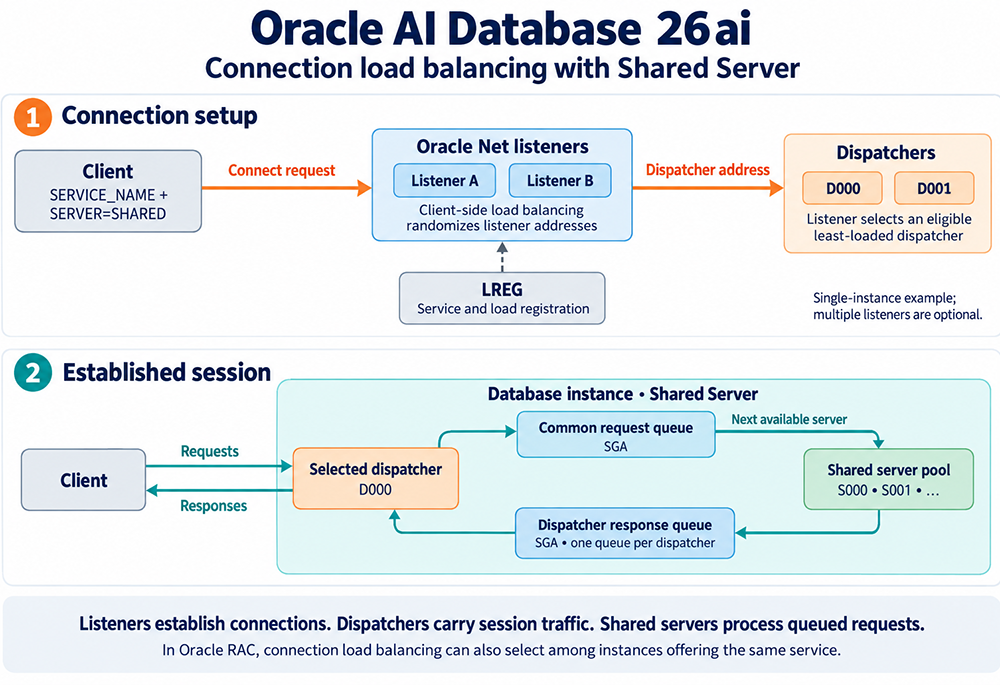
In the connection setup stage, a client connects with a service name and
SERVER=SHARED. The LREG background process keeps the Oracle Net listeners, Listener A and Listener B in this example, continuously updated with service and load information. The client itself randomizes which listener address it tries, exactly as covered above, and whichever listener actually receives the request selects an eligible, least loaded dispatcher, D000 or D001 here, and returns that dispatcher's address to the client.
In the established session stage, the client communicates directly with its selected dispatcher, D000. Requests go onto the common request queue in the SGA, and the next available shared server from the pool, S000, S001, and so on, picks up each request in turn and processes it. Responses do not travel back through the shared server or the listener; they go onto that dispatcher's own response queue in the SGA, one queue per dispatcher as covered above, and the dispatcher delivers them back to the client.
As the diagram notes, this single instance example does not require multiple listeners at all; they are optional here, though useful for the load distribution this lesson covers. In an Oracle RAC environment, the same connection load balancing can also choose among multiple instances offering the same service, not just among dispatchers within a single instance.
Configuring Listener Load Balancing Across Instances
When a set of databases provides equivalent service, such as replicas of the same data, listener load balancing across several listeners that all serve more than one instance becomes genuinely useful rather than just a single instance nicety. To set this up, configure multiple listeners for each database; they can run on the same host as the database, or, for Shared Server, on entirely different nodes, since dispatchers can register with listeners across nodes just as easily as with one on the local host.
For Oracle RAC specifically, register with the SCAN listener through the
It is worth remembering that server side connection load balancing, the least loaded node, instance, then dispatcher order covered earlier, is exactly what makes a RAC deployment's SCAN listener useful in the first place. A client connecting through SCAN does not need to know which node is currently least busy; the listener figures that out using the same load information LREG keeps registering, the same mechanism this lesson has covered throughout, just applied across cluster nodes instead of within a single instance.
Whichever of these setups you use, remember that most of the parameters involved,
For Oracle RAC specifically, register with the SCAN listener through the
REMOTE_LISTENER parameter rather than hand configuring individual node listeners yourself; SCAN already provides a single, stable name that resolves across the cluster. Oracle's general recommendation is one listener per node unless a specific reason calls for more, which keeps the configuration simple without giving up any of the load balancing benefit.
It is worth remembering that server side connection load balancing, the least loaded node, instance, then dispatcher order covered earlier, is exactly what makes a RAC deployment's SCAN listener useful in the first place. A client connecting through SCAN does not need to know which node is currently least busy; the listener figures that out using the same load information LREG keeps registering, the same mechanism this lesson has covered throughout, just applied across cluster nodes instead of within a single instance.
Whichever of these setups you use, remember that most of the parameters involved,
DISPATCHERS, LOCAL_LISTENER, REMOTE_LISTENER, apply through ALTER SYSTEM without an instance restart. That persistence still depends on the instance using a server parameter file rather than a traditional text based PFILE; a PFILE remains fully supported, it just cannot be written to directly by ALTER SYSTEM, so changes made against a PFILE based instance need a manual edit to survive a restart. The initialization parameters page in the database architecture course covers PFILE and SPFILE administration in more depth.
Configuring multiple listeners well comes down to keeping the two mechanisms in this lesson straight: let clients randomize across listener addresses on their side, and let the receiving listener pick the least loaded node, instance, and dispatcher on its side. Neither one substitutes for the other, and both are already working together in the diagram above the moment more than one listener address exists to choose from.
The next lesson discusses how to set up connection pooling.
The next lesson discusses how to set up connection pooling.
Load Balancing Shared Server - Exercise
Before moving on to the next lesson, click the Exercise link below to see how well you understand load balancing.
Load Balancing Shared Server - Exercise
Load Balancing Shared Server - Exercise