Describe the Memory Structures that make up the System Global Area.
Memory Structures that make up System Global Area
The acronym SGA stands for System Global Area. Because it is a shared memory structure, and because
the word "shared" also begins with an "S," people sometimes refer to the SGA as the Shared Global
Area. This is such a common occurrence that Oracle even mentions it in its own manuals. The correct
term is System Global Area, but you will hear both used in practice, and it is worth knowing they
mean the same thing so a mislabeled diagram or a colleague's shorthand does not throw you off.
The SGA is created when an Oracle instance starts and released when the instance shuts down. You can
confirm its total size and see it broken into its major components at any time with:
SELECT * FROM V$SGA;
Automatic Memory Management
Oracle strongly recommends automatic memory management for sizing this memory rather than hand
tuning every individual component. Automatic memory management lets Oracle Database manage and tune
instance memory on its own, governed by two initialization parameters: a target memory size
(MEMORY_TARGET) and a maximum memory size (MEMORY_MAX_TARGET). The database continuously tunes
toward the target, redistributing memory as needed between the SGA and the aggregate instance PGA
based on actual workload demand. You can check both values with:
SHOW PARAMETER memory_target;
SHOW PARAMETER memory_max_target;
Before manually setting any individual memory pool size, consider whether automatic memory
management already handles it well enough. If you do need to configure allocations by hand, Oracle
Enterprise Manager's Memory Advisor is the recommended starting point rather than guessing at
values.
Considering Multiple Buffer Pools
A single default buffer pool is generally adequate for most systems. However, if you understand your
application's access patterns in detail, you may benefit from configuring multiple buffer pools.
Segments with atypical access patterns, either constantly accessed ("hot") or infrequently accessed
(for example, a large segment touched by a batch job once a day), are good candidates for isolation
into their own pool rather than competing for space with everything else.
Multiple buffer pools let you address exactly this kind of difference. A KEEP buffer pool holds
frequently accessed segments in memory so they are not aged out by unrelated activity. A RECYCLE
buffer pool holds the opposite kind of segment, preventing large, infrequently reused objects from
consuming space that would be better spent on hot data. When an object is associated with a
particular pool, every block belonging to that object is placed in that pool. Objects with no
explicit assignment land in the DEFAULT buffer pool, sized by DB_CACHE_SIZE. Every pool, KEEP,
RECYCLE, and DEFAULT alike, uses the same Least Recently Used (LRU) replacement policy: if a pool is
not large enough to hold everything assigned to it, the oldest blocks simply age out first.
You can size the KEEP and RECYCLE pools independently with:
ALTER SYSTEM SET db_keep_cache_size = 200M;
ALTER SYSTEM SET db_recycle_cache_size = 100M;
and confirm current pool sizes and hit activity with:
SELECT * FROM V$BUFFER_POOL;
By allocating objects to the appropriate pool, you can:
Reduce or eliminate unnecessary physical I/Os
Isolate or limit an object's footprint to a separate cache, protecting the rest of the buffer
cache from being flushed by that object's activity
Databases and Instances
Many Oracle practitioners use the terms instance and database interchangeably. In fact, they are
different entities, though closely related, and the distinction matters because it provides real
insight into Oracle's architecture. In Oracle terminology, the database refers to the
physical storage of information, while the instance refers to the software running on the server
that provides access to that information. The instance runs on the computer or server; the database
lives on the disks attached to it.
The database is physical: it consists of files stored on disks.
The instance is logical: it consists of in-memory structures and processes running on the
server.
This is exactly why memory architecture matters so much to an Oracle DBA. The instance is built from
an area of shared memory, the System Global Area (SGA), plus a private memory area for each process,
the Program Global Area (PGA). An instance can belong to one and only one database, although
multiple instances can serve the same database, as in an Oracle RAC configuration. Instances are
temporal: you can stop and start one in seconds. Databases, with proper maintenance, persist
indefinitely. Users never touch the database's files directly. Instead, every request passes through
an instance, which is exactly why understanding SGA and PGA memory is inseparable from understanding
how Oracle actually works day to day.
The System Global Area is the heart of every Oracle instance. Every Oracle process, foreground and
background alike, communicates with the SGA in one way or another.
Memory Structures in SGA:
The previous lesson introduced you to the major structures in the SGA at a high level. This lesson
goes a level deeper into two of those structures specifically, the database buffer cache and the
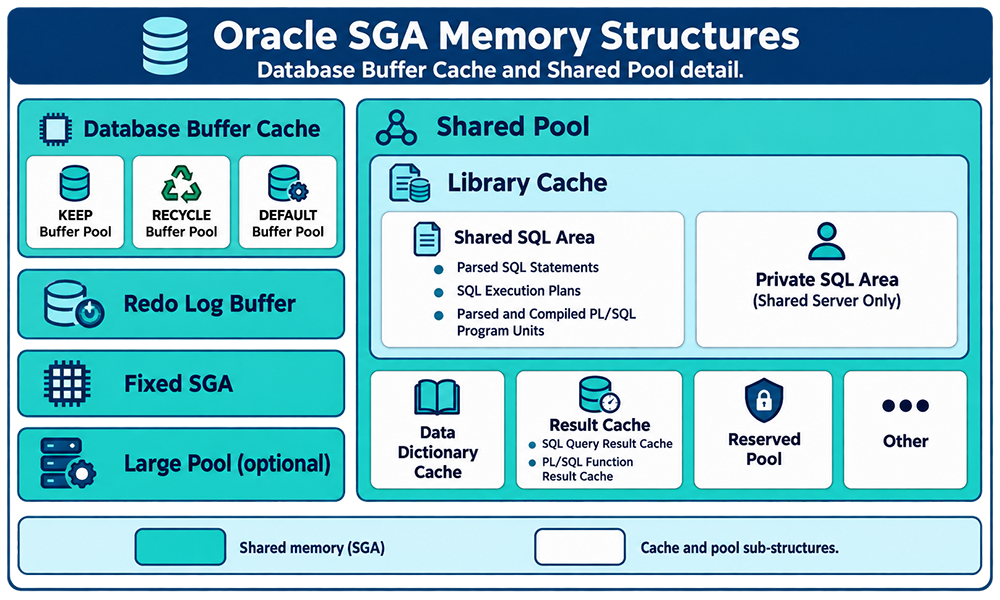
shared pool, since they are the two you will spend the most time tuning in practice. The diagram
below shows both in detail.
Figure 2: Detail view of the two SGA structures covered in this lesson. On the left, the Database
Buffer Cache is split into KEEP, RECYCLE, and DEFAULT buffer pools, alongside the Redo Log Buffer,
Fixed SGA, and the optional Large Pool. On the right, the Shared Pool is broken into the Library
Cache, which holds the Shared SQL Area (parsed SQL statements, execution plans, and compiled
PL/SQL) and, under shared server connections only, a Private SQL Area, plus the Data Dictionary
Cache, Result Cache, Reserved Pool, and Other allocations.
Purpose of the Database Buffer Cache
The database buffer cache, often just called the buffer cache, is the memory area that stores copies
of data blocks read from data files. A buffer is a location in main memory where the buffer manager
temporarily holds a currently or recently used data block. Every session concurrently connected to
the instance shares access to this same cache.
Oracle Database uses the buffer cache to accomplish two related goals:
Optimize physical I/O. The database updates data blocks directly in the cache
and records metadata about the change in the redo log buffer. After a COMMIT, the database writes
the redo entries to the online redo log immediately, but it does not write the modified data blocks
to the data files right away. Instead, the database writer processes (DBWn) perform lazy writes in
the background, batching and scheduling the actual disk writes for efficiency rather than writing on
every single change.
Keep frequently accessed blocks in memory and push infrequently accessed blocks out to
disk. When Database Smart Flash Cache is enabled, part of the buffer cache can extend onto
flash storage. This buffer cache extension lives on one or more flash disk devices, solid state
storage that is far faster than magnetic disk but not as fast as DRAM, giving you a middle tier
between full memory speed and full disk latency. The database can improve performance by caching
buffers in flash memory rather than re-reading them from magnetic disk. Configure this with the
DB_FLASH_CACHE_FILE and DB_FLASH_CACHE_SIZE initialization parameters, which can each accept a list
of devices; the buffer cache tracks every device and distributes buffers across them uniformly.
SGA Structure Terms
The table below summarizes the SGA structures most relevant to this lesson, as a quick-reference
before the detailed discussion that follows.
Data Dictionary Cache
Holds frequently accessed data dictionary information
Redo Log Buffer
Holds redo log entries waiting to be written to disk
Library Cache
Contains the shared SQL area and PL/SQL code
Shared Pool
Contains memory structures related to SQL execution
Large Pool
An optional memory area used for backup and restore operations
Data Dictionary Cache
The data dictionary is a collection of database tables and views holding reference information about
the database itself: its structures, its objects, and its users. Oracle Database consults the data
dictionary constantly during SQL statement parsing, checking that tables exist, that columns match,
and that the current user has the privileges the statement requires. Because it is accessed so
often, two dedicated memory locations exist specifically to hold dictionary data:
Data dictionary cache: holds information about database objects. It is also
known as the row cache, because it stores data as individual rows rather than as whole buffers, which
suits the small, targeted lookups dictionary access typically needs.
Library cache: shared by every server process for access to data dictionary
information alongside parsed SQL.
You can check dictionary cache hit ratios directly with:
SELECT parameter, gets, getmisses FROM V$ROWCACHE;
and check library cache activity, including reload and invalidation counts that often point to
undersized memory or unshared SQL, with:
SELECT namespace, gets, gethits, pins, reloads FROM V$LIBRARYCACHE;
The Redo Log Buffer
The redo log buffer is a circular buffer in the SGA that stores redo entries describing changes made
to the database. A redo record is a data structure containing everything necessary to reconstruct,
or redo, a change made by a DML or DDL operation. Database recovery applies these entries to data
files to reconstruct changes that were lost, for example after an instance crash. Server processes
copy redo entries from their own private memory into the redo log buffer in the SGA, where the
entries occupy continuous, sequential space. The Log Writer background process (LGWR) then flushes
the buffer to the active online redo log group on disk, typically on commit, when the buffer is a
third full, or every three seconds, whichever comes first.
The next few lessons take each of these SGA memory structures in turn and go deeper still, starting
with the shared pool itself.