Oracle Enterprise Manager: From Browser Access to Database Monitoring
Objective: Bring together secure browser access, target discovery, job credentials, email configuration, and database monitoring in an Oracle Enterprise Manager deployment managing supported Oracle AI Database 26ai targets.
This module followed the path from opening the Enterprise Manager console to receiving useful information about a database. Each lesson prepared a different part of that workflow: understanding the management architecture, connecting securely, preparing a Windows execution account, configuring credentials and mail delivery, and defining how monitored conditions receive attention.
The result is more than a working dashboard. A useful management deployment gives administrators evidence about database health, a controlled way to perform operations, and a dependable route for communicating problems. Those outcomes depend on several configurations working together. Successfully signing in does not prove that a target is monitored, and successfully running a host job does not prove that email notifications will reach the responsible administrator.
Review the Five-Lesson Workflow
- Browser-based Enterprise Manager administration: identify the console, Oracle Management Service, management repository, and Management Agents.
- Configure and access the web console: establish secure browser access and confirm that the intended targets are managed.
- Prepare a Windows user for batch jobs: give the execution account the required logon rights and resource permissions on the target host.
- Configure job credentials and email: select suitable credentials for target operations and configure the notification delivery system separately.
- Monitor the database using Enterprise Manager: evaluate target availability and metrics, then use incident rules to route actionable conditions.
The order matters. Credentials cannot compensate for an undiscovered target, and a notification rule cannot compensate for missing metric data. When troubleshooting, return to the earliest unverified step instead of changing several unrelated settings at once.
Understand What the Browser Connects To
Enterprise Manager 24ai and Oracle AI Database 26ai are separate products with separate release and support requirements. The database being monitored is a target of the management deployment. It is not automatically the database that stores Enterprise Manager's own management repository.
The browser presents the console delivered through Oracle Management Service, or OMS. The repository stores management information, while Management Agents and appropriate plug-ins support monitoring and operations against managed targets. This architecture explains why several systems may need attention when one console page becomes unavailable or stops showing fresh data.
A database installation alone does not provide this complete management environment. Likewise, installing Enterprise Manager does not establish that every database version, operating system, repository configuration, and plug-in combination is supported. Check the applicable certification and release documentation before deploying or upgrading each component.
The module uses the Enterprise Manager console rather than the old embedded Database Express interface. EM Express is desupported in Oracle AI Database 26ai. Instructions for enabling a database's XDB HTTPS port therefore do not establish the management console described here.
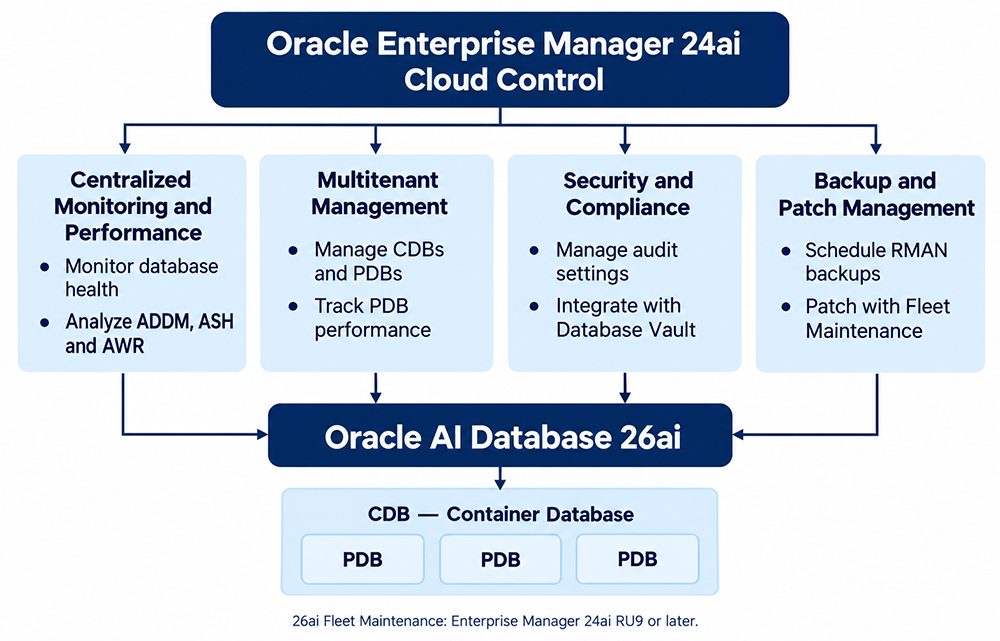
Make Console Access Secure and Verifiable
Use the HTTPS console address supplied for your deployment. Its general form is https://<oms-host>:<https-console-port>/em, although a load balancer may provide the published address. Use the actual configured endpoint instead of assuming a port from an older example.
On the OMS host, an authorized administrator can use emctl status oms -details from the relevant installation to inspect deployment information. Agent status is checked separately with emctl status agent from the agent installation. These are operating-system commands, not SQL statements.
Confirm that name resolution, network access, and certificate trust work from the administrator's workstation. An unexpected certificate warning calls for checking the endpoint and certificate configuration. Routine acceptance of warnings weakens the protection HTTPS is intended to provide.
After signing in, verify that your account can see the required targets and perform its assigned tasks. Use individually accountable administrator accounts and appropriate roles. Reserve deployment-wide administrative privileges for work that requires them. A successful login confirms console access; it does not establish authorization for every target operation.
Confirm That Monitoring Has a Reliable Foundation
Target discovery makes a database available for management, but discovery is only the beginning. Confirm that the associated agent is communicating, the database plug-in is appropriate, and the configured monitoring credentials work. Check collection timestamps as well as displayed values. An old value may look reassuring while no longer describing the current system.
Review the target hierarchy before interpreting status. In a multitenant environment, the container database and its pluggable databases represent different scopes. A container database that is up does not establish that every PDB is open or that an application's service is reachable.
For the same reason, distinguish a database failure from a monitoring failure. An unreachable agent, rejected monitoring credential, or failed collection can prevent Enterprise Manager from obtaining evidence. These conditions deserve investigation, but none independently proves that the database instance has stopped.
Keep a short target inventory that identifies the database, host, relevant PDBs, services, responsible team, and maintenance arrangements. This practical record helps administrators choose the correct target when creating jobs or rules and reduces confusion when similar names appear in different environments.
Keep Each Identity's Purpose Clear
Several identities participate in the workflow. Treating them as interchangeable creates both operational problems and unnecessary access. Start with the operation being performed, then identify the account and permissions needed for that operation.
| Identity or configuration | Purpose | Useful verification |
|---|---|---|
| Enterprise Manager administrator | Access the console and authorized management functions. | Confirm target visibility and assigned privileges. |
| Target monitoring credentials | Allow the monitoring configuration to collect required information. | Check credential validation and recent collections. |
| Host job credentials | Run an authorized operating-system operation on its execution host. | Run a harmless identity and hostname check. |
| Database operation credentials | Perform the requested database task with suitable database privileges. | Validate the connection and required authorization. |
| Mail server configuration | Deliver notification messages through the approved mail service. | Test mail delivery and then the complete notification route. |
Document credential ownership and rotation responsibilities. A password change can affect monitoring or scheduled work if the stored configuration is not updated. Plan the change, update the relevant references, and verify the dependent operation afterward.
Prepare and Test Windows Job Execution
The Windows account prepared in Lesson 3 belongs to the execution context of the job. If a job runs on a managed database host, that host's effective security policy and resource permissions matter. Creating an account only on the OMS host does not automatically prepare another Windows server.
Grant the account the required Log on as a batch job right and the specific access needed by its task. Review effective policy, including domain policy and any conflicting denial. Logon rights alone do not grant permission to read a script, write an output file, or access a remote resource.
Use a harmless job to check both identity and location. Commands such as whoami and hostname can show which Windows account ran the process and where it executed. Inspect the recorded output before expanding the task to backups, maintenance, or other consequential operations.
A successful interactive command is useful evidence, but scheduled execution may have a different working directory, environment, and access to network resources. Use explicit paths and verify the scheduled context. Keep ordinary task permissions separate from the privileges required by the Management Agent service itself.
Use Credentials Deliberately When Scheduling Work
Lesson 4 connected the prepared execution account to Enterprise Manager operations. Named credentials allow controlled reuse of stored authentication information. Preferred credentials supply defaults in supported workflows. They do not mean that every job everywhere runs under one Windows account.
When defining a job, inspect the credentials actually selected for that job and target. An explicit selection can differ from a preferred default. Also inspect the target list, schedule, parameters, and expected output before submission. These checks are especially valuable when copying a job that originally ran against another environment.
Separate job execution from job outcome. A process may start successfully and still fail its intended work because a path is wrong or an application command returns an error. Review the job's detailed results and verify the intended effect rather than relying only on evidence that it was submitted.
Enterprise Manager jobs and database Scheduler jobs also serve different contexts. Enterprise Manager coordinates supported management operations through its job system. Oracle Scheduler provides database scheduling facilities through DBMS_SCHEDULER. Choose the mechanism that fits the task, then validate its own credentials, permissions, and execution history.
Verify Email Separately from Job Credentials
Host credentials do not configure email delivery. The notification system needs its own approved mail-server settings. An appropriately privileged administrator configures these through Setup > Notifications > Mail Servers, which opens the Notification Methods page.
Keep sender identity separate from recipient addresses. The sender identifies outgoing mail; administrator email settings identify notification recipients. The mail-server test sends to the configured sender address, so its success does not establish that an incident rule will notify the intended on-call administrator.
Test the complete route after validating the mail service: an eligible condition must be detected, the intended rule must match, and the resulting message must arrive at the intended destination. Record those results separately so that a later delivery problem can be isolated efficiently.
Turn Monitoring Data into Actionable Information
Lesson 5 introduced the distinction between a measurement and a response. A metric records an observed value. A threshold identifies a condition of interest. A metric alert is already an event; incident rules act on eligible events to create incidents or perform other configured actions, including notifications.
Choose thresholds from operational requirements and observed behavior. For capacity, understand the metric's units and denominator, including how the documented calculation treats autoextension or configured limits. Example warning and critical percentages are teaching values, not universal settings suitable for every database.
Consider collection frequency and the persistence required before an alert is raised. A single brief spike may call for a different response from sustained pressure. Review enough history to distinguish normal variation from a condition that needs investigation, without making detection so slow that useful response time disappears.
Monitoring templates can help apply consistent settings across compatible targets. Review target-specific differences and verify the result of application. Do not assume that editing a saved template automatically updates every target previously configured from it.
Give Each Important Condition a Response Path
A useful incident rule has a clear scope and purpose. Decide which targets and event conditions it covers, who should take responsibility, and what action should follow. Review overlapping rules so that the same condition does not generate unnecessary duplicate messages.
Notification content should help the recipient act: identify the affected target, describe the condition, and provide the relevant time and context. The operating procedure should explain where to investigate and how to escalate if the assigned responder cannot resolve the issue.
Acknowledging an incident records attention; it does not repair the underlying condition. After corrective work, check fresh monitoring evidence and the applicable clearing behavior. Record what changed and confirm that the target or service has actually recovered.
Availability monitoring also has limits. A sampled view is not a complete audit of every startup, shutdown, or brief interruption. If the requirement is to establish exactly who issued a command, use appropriate auditing and logs alongside monitoring evidence.
Validate the Workflow with a Controlled Scenario
Use a nonproduction target or an approved maintenance window to bring the lessons together. Suppose a team wants notification of a sustained capacity condition on a training database. The purpose of the test is to prove the monitoring and response path without creating an actual storage emergency.
- Confirm the target identity, collection freshness, monitoring access, and normal baseline.
- Record the existing metric settings and choose a reversible test configuration that can produce an eligible condition safely.
- Scope the incident rule to the training target and intended test recipients.
- Observe the relevant collection and event, then verify the configured incident or notification action.
- Confirm message receipt and check that the target, condition, and timing are understandable.
- Restore the original settings and verify the resulting monitored state.
Rule simulation can help evaluate matching and actions before a live test, but it does not prove target collection or mail delivery. Keep separate evidence for each stage. If a test fails, identify the first stage that lacks evidence and investigate there.
Troubleshoot by Following the Evidence
When an expected notification does not arrive, begin with the target. Was a fresh value collected, and did it satisfy the configured condition? If no eligible event exists, changing the recipient address will not solve the detection problem. Inspect collection errors, target scope, threshold settings, and any active maintenance configuration.
If the event exists, review the applicable rule and its actions. Confirm that the target and event type are included and that the intended recipient is selected. Then investigate delivery, including the configured mail service and the recipient's mailbox handling. This sequence separates detection, routing, and transport instead of treating them as one failure.
Apply the same approach to a failed job. Confirm submission and target selection, examine the execution account, and inspect the job output. An authentication failure calls for different work from a script that starts but cannot open its input file. Preserve useful error details while avoiding passwords or other secrets in shared troubleshooting notes.
After resolving a problem, repeat the smallest meaningful verification and record the result. A configuration change is complete when the intended behavior has been observed, not merely when the settings page has been saved.
Plan Maintenance and Expand Management Carefully
Maintenance requires deliberate monitoring behavior. A blackout suspends relevant monitoring for its scope. A notification blackout allows monitoring to continue while suppressing notifications. Select the approach that matches the work, use a defined duration, and confirm normal behavior after maintenance ends.
The same discipline supports neighboring administrative tasks. Backups require suitable execution access and verification that recovery is possible. Patching requires a supported configuration and a change plan. Performance investigation requires valid measurements and attention to the licensing conditions of the features being used.
For example, seeing a performance page does not by itself establish entitlement to every diagnostic feature. Before using facilities such as AWR, ASH, or ADDM, check the applicable database and management-pack licensing requirements. Before adopting fleet operations, check the exact Enterprise Manager release update and target support requirements.
The module's core achievement is a verified management workflow: administrators can connect securely, identify the correct target, execute authorized work, interpret current monitoring evidence, and route important conditions to someone who can respond. Maintain that workflow by reviewing access, credential changes, collection failures, notification delivery, and response procedures as the environment evolves.
Oracle Documentation for Continued Study
- Configuring and Using Target Credentials
- Setting Up a Mail Server for Notifications
- Event Management
- Using Monitoring Templates
- Blackouts and Notification Blackouts
Glossary
- Batch Job: A process executed without any user interaction on a predefined schedule
- Event: A threshold activity that can be detected by the Intelligent Agent and monitored by the Enterprise Manager
- Fat Client: The client computer holds a portion of the application system you install
- Thin Client: The client computer does to need to store any part of the application system
- Registered Event: A predefined event scheduled and monitored by the Enterprise Manager