| Lesson 3 | Tablespace and resource management |
| Objective | Explain how Oracle 26ai manages tablespace storage, read-only access, transportable data, and workload resources. |
Tablespace and Resource Management in Oracle 26ai
Oracle AI Database 26ai provides several controls for managing where data is stored, whether it can be changed, and how competing workloads use database resources. A tablespace organizes storage; a Resource Manager plan governs workload resource allocation. An administrator needs both perspectives because a storage shortage and a busy CPU require different investigations and different remedies.
This lesson connects four established administration techniques: transporting a tablespace set, making an application tablespace read-only, managing space with bitmaps, and assigning workload resources through plans and consumer groups. It also explains how to inspect SYSAUX occupancy and distinguish storage limits from workload controls. These techniques remain relevant in 26ai, even though many originated in earlier Oracle releases.
Storage and workload controls at a glance
In a multitenant database, identify the container involved before inspecting or changing a setting. An application PDB has its own tablespaces and application objects. Resource allocation can involve both the CDB's allocation among PDBs and the management of workloads within a PDB. A result obtained in the root may not describe the application environment you intended to examine.
| Question | Relevant mechanism |
|---|---|
| How can a suitable collection of stored data be copied to another database? | A transportable tablespace set and its metadata. |
| How can ordinary updates to a tablespace be stopped while queries continue? | The tablespace's READ ONLY state. |
| How does Oracle track available extents? | Locally managed tablespace bitmaps. |
| How does Oracle track free space inside segments? | Automatic segment space management, or ASSM. |
| How much storage may a schema allocate, and how far may files grow? | Tablespace quotas and file growth settings, subject to available storage. |
| How should reporting and transaction processing share resources? | Resource Manager plans, consumer groups, and directives. |
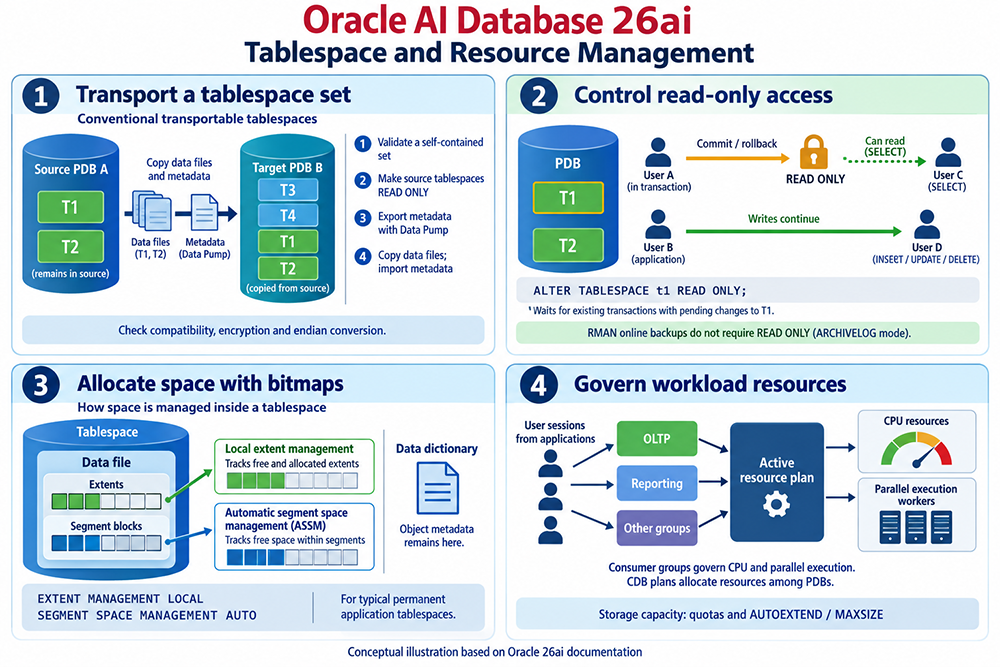
Read the illustration as four related concepts. In Panel 2, “Writes continue” refers to a different read/write tablespace, such as T2. It does not mean that another user can keep updating T1 after T1 becomes read-only. The storage drawing is also simplified: it does not imply that every tablespace has a single datafile or that all of a segment's extents are adjacent.
1. Transport a self-contained tablespace set
Conventional transportable tablespaces combine a physical copy of datafiles with a Data Pump export/import of the metadata needed to describe their objects. Panel 1 shows T1 and T2 copied from source PDB A into target PDB B, which already contains T3 and T4. “Transportable” describes the operation and eligibility of the set; it is not a special tablespace type selected when the tablespace is created.
The set must meet containment rules. For example, an object whose required storage spans tablespaces inside and outside the selected set may prevent transport. Check the proposed application tablespaces and resolve reported dependencies before scheduling the copy. SYSTEM and SYSAUX do not belong in this ordinary application-tablespace transport example.
The following example checks a proposed T1/T2 set. Run it in the source container using an appropriately authorized account. A full containment check examines dependencies in both directions, and the constraint option includes referential integrity constraints.
BEGIN
  DBMS_TTS.TRANSPORT_SET_CHECK(
    ts_list          => 'T1,T2',
    incl_constraints => TRUE,
    full_check       => TRUE);
END;
/

SELECT violations
FROM transport_set_violations;
Review every reported violation. An empty result establishes the outcome of this containment check, not that every platform, encryption, character set, version, or object restriction has been satisfied. Check those separately for the actual source and destination.
For the conventional method illustrated, make the source set read-only, export its metadata, copy its datafiles, and import into the prepared target using the supported procedure. Check endian conversion and encryption requirements where applicable. RMAN provides alternative transport workflows with different prerequisites; the diagram does not describe all of them.
The copy leaves the original data at the source. It does not continuously synchronize later changes. Decide which environment will accept future application writes and when the source can return to read/write use. Validate the target objects, access, and representative queries before handing the data to users. Keep the source and destination roles explicit in the change record so a successful copy is not mistaken for a completed application cutover.
2. Control read-only access without stopping unrelated work
A read-only application tablespace allows queries while preventing ordinary DML changes to its contents. This can support a conventional transport operation or an application requirement for stable historical data. It is a tablespace-wide state, rather than a restriction applied to a particular username.
For a suitable application tablespace, an authorized administrator can request the transition as follows. This command changes database state, so coordinate it with the application before running it.
ALTER TABLESPACE t1 READ ONLY;Oracle waits for transactions that started before the statement and have pending or uncommitted changes to T1 to commit or roll back. The transition does not require every connected user to disconnect. Once complete, queries can still read T1; writes to objects in a different read/write tablespace can continue when their own dependencies permit.
In the figure, User A's earlier changes must be resolved before the transition completes. User C can subsequently read T1. The green write path represents work in T2. An application transaction touching both tablespaces still needs review, because a write to a T1 object will fail after T1 is read-only.
SYSTEM, SYSAUX, and temporary tablespaces cannot be made read-only with this clause. Also distinguish this operation from taking a tablespace offline, opening an entire PDB read-only, or starting a read-only transaction. Those choices have different scope and behavior.
Ordinary RMAN online backups in ARCHIVELOG mode do not require application tablespaces to be read-only. Plan backups and recovery according to the database's recovery requirements; do not interrupt writes simply because the transport diagram includes a read-only step.
3. Understand the two bitmap mechanisms
Panel 3 distinguishes extent allocation from free space inside an allocated segment. A segment, such as a table or index segment, consists of extents; an extent consists of database blocks. Managing which extents are available is a different task from locating blocks that have room for more rows.
- Local extent management: Bitmaps track free and allocated extents in the tablespace's files.
- Automatic segment space management: ASSM uses bitmaps to track free space within segments and help locate suitable blocks.
- Data dictionary metadata: Object definitions and related metadata still exist. Local bitmaps do not replace the data dictionary.
For ordinary permanent application tablespaces, the relevant creation clauses are shown below. They are clauses within a CREATE TABLESPACE statement, not a complete command.
EXTENT MANAGEMENT LOCAL
SEGMENT SPACE MANAGEMENT AUTO
Do not copy these clauses indiscriminately into templates for undo or temporary tablespaces. Choose syntax appropriate to the tablespace's purpose. Likewise, distinguish smallfile tablespaces, which can contain multiple datafiles, from a bigfile tablespace, which has one datafile. A capacity procedure that adds a file to a smallfile tablespace is not applicable to a bigfile tablespace.
An authorized account can inspect these attributes in the intended container:
SELECT tablespace_name,
       contents,
       status,
       extent_management,
       segment_space_management,
       bigfile
FROM dba_tablespaces
ORDER BY tablespace_name;
Use the result to identify what is actually configured. The CONTENTS column distinguishes purposes such as permanent, temporary, and undo. The BIGFILE column identifies the file model, while the extent and segment-space columns describe allocation mechanisms. This query reports attributes; it does not show how much usable disk capacity remains.
4. Separate quotas, file growth, and physical capacity
A user's tablespace quota controls how much space that user can allocate in the tablespace, subject to the account's privileges. AUTOEXTEND permits a file to grow under its configured rules, and MAXSIZE bounds that automatic growth. Available filesystem or ASM capacity places another constraint on what can actually be allocated.
Consider an application that cannot extend a segment. The investigation should establish whether the schema has reached its quota, the file has reached its growth limit, or the underlying storage is exhausted. These conditions may look similar to an application but require different remedies. Increasing a quota cannot create disk capacity, and enabling file growth cannot bypass all other limits.
For permanent datafiles, the following read-only query provides a starting inventory:
SELECT tablespace_name,
       file_id,
       ROUND(bytes / 1024 / 1024, 1) AS allocated_mb,
       autoextensible,
       ROUND(maxbytes / 1024 / 1024, 1) AS configured_max_mb
FROM dba_data_files
ORDER BY tablespace_name, file_id;
Interpret MAXBYTES together with AUTOEXTENSIBLE. It describes a file setting, not free storage or guaranteed future capacity. This query also does not measure free space within segments or report temporary files. Add the appropriate storage and space-usage measurements before deciding on a change.
A useful capacity review compares current usage with growth over several reporting periods. Include known events such as a data load, index build, or retention change. Set an alert early enough to investigate and provision space before allocation fails. Document whether the remedy changes a schema quota, a file limit, the storage allocation, or the application's retention policy.
5. Monitor SYSAUX through its occupants
SYSAUX is an auxiliary system tablespace used by database components. Manage its growth with awareness of those components and their supported maintenance procedures. It is not an application tablespace to rename, drop, or empty when storage runs short.
In the appropriate container, query its registered occupants using an account with permission to read the view:
SELECT occupant_name,
       schema_name,
       ROUND(space_usage_kbytes / 1024, 1) AS space_usage_mb
FROM v$sysaux_occupants
ORDER BY space_usage_kbytes DESC;
The results identify reported component occupancy. Compare samples over time to identify growth, then consult the relevant component's retention or maintenance documentation. Installed occupants vary, so use the query rather than assuming every database contains the same list.
A fixed historical suggestion such as 240 MB or 500 MB is not a capacity plan for a current workload. Determine space requirements from the installed features, retention choices, and observed growth. Use supported component procedures when moving or reducing occupancy; do not delete component-owned objects manually. Include SYSAUX in the database's backup and recovery arrangements.
6. Govern workloads with Resource Manager
Panel 4 shows application sessions grouped by workload and governed through an active plan. Oracle Database Resource Manager can help allocate CPU and control parallel execution; specific directives provide other supported controls. This operates within Oracle's database resource-management model and does not replace operating system administration or storage provisioning.
| Element | Role |
|---|---|
| Consumer group | Classifies sessions with related resource requirements. |
| Resource plan | Defines the set of workload resource policies to use when activated. |
| Plan directive | Associates a group or supported subplan with a plan and specifies its controls. |
Creating a plan is only part of configuration. Sessions must reach the intended consumer groups, the plan must be activated, and its effect must be measured. The OLTP and Reporting labels in the diagram are illustrative categories, not proof that groups with those names already exist in your database.
At the CDB level, plans can allocate resources among PDBs. Within a PDB, consumer groups and directives govern its workloads. Choose the level that matches the problem. Resource availability inside an application PDB is affected by what the CDB makes available to that PDB.
Distinguish CPU allocation from a utilization ceiling. An allocation percentage or share is not automatically a hard maximum that applies to one user at every instant. If a ceiling is required, investigate the applicable explicit utilization-limit control and its scope. Similarly, parallel execution controls require attention to queuing, worker limits, and workload behavior.
Other controls need equally precise descriptions. A session PGA limit is not a general allocation of every kind of memory. Exadata I/O management and managed-service policies depend on the deployment. Consumer-group switching is also different from changing the active plan; scheduling a plan change or configuring switching rules requires an explicit mechanism.
7. Verify the active plan and test its effect
Use the correct views for the question. DBA_RSRC_PLANS describes configured plans. V$RSRC_PLAN reports active plans and identifies the top plan. An authorized administrator can begin with:
SELECT name, is_top_plan
FROM v$rsrc_plan;

SELECT plan
FROM dba_rsrc_plans
ORDER BY plan;
The lists serve different purposes. Finding a named plan in the data dictionary does not prove that it currently governs application sessions. Check session classification and relevant Resource Manager metrics as well, using the container and instance context appropriate to the deployment.
For example, a reporting workload and an order-entry workload may compete during business hours. First measure response times, CPU demand, parallel work, and waiting. Next confirm that the workloads can be classified reliably. Test a proposed plan with representative concurrent activity, compare the results, and check whether reporting still completes within its required window.
Keep the test focused on the original problem. If the order-entry schema cannot allocate another extent, adjusting CPU shares will not fix that shortage. If reports are waiting because of workload resource controls, adding storage may not improve their completion time. Record the observed symptom, chosen control, and validation result so the next administrator can understand the decision.
Summary and next lesson
Tablespace administration covers the location, availability, transport, and allocation of stored data. Resource Manager addresses how database workloads share execution resources. Use the diagram to distinguish those responsibilities, verify the container and configuration before acting, and measure the result of each change. Reliable administration depends on matching the control to the actual constraint.
The next lesson examines features for large databases, extending these storage and workload concepts to larger data volumes.
Oracle documentation
- Managing tablespaces
- Transporting data and tablespace sets
- ALTER TABLESPACE reference
- V$SYSAUX_OCCUPANTS reference
- Managing resources with Resource Manager
- V$RSRC_PLAN reference