| Lesson 6 | TCP.NODELAY and Nagle’s algorithm |
| Objective | Describe the use of the TCP.NODELAY option. |
Oracle TCP.NODELAY and Nagle’s Algorithm
TCP.NODELAY controls whether Oracle Net requests TCP transmission without Nagle-specific delays. In Oracle AI Database 26ai, the documented sqlnet.ora default is YES. This disables Nagle’s algorithm for the applicable connection; NO allows it. Adding YES when the effective setting is already YES does not create a new performance improvement.
The parameter affects one aspect of transport behavior. It does not remove application buffering, Oracle Net buffering, network travel time, congestion, or database execution time. A slow query is not automatically a TCP.NODELAY problem.
What Nagle’s algorithm actually does
Nagle’s algorithm reduces the number of small TCP segments. When earlier data remains unacknowledged, it can hold additional small writes until an acknowledgment arrives or enough data accumulates for a full-sized segment. It does not impose a fixed delay on every write, and a first small send need not wait for another application write.
This behavior can matter when an application sends several small pieces of a request and the peer cannot respond until it has received all of them. Delayed acknowledgment behavior can interact with that exchange. The resulting timing depends on the TCP implementation and workload, so avoid teaching a universal delay such as “every packet waits 200 milliseconds.”
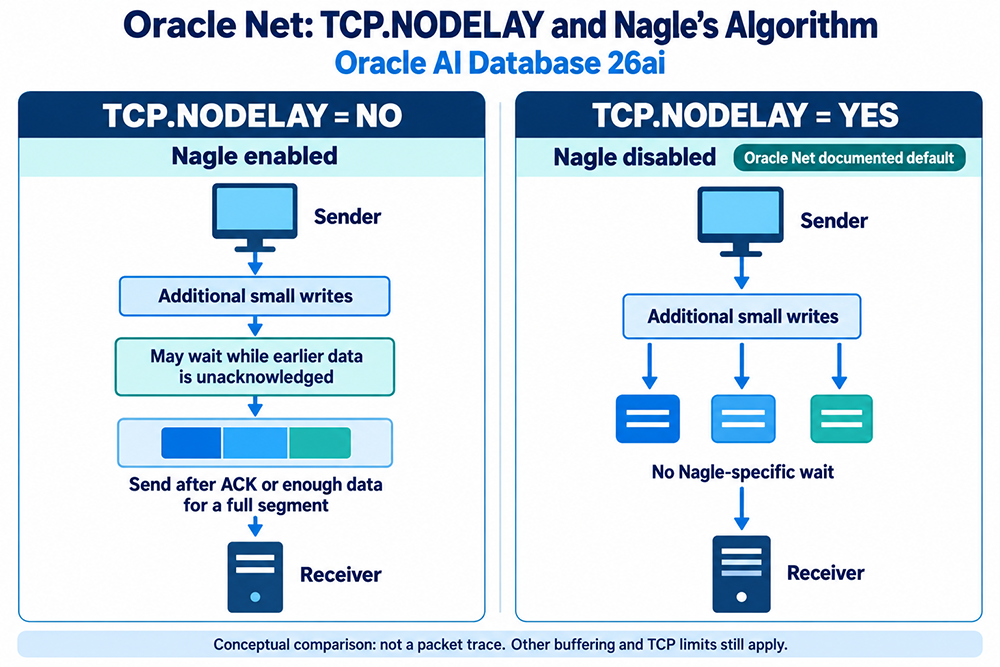
YES versus NO
| Setting | Meaning | Trade-off |
|---|---|---|
TCP.NODELAY=YES | Disable Nagle’s algorithm; documented Oracle Net 26ai default | Can avoid Nagle-related waiting, potentially sending more small segments |
TCP.NODELAY=NO | Allow Nagle’s algorithm | Can combine small sends, but may add latency to some exchanges |
Neither setting is a promise of better throughput. Keep the supported default unless a controlled test justifies a change. In particular, “bulk workload” alone is not evidence that NO will be faster: bulk transfers may already produce full-sized segments.
Where to configure Oracle Net
The Oracle 26ai Net Services Reference documents this parameter in sqlnet.ora. Use the profile actually read by the relevant Oracle Net installation. The next lesson explains how to locate sqlnet.ora and check TNS_ADMIN.
# sqlnet.ora: explicitly retain the documented Oracle Net default
TCP.NODELAY = YES
This is configuration-file text, not SQL. Do not run it in a SQL worksheet or add a SQL semicolon. A copy in an unused Oracle home has no effect on the application you are testing. The historical protocol.ora terminology in older course material should not guide a new 26ai configuration.
Do not combine this test with arbitrary send-buffer, receive-buffer, or SDU changes. Each controls a different part of the path. Changing several values at once makes it difficult to identify which change caused a measured result.
Oracle Net and JDBC Thin are not interchangeable settings
A database version does not identify every client’s networking implementation. Establish whether the application uses an OCI-based client, JDBC Thin, or another driver. Consult that driver’s version-specific connection-property documentation rather than assuming that changing a server-side profile changes every client socket.
For JDBC Thin, investigate the driver’s supported TCP no-delay property and its default for the exact driver release. Do not translate the Oracle Net default into an unverified JDBC default. Also distinguish Oracle Cloud Infrastructure from the Oracle Call Interface: both are abbreviated OCI, but they describe different things.
The same caution applies to managed cloud services. A local file may not control the managed database endpoint, and service restrictions may limit configuration access. Identify the component you actually administer before proposing a change.
TCP segments, SDUs, and round trips
Oracle Net groups data in a session data unit (SDU) before the transport layer sends it. SDU boundaries, application write boundaries, and TCP segment boundaries are different. Disabling Nagle does not force every SQL call into a separate packet or flush every higher-level buffer.
Consider a screen that retrieves 500 rows one row at a time. Reducing database round trips through suitable fetch sizing may address the main cost, even when TCP.NODELAY already uses its default. Conversely, a trace showing small writes waiting on acknowledgments suggests a different investigation. Measure the application exchange before selecting a tuning parameter.
A controlled investigation
- Describe the symptom. Record the operation, client and driver versions, server version, network route, and whether the delay occurs during connection, execution, or fetching.
- Establish a baseline. Measure repeated end-to-end timings under comparable load. Separate SQL execution and lock waits from network time where possible.
- Confirm effective configuration. Identify the loaded client library and profile or driver properties. A file containing YES does not prove that the running process read it.
- Test one change. Use an approved test environment and fresh connections when evaluating connection-level settings. Preserve the original configuration and avoid unrelated changes.
- Compare and decide. Examine latency distribution, throughput, and packet behavior where available. Retain a change only when the result is repeatable and has no unacceptable trade-off.
Database work can dominate total response time. If execution plans, locking, or excessive round trips explain the delay, changing this socket behavior will not correct the underlying cause.
Key points
Oracle Net 26ai documents YES as the default. NO enables Nagle’s small-send coalescing behavior; YES removes that specific waiting rule. Neither setting means zero buffering or guaranteed speed. Verify the actual driver, preserve the default unless evidence supports a change, and measure the complete request.
References: Oracle Net parameter reference; Oracle Net performance guidance; RFC 1122: Nagle algorithm requirements.
OracleNet Components - Quiz
OracleNet Components - Quiz