| Lesson 2 | Recovery Manager Features and Architecture |
| Objective | Identify and understand key features and enhancements in Oracle Recovery Manager (RMAN) for Oracle 23ai |
Oracle Recovery Manager Features and Architecture
Very large database systems impose stringent requirements on backup and recovery operations. Physical backup operations for terabyte-scale databases can take hours, yet businesses demand minimal interruption to production workloads. RMAN addresses these challenges through intelligent parallelization, incremental backup strategies, block-level operations, and tight integration with Oracle's storage architecture—enabling efficient backups even while databases remain fully operational.
This lesson explores RMAN's core features, architectural components, and modern enhancements in Oracle 23ai that enable DBAs to implement robust backup solutions aligned with business availability requirements.
RMAN Architecture and Components
Core RMAN Components
- RMAN Client: Command-line executable or Enterprise Manager Cloud Control interface that sends backup and recovery commands to the target database
- Target Database: The database being backed up or recovered; RMAN connects to the target database as SYSDBA to perform operations
- Server Processes: Oracle processes spawned on the target database server to perform actual backup, restore, and recovery operations
- Channels: Connections between RMAN and target database server processes; each channel represents one data stream for backup or restore operations
- Recovery Catalog (Optional): Centralized repository database storing RMAN metadata for multiple target databases; enables enterprise-wide backup reporting and scripting
- Fast Recovery Area (FRA): Dedicated disk location for backups, archived redo logs, Flashback logs, and control file autobackups
- Media Management Layer: Integration with tape libraries and backup appliances through industry-standard APIs
Channel Allocation and Parallelization
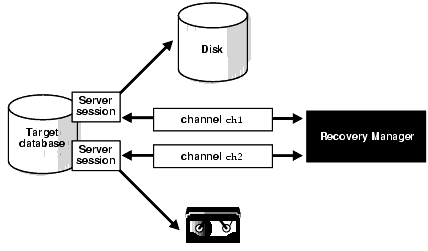
This diagram illustrates RMAN allocating two channels to the target database. Each channel initiates a server session that performs backup operations. Channel 1 backs up to disk storage while Channel 2 writes to tape, demonstrating RMAN's ability to parallelize backup operations across multiple destinations simultaneously. Multiple channels working in parallel reduce total backup time proportionally—four channels can complete backups approximately four times faster than a single channel for large databases.
Channel Configuration Options
Channels can be allocated dynamically or configured persistently:
- Dynamic allocation: Allocate channels within individual RMAN scripts for specific backup operations
- Persistent configuration: Configure default channels that RMAN uses automatically for all operations
- Disk channels: Write backups to file system or ASM disk groups
- Tape channels (SBT): Write backups to tape libraries through media management layer
Example configuration:
RMAN> CONFIGURE DEVICE TYPE DISK PARALLELISM 4;
RMAN> CONFIGURE CHANNEL DEVICE TYPE DISK FORMAT '/backup/%U';
This configuration establishes four parallel disk channels, enabling RMAN to back up four datafiles simultaneously and dramatically reducing backup duration for large databases.
Core RMAN Features
1. Online Backup Capability
RMAN performs backups while databases remain fully operational (OPEN mode), eliminating maintenance windows for backup operations:
- Users continue working during backups without interruption
- Transactions commit normally while backups proceed
- RMAN coordinates with Oracle's checkpoint and logging mechanisms to ensure backup consistency
- Archived redo logs provide recovery capability to make backups consistent
Business benefit: 24/7 database availability without backup-related downtime windows
2. Incremental Backup Strategy
Incremental backups capture only changed data blocks since the last backup, dramatically reducing backup storage and duration:
- Level 0 (full incremental): Backs up all data blocks containing data; serves as base for subsequent incremental backups
- Level 1 differential: Backs up blocks changed since most recent Level 0 or Level 1 backup
- Level 1 cumulative: Backs up all blocks changed since most recent Level 0 backup
- Block change tracking: Bitmap file identifies changed blocks, eliminating need to scan entire datafiles
Example scenario: 10 TB database with 1% daily change rate requires only 100 GB daily incremental backup versus 10 TB full backup—100x storage savings
3. Block-Level Corruption Detection
RMAN validates data block integrity during backup and restore operations:
- Detects logical corruption (inconsistent block structure)
- Detects physical corruption (checksum mismatches)
- Reports corrupted blocks without failing entire backup
- Enables targeted block recovery without restoring entire datafiles
Validation command:
RMAN> VALIDATE DATABASE;
RMAN> BACKUP VALIDATE CHECK LOGICAL DATABASE;
4. Backup Compression and Encryption
Reduce storage requirements and protect sensitive data:
- Binary compression: 50-90% reduction in backup size with minimal CPU overhead
- Advanced compression: Higher compression ratios with more CPU utilization
- Transparent encryption: AES-128/192/256 encryption protects backups from unauthorized access
- Integration with Oracle Wallet: Centralized encryption key management
Configuration example:
RMAN> CONFIGURE COMPRESSION ALGORITHM 'MEDIUM';
RMAN> CONFIGURE ENCRYPTION FOR DATABASE ON;
5. Automated Backup Set Management
RMAN automatically manages backup lifecycle based on retention policies:
- Retention policies: Define how long backups are kept (e.g., 30 days)
- Redundancy policies: Maintain N copies of each backup
- Recovery window: Ensure point-in-time recovery capability for specified period
- Automatic obsolescence: RMAN identifies obsolete backups eligible for deletion
- DELETE OBSOLETE command: Removes obsolete backups, freeing storage space
6. Backup Multiplexing
RMAN reads from multiple datafiles simultaneously and writes them into the same backup piece, improving backup efficiency:
- Reduces number of backup files created
- Balances I/O load across multiple disks
- Configurable multiplexing level controls how many files are read in parallel
Benefit: Optimizes tape streaming by maintaining consistent write throughput
7. Proxy Copy Integration
For storage systems with intelligent backup capabilities, RMAN delegates backup operations to the storage layer:
- Storage array performs backup using snapshot technology
- RMAN tracks metadata but doesn't move data through database server
- Reduces backup impact on database server CPU and I/O
- Requires media manager supporting proxy copy API
Use case: High-performance storage arrays (NetApp, EMC, Pure Storage) with integrated backup features
Oracle 23ai RMAN Enhancements
1. Cloud-Native Backup Integration
- Direct OCI Object Storage backups: RMAN backs up directly to Oracle Cloud Infrastructure without requiring intermediate staging
- Automatic cloud credentials: Seamless authentication using OCI IAM policies
- Cross-region replication: Backups replicate across OCI regions for geographic disaster recovery
- Backup-to-cloud policies: Automatic tiering of older backups from on-premises to cloud storage
2. Multitenant Container Database Support
- PDB-level backups: Back up individual pluggable databases without backing up entire container
- PDB point-in-time recovery: Restore individual PDBs to different points in time
- CDB-wide operations: Single command backs up all PDBs efficiently
- Sparse PDB backups: Optimize backup storage for PDBs sharing data files
3. Automated Backup Policies
- Smart backup scheduling: RMAN automatically schedules backups based on database activity patterns
- Adaptive compression: Dynamically adjusts compression algorithms based on data characteristics
- Automatic retention adjustment: Extends retention when recovery window requirements change
4. Enhanced Performance Features
- Improved block change tracking: Faster incremental backups through optimized change detection
- Section-based backup: Parallel backup of large datafiles divided into sections
- Sparse backup optimization: Skip unused blocks in datafiles for faster backups
5. Zero Data Loss Recovery Appliance (ZDLRA) Integration
- Real-time redo transport: Continuous protection with near-zero RPO
- Incremental forever: Eliminate full backups entirely; ZDLRA maintains virtual full backups
- Automated backup validation: ZDLRA continuously validates backup integrity
- Recovery time optimization: Backups stored in recovery-optimized format
RMAN Interface Options
1. Command-Line Interface
Direct RMAN commands provide maximum flexibility and scriptability:
- Interactive mode: Execute commands directly from RMAN prompt
- Batch mode: Execute RMAN scripts from files for automation
- Shell integration: Embed RMAN commands in shell scripts for workflow automation
Example session:
$ rman target /

RMAN> BACKUP DATABASE PLUS ARCHIVELOG;
RMAN> LIST BACKUP SUMMARY;
RMAN> DELETE OBSOLETE;
2. Oracle Enterprise Manager Cloud Control
Graphical management interface for enterprise backup operations:
- Backup scheduling: Configure automatic backups across database fleets
- Monitoring dashboards: Real-time backup job status and historical trends
- Guided recovery: Wizard-based recovery operations for common scenarios
- Compliance reporting: Verify backup policies across all managed databases
3. Autonomous Database Automatic Backups
For Autonomous Database, backups are completely automated:
- Automatic daily backups with 60-day retention
- Continuous incremental backups every 5 minutes
- Point-in-time recovery to any second within retention window
- One-click restore from Cloud Console
RMAN in RAC Environments
RAC-Specific Features
- Node affinity: RMAN channels can target specific RAC instances for backup operations, balancing load across cluster nodes
- Automatic failover: If a RAC node fails during backup, RMAN automatically transfers operations to surviving nodes
- Parallel backup across nodes: Channels distributed across RAC instances enable maximum parallelization
- ASM integration: Direct backup from Automatic Storage Management (ASM) disk groups used in RAC environments
Configuration example:
RMAN> CONFIGURE SNAPSHOT CONTROLFILE NAME TO '+FRA/snapcf.f';
RMAN> CONFIGURE CHANNEL 1 DEVICE TYPE DISK CONNECT 'sys@rac1';
RMAN> CONFIGURE CHANNEL 2 DEVICE TYPE DISK CONNECT 'sys@rac2';
This configuration distributes backup operations across two RAC nodes, maximizing throughput and balancing cluster resource utilization.
Best Practices for RMAN Feature Usage
- Configure persistent channels: Set default parallelism and channel configurations to avoid manual allocation for every backup
- Enable block change tracking: Essential for incremental backups on large databases; minimal overhead with significant benefit
- Use compression judiciously: Balance storage savings against CPU overhead; test compression levels for your workload
- Implement retention policies: Define clear retention requirements based on business recovery needs, then automate obsolete backup deletion
- Leverage Fast Recovery Area: Simplifies backup management; Oracle automatically manages space and cleanup
- Test proxy copy: If using intelligent storage, verify proxy copy reduces database server load as expected
- Monitor channel utilization: Adjust parallelism based on actual I/O throughput and bottlenecks
- Validate backups regularly: Use VALIDATE commands to detect corruption before you need to restore
Command Summary
CONFIGURE- Set persistent RMAN configuration parametersBACKUP- Perform backup operations with specified optionsLIST- Display backup metadata and historyCROSSCHECK- Verify backup physical existence matches catalog recordsDELETE OBSOLETE- Remove backups exceeding retention policyVALIDATE- Check database or backup integrity without restorationSTARTUP/SHUTDOWN- Control target database state from RMANREPORT- Generate reports on backup coverage and recoverability
Next Steps
With knowledge of RMAN's capabilities, you'll learn to design backup solutions that balance recovery objectives, storage costs, backup windows, and operational complexity—creating resilient backup architectures aligned with business needs.