| Lesson 6 | Selecting fields in a table |
| Objective | Select fields in Datasheet and Design views in MS Access |
Select Fields in Datasheet View and Design View
Before you can edit a table, change field properties, or clean up data, you need to know how to select what you want to work with. In Microsoft Access, selection works differently depending on the view:
- Datasheet view: you are working with data (rows and columns). Selections usually target records (rows), fields (columns), or a block of cells.
- Design view: you are working with the table structure (field definitions). Selections usually target one or more field definitions (rows in the field grid) so you can reorder, delete, or change properties.
What you should be able to select
In this lesson, you will practice the most common selections you will use when maintaining tables:
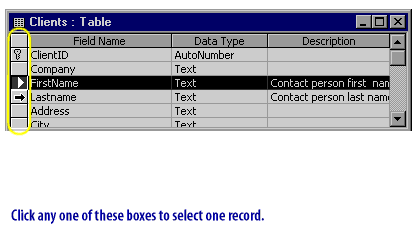
- Select one record (a single row) in Datasheet view.
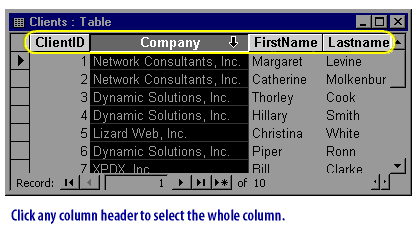
- Select an entire field (a single column) in Datasheet view.
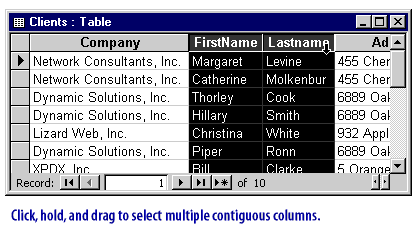
- Select multiple contiguous fields (adjacent columns) in Datasheet view.
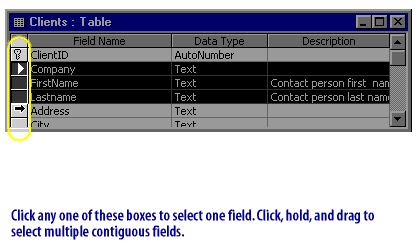
- Select multiple contiguous fields in Design view (adjacent field definitions).
Selection techniques that work almost everywhere
- Click selects a single target (one row selector, one column header, one field definition).
- Shift + Click selects a contiguous range (everything between two clicks).
- Ctrl + Click selects noncontiguous items (pick individual fields/rows one-by-one).
- Keyboard selection can be faster: in Datasheet view, common shortcuts include Ctrl + Space to select the current column and Shift + Space to select the current record (behavior can vary slightly by focus and version, so test in your environment).
Examples in Datasheet view
Datasheet view provides visible “selectors” that make selection precise: record selectors on the left margin for rows and field selectors (column headers) at the top. The figures below demonstrate the standard selection patterns.
Selecting fields in Design view
Design view is where you edit the schema: field names, data types, and properties such as Required, Default Value, Input Mask, and Validation Rule. To select field definitions (not data):
- Open the table in Design View.
- Click the small gray selector area to the left of a field row (the row selector for the field definition). This selects the entire field definition.
- To select multiple contiguous field definitions, click the first field row selector, then use Shift + Click on the last field row selector.
- To select noncontiguous field definitions (when supported by your current selection context), use Ctrl + Click on additional field row selectors.
Practical tips
- If your goal is to delete a column of values or apply a format to an entire column, select the whole field (column) first.
- If your goal is to change the data type, Input Mask, or Validation Rule, switch to Design view and select the field definition.
- Use Shift for contiguous ranges and Ctrl for “pick-and-choose” selection—this prevents accidental edits.
Next, you will use these selection methods to edit table design fields by adding and removing fields.
Learn to edit your table design fields by adding and removing fields.
Learn to edit your table design fields by adding and removing fields.