| Lesson 3 | How Directory Naming resolves requests |
| Objective | Describe how a request is resolved through Directory Naming. |
How Directory Naming Resolves a Request
Clients no longer need local directory usage configuration (
ldap.ora) at all. If a directory server is registered with the Domain Name System (DNS), clients can locate it automatically, eliminating local configuration entirely. That's a genuine simplification over the Net8 era this lesson used to describe, where every client needed its own copy of connection information one way or another.
Walking Through a Resolution
Here's a concrete example, an application connecting to a service called
SALES_APP, walked through step by step:
- A client application requests a connection to
SALES_APP. It checks its own configuration first; finding no localtnsnames.oraentry and no directory usage file, it falls back to locating a directory server through DNS. - The client sends the directory server a request to resolve the net service name
SALES_APP. - The directory server looks up the entry and returns a connect descriptor: the listener's host and port, and the target
SERVICE_NAME. Nothing about user credentials is part of this response. Worth being precise about the comparison here: Oracle Names' standard response for an ordinary client lookup was also just a connect descriptor, host, port, database identifier, with no credentials involved. The one place Oracle Names genuinely could return stored credentials was a specific, optional feature: a configured global database link could have a user ID and password stored alongside it, so that link would authenticate automatically. That was a real, narrower security consideration (a shared stored credential exposing the linked account), not a universal property of every Oracle Names lookup. Directory naming doesn't have an equivalent credential-storage option at the naming layer at all, database link authentication, like everything else, is handled entirely separately from name resolution. - The client uses that connect descriptor to contact the Oracle Net listener directly and requests the database service.
- The listener hands the connection off to a server process, and only now does the client authenticate to actually use the database.
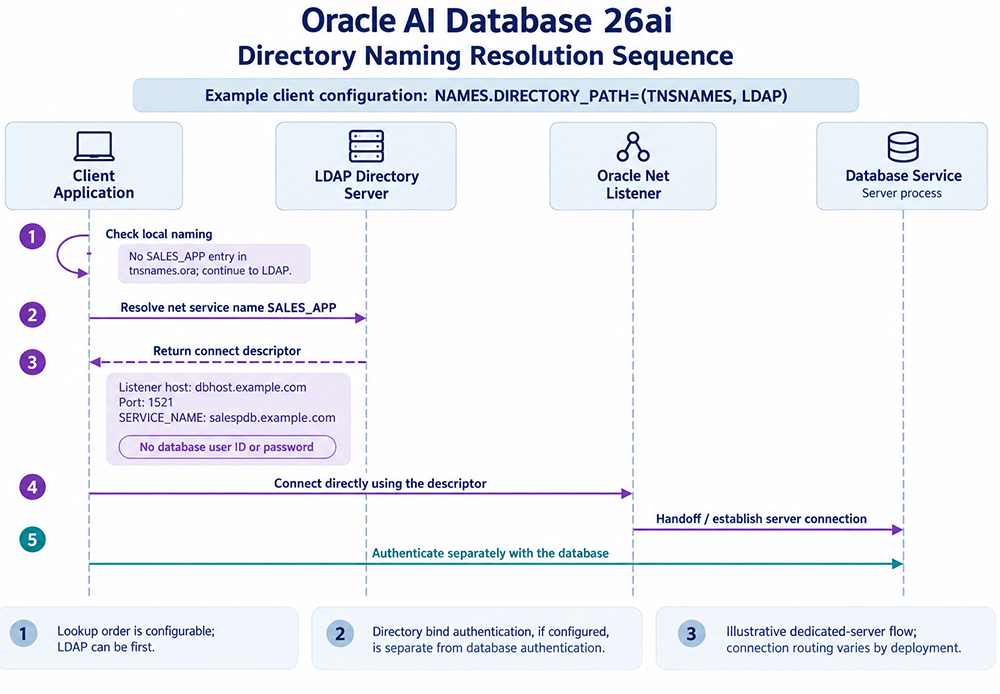
NAMES.DIRECTORY_PATH=(TNSNAMES, LDAP), resolution proceeds in five steps: (1) the client checks local naming first, finds no SALES_APP entry in tnsnames.ora, and continues to LDAP; (2) it sends the directory server a request to resolve SALES_APP; (3) the directory returns a connect descriptor, listener host, port, and SERVICE_NAME, with no database user ID or password included; (4) the client connects directly to the Oracle Net listener using that descriptor, which hands the connection off to a database server process; (5) the client authenticates with the database separately from the lookup. The lookup order itself is configurable, LDAP could be checked first instead. If the directory server requires bind authentication to perform the lookup, that's a separate concern from database authentication. The connection handoff shown is an illustrative dedicated-server flow; actual routing varies by deployment.
What Happens When the Directory Server Doesn't Answer
Every step in that walkthrough assumes the directory server actually responds. In practice, it's worth planning for the case where it doesn't, an unreachable directory server, a network partition, a server that's simply overloaded, because without a timeout configured, a client can hang indefinitely waiting on step 2 rather than failing cleanly and reporting a usable error.
This is exactly what the
This is exactly what the
sqlnet.ora timeout parameters exist to prevent. Configuring sane values for these avoids exactly the kind of silent hang that's hardest to diagnose after the fact:
SQLNET.OUTBOUND_CONNECT_TIMEOUT, how long the client waits for an outbound connection attempt, including the directory lookup itself, before giving up.SQLNET.INBOUND_CONNECT_TIMEOUT, how long the database server waits for a client to complete authentication after the network connection is established.SQLNET.SEND_TIMEOUTandSQLNET.RECV_TIMEOUT, how long a send or receive operation can sit waiting before the connection is considered dead.
Administering the Directory Server
Older Oracle Net material describes a utility called NAMESCTL for controlling the Names Server specifically, restart, shutdown, status, and similar commands, run only on the database server hosting the Names database. That utility doesn't have a direct equivalent in directory naming, and the reason is architectural, not a gap: a directory server like Oracle Internet Directory or Oracle Unified Directory is a general-purpose LDAP product, not something built exclusively for Oracle Net, so it's administered through its own tools,
It's worth sitting with why that split makes sense rather than treating it as a downgrade. NAMESCTL existed because the Names Server was a single-purpose Oracle component with no other reason to exist; controlling it was Oracle Net's job because nothing else touched it. A directory server is different by design: the same LDAP server holding your net service names might also be authenticating users for a dozen other applications that have nothing to do with Oracle. Giving Oracle Net its own dedicated control utility for a shared, general-purpose service would have been the wrong architecture, not a missing feature.
oidadmin for Oracle Internet Directory, for instance, rather than a purpose-built Oracle Net control utility. Oracle Net Manager and Enterprise Manager Cloud Control remain the tools for managing the net service name entries themselves, covered in the previous lesson.
It's worth sitting with why that split makes sense rather than treating it as a downgrade. NAMESCTL existed because the Names Server was a single-purpose Oracle component with no other reason to exist; controlling it was Oracle Net's job because nothing else touched it. A directory server is different by design: the same LDAP server holding your net service names might also be authenticating users for a dozen other applications that have nothing to do with Oracle. Giving Oracle Net its own dedicated control utility for a shared, general-purpose service would have been the wrong architecture, not a missing feature.
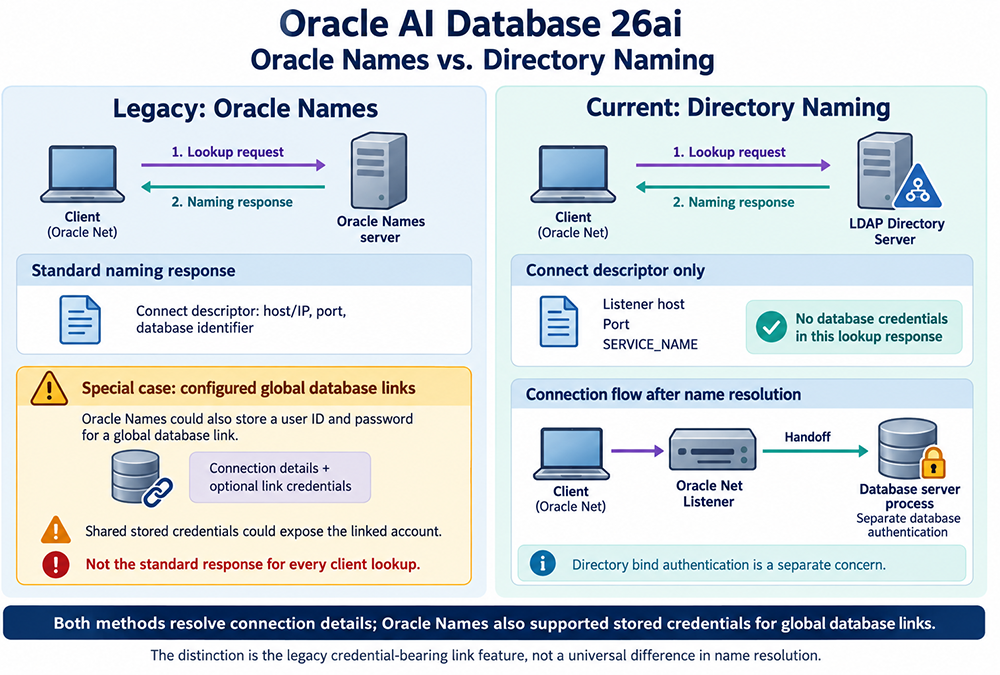
That's really the more precise version of this lesson's throughline: the mechanics of resolving a name are more similar between the two models than the folklore suggests, both hand back a connect descriptor, not credentials, for an ordinary lookup. What directory naming actually removed is a narrower, specific thing: Oracle Names' optional ability to store link credentials at the naming layer for global database links. That's a real security surface that's simply gone now, not because directory naming redesigned authentication, but because it never had that feature to begin with. Name resolution and database authentication are, and always have mostly been, two separate steps; directory naming just closes off the one legacy exception.