| Lesson 6 | Data Pump Direct Path and Access Methods |
| Objective | Explain how Data Pump selects direct path, external-table, and conventional access methods and when to override
AUTOMATIC. |
Oracle Data Pump Direct Path Export in 26ai
Oracle Data Pump Export can use several methods to unload table data. Direct path is important because it bypasses the SQL layer and moves rows to the dump file with minimal interpretation. For compatible tables, this can reduce row-processing overhead. It does not copy physical data files, bypass Data Pump security, or convert a logical export into a physical database backup.
The supported command-line client is expdp. The original Export utility and its DIRECT=Y option are not the subject of this lesson and are not supported Oracle AI Database 26ai procedures. Data Pump uses the ACCESS_METHOD parameter, whose default value is AUTOMATIC.
Normally, leave that default in place. Data Pump can choose a suitable unload method for each table in the job. An explicit method is most useful for a controlled comparison, a documented compatibility problem, or a diagnostic procedure. It is not a universal performance switch.
Understand the Data Movement Methods
Data Pump can move data by copying data files, using direct path, using external tables, using conventional path, or moving data across a database link. These categories describe the larger movement architecture. They are not all interchangeable values of the Export ACCESS_METHOD
parameter.
| Movement method | High-level behavior | Selection | Guidance |
|---|---|---|---|
| Data file copying | Moves compatible physical data files while Data Pump handles metadata | Transportable workflow | Requires separately managed data-file movement |
| Direct path | Bypasses the SQL layer and minimally interprets rows | AUTOMATIC or DIRECT_PATH | Let Data Pump choose unless testing a specific issue |
| External tables | Uses SQL and the ORACLE_DATAPUMP access driver |
AUTOMATIC or EXTERNAL_TABLE | Handles cases in which direct path is unsuitable |
| Conventional path | Performs SQL-layer row processing | Automatic fallback | Compatibility path rather than a tuning goal |
| Network-link movement | Reads from a remote database through a database link | NETWORK_LINK | Writes the export dump on the connected database system |
Transportable operations move metadata through Data Pump and require the associated data files to be transported separately. The Export ACCESS_METHOD parameter is not valid for a transportable-tablespace job. A network export has different topology: the connected database reads from the source identified by the database link and writes the dump file set on the connected system.
This lesson concentrates on ordinary dump-file Export. Its current access-method values are AUTOMATIC, DIRECT_PATH, and
EXTERNAL_TABLE. Conventional path exists in the Data Pump movement model, but it is not a general Export parameter value to place in the
examples.
Use AUTOMATIC for Normal Exports
With ACCESS_METHOD=AUTOMATIC, Data Pump determines how to unload each table. One schema export can therefore use direct path for some tables and another method for other tables. A method chosen during Export does not also have to be the method used when the dump is imported, because the source and target structures can impose different requirements.
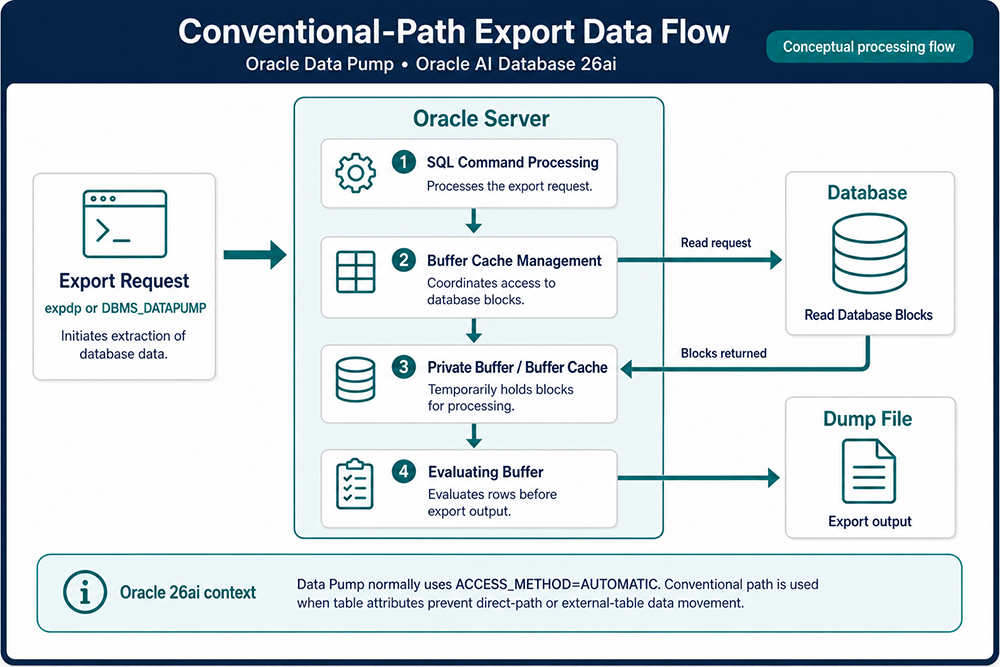
Automatic selection also preserves fallback behavior. If the structure of a table or a requested operation prevents direct path, Data Pump can use the external-tables mechanism. If conflicting table attributes prevent both direct path and external tables, conventional path can provide a compatible, although potentially slower, route.
Do not assume that every ordinary table uses direct path or that direct path always produces the shortest complete job. External-table movement can benefit from parallel SQL. Compression, encryption, filters, CPU availability, dump-file layout, storage latency, and competing workload can have a greater effect on elapsed time than the access-method label alone.
What Direct Path Bypasses
During direct-path movement, Data Pump bypasses the SQL layer for moving table rows and transfers them to the dump file with minimal interpretation. Data Pump still performs substantial server-side work: it maintains the job's control table, coordinates worker processes, extracts metadata, applies security rules, manages dump files, writes the log, and reports object-level results.
The phrase direct path does not mean that the client copies bytes directly from a data file. The expdp client submits and controls the job, while database server processes perform the export and write the dump and log files. The files are addressed through database directory
objects or through supported service-managed storage mechanisms.
Keep Data Pump direct path distinct from SQL*Loader direct-path load, SQL direct-path INSERT, the APPEND hint, operating-system direct I/O, RMAN block reads, and transportable data-file copying. These features share terminology, but their syntax, data handling, and recovery
purposes are different.
External Tables and Conventional Fallback
The external-tables mechanism uses the SQL engine and the ORACLE_DATAPUMP access driver. For Export, Data Pump uses SQL to select the source rows and produce the external representation stored in the dump file. This path can support tables or operations that direct path cannot use, and it can be advantageous for very large tables when parallel SQL is appropriate.
The representation of table data in the Data Pump dump allows Export and Import to choose different movement methods. A table exported through direct path can later be imported through external tables, and a table exported through external tables can later be imported through direct path. The dump file records logical table data; it does not lock the table to one loading implementation.
Conventional path is the last compatibility route when conflicting table attributes prevent both direct path and external-table movement. It uses SQL-layer row processing and can take longer. Let AUTOMATIC select it when required rather than attempting to force it through an unsupported Export parameter value.
ACCESS_METHOD=AUTOMATIC and selects a suitable method for each table.
Prepare the PDB and Directory Access
The example exports the HR schema from a service named PDB1. Before running it, confirm that the service reaches the intended PDB. A DBA must create or approve the operating-system destination and its database directory object. The Oracle software owner must be able to access the
underlying path.
From an authorized administrative SQL session in the intended container, verify the context and directory, then grant only the required directory privileges:
SHOW CON_NAME

SELECT directory_name, directory_path
FROM   dba_directories
WHERE  directory_name = 'DPUMP_DIR1';

GRANT READ, WRITE ON DIRECTORY dpump_dir1 TO hr;
The directory path is on the database server, not the workstation on which expdp is started. In a CDB, the default
DATA_PUMP_DIR can resolve to a unique path for each PDB. Oracle RAC, ASM, Autonomous Database, and cloud object stores have additional placement and credential requirements; follow the documentation for the deployed environment.
The schema owner does not need DATAPUMP_EXP_FULL_DATABASE to export its own schema. Do not grant that powerful role merely to run this example. Cross-schema and full-database jobs require separate administrative authorization.
Run the Recommended Automatic Export
Place the reusable parameters in a client-side file named hr_access.par:
DIRECTORY=DPUMP_DIR1
DUMPFILE=hr_access_%L.dmp
LOGFILE=hr_access.log
SCHEMAS=HR
ACCESS_METHOD=AUTOMATIC
METRICS=YES
LOGTIME=ALL
JOB_NAME=HR_ACCESS_METHOD_EXPORT
Start the job by connecting to the named PDB service:
expdp hr@pdb1 PARFILE=hr_access.parData Pump prompts for the database credential unless an approved secure credential mechanism supplies it. Do not place a password in the command line or parameter file. The parameter file is read by the client from the current directory unless its client-side path is supplied. In contrast, the dump and log files are written by the database server under DPUMP_DIR1.
The %L substitution gives Data Pump an incrementing dump-file name. It supports the familiar two-digit sequence and can continue beyond 99 when a large file set requires it. This small schema may create only one file, but the template also supports later file sizing or parallelism without a
naming change.
METRICS=YES records object counts and elapsed time in the log. LOGTIME=ALL timestamps status and log messages. These settings aid review and comparison, but they do not make the log a complete performance trace or guarantee that every internal access-method decision appears as one summary message.
Monitor and Reattach to the Export Job
The client displays job progress while it remains attached, but the database owns the Data Pump job. Closing a client session does not necessarily erase a running or stopped job. The explicit JOB_NAME makes monitoring and reattachment predictable while the job and its control table still exist. After a successful completion, Data Pump normally removes the control table, so there is no completed job to reattach to.
From an authorized SQL session, the job owner can inspect current Data Pump jobs:
SELECT job_name, operation, job_mode, state,
       degree, attached_sessions
FROM   user_datapump_jobs
ORDER  BY job_name;
The view reports repository state; it does not replace the export log or an object-by-object validation. A DBA can use the corresponding
DBA_DATAPUMP_JOBS and DBA_DATAPUMP_SESSIONS views when cross-schema visibility is authorized.
To attach the client to the named job, reconnect as its owner:
expdp hr@pdb1 ATTACH=HR_ACCESS_METHOD_EXPORTAt the Export prompt, request current details:
Export> STATUSInteractive attachment allows the operator to inspect or control an existing job; it does not change the access method originally defined for that job. Before issuing commands that stop, resume, or terminate work, confirm the job name, owner, service, state, and operational authorization. Detach cleanly when monitoring is complete so that the server-side job can continue under its existing plan.
Compare Explicit Methods Carefully
After the automatic job completes successfully, an administrator can compare explicit methods in a controlled environment. Each run needs different dump, log, and job names so that files cannot be confused or accidentally overwritten.
Force direct-path unload
Create hr_direct.par:
DIRECTORY=DPUMP_DIR1
DUMPFILE=hr_direct_%L.dmp
LOGFILE=hr_direct.log
SCHEMAS=HR
ACCESS_METHOD=DIRECT_PATH
METRICS=YES
LOGTIME=ALL
JOB_NAME=HR_DIRECT_PATH_TEST
expdp hr@pdb1 PARFILE=hr_direct.parDIRECT_PATH instructs Data Pump to use direct-path unload for every table in scope. If a table cannot use that method, Data Pump records an
error for the table's data and continues to the next work item. Forcing the method therefore removes the per-table fallback advantage of
AUTOMATIC. A completed job can still contain object-level errors, so review the entire log and process exit code.
Force the external-tables method
Create hr_external.par:
DIRECTORY=DPUMP_DIR1
DUMPFILE=hr_external_%L.dmp
LOGFILE=hr_external.log
SCHEMAS=HR
ACCESS_METHOD=EXTERNAL_TABLE
METRICS=YES
LOGTIME=ALL
JOB_NAME=HR_EXTERNAL_TABLE_TEST
expdp hr@pdb1 PARFILE=hr_external.parThis test asks Data Pump to use the external-table method for every table. Its ORACLE_DATAPUMP representation is internal to the Data Pump workflow. Do not assume that its files are interchangeable with files created through an independently defined CREATE TABLE ... ORGANIZATION EXTERNAL operation.
Avoid Frozen Restriction Lists
A table's structure and the operations requested by the job determine which access methods are available. Filters, sampling, remapping, encryption, security policies, index structures, complex types, and other table attributes can affect the choice. Export and Import also have different rules. A restriction observed while loading a target table must not automatically be presented as an unload restriction.
For that reason, do not preserve an old list claiming that every LOB, BFILE, REF, object type, nested table, or VARRAY prevents direct-path Export. Check the current Data Pump documentation and the exact source and target releases for the objects in the
planned job.
Oracle AI Database 26ai provides two useful examples of changing compatibility. Vector datatype columns can be unloaded and loaded in full, schema, or table mode with the available access methods. Blockchain tables have narrower rules: they use conventional access method or, beginning with 26ai, a supported transportable-tablespaces workflow. A static restriction list copied from an older release would misstate both cases.
Measure Export Performance
Direct-path unload can reduce processing overhead for compatible tables, but it does not improve the database's ongoing application performance. The correct question is whether the complete export finishes reliably within its operational window and produces a usable dump file set.
To compare methods, export the same objects under comparable conditions. Record the database release, PDB, job parameters, object sizes, active workload, server CPU, I/O throughput, output size, elapsed time, warnings, and failed objects. Separate file names and job names are essential. A faster run that omitted table data because of method errors is not a successful optimization.
Parallelism is a separate choice from access method. Increasing PARALLEL does not force direct path, and forcing direct path does not ensure
useful parallelism. Too few dump files can leave workers waiting, while excessive parallelism can compete with production workload or saturate the
destination. Test the degree against the database, storage, dump-file templates, and service-level objectives.
Compression and encryption can trade CPU work for smaller or protected output. Storage throughput, networked file systems, RAC file visibility, and cloud-object-store latency can also become limiting factors. Tune the whole export path instead of attributing every timing difference to one parameter.
Validate the Dump File Set
When the job ends, review its process exit code and complete log. A zero exit code indicates success without reported errors. A completed job can also report errors, and an irrecoverable failure has a separate result. Confirm the intended service, schema mode, job name, completion state, object-level messages, and the exact dump files listed at the end of the job.
Protect the dump file set as sensitive data. Inventory every required file, record its size and approved storage location, and apply the site's access, encryption, retention, and independent-copy policies. If files are transferred, use an approved integrity procedure. Oracle Data Pump can also calculate dump-file checksums when the environment and compatibility level support that feature.
The decisive test is an Import into an isolated PDB or schema. Compare the restored object inventory with the export scope, inspect invalid objects and dependencies, verify representative row counts and application data, and record the elapsed time. When metadata needs review before execution, use Data Pump Import's SQLFILE option against the dump in a controlled environment.
Testing also exposes dependencies outside the dump: directory objects, database links, external tables, wallets, TDE keys, credentials, service names, and application configuration. A successful Export message alone cannot prove that all of those components will be available during recovery or migration.
Keep Data Pump and RMAN in Their Proper Roles
Regardless of its access method, Data Pump Export creates a logical dump containing supported data and metadata. It cannot restore a lost data file, control file, SPFILE, or online redo log. It does not supply RMAN media recovery, archived-redo application, or database point-in-time recovery.
Use RMAN as the foundation for physical backup and recovery. Use Data Pump when logical portability, selective object movement, metadata extraction, schema refresh, or object-level recovery flexibility is required. Direct path can make a compatible logical unload efficient; it does not change that division of responsibility.
Apply the Direct-Path Decision
Start with ACCESS_METHOD=AUTOMATIC, inspect the resulting job, and override the method only for a documented reason. Direct path bypasses the
SQL layer for compatible rows. External tables provide a SQL-based alternative, and conventional path remains a compatibility fallback. Judge success
by complete scope, clean logs, protected dump files, and a tested Import—not by the presence of DIRECT_PATH in a parameter file.
The next lesson uses Data Pump Import to load logical objects from a dump file set. Its loading method can differ from the method used during Export, so Import must be planned and validated against the target database rather than inferred from this export job.