| Lesson 3 | The subject approach to database design |
| Objective | Describe the subject approach to database design. |
Subject Approach to Database Design
As introduced in the previous lesson, there are two ways to approach database design: focusing on the subject matter the database is concerned with, or focusing on the specific application in which the database will be created and used. This lesson looks closely at the first of these.
Organizing Data by Subject Matter
In the subject approach, also called the entity-centered or data-centered approach, every table in a database stores data according to the subject matter it represents, rather than according to any one application's needs. A large company, for example, might maintain a database devoted to its sales department, with tables for customers, orders, and discounts, while separate databases serve personnel, accounting, and marketing. Just as a single table is devoted to one specific entity, a subject-oriented database groups the tables that belong to a single subject area together.
Each entity in this kind of design, a customer, a product, an order, an employee, is defined by its own attributes: name, address, phone number, and so on, each stored in its corresponding column. The subject approach is closely tied to normalization, the process of organizing data to minimize redundancy and inconsistency, since it naturally leads to breaking data into smaller, related tables rather than one large, repetitive one. The result tends to be a more flexible, more easily extended design than one built around a single application's requirements, since the data is organized around what it represents rather than around how one program happens to use it today.
While this approach is most closely associated with relational database design, the underlying idea, organizing by subject rather than by process, is not exclusive to it; the same philosophy can apply to other data models as well.
You have already seen the subject approach at work without naming it. The Stories on CD, Inc. project from Module 1 identified CUSTOMER, ORDER, CD, and DISTRIBUTOR as entities because those are the subjects the business itself deals with, not because any particular screen or report needed them structured that way. A reporting application might only ever touch the ORDER and CD tables, while a vendor-management application might only ever touch DISTRIBUTOR, but the underlying schema does not change shape depending on which application is asking. That stability is the entire point of designing by subject rather than by application.
Each entity in this kind of design, a customer, a product, an order, an employee, is defined by its own attributes: name, address, phone number, and so on, each stored in its corresponding column. The subject approach is closely tied to normalization, the process of organizing data to minimize redundancy and inconsistency, since it naturally leads to breaking data into smaller, related tables rather than one large, repetitive one. The result tends to be a more flexible, more easily extended design than one built around a single application's requirements, since the data is organized around what it represents rather than around how one program happens to use it today.
While this approach is most closely associated with relational database design, the underlying idea, organizing by subject rather than by process, is not exclusive to it; the same philosophy can apply to other data models as well.
You have already seen the subject approach at work without naming it. The Stories on CD, Inc. project from Module 1 identified CUSTOMER, ORDER, CD, and DISTRIBUTOR as entities because those are the subjects the business itself deals with, not because any particular screen or report needed them structured that way. A reporting application might only ever touch the ORDER and CD tables, while a vendor-management application might only ever touch DISTRIBUTOR, but the underlying schema does not change shape depending on which application is asking. That stability is the entire point of designing by subject rather than by application.
Top-Down Design
The subject approach is called a top-down design because it follows a consistent four-step order, moving from the business itself down to the applications that will eventually use the data.
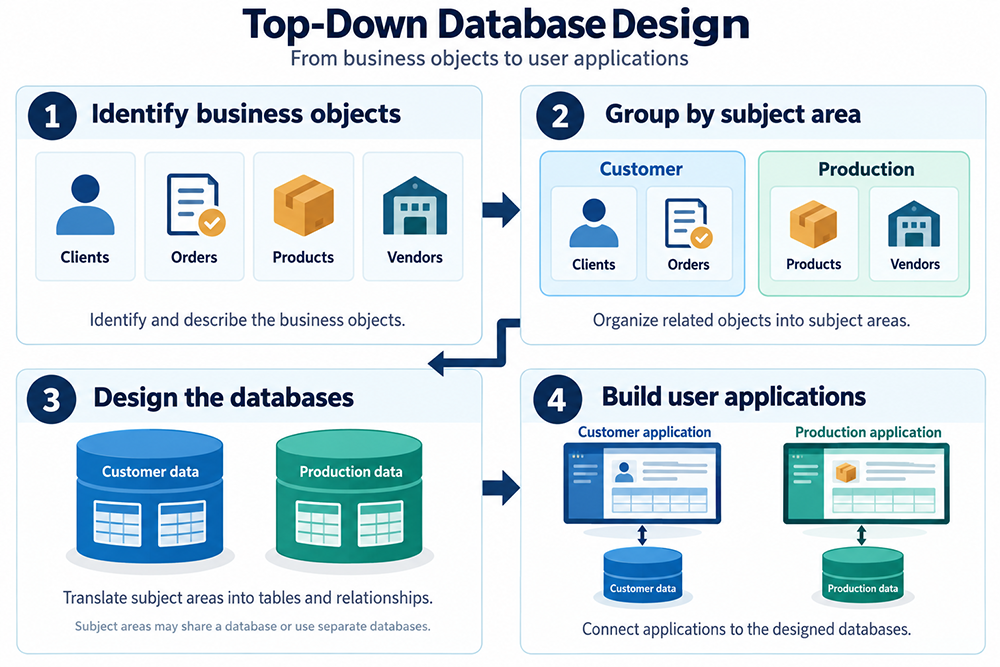
- Identify business objects. Recognize and describe the objects the business deals with, for example, clients, orders, products, and vendors.
- Group by subject area. Organize those objects into related subject areas; clients and orders might both belong to a Customer subject area, while products and vendors belong to a Production subject area.
- Design the databases. Translate each subject area into tables and relationships. Subject areas may share a single database or be split into separate ones.
- Build user applications. Connect applications, a Customer application, a Production application, to the data designed for their respective subject area.
Top-Down Design in the Context of Database Design
More generally, top-down design means designing the overall structure of a database before working out the detailed specification of individual tables and fields. It starts with the high-level requirements, the entities, relationships, and data elements that need to be stored, usually captured in an entity-relationship diagram or data model. Only once that overall structure is established does the design move on to the specifics: which tables, which fields, which datatypes.
The advantage of this order is that it keeps the overall structure well-defined before the details are locked in, which helps prevent inconsistency and makes the database easier to maintain and extend later. The tradeoff is that top-down design can take longer up front. A bottom-up approach, where individual tables are designed first and then combined into a larger structure, is sometimes more appropriate for a smaller, narrower project. Which approach fits best depends on the specific needs of the project at hand.
The difference shows up clearly in how each approach handles growth. Starting bottom-up with just an ORDER table, built to answer one immediate question, which products did this customer buy, tends to produce a table with customer name and address columns baked directly into it, since that is all the one application in front of you needs. Add a second application later, say, one that needs to look up a customer's orders by phone number, and the bottom-up table has to be reworked, or worse, duplicated. The top-down, subject-first approach avoids this because CUSTOMER was already identified and separated out as its own subject area in step 1 and step 2, long before any specific application's needs were considered.
The advantage of this order is that it keeps the overall structure well-defined before the details are locked in, which helps prevent inconsistency and makes the database easier to maintain and extend later. The tradeoff is that top-down design can take longer up front. A bottom-up approach, where individual tables are designed first and then combined into a larger structure, is sometimes more appropriate for a smaller, narrower project. Which approach fits best depends on the specific needs of the project at hand.
The difference shows up clearly in how each approach handles growth. Starting bottom-up with just an ORDER table, built to answer one immediate question, which products did this customer buy, tends to produce a table with customer name and address columns baked directly into it, since that is all the one application in front of you needs. Add a second application later, say, one that needs to look up a customer's orders by phone number, and the bottom-up table has to be reworked, or worse, duplicated. The top-down, subject-first approach avoids this because CUSTOMER was already identified and separated out as its own subject area in step 1 and step 2, long before any specific application's needs were considered.
What Makes a Good Database Design?
Everyone involved in a database's life, designers, application architects, programmers, database administrators, and project managers, benefits from understanding what makes a design good. Even an application's end users benefit indirectly, since a poor design eventually shows up as missing data, inconsistent reports, or a system that cannot be extended without breaking something else. Many IT professionals pick up what they know about databases through trial and error rather than through deliberate study, and while some develop a reasonably good intuitive feel for a sound design, intuition alone does not explain why a design works, and it does not transfer well to the next project.
This course aims to give you the tools to design a database deliberately: how to determine what belongs in it, how to organize it for data integrity and reasonable performance, and how to make it strong enough to store data safely, flexible enough to retrieve what applications need quickly, and adaptable enough to absorb a realistic amount of future change.
Even for a small company, the subject approach is a real commitment, not just a diagram exercise. If you identify two distinct subject areas in a small company's operations, exactly as the Customer and Production example above does, the subject approach calls for designing around those two subject areas as a starting point, whether they end up sharing one database or living in two, rather than organizing the design around whichever application happens to be built first.
This course aims to give you the tools to design a database deliberately: how to determine what belongs in it, how to organize it for data integrity and reasonable performance, and how to make it strong enough to store data safely, flexible enough to retrieve what applications need quickly, and adaptable enough to absorb a realistic amount of future change.
Even for a small company, the subject approach is a real commitment, not just a diagram exercise. If you identify two distinct subject areas in a small company's operations, exactly as the Customer and Production example above does, the subject approach calls for designing around those two subject areas as a starting point, whether they end up sharing one database or living in two, rather than organizing the design around whichever application happens to be built first.
Summary
A short recap before moving on:
- The subject approach organizes a database around the subjects the business deals with, customers, orders, products, rather than around any single application's requirements.
- It is a top-down approach: identify business objects, group them into subject areas, design the databases, then build applications on top, in that order.
- The payoff is stability: a subject-oriented design does not need to be reworked every time a new application needs the same underlying data in a different way.
- The next lesson covers the application approach, the alternative this lesson has been contrasted against throughout.
Before moving on to the next lesson, click the link below to check your understanding of the subject approach to database design.
Designing Subject Database
The next lesson introduces the application approach to database design.
Designing Subject Database
The next lesson introduces the application approach to database design.