| Lesson 2 | Entities and their Attributes |
| Objective | Describe how entities map to relational tables. |
From Entities and Attributes to the Conceptual Model
Step 1 - Conceptual modeling: Convert the business objects and policies gathered during Requirements Analysis into entities (things to store data about) and their attributes (facts about those things). Capture relationships, identifiers, and cardinalities in an ER diagram (ERD). The ERD is technology-neutral and focuses on structure, not implementation.
Core Definitions
- Entity (type): A real-world concept the business cares about (e.g., Customer, Order, Product). Similar occurrences form an entity set.
- Entity instance: One occurrence of an entity (a future row).
- Attribute: A property of an entity (a future column). Prefer atomic (simple) attributes; split composites (e.g., Address → Street, City, State, PostalCode).
- Identifier (key): Attribute(s) that uniquely identify each instance (candidate keys; choose one as the primary key).
- Relationship: Association between entity types with cardinality (1:1, 1:M, M:N) and optionality (mandatory/optional participation).
- Domain & constraints: Allowed values, data types, and rules (e.g.,
CHECK,UNIQUE,NOT NULL).
Mapping the ERD to Relational Tables
- Entity → Table: Create a table for each strong entity. Name tables in the singular (recommended) and follow a consistent convention.
- Attribute → Column: Each simple attribute becomes a column. Composite attributes are implemented as their simple components. Derived attributes are usually excluded from base tables and computed in views or queries.
- Identifier → PRIMARY KEY: Choose a stable, minimal key. If a natural key is bulky/volatile, use a surrogate key and enforce natural key rules with
UNIQUEconstraints. - 1:M Relationship → FOREIGN KEY: Place the foreign key in the many side. Optionality drives
NULLvs.NOT NULLand may influence additional constraints. - M:N Relationship → Associative Table: Create a bridge entity/table with FKs to both parents; add attributes that belong to the association itself (e.g., Quantity, Role).
- 1:1 Relationship → Merge or FK+UNIQUE: Either combine entities (when lifecycles/access patterns align) or keep separate tables and enforce a unique FK on one side.
- Multi-valued Attribute → New Entity: Replace list-like columns (e.g., PhoneNumbers) with a child entity/table linked 1:M to the parent.
- Domains & Business Rules → Constraints: Implement data types, length/format rules,
CHECKconstraints, and referential actions that reflect the business rules captured earlier.
Note: Normalization typically follows during logical design to reduce redundancy and anomalies while preserving business meaning.
Notation & Diagramming Tips
- Use a consistent ER notation (e.g., Crow’s Foot). Mark primary identifiers clearly and show cardinalities/optionality on relationships.
- Keep the main ERD focused on entities and relationships; place long attribute lists in a data dictionary to avoid visual clutter.
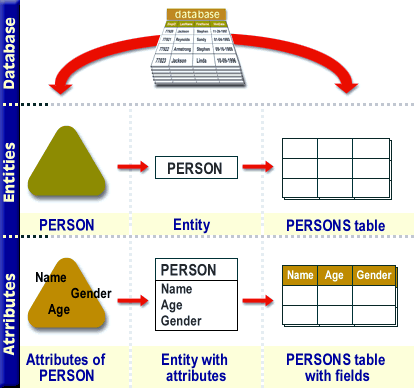
Entities as Business Objects
An entity is a tangible or intangible business object (e.g., person, item, reservation). Avoid modeling aggregates (e.g., “inventory”, “medical history”) as single entities—these are collections of related entities.
- Attributes become fields: Attributes that describe an entity are non-key columns (e.g., Name, Address, Phone). Attributes that identify an entity are key columns (entity identifiers).
Step 2 - Logical/physical realization: Entities become tables; attributes become columns; identifiers become keys; relationships become foreign keys and constraints. Special entities (associative/bridge) represent M:N relationships and carry their own attributes.
Entities & Attributes - Exercise
Entities & Attributes — Exercise