| Lesson 8 | Many-to-many relationships, part 1 |
| Objective | Define many-to-many relationships and explain how they are modeled in a relational schema. |
Many-to-Many Relationships: Definition, Diagrams and SQL
A many-to-many (M:N) relationship permits one instance of A to relate to several instances of B, and one instance of B to relate to several instances of A. Both directions permit a maximum greater than one. Minimum participation is a separate rule: an instance may require an association, or it may be allowed to exist without one.
Examples include employees assigned to projects, students enrolled in courses, and orders containing products. In the order example, one order may contain several products, and the same product may appear on several orders.
Key point: In a conventional normalized relational design, represent the association with a third table, called a junction table, associative table, or bridge table. Each row records one association between the two parent tables. Each parent then has a 1:N relationship with the junction.
Read the Many-to-Many Rule in Both Directions
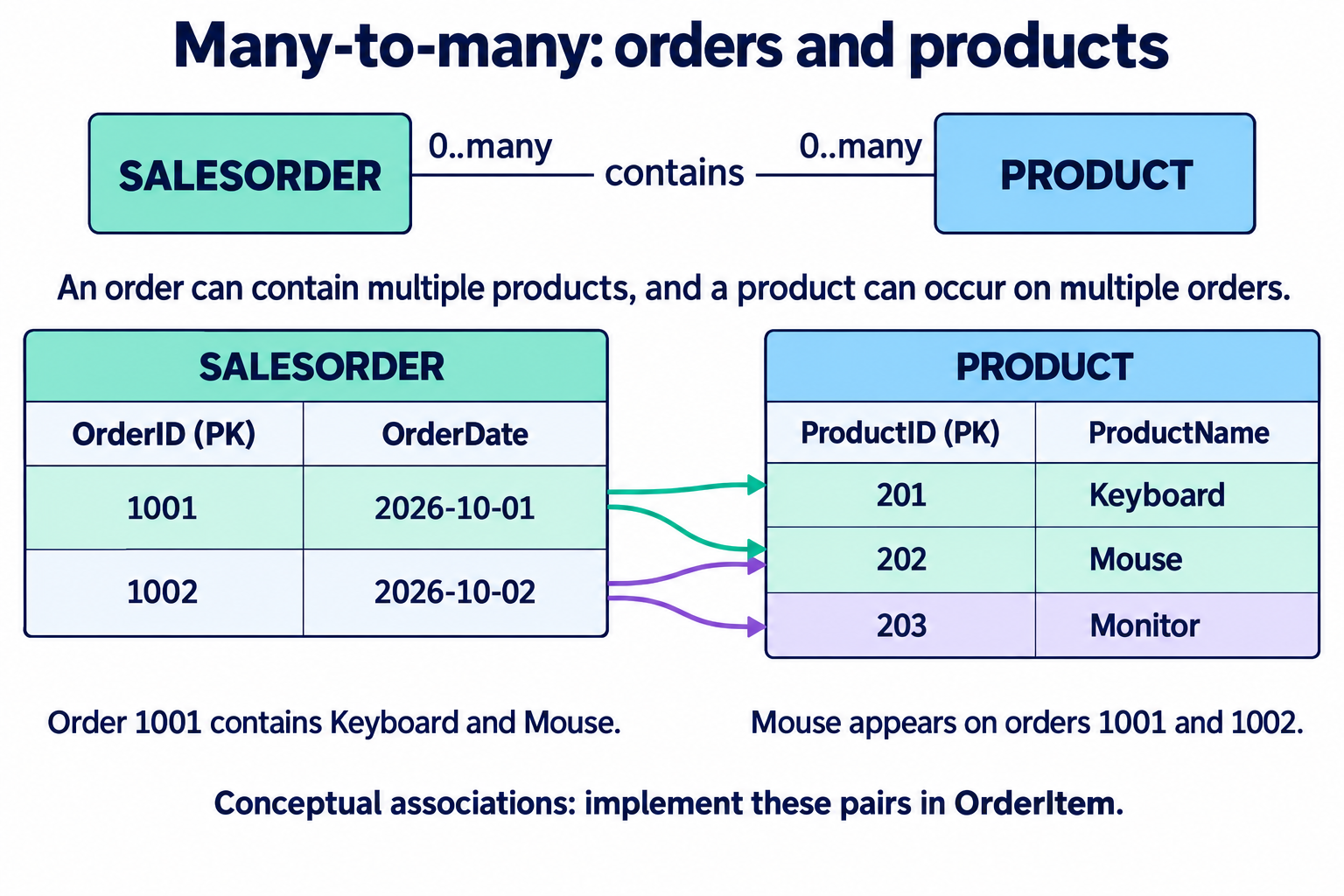
Ask both questions: how many products may be on one order, and how many orders may include one product? Both answers are many. Seeing several products on a single order establishes only the first direction; the second direction must also be confirmed.
The figures use a simplified model in which an order may exist while it is being drafted and a product may exist before it has been ordered. Both parents may therefore have zero item rows. Requirements for submitting or fulfilling an order are separate business rules.
Why a Single Parent Reference Does Not Capture M:N
- One reference permits only one parent value per row. A single ProductID in SalesOrder cannot represent every product on that order. A single OrderID in Product cannot represent every order containing that product.
- Repeating columns impose an arbitrary limit. ProductID1, ProductID2 and ProductID3 would require schema changes for larger orders. A comma-separated list also makes ordinary foreign-key validation of individual product references difficult.
- Association facts need their own row. Quantity describes how much of a product appears on a particular order. It is neither a property of the order alone nor the product alone.
Storing order-product pairs as rows gives each association a clear identity and allows keys and foreign keys to enforce its integrity. Repeating all order details or product details in every pair would duplicate parent facts unnecessarily.
Database Systems
Resolve the Association with an OrderItem Table
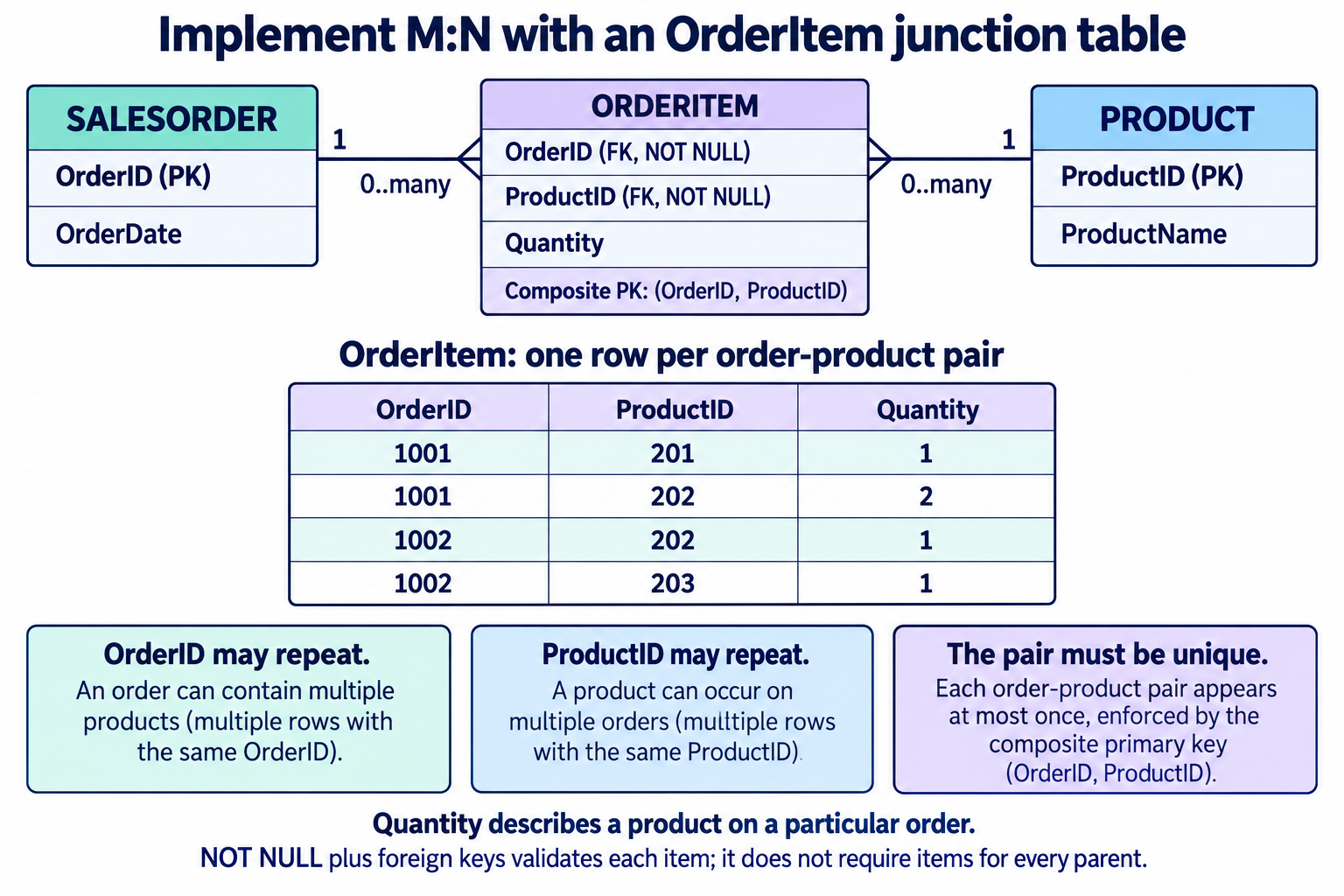
OrderID may repeat because an order can contain several products. ProductID may repeat because a product can occur on several orders. The combination identifies one item in this design. Making either foreign key individually unique would incorrectly restrict one side of the association.
CREATE TABLE SalesOrder (
  OrderID INT NOT NULL PRIMARY KEY,
  OrderDate DATE NOT NULL
);

CREATE TABLE Product (
  ProductID INT NOT NULL PRIMARY KEY,
  ProductName VARCHAR(100) NOT NULL
);

-- One row per product on an order in this example.
CREATE TABLE OrderItem (
  OrderID INT NOT NULL,
  ProductID INT NOT NULL,
  Quantity INT NOT NULL,
  CONSTRAINT pk_order_item PRIMARY KEY (OrderID, ProductID),
  CONSTRAINT fk_item_order
    FOREIGN KEY (OrderID) REFERENCES SalesOrder(OrderID),
  CONSTRAINT fk_item_product
    FOREIGN KEY (ProductID) REFERENCES Product(ProductID),
  CONSTRAINT ck_item_quantity CHECK (Quantity > 0)
);
Supply the identifiers explicitly. The parent tables must exist before their foreign keys are defined. Create the referenced order and product rows before inserting their items.
| OrderID | ProductID | Quantity |
|---|---|---|
| 1001 | 201 | 1 |
| 1001 | 202 | 2 |
| 1002 | 202 | 1 |
| 1002 | 203 | 1 |
The quantity of Mouse, product 202, differs between the two orders. Updating that product's name belongs in Product; changing the quantity for order 1001 belongs in its OrderItem row. This separates product facts from facts about the association.
Composite Key or Separate Item Identifier?
The composite primary key is suitable when a product appears at most once per order, with Quantity recording its count. A separate OrderItemID can be useful when other tables need to reference an item by one identifier. If the one-product-per-order rule still applies, retain a unique constraint on (OrderID, ProductID).
If the same product may occur on separate lines with different prices, deliveries, or options, the pair is no longer a unique business key. Define what distinguishes a line, such as (OrderID, LineNumber), instead of adding a pair-uniqueness constraint that contradicts the requirement. Having more attributes alone does not require a surrogate primary key.
Decide deletion policy deliberately. The example omits explicit referential actions; referenced parents cannot be removed while item references remain. Cascading item deletion may suit some draft-order policies, but retained order history can require a different approach. Check existing indexes and query plans before adding indexes on the junction's foreign keys; a composite key may already support access by its leading column.
Separate Item Integrity from Parent Participation
The non-null foreign keys require every existing OrderItem to reference an order and a product. They do not require every order or every product to have an item. A product with no sales is valid in the illustrated model, and a draft order can be empty.
If a submitted order must contain at least one item, enforce that requirement at the appropriate state transition and ensure all permitted write paths respect it. Simply declaring OrderItem.OrderID NOT NULL does not enforce that parent-side minimum.
Other rules, such as a maximum number of project assignments per employee or a minimum team size, require additional enforcement. A bare count check in application code can race with another writer; the design must account for transactions and concurrency. Lesson 7's three-slot example illustrates one way to enforce a fixed upper bound using ordinary constraints.
The zero-or-more labels shown here are example participation choices. An M:N maximum does not imply that zero participation is allowed in every application.
Read the Conceptual and Implemented Diagrams Correctly
- Conceptual M:N: Both association ends allow many related instances. The first figure describes the business relationship between orders and products.
- Implemented schema: The second figure makes the junction explicit. Each parent has one-to-many items; each item references one instance of each parent.
- Crow's Foot notation: A many endpoint combines the crow's foot with a circle for zero or many, or a bar for one or many. See the symbol reference.
- Numerical multiplicities: The figures use labels such as 1 and 0..many to state the example's rules directly.
The conceptual order-product association remains many-to-many after implementation. The junction provides a relational representation of that association rather than changing its business meaning.
Design Checklist
- Confirm that both directions permit several related instances.
- Define what one junction row represents and whether the same pair may occur again.
- Choose a primary key and any additional uniqueness constraints that match that rule.
- Reference both parents with foreign keys and specify nullability explicitly.
- Put attributes of the association, such as Quantity or AssignedDate, in the junction.
- Document parent-side minimums, deletion policy, and any additional limits.
Check Your Understanding
- Can ProductID 202 appear on two orders? Yes. The two pairs (1001, 202) and (1002, 202) are different primary-key values.
- Can the pair (1001, 202) be inserted twice? No, under the illustrated one-row-per-pair rule.
- Can an item reference a nonexistent product? No. The product foreign key rejects that reference.
- Do the foreign keys require every product to have been ordered? No. They validate item rows, not the existence of items for each product.
The next lesson develops how to identify many-to-many relationships from business rules. For another worked association, revisit the employee/project junction in Lesson 2.