Crow’s Foot Notation: ER Diagram Symbols and Examples
Crow’s Foot is a compact ERD notation used by data modelers, DBAs, and application teams to describe how data fits together.
It emphasizes entities (things we store), their attributes (columns), and the
relationships between them (cardinality and optionality). This page explains the symbols, shows
real examples, and highlights common design choices, so your diagrams are consistent and easy to read on desktop or mobile.
How to Read Crow’s Foot
Entity (table): A rectangle with the entity name; attributes are listed inside. Primary keys are often
underlined or flagged “PK”; foreign keys may be flagged “FK”.
Relationship line: Connects two entities. The end markers communicate both
cardinality and optionality:
Cardinality: a single bar “|” means “one”; a “crow’s foot” (three-pronged) means “many”.
Optionality: an open circle “○” means “zero allowed”; a bar “|” means “must exist”.
Read the two markers at each endpoint together: one specifies the minimum participation, and the other specifies the maximum. Do not interpret a single endpoint as the entire relationship.
Identifying vs. non-identifying: Some styles use a solid line when the child’s PK includes the parent FK
(identifying), and a dashed line when the child has its own PK (non-identifying). Pick a convention and use it consistently.
Crow’s Foot Symbols: Cardinality and Optionality
Four endpoint combinations; text sketches are shown for a right-hand endpoint
Markers
Text sketch
Minimum
Maximum
Meaning
Circle and bar
o|
0
1
Zero or one
Two bars
||
1
1
Exactly one
Circle and crow’s foot
o{
0
Many
Zero or many
Bar and crow’s foot
|{
1
Many
One or many
The letter o stands for the circle and { approximates the three-pronged crow’s foot in these text sketches. Actual ER diagrams use drawn symbols. Endpoint orientation reverses on the other side of the line.
How to Read a Crow’s Foot ER Diagram: Customer and Orders
Customer ||----------o{ SalesOrder
Start with one Customer and read the markers beside SalesOrder: that customer may have zero or many orders.
Start with one SalesOrder and read the markers beside Customer: that order must reference exactly one customer.
Check the business rules before choosing the markers. If customers must have an order, the SalesOrder end becomes one or many.
See the one-to-many ER diagram and SQL example for the foreign key implementation. A foreign key can require every order to reference a customer, but it does not by itself require every customer to have an order.
Compare one-to-one relationships when each parent may have at most one companion row. For M:N, use an associative entity as shown below.
Core Components
Entities & Attributes
Entities are nouns such as Customer, Order, or Publication. Attributes are the columns stored about each entity (e.g., CustomerID, Email, CreatedAt).
In Crow’s Foot, attributes are listed inside the entity box, no separate ovals as in Chen notation.
Relationships
Use the line ends to show one-to-one (1:1), one-to-many (1:M), and, conceptually many-to-many (M:N). In physical design,
M:N is implemented via an associative entity (junction table) that becomes two 1:M relationships.
Examples in the Diagram Set
Crow’s Foot (the “many” marker)
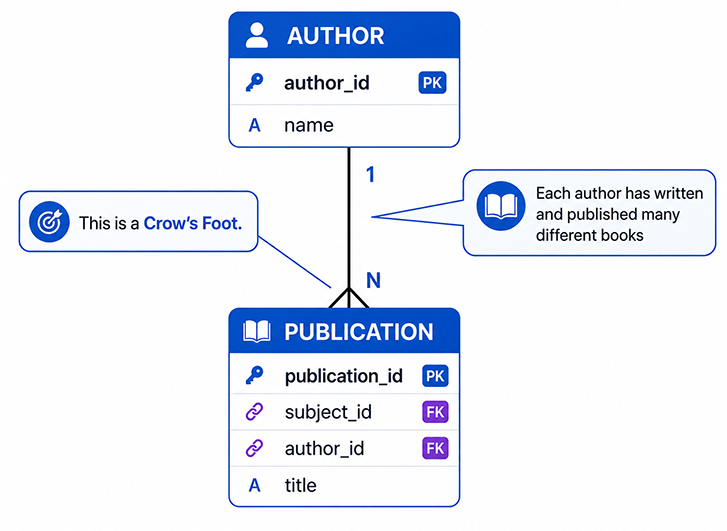
A crow’s foot marks the “many” side of a relationship. In the diagram below, one AUTHOR can write many
PUBLICATION rows.
Figure 7-51. Crow’s foot marks the “many” side in AUTHOR → PUBLICATION (1:M).
One-to-One (1:1)
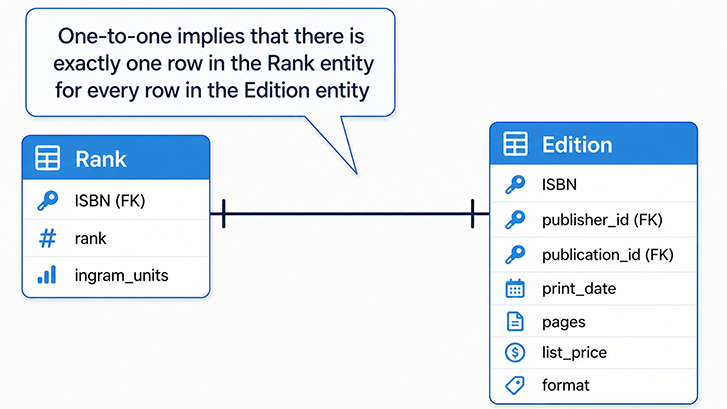
1:1 is less common. It’s used to separate rarely-used or sensitive attributes, or to enforce a one-row extension of a base entity.
Each EDITION has exactly one RANK, and vice versa.
Figure 7-12. Exactly one EDITION ↔ exactly one RANK.
One-to-Many (1:M)
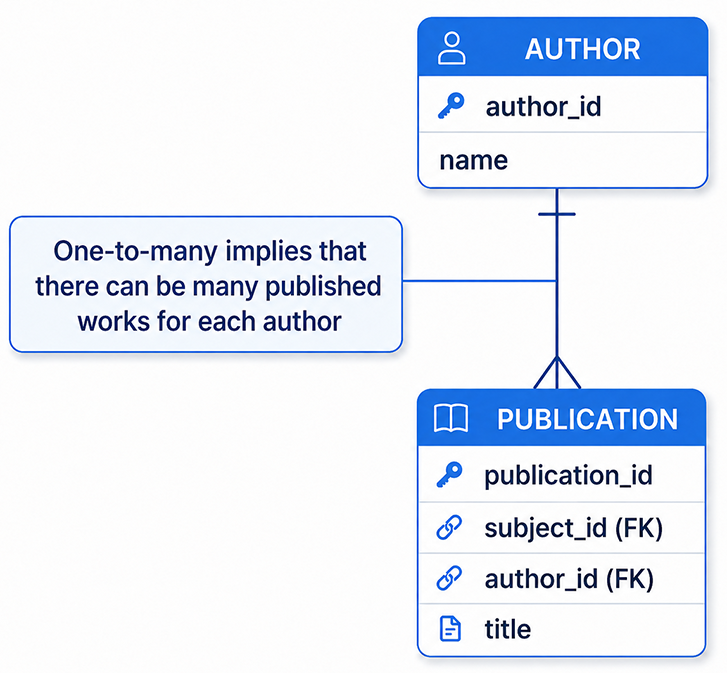
1:M is the workhorse of relational design. One AUTHOR can have many PUBLICATIONs; each PUBLICATION has one and only one AUTHOR.
Figure 7-14. One-to-many: one row relates to many rows on the other side.
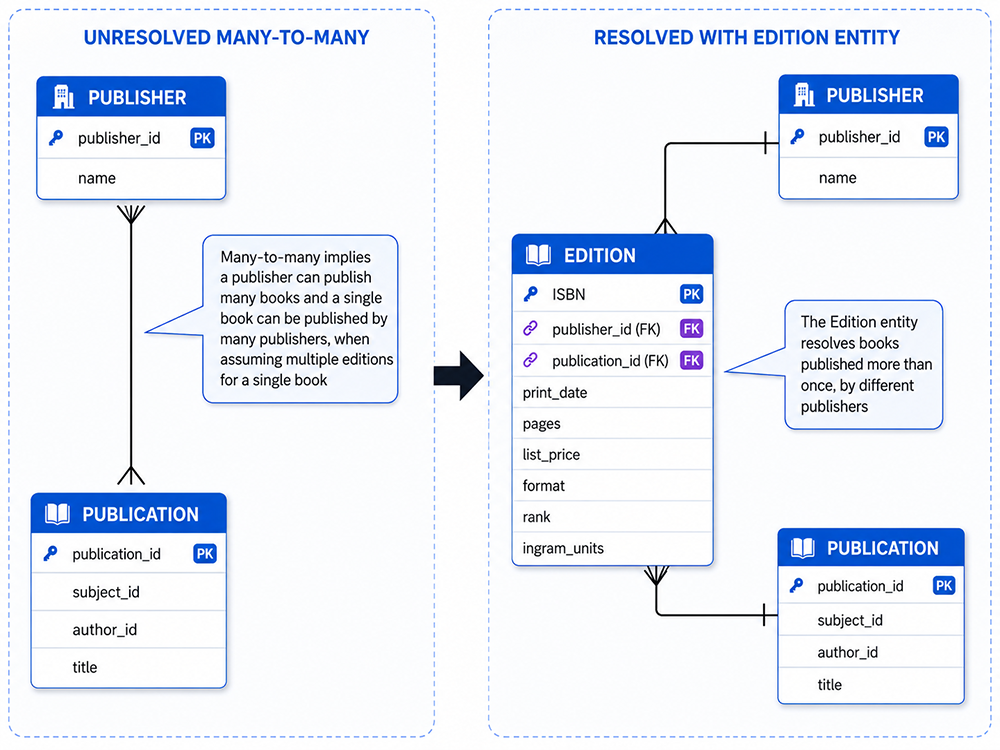
Conceptually, a publisher can produce many publications and a publication can be produced by many publishers. Physically, model this with an
associative entity (here: EDITION) that captures the pairing-and any attributes of the pairing (e.g., format, print run).
Figure 7-16. Resolving M:N into two 1:M relationships via an associative entity.
Advanced: Multivalued Facts and 4NF (Where M:N Comes From)
Multivalued facts-e.g., a Student with several Courses and independent Hobbies-create cartesian combinations if stored in a single table.
Fourth Normal Form (4NF) removes that redundancy by decomposing into separate relations so each independent multivalued set is modeled on its own
(e.g., StudentCourse and StudentHobby). Crow’s Foot diagrams make these dependencies concrete: each independent set becomes its own entity with a clean 1:M link.
Modeling Checklist
Name entities in singular (Order, not Orders). Keep attribute names consistent and descriptive.
Choose stable primary keys; avoid embedding meaning in identifiers.
Show optionality explicitly (○ vs |). Don’t leave “nullable vs. required” to guesswork.
Resolve M:N with an associative entity; put relationship attributes there (e.g., role, effective dates).
Keep diagrams focused: split very large models into subject areas and link them with navigation notes.
Common Mistakes
Mixing notations (e.g., Chen-style ovals) inside a Crow’s Foot diagram.
Omitting optionality, leading to different interpretations by engineering and analytics teams.
Leaving M:N unimplemented in the physical model; always introduce the junction table.
Storing multivalued lists in a single attribute instead of modeling them as related rows.
Quick Build: From Idea to Diagram
List the core entities and their key attributes.
Sketch relationships with cardinality and optionality at both ends.
Identify any conceptual M:N; introduce associative entities.
Review with stakeholders; refine names, keys, and constraints.